پیژندنه
This manual provides essential instructions for the safe and efficient use of your Haier 43K7700UGA 43 Inch 4K Google Smart Android Television. Please read this manual thoroughly before operating the television and retain it for future reference. This television features a 4K UHD display, Google Android 11 operating system, and built-in Chromecast for an enhanced viewتجربه
د خوندیتوب مهم معلومات
د دې ټلویزیون کارولو پرمهال تل د خوندیتوب لومړني احتیاطي تدابیر تعقیب کړئ ترڅو د اور، بریښنا شاک او ټپي کیدو خطر کم کړئ.
- تلویزیون باران یا رطوبت ته مه ښکاره کوئ.
- د هوا د جریان لپاره د تلویزیون شاوخوا کافي ځای ډاډمن کړئ.
- د بریښنا تار د چلولو یا پنچ کیدو څخه خوندي کړئ.
- یوازې د جوړونکي لخوا مشخص شوي ضمیمې / لوازم وکاروئ.
- د برېښنا د طوفانونو پر مهال یا کله چې د اوږدې مودې لپاره نه کارول کیږي، تلویزیون خلاص کړئ.
- ټول خدمتونه وړ خدمت پرسونل ته راجع کړئ.
د بسته محتويات
ډاډ ترلاسه کړئ چې ټول توکي په کڅوړه کې شتون لري:
- 1 x Haier 43 Inch LED TV
- 1 x ریموټ کنټرول
- ۱ x د میز سر ولاړ (سیټ)
- 1 x د بریښنا کیبل
- ۲ x AAA بیټرۍ (د ریموټ لپاره)
- ۱ x د کارونکي لارښود (دا سند)
- 1 x تضمین کارت
د تنظیم کولو لارښود
۱. خلاصول او ځای پر ځای کول
Carefully remove the television from its packaging. Place the TV on a stable, flat surface or prepare for wall mounting (wall mount kit sold separately). Ensure proper ventilation around the TV.
۱. د میز د سر سټینډ نښلول
If using the included table top stand, align the stand components with the designated slots at the bottom of the television. Secure them firmly with the provided screws. Refer to the diagram below for guidance.
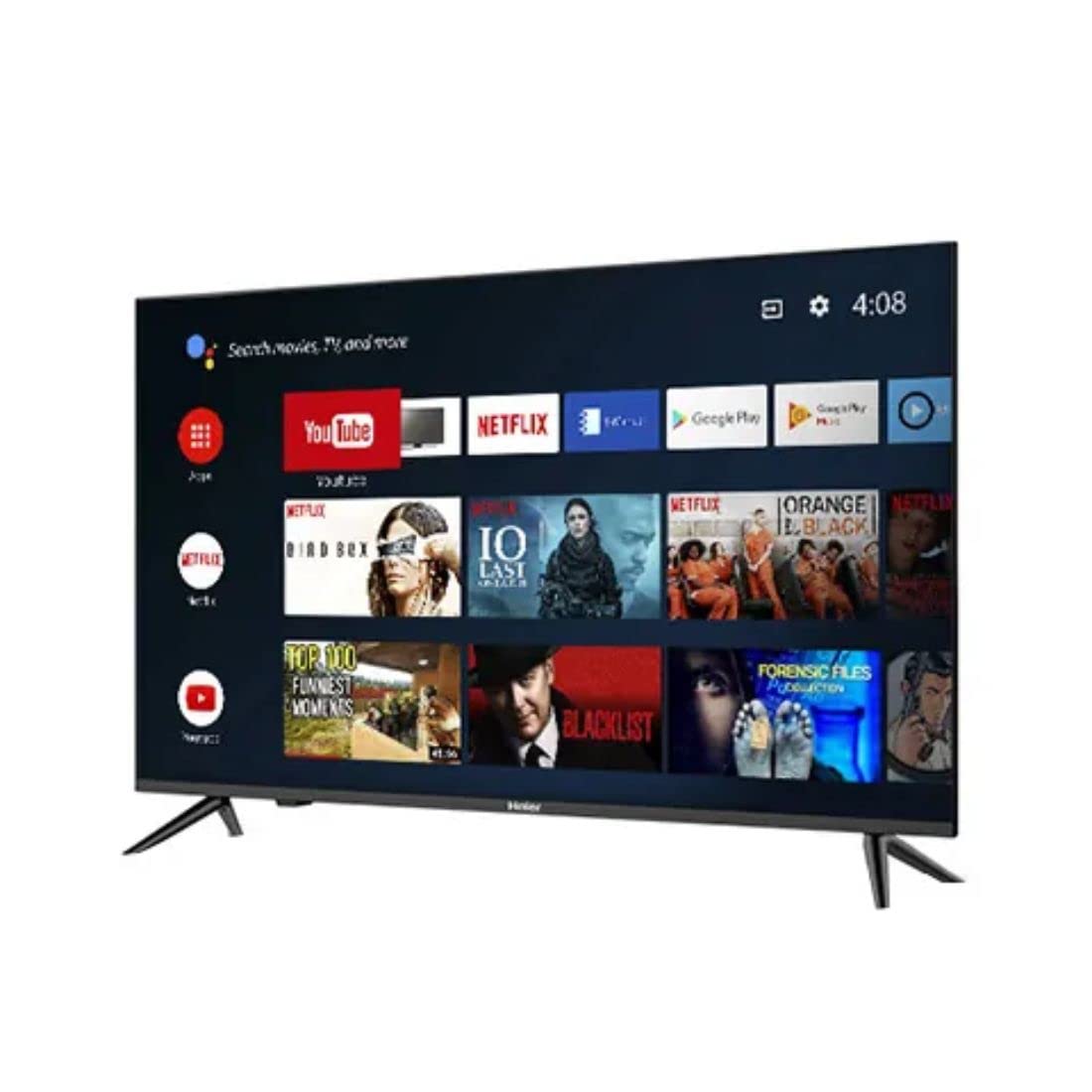
انځور: اړخ view of the television demonstrating stand attachment.
3. د نښلولو بریښنا
Connect the power cable to the AC input port on the back of the television, then plug the other end into a suitable power outlet. Ensure the power supply matches the voltage requirements of the TV (230 Volts).
4. د بهرنیو وسایلو نښلول
Your Haier TV supports various connections. Use the HDMI ports for high-definition devices like set-top boxes, gaming consoles, or Blu-ray players. USB ports are available for media playback from storage devices.
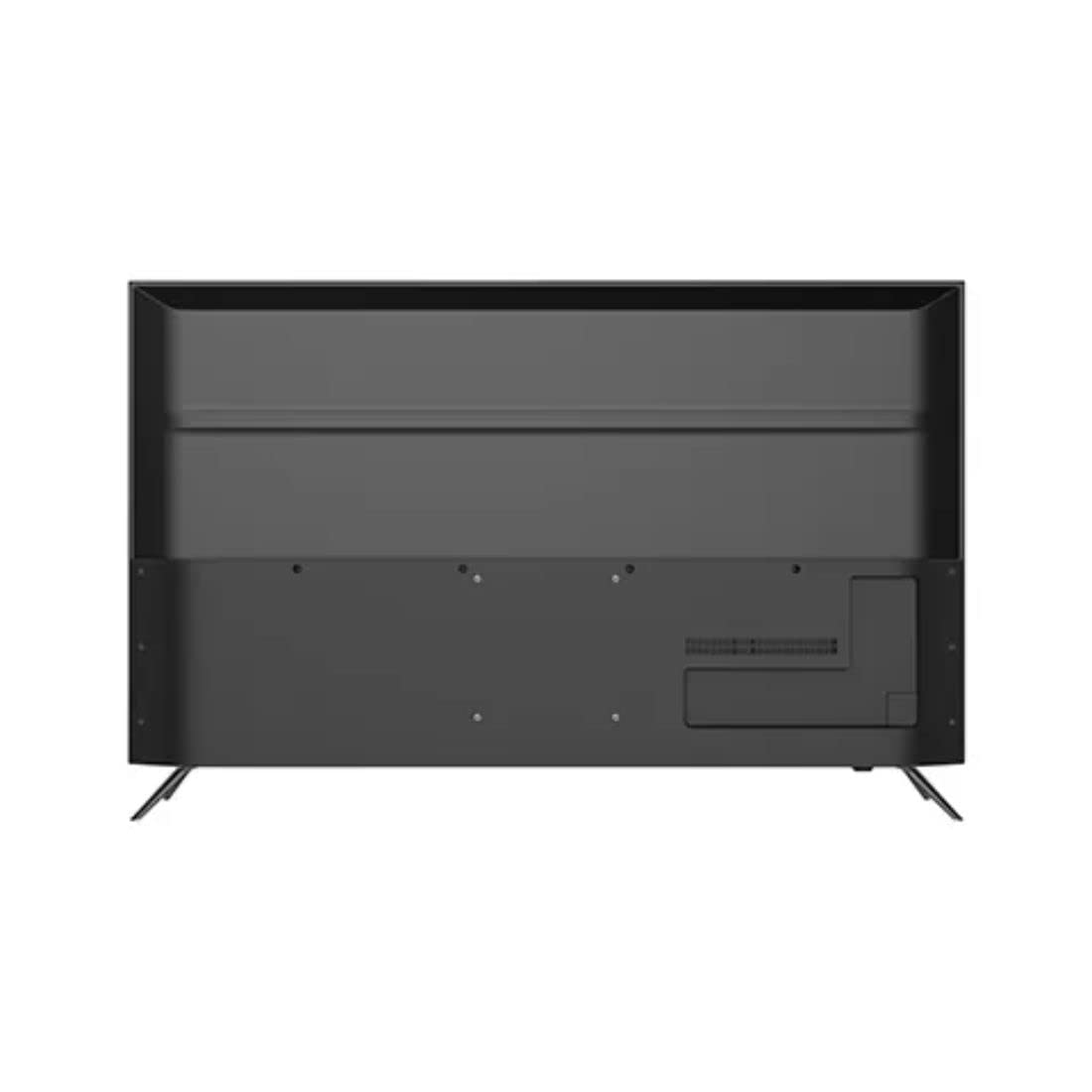
انځور: شاته view of the television highlighting various input ports such as HDMI and USB.
- HDMI: Connect HDMI cables from your devices to the HDMI ports on the TV.
- USB: Insert USB storage devices into the USB ports for accessing media files.
- بلوتوث: Use Bluetooth for wireless audio devices or other compatible accessories.
5. Initial Setup (First Power On)
Upon first power-on, the TV will guide you through the initial setup process. This includes selecting your language, connecting to a Wi-Fi network, signing in with your Google account, and configuring basic settings for your Android TV experience.
ستاسو د تلویزیون چلول
1. ریموټ کنټرول
Insert the two AAA batteries into the remote control, ensuring correct polarity. The remote allows you to navigate the TV's interface, adjust volume, change channels, and access smart features.
2. بریښنا فعال/بند
فشار ورکړئ ځواک button on the remote control or on the TV to turn the television on or off.
۴.۲. د انډرایډ تلویزیون انٹرفیس
Your Haier TV runs on Google Android 11, providing access to a wide range of apps and services. Use the directional buttons on your remote to navigate the home screen, select apps, and browse content.

انځور: مخکینۍ برخه view of the television showing the Android TV home screen with applications like YouTube and Netflix.
4. د ګوګل اسسټنټ کارول
Press the Google Assistant button on your remote to activate voice commands. You can ask questions, search for content, control smart home devices, and more.
۳. د Chromecast جوړ شوی
With Chromecast built-in, you can cast movies, shows, photos, and more from your smartphone, tablet, or computer directly to your TV. Ensure your device and TV are on the same Wi-Fi network.
۳. د انځور او غږ ترتیبات
Access the settings menu to customize picture modes (e.g., Standard, Vivid, Movie), adjust brightness, contrast, color, and sound settings (e.g., sound mode, equalizer).
ساتنه
۳. د پردې پاکول
په نرمۍ سره سکرین د نرم، وچ، لینټ نه پاک ټوکر سره پاک کړئ. د سختو نښو لپاره، په نرمۍ سرهampټوکر د اوبو یا ځانګړي سکرین پاکونکي سره ومینځئ. هیڅکله مایع مستقیم په سکرین مه سپری کوئ.
2. عمومي پاملرنه
Keep the television free from dust by regularly wiping the cabinet with a soft, dry cloth. Avoid placing heavy objects on the TV or exposing it to direct sunlight or extreme temperatures.
د ستونزو حل کول
که تاسو د خپل تلویزیون سره ستونزې سره مخ شئ، د پیرودونکو ملاتړ سره اړیکه نیولو دمخه لاندې عام حلونو ته مراجعه وکړئ.
- ځواک نشته: Ensure the power cable is securely connected to both the TV and the power outlet. Check if the outlet is functioning by plugging in another device.
- انځور/غږ نشته: Verify that the correct input source is selected. Check all cable connections (HDMI, etc.) are secure. For no sound, check volume levels and mute settings.
- ریموټ کنټرول کار نه کوي: په ریموټ کنټرول کې د AAA بیټرۍ بدل کړئ. ډاډ ترلاسه کړئ چې د ریموټ او د تلویزیون د IR سینسر ترمنځ هیڅ خنډ شتون نلري.
- د شبکې د اتصال ستونزې: Restart your Wi-Fi router. Go to the TV's network settings to reconnect to your Wi-Fi network. Ensure the Wi-Fi password is entered correctly.
- د انځور کیفیت مسایل: Adjust picture settings (brightness, contrast, sharpness) in the TV's menu. Ensure the input source is providing a high-quality signal.
تخنیکي مشخصات
Below are the key technical specifications for the Haier 43K7700UGA television:
| فیچر | مشخصات |
|---|---|
| برانډ | هایر |
| د ماډل نوم | 43K7700UGA |
| د سکرین اندازه | ۵۵ انچه (۱۳۹ سانتي متره) |
| ټیکنالوژي ښکاره کول | LED |
| قرارداد | 4K الټرا HD (3840 x 2160 پکسلز) |
| د تازه کولو نرخ | 60 Hz |
| عملیاتي سیسټم | Google Certified Android 11 |
| د حافظې د ذخیره کولو ظرفیت | 1 جي بي |
| هډوتري برسیر | HDMI، USB |
| ټول USB پورټونه | 2 |
| د نښلونکي ډول | بلوتوث |
| ملاتړ شوي انټرنیټ خدمتونه | د ګوګل مرستیال |
| Viewزاویه | 178 درجې |
| د محصول ابعاد (LxWxH) | 95.9 x 23 x 61.7 سانتي متره |
| د توکي وزن | 7.3 کیلو ګرامه |
| والیtage | 230 ولټه |
| واټtage | 180 واټ |

انځور: مخکینۍ برخه view of the television with key dimensions indicated.
تضمین او ملاتړ
Your Haier 43K7700UGA television comes with a 1 کلن تضمین د پیرود نیټې څخه. مهرباني وکړئ د تفصيلي شرایطو او مقرراتو لپاره شامل شوي تضمین کارت ته مراجعه وکړئ.
For technical assistance, troubleshooting not covered in this manual, or warranty claims, please contact Haier customer support. Contact information can typically be found on the warranty card or the official Haier webسایټ


