پیژندنه
This user manual provides detailed instructions for the operation and maintenance of your Jensen CD-660 Portable Stereo CD Player Boombox. Please read this manual thoroughly before using the device to ensure proper function and to maximize your listening experience. Keep this manual for future reference.
د خوندیتوب مهمې لارښوونې
د بریښنایی شاک، اور، یا ټپي کیدو خطر کمولو لپاره، تل د خوندیتوب دا اساسي احتیاطي تدابیر تعقیب کړئ:
- دا وسیله باران یا رطوبت ته مه رسوئ.
- د وینټیلیشن هیڅ خلاصون مه بندوئ.
- د تودوخې کومې سرچینې ته نږدې مه نصب کړئ لکه ریډیټرونه، د تودوخې راجسترونه، بخارۍ، یا نور وسایل (په شمول ampلایفیر) چې تودوخه تولیدوي.
- د بریښنا تار د چلولو یا پنچ کیدو څخه خوندي کړئ.
- یوازې د جوړونکي لخوا مشخص شوي ضمیمې / لوازم وکاروئ.
- دا وسیله د بریښنایی طوفانونو په جریان کې یا کله چې د اوږدې مودې لپاره نه کارول کیږي خلاص کړئ.
- ټول خدمتونه وړ خدمت پرسونل ته راجع کړئ.
د بسته محتويات
ډاډ ترلاسه کړئ چې لاندې ټول توکي ستاسو په بسته کې شامل دي:
- Jensen CD-660 Portable Stereo CD Player Boombox
- AC Adapter (120V)
- د مالک لارښود
محصول پای ته ورسیدview
Familiarize yourself with the various parts and controls of your Jensen CD-660 boombox.
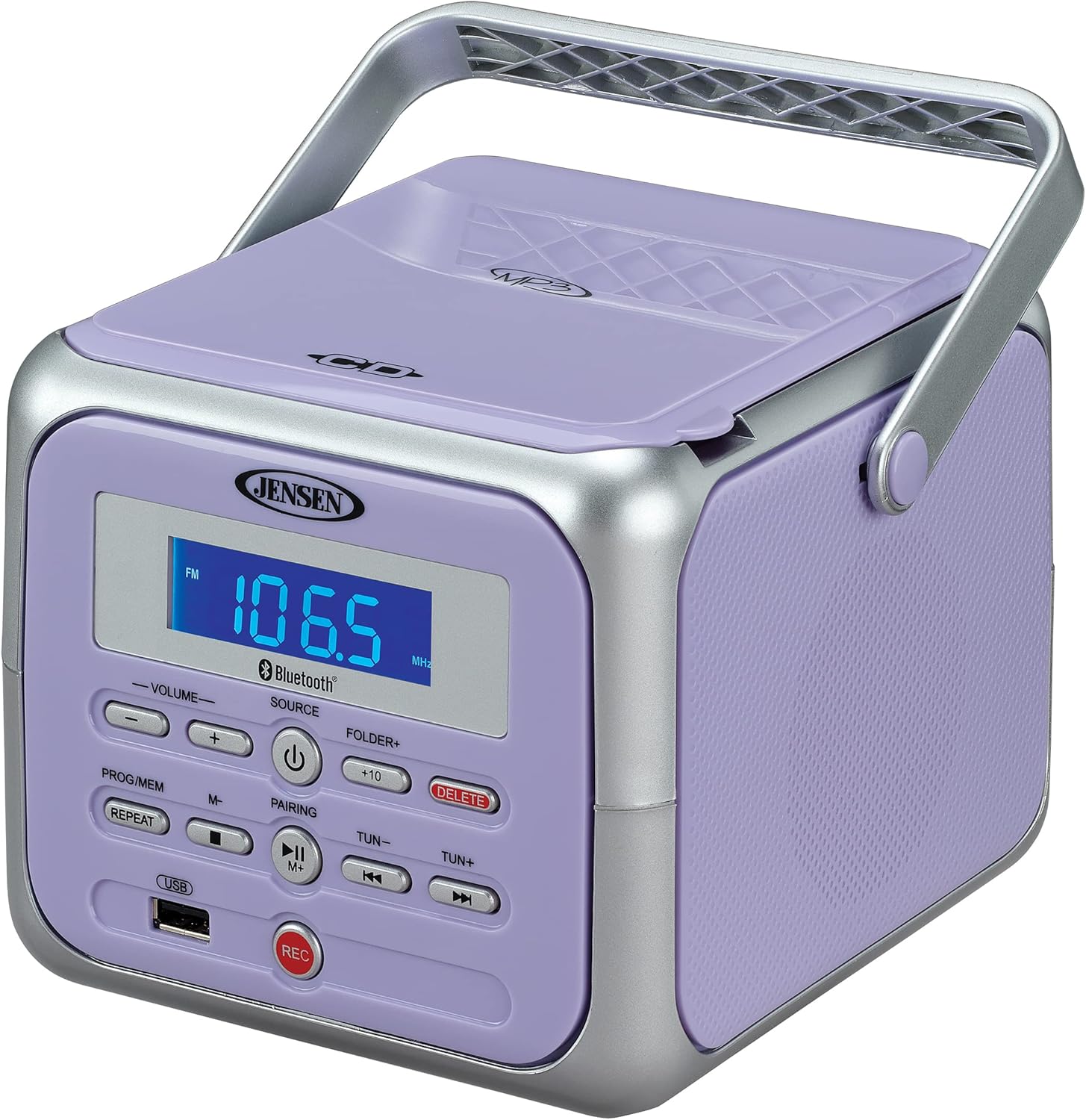
شکل 1: مخکی view of the Jensen CD-660 with the carrying handle extended. This image displays the main control panel, including the display screen, volume controls, source selection, and playback buttons.

شکل 2: مخکی view of the Jensen CD-660 with the carrying handle folded down. This perspective highlights the compact design and the arrangement of buttons and the LCD display.

شکل 3: پورته view of the Jensen CD-660 with the CD compartment lid open, revealing the CD tray. This illustrates the top-loading mechanism for disc insertion.
د کنټرول پینل ځانګړتیاوې:
- د LCD نندارې: Shows current mode, track number, frequency, and other information.
- حجم +/- تڼۍ: د آډیو د وتلو کچه تنظیم کړئ.
- د سرچینې تڼۍ: Selects between CD, Bluetooth, FM Radio, and Aux-in modes.
- د چالانېدو تڼۍ: واحد فعال یا بندوي.
- PROG/MEM Button: Programs CD tracks or stores FM radio presets.
- د تکرار تڼۍ: اوسنی ټریک یا ټول ټریکونه تکراروي.
- PAIRING Button: د بلوتوث جوړه کولو حالت پیل کوي.
- د پلی/پاز بټن: پلے بیک شروع کوي یا وقفه کوي.
- د بندولو تڼۍ: د پلې بیک مخه نیسي.
- SKIP/SEARCH Buttons (◀◀ / ▶▶): Skips tracks or searches within a track.
- TUN +/- Buttons: Tunes FM radio frequency.
- FOLDER+ Button: Navigates to the next folder on a USB device.
- +10 Button: Skips 10 tracks forward on CD/USB.
- د حذف تڼۍ: ثبت شوي حذفونه files له USB څخه.
- د REC تtonۍ: Initiates recording to a USB flash drive.
- USB پورټ: For USB flash drive playback and recording.
- آکس ان جیک: بهرني آډیو وسیلې سره نښلوي.
- د سر غوږ جیک: د شخصي اوریدلو لپاره.
چمتو کول
د واحد ځواک ورکول
The Jensen CD-660 can be powered by either the included AC adapter or batteries.
د AC بریښنا عملیات:
- Plug the AC adapter into the AC IN jack located on the back of the unit.
- د AC اډاپټر بله پای په معیاري 120V AC دیوال آوټ لیټ کې ولګوئ.
د بیټرۍ بریښنا عملیات:
For portable use, the unit requires 6 x 'C' (UM-2) batteries (not included).
- د بیټرۍ د برخې پوښ د واحد په ښکته برخه کې خلاص کړئ.
- Insert 6 'C' size batteries, ensuring correct polarity (+/-) as indicated inside the compartment.
- د بیټرۍ کمپارټ پوښ په خوندي ډول وتړئ.
یادونه: Disconnect the AC adapter when operating on battery power. Remove batteries if the unit will not be used for an extended period.
عملیاتي لارښوونې
عمومي عملیات:
- فشار ورکړئ پاور د واحد د فعالولو لپاره تڼۍ.
- فشار ورکړئ سرچینه button repeatedly to select your desired mode (CD, Bluetooth, FM, USB, AUX).
- د. په کارولو حجم تنظیم کړئ حجم +/- تڼۍ
سي ډي غږول:
The unit supports CD, CD-R/RW, MP3, and WMA disc formats.
- Open the CD compartment lid.
- یوه سي ډي د لیبل اړخ پورته مخ په سپینډل باندې کېږدئ.
- د سي ډي کمپارټ لپټ بند کړئ.
- فشار ورکړئ سرچینه د CD حالت غوره کولو لپاره ت buttonۍ.
- فشار ورکړئ پلی/پاز د بيا غږولو پيلولو لپاره ت buttonۍ.
- د کارولو SKIP / لټون تڼۍ (◀◀ / ▶▶) د ټریکونو نیویګیټ کولو لپاره.
- فشار ورکړئ ودروئ د بيا غږولو د بندولو لپاره ت buttonۍ.
د بلوتوټ عملیات:
د خپل بلوتوث فعال شوي وسیلې څخه په بې سیم ډول آډیو جریان کړئ.
- فشار ورکړئ سرچینه button to select Bluetooth mode. The display will show "BT" and flash, indicating pairing mode.
- په خپل بلوتوټ وسیله کې، بلوتوټ فعال کړئ او د شته وسایلو لټون وکړئ.
- Select "JENSEN CD-660" from the list of devices.
- Once paired, the display will stop flashing and show "BT".
- Start playing audio on your connected device.
- د کارولو پلی/پاز او SKIP / لټون buttons on the boombox or your device to control playback.
ایف ایم راډیو:
خپل د خوښې ایف ایم راډیو سټیشنونه واورئ.
- فشار ورکړئ سرچینه د FM راډیو حالت غوره کولو لپاره تڼۍ.
- Extend the FM wire antenna for optimal reception.
- فشار ورکړئ ټون +/- د سټیشن سره په لاسي ډول د ټون کولو لپاره تڼۍ.
- فشار ورکړئ او ونیسئ ټون +/- buttons for automatic scanning to the next available station.
د پریسیټونو ذخیره کول او یادول:
The unit can store up to 30 FM presets.
- مطلوب ایف ایم سټیشن ته ټون کړئ.
- فشار ورکړئ پروګ / میم button. The display will show a flashing preset number.
- د کارولو SKIP / لټون buttons (◀◀ / ▶▶) to select the desired preset number.
- فشار ورکړئ پروګ / میم د سټیشن تایید او خوندي کولو لپاره بیا تڼۍ.
- د پری سیټ یادولو لپاره، فشار ورکړئ پروګ / میم button repeatedly to cycle through stored stations.
USB پلیباک:
Play MP3, WAV, or FLAC audio fileد USB فلش ډرایو څخه.
- په USB پورټ کې د USB فلش ډرایو دننه کړئ.
- فشار ورکړئ سرچینه د USB حالت غوره کولو لپاره تڼۍ.
- The unit will automatically begin playing the first compatible audio file.
- د کارولو SKIP / لټون تڼۍ (◀◀ / ▶▶) د ټریکونو نیویګیټ کولو لپاره.
- د کارولو فولډر+ button to navigate between folders on the USB drive.
- د +۵۷ button can be used to skip 10 tracks forward.
د USB ثبتول:
Record audio directly to a USB flash drive from CD, FM Radio, Aux-in, or Bluetooth sources.
- په USB پورټ کې د USB فلش ډرایو دننه کړئ.
- Select the desired audio source (CD, FM, AUX, or Bluetooth).
- Start playback of the audio you wish to record.
- فشار ورکړئ REC button to begin recording. The display will indicate recording status.
- فشار ورکړئ REC د ثبت کولو بندولو لپاره بیا تڼۍ.
- د ثبت شوي حذف کولو لپاره fileته لاړ شئ file in USB playback mode and press the ړنګول تڼۍ
Aux-in Connection:
Connect external audio devices like smartphones or tablets.
- Connect one end of a 3.5mm audio cable (not included) to the Aux-in jack on the boombox.
- د کیبل بل پای د خپل بهرني وسیلې د هیډفون جیک یا آډیو آوټ پټ سره وصل کړئ.
- فشار ورکړئ سرچینه button to select Aux-in mode.
- په خپل بهرني وسیله کې آډیو غږول پیل کړئ.
- د غوره غږ لپاره په بوم باکس او خپل بهرني وسیله دواړو کې حجم تنظیم کړئ.
ساتنه
د واحد پاکول:
- د یونټ بهرنۍ برخه په نرمۍ سره مسح کړئamp ټوکر د کثافاتو پاکوونکي یا محلول مه کاروئ.
- د سي ډي لینز لپاره، د سي ډي لینز پاکولو لپاره ځانګړی ډیسک وکاروئ.
د بیټرۍ پاملرنه:
- که چیرې واحد د اوږدې مودې لپاره د لیکیدو مخنیوي لپاره ونه کارول شي نو بیټرۍ لرې کړئ.
- زاړه او نوي بیټرۍ، یا د بیټرۍ مختلف ډولونه مه ګډوئ.
د ستونزو حل کول
If you encounter issues with your Jensen CD-660, refer to the following table for common problems and solutions.
| ستونزه | احتمالي لامل | د حل لاره |
|---|---|---|
| هیڅ ځواک نشته | د AC اډاپټر سره وصل نه دی؛ بیټرۍ خالي شوې یا په غلط ډول داخل شوې دي. | Ensure AC adapter is securely plugged in; Replace batteries or check polarity. |
| غږ نشته | غږ ډېر ټیټ دی؛ ناسمه سرچینه غوره شوې ده؛ هیډفونونه وصل دي. | Increase volume; Select correct source; Disconnect headphones. |
| سي ډي نه غږېږي | CD inserted incorrectly; Disc is dirty or scratched; CD compartment not closed. | Insert CD with label side up; Clean or replace disc; Close compartment securely. |
| بلوتوث جوړه ناکامه شوه | Device too far; Bluetooth not enabled on external device; Boombox not in pairing mode. | Move device closer; Enable Bluetooth; Ensure boombox is in BT pairing mode. |
| د FM ضعیف استقبال | انتن نه دی غځول شوی؛ کمزوری سیګنال. | د FM تار انتن په بشپړه توګه پراخ کړئ؛ د ښه استقبال لپاره واحد بیا ځای په ځای کړئ. |
| د USB پلې بیک ستونزې | بې ملاتړه file format; USB drive not properly inserted or corrupted. | ډاډ ترلاسه کړئ files are MP3/WAV/FLAC; Reinsert USB drive; Try a different USB drive. |
مشخصات
| فیچر | تفصیل |
|---|---|
| د ماډل شمیره | CD-660 |
| د بریښنا سرچینه | AC 120V (included adapter) or 6 x 'C' (UM-2) batteries (not included) |
| ارتباط | Bluetooth 5.1 (A2DP, AVRCP), USB, Aux-in |
| د CD مطابقت | سي ډي، سي ډي-آر/آر ډبليو، ايم پي ۳، ډبليو اېم اې |
| د USB پلی بیک | MP3 ، WAV ، FLAC |
| ایف ایم راډیو | Stereo Receiver with 30 Presets, PLL Digital Tuning |
| ابعاد (W x H x D) | ۱.۳۵" x ۳.۷۱" x ۳.۷۱" (۳.۴۳ سانتي متره x ۹.۴۲ سانتي متره x ۹.۴۲ سانتي متره) |
| وزن | نږدې 2.46 پونډه (1.12 کیلو ګرامه) |
تضمین او ملاتړ
This Jensen CD-660 Portable Stereo CD Player Boombox comes with a manufacturer's warranty. Please refer to the included Owner's Manual for specific details regarding warranty coverage, terms, and conditions. For technical support or service inquiries, please contact Jensen customer service directly. Contact information can typically be found in the Owner's Manual or on the official Jensen webسایټ


