1. پیژندنه
Thank you for choosing the SPLITSKY NZFS Kids Alarm Clock. This device combines an alarm clock, white noise sleep aid, and an 8-mode RGB night light, designed to assist with sleep and wake-up routines for children and adults. Please read this manual thoroughly to understand its features and ensure proper operation.
د خوندیتوب معلومات:
- وسیله د اوبو او لوړ رطوبت چاپیریال څخه لرې وساتئ.
- هڅه مه کوئ چې وسیله پخپله جلا کړئ یا ترمیم کړئ.
- Use only the provided USB-C power cable or a certified equivalent.
- ډاډ ترلاسه کړئ چې د وسیلې شاوخوا مناسب هوا ورکول.
2. د بسته محتويات
ډاډ ترلاسه کړئ چې ټول توکي ستاسو په کڅوړه کې شتون لري:
- SPLITSKY NZFS Kids Alarm Clock
- 1.2M (4.7 inch) USB-C Power Cable
- د کارونکي لارښود (دا لاسوند)
- 1 x CR2032 Lithium Ion Battery (pre-installed for memory backup)
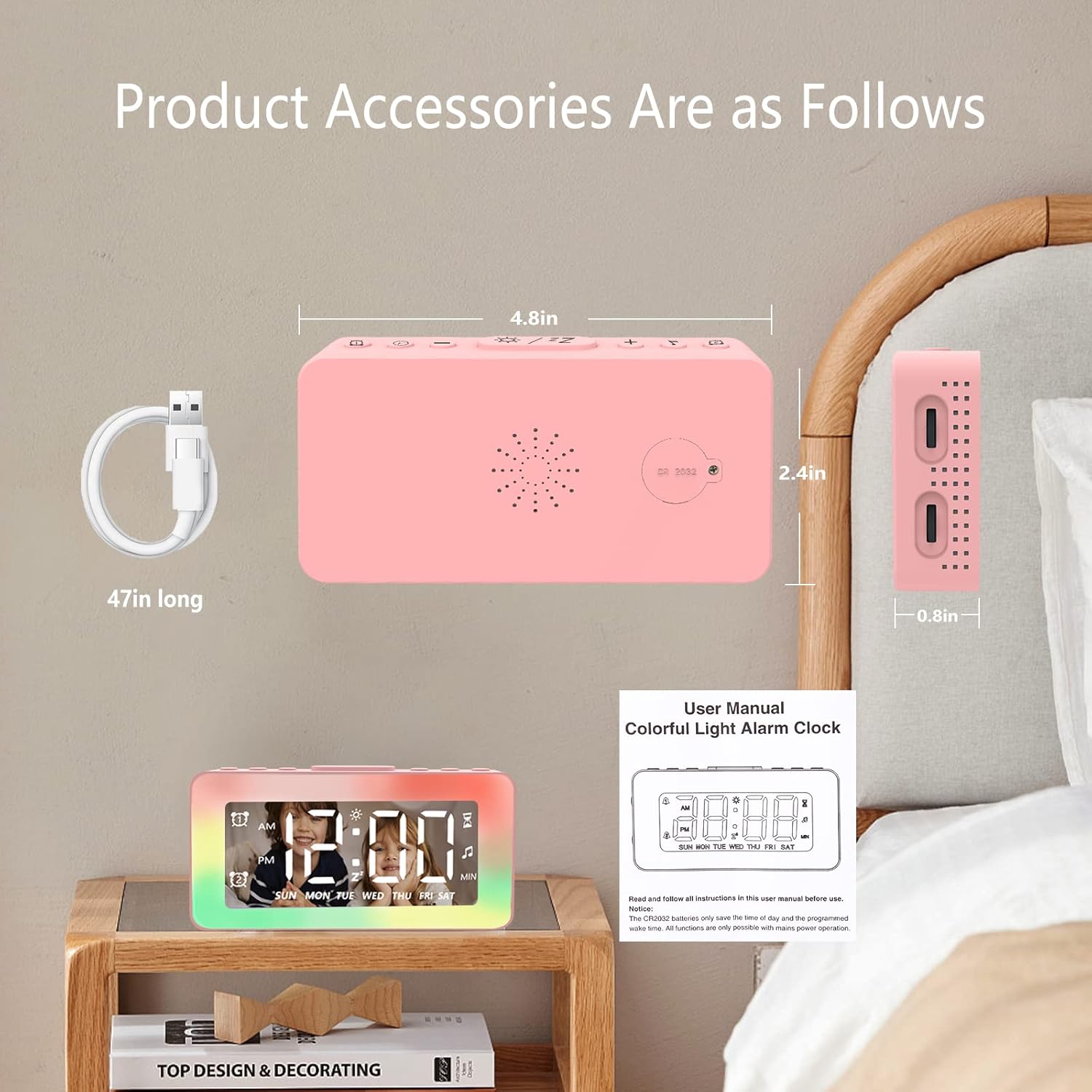
Image: The SPLITSKY NZFS Kids Alarm Clock, a USB-C power cable, and the user manual are included in the package.
3. محصول ختم شوview
په خپل الارم ساعت کې د تڼیو او پورټونو سره ځان بلد کړئ:

انځور: تفصیلي view of the alarm clock's top buttons and side ports, including Alarm 1, Time Setting, Light Minus/Settings, Snooze/Light Mode Switch, Light Plus/Setup, Music Switch, Alarm 2, Volume Setting, Time Brightness Setting, USB Output Charging Port, and Type-C Input Interface.
- د الارم 1 بټن: Set and activate Alarm 1.
- د وخت تنظیم کولو تڼۍ: اوسنی وخت تنظیم کړئ.
- Light Minus / Settings Button: Decrease light brightness or navigate settings.
- Snooze / Light Mode Switch Button: Activate snooze, or cycle through light modes.
- Light Plus / Setup Button: Increase light brightness or confirm settings.
- Music Switch Button: Cycle through white noise sounds.
- د الارم 2 بټن: Set and activate Alarm 2.
- Volume Setting Wheel (Side): Adjust alarm and white noise volume.
- Time Brightness Setting Wheel (Side): د ښودنې روښانتیا تنظیم کړئ.
- USB Output Charging Port (Side): Charge external devices.
- Type-C Input Interface (Side): Connect power cable to the alarm clock.
4. ترتیب کول
4.1 د بریښنا نښلول
- Connect the provided USB-C power cable to the Type-C Input Interface on the side of the alarm clock.
- Plug the other end of the USB-C cable into a compatible USB power adapter (not included) or a USB port.
- ښودنه به روښانه شي، چې دا په ګوته کوي چې ساعت فعال دی.

Image: The SPLITSKY NZFS Kids Alarm Clock is shown powered on and connected via its USB-C port, also demonstrating its capability to charge a smartphone.
4.2 Battery Installation (Memory Backup)
The alarm clock includes a pre-installed CR2032 battery. This battery serves as a memory backup to retain time and alarm settings during a power outage or when the main power is disconnected. It does not power the clock for regular operation.
- If the battery needs replacement, locate the battery compartment on the back of the unit.
- د کڅوړې د خلاصولو لپاره یو کوچنی سکرو ډرایور وکاروئ.
- د نوي CR2032 بیټرۍ سره بدل کړئ، ترڅو سم قطبي والی ډاډمن شي.
- کڅوړه په خوندي توګه وتړئ.
5. عملیاتي لارښوونې
5.1 Setting the Time (12H/24H Format)
- فشار ورکړئ او ونیسئ د وخت تنظیم کولو تڼۍ until the hour digits begin to flash.
- د کارولو Light Minus / Settings Button (ښکته) یا Light Plus / Setup Button (up) to adjust the hour.
- فشار ورکړئ د وخت تنظیم کولو تڼۍ again to move to minute adjustment. Adjust minutes using the Light Minus/Plus buttons.
- فشار ورکړئ د وخت تنظیم کولو تڼۍ a third time to select 12-hour or 24-hour format. Adjust using the Light Minus/Plus buttons.
- فشار ورکړئ د وخت تنظیم کولو تڼۍ یو ځل بیا د تایید لپاره او د وخت تنظیم کولو حالت څخه وتلو لپاره.
5.2 Setting Alarms (Dual Alarm, Daily/Weekday/Weekend Mode)
ساعت دوه خپلواک الارمونه (الارم ۱ او الارم ۲) ملاتړ کوي.
- فشار ورکړئ او ونیسئ د الارم 1 تtonۍ (د الارم ۱ لپاره) یا د الارم 2 تtonۍ (د الارم ۲ لپاره) تر هغه چې د الارم ساعت عددونه روښانه شي.
- د کارولو Light Minus / Settings Button or Light Plus / Setup Button د ساعت تنظیم کولو لپاره.
- Press the respective Alarm Button again to move to minute adjustment. Adjust minutes using the Light Minus/Plus buttons.
- Press the respective Alarm Button again to select the alarm mode:
- ورځنی حالت: هره ورځ الارم غږېږي.
- Weekday Mode: Alarm sounds Monday to Friday.
- د اونۍ پای حالت: Alarm sounds Saturday and Sunday.
- Press the respective Alarm Button once more to confirm and exit alarm setting mode.
- To enable/disable an alarm, short press the د الارم 1 تtonۍ or د الارم 2 تtonۍ. د الارم آیکون به په ډسپلې کې څرګند شي/ورک شي.
5.3 د سنوز فعالیت
When an alarm sounds, tap the Snooze / Light Mode Switch Button on top to activate snooze. The alarm will pause for 9 minutes and then sound again. This can be repeated multiple times.
5.4 Night Light (8 Modes RGB, 10-level dimming)
The alarm clock features 6 solid color lights and 2 ambient colorful lights.
- لنډ فشار ورکړئ Snooze / Light Mode Switch Button to turn on the night light and cycle through the 8 color modes.
- To adjust the brightness (10 levels), use the Light Minus / Settings Button or Light Plus / Setup Button while the night light is active.
- To turn off the night light, continue pressing the Snooze / Light Mode Switch Button تر هغه چې رڼا بنده شي.

Image: Multiple SPLITSKY NZFS Kids Alarm Clocks are shown, each displaying a different color from the 8 available RGB night light modes.
5.5 White Noise Sleep Aid (8 Sounds)
The clock offers 8 soothing sounds to aid sleep.
- لنډ فشار ورکړئ د موسیقۍ د بدلولو تڼۍ to turn on the white noise and cycle through the available sounds.
- To adjust the volume (16 levels), use the Volume Setting Wheel on the side of the clock.
- To turn off the white noise, continue pressing the د موسیقۍ د بدلولو تڼۍ until the sound stops.

Image: The SPLITSKY NZFS Kids Alarm Clock is displayed on a bedside table, with icons illustrating the various white noise options such as rain, cicadas, piano, bonfire, waves, birdsong, and church bells.
5.6 Sleep Timer (10-120 minutes)
The sleep timer allows you to set a duration for the white noise and/or night light to play before automatically turning off.
- While white noise or night light is active, press and hold the د موسیقۍ د بدلولو تڼۍ (for white noise timer) or Snooze / Light Mode Switch Button (for light timer).
- د کارولو Light Minus / Settings Button or Light Plus / Setup Button to select the desired timer duration (10, 20, 30, 60, 90, 120 minutes).
- Press the respective button again to confirm the timer setting. The timer icon will appear on the display.
5.7 د روښانتیا تنظیم کول
د LED وخت ښودنې روښانتیا د دې په کارولو سره تنظیم کړئ Time Brightness Setting Wheel on the side of the clock.
5.8 د USB چارج کولو بندر
The USB output charging port on the side of the alarm clock can be used to charge other small electronic devices, such as smartphones. Connect your device's charging cable to this port.
6. ساتنه
6.1 پاکول
- ډاډ ترلاسه کړئ چې وسیله د پاکولو دمخه غیر پلګ شوې ده.
- سطح د نرم، وچ ټوکر سره پاک کړئ.
- د کثافاتو پاکوونکي، محلولونه، یا کیمیاوي سپرې مه کاروئ.
6.2 ذخیره کول
When not in use for extended periods, store the alarm clock in a cool, dry place, away from direct sunlight and extreme temperatures.
7. ستونزه حل کول
If you encounter issues with your SPLITSKY NZFS Kids Alarm Clock, refer to the table below for common problems and solutions.
| ستونزه | احتمالي لامل | د حل لاره |
|---|---|---|
| د ساعت ښودنه بنده یا تیاره ده. | Not connected to power; Time brightness set too low. | Ensure USB-C cable is securely connected to a power source. Adjust the Time Brightness Setting Wheel. |
| الارم نه غږېږي. | الارم فعال نه دی؛ د الارم غږ ډېر ټیټ دی. | Check if the alarm icon is displayed. If not, short press the respective Alarm Button to activate. Adjust the Volume Setting Wheel. |
| Time/settings reset after power disconnection. | CR2032 backup battery is depleted or missing. | Replace the CR2032 battery in the battery compartment. |
| Night light or white noise not working. | Function not activated; Sleep timer active. | لنډ فشار ورکړئ Snooze / Light Mode Switch Button or د موسیقۍ د بدلولو تڼۍ to activate. Check if a sleep timer is set. |
8. مشخصات
| فیچر | تفصیل |
|---|---|
| برانډ | سپلیټسکي |
| د ماډل شمیره | NZFS |
| د ښودلو ډول | ډیجیټل LED |
| د محصول ابعاد | 3.17"W x 3.17"H (approximately 8.05 cm W x 8.05 cm H) |
| د توکي وزن | ۰.۳ اونس (تقریبا ۸.۵ ګرامه) |
| د بریښنا سرچینه | Corded Electric (USB-C), Battery Powered (CR2032 for memory) |
| د شپې د رڼا طریقې | 8 (6 solid colors, 2 ambient colorful) with 10-level dimming |
| د سپینې شور غږونه | 8 ارامه غږونه |
| د الارم ټون | 7 wake-up alarm tones with 16-level volume control |
| د الارم ځانګړتیاوې | Dual Alarm, Daily/Weekday/Weekend modes, 9-minute Snooze |
| د ټیمر فعالیت | 10-120 minute sleep timer for sounds and lights |
| ارتباط | USB-C Input, USB-A Output (for charging external devices) |
| مواد | اکریلونیتریل بوټایډین سټرینه |
9. تضمین او ملاتړ
9.1 د تضمین معلومات
Please refer to the warranty information provided at the time of purchase or contact your retailer for details regarding the product warranty. Keep your proof of purchase for any warranty claims.
9.2 د پیرودونکي ملاتړ
For technical assistance, troubleshooting beyond this manual, or general inquiries, please contact the seller through the platform where you purchased the product. Provide your order number and a detailed description of the issue for prompt support.


