1. پیژندنه
Thank you for choosing the BuTure VC70 Cordless Vacuum Cleaner. This manual provides important information on the safe operation, maintenance, and troubleshooting of your new appliance. Please read this manual thoroughly before first use and keep it for future reference.
2. د خوندیتوب لارښوونې
د اور لګېدو، برقي شاک یا ټپي کېدو خطر کمولو لپاره تل د بریښنایی وسایلو کارولو پر مهال د خوندیتوب اساسي احتیاطي تدابیر تعقیب کړئ.
- په لوند سطحو یا بهر کې مه کاروئ.
- اجازه مه ورکوئ چې د لوبو په توګه وکارول شي. نږدې پاملرنه اړینه ده کله چې د ماشومانو لخوا یا نږدې کارول کیږي.
- یوازې هغه ډول وکاروئ لکه څنګه چې پدې لارښود کې تشریح شوي. یوازې د جوړونکي لخوا وړاندیز شوي ضمیمې وکاروئ.
- د خراب شوي تار یا پلګ سره مه کاروئ. که وسیله لکه څنګه چې باید کار نه کوي، غورځول شوی، خراب شوی، په بهر کې پریښودل شوی، یا په اوبو کې غورځول شوی، د خدماتو مرکز ته یې بیرته ورکړئ.
- د تار پواسطه کش یا کیږدئ، د دستګاه په توګه تار وکاروئ، په تار باندې دروازه وتړئ، یا د تیزو څنډو یا کونجونو شاوخوا تار کش کړئ. وسیله په تار باندې مه چلوئ. تار د ګرمو سطحو څخه لرې وساتئ.
- د تار په ایستلو سره مه خلاصوئ. د خلاصولو لپاره، پلګ ونیسئ، نه تار.
- د لوند لاسونو سره پلګ یا وسایل مه اداره کوئ.
- هیڅ شی په خلاصیدو کې مه اچوئ. د هیڅ ډول خلاصیدو سره مه کاروئ؛ د دوړو، لین، ویښتو او هر هغه څه څخه پاک وساتئ چې ممکن د هوا جریان کم کړي.
- ویښتان، لوڅې جامې، ګوتې او د بدن ټولې برخې د خلاصیدو او خوځنده برخو څخه لرې وساتئ.
- هغه څه مه اخلئ چې سوځول یا سګرټ څکول وي، لکه سګرټ، ماچس، یا ګرمې.
- د سوځیدونکي یا سوځیدونکي مایعاتو د راټولولو لپاره مه کاروئ، لکه پټرول، یا په هغو سیمو کې چې ممکن شتون ولري وکاروئ.
- زهرجن مواد مه پورته کوئ، لکه کلورین بلیچ، امونیا، یا د اوبو ایستلو پاکونکی.
- په ځای کې د دوړو کڅوړې او / یا فلټرونو پرته مه کاروئ.
- د پلګ کولو دمخه ټول کنټرولونه بند کړئ.
- په زینو کې د پاکولو پر مهال اضافي احتیاط وکاروئ.
- د سختو یا تیزو شیانو لکه شیشې، میخونو، پیچونو، سکې او نورو د راټولولو لپاره مه کاروئ.
3. د بسته محتويات
Carefully unpack your BuTure VC70 and check that all items are present and in good condition. If any items are missing or damaged, please contact customer support.

شکل 3.1: All components of the BuTure VC70 cordless vacuum cleaner, including the main unit, extension wand, floor brush, crevice tool, 2-in-1 brush, wall mount, charger, and spare filter.
- د ویکیوم اصلي برخه (د کثافاتو ډبې او موټرو سره)
- د ترویج وانډ
- د موټر چلولو فرش برش
- د کریوس وسیله
- د 2-in-1 برش وسیله
- د وال ماونټ بریکٹ
- د بریښنا اډاپټر / چارجر
- اضافي فلټر
- د کارونکي لارښود (دا لاسوند)
4. محصول ختم شوview
Familiarize yourself with the main parts of your BuTure VC70 vacuum cleaner.

شکل 4.1: The BuTure VC70 cordless vacuum cleaner shown as a stick vacuum, and in handheld configurations with different attachments, along with the wall mount and filters.
- اصلي واحد: Contains the motor, dustbin, and control panel.
- د ترویج وانډ: د مستقیم پاکولو لپاره اصلي واحد د فرش برش سره وصل کوي.
- د موټرو فرش برش: Features an integrated brush with soft and hard bristles for effective cleaning on various floor types.
- ډسټبین: د دوړو او کثافاتو د راټولولو لپاره شفاف کانتینر.
- د فلټر کولو سیسټم: Multi-layer system designed to capture fine dust and allergens.
- د LED ټچ سکرین: Displays battery level, current mode, and maintenance reminders.
5. تنظیم او مجلس
Follow these steps to assemble your vacuum cleaner for first use.
5.1 ابتدايي چارج کول
د لومړي ځل کارولو دمخه، بیټرۍ په بشپړه توګه چارج کړئ. بیټرۍ د اسانه چارج کولو لپاره لرې کیدونکې ده.
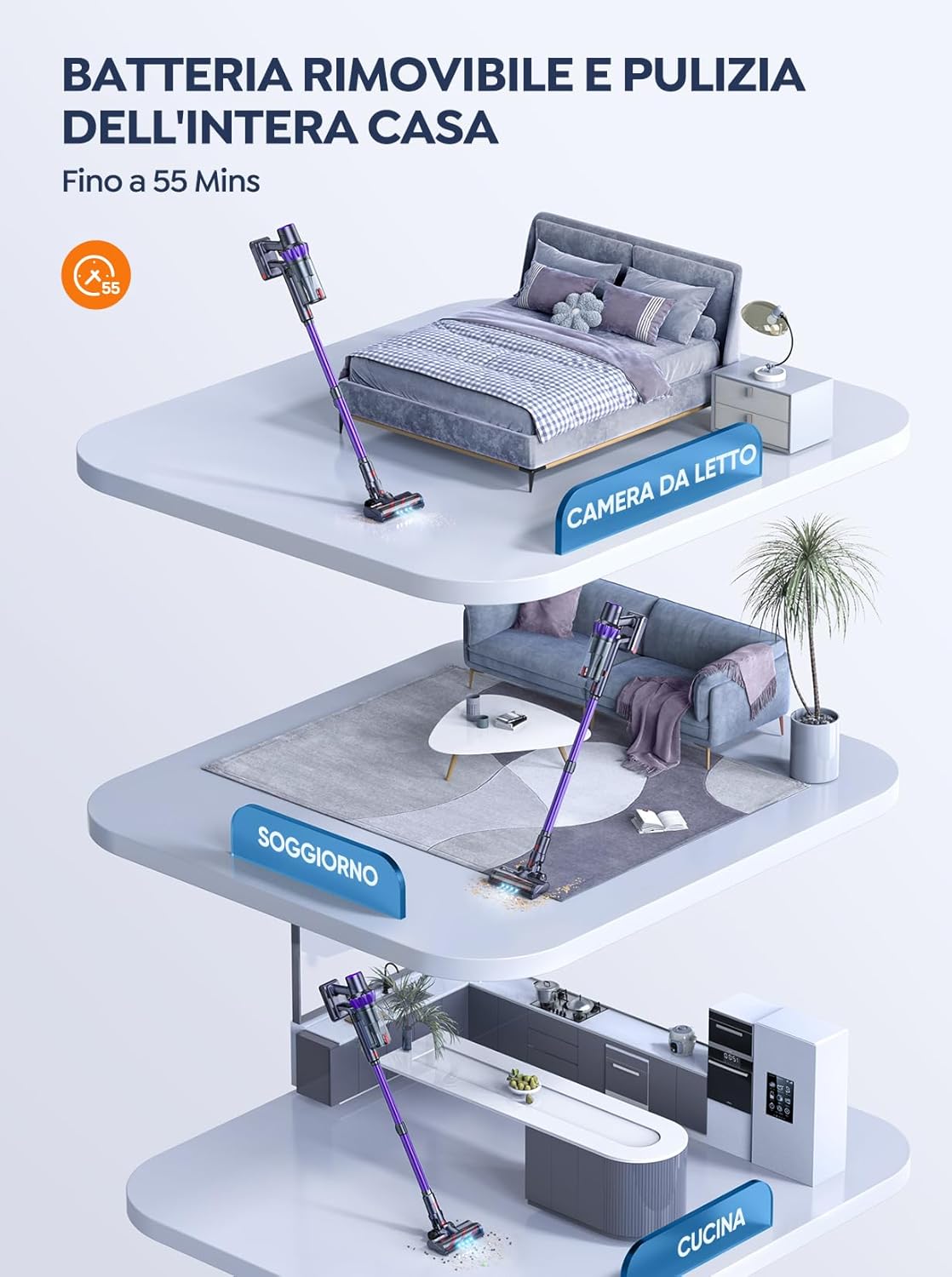
شکل 5.1: The removable battery allows for flexible charging options and extended cleaning time across multiple rooms.
- Connect the power adapter to the charging port on the main unit or directly to the battery if removed.
- اډیپټر په دیوال ساکټ کې ولګوه.
- The LED screen will indicate charging status. A full charge typically takes 4-5 hours.
۳.۲ د خلا راټولول
- د تمدید وینډ ضمیمه کړئ: د توسعې وینډ پورتنۍ پای د اصلي ویکیوم بدن کې دننه کړئ تر هغه چې دا په خپل ځای کې کلیک وکړي.
- د فرش برش سره وصل کړئ: Insert the bottom end of the extension wand into the motorized floor brush until it clicks into place.
- Attach Accessories (for handheld use): For handheld cleaning, you can directly attach the crevice tool or 2-in-1 brush tool to the main vacuum body.
6. د ویکیوم کلینر چلول
Learn how to effectively use your BuTure VC70 for various cleaning tasks.
۶.۱ د بریښنا فعالول/بندول او د حالت انتخاب

شکل 6.1: The intelligent LED touch screen provides real-time information on battery status and selected cleaning mode.
- د فعالولو لپاره: Press the power button on the main unit. The vacuum will start in the default mode.
- د حالتونو بدلولو لپاره: Use the mode selection button on the LED touch screen to cycle through available suction modes (e.g., Eco, Standard, Max, Auto).
- د بریښنا بندولو لپاره: د بریښنا تڼۍ بیا فشار ورکړئ.
6.2 Intelligent Automatic Suction Mode
The BuTure VC70 features an intelligent automatic suction mode that adjusts power based on floor type.
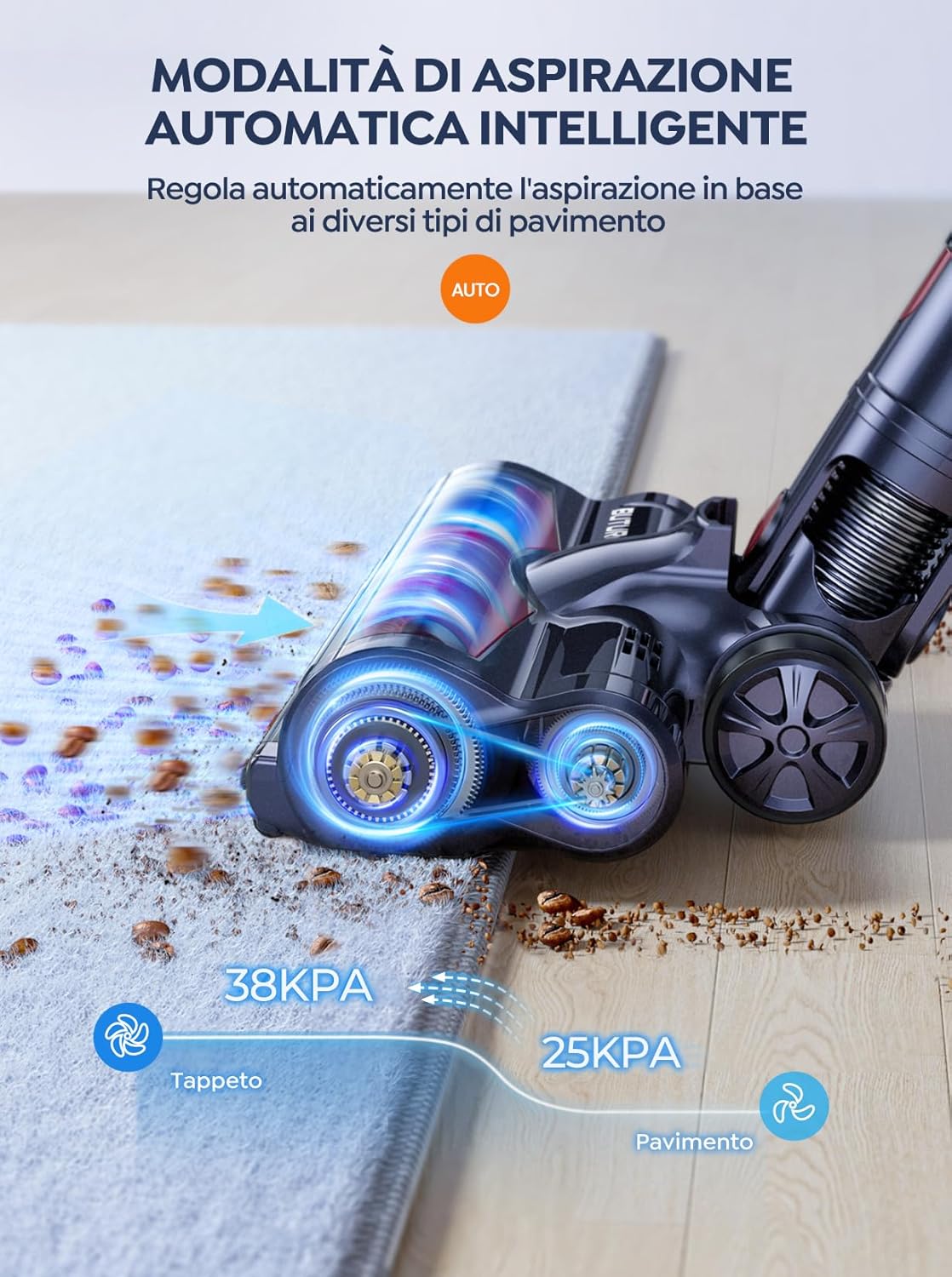
شکل 6.2: The vacuum automatically adjusts suction power, providing 38KPA for carpets and 25KPA for hard floors in Auto mode.
In Auto mode, the vacuum detects the floor type and automatically increases suction for carpets (up to 38KPA) and reduces it for hard floors (25KPA), optimizing cleaning efficiency and battery life.
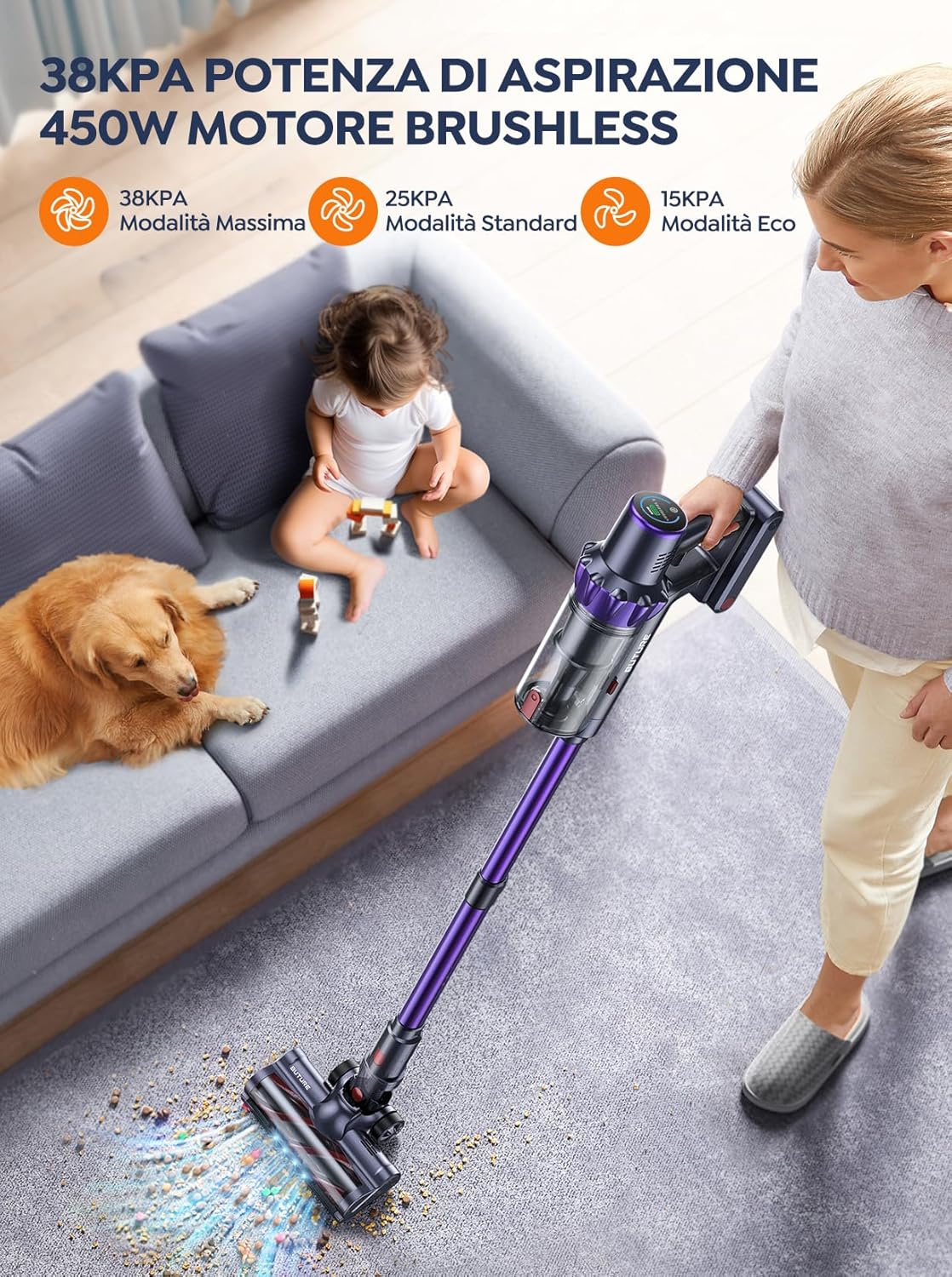
شکل 6.3: The 450W brushless motor delivers powerful suction, with modes including 38KPA Max, 25KPA Standard, and 15KPA Eco.
۱.۳ د ضمیمو کارول
- د کریس وسیله: د تنګ تشو، کونجونو او څنډو لپاره مثالی.
- د برش ۲-په ۱ وسیله: Use the brush for delicate surfaces like upholstery or curtains, and the nozzle for general dusting.
- د موټرو فرش برش: Designed for efficient cleaning of both hard floors and carpets. Its integrated bristles effectively pick up various debris.

شکل 6.4: The motorized floor brush features a combination of soft and hard bristles to effectively clean different types of debris from various floor surfaces.
7. ساتنه
منظم ساتنه غوره فعالیت تضمینوي او ستاسو د ویکیوم کلینر عمر اوږدوي.
۶.۱ د کثافاتو د ډبې خالي کول
د هر استعمال وروسته یا کله چې د ډکولو اعظمي حد ته ورسیږي، د کثافاتو ډبې خالي کړئ.
- د کثافاتو د صندوق د خوشې کولو تڼۍ فشار ورکړئ ترڅو دا له اصلي واحد څخه جلا کړئ.
- Open the dustbin lid and empty contents into a trash can.
- Close the lid and reattach the dustbin to the main unit.
۳.۱ د فلټرونو پاکول
The BuTure VC70 features an advanced multi-layer filtration system. Clean filters regularly to maintain suction power.

شکل 7.1: The advanced multi-layer filtration system captures 99.99% of dust and dirt, ensuring cleaner exhaust air.
- Remove the dustbin and locate the filters inside.
- Gently tap the filters to remove loose dust.
- Rinse the filters under cold running water. Ensure they are completely dry before reinserting (allow 24-48 hours for air drying).
- Replace filters every 3-6 months depending on usage.
۶.۳ د برش رول پاکول
په دوره یي ډول د برش رول د پیچلي ویښتو یا کثافاتو لپاره وګورئ.
- Turn off the vacuum and detach the motorized floor brush.
- Locate the brush roll access latch/button and open it.
- Remove the brush roll. Use scissors or a cleaning tool to cut and remove any tangled hair or fibers.
- Reinsert the brush roll and secure the access latch.
8. ستونزه حل کول
که تاسو د خپل ویکیوم کلینر سره ستونزې سره مخ شئ، د عامو ستونزو او حلونو لپاره لاندې جدول ته مراجعه وکړئ.
| ستونزه | احتمالي لامل | د حل لاره |
|---|---|---|
| ویکیوم نه خلاصیږي | بیټرۍ نه چارج کیږي بیټرۍ په سمه توګه نه ده نصب شوې | بیټرۍ په بشپړه توګه چارج کړئ Ensure battery is securely clicked into place |
| د کم سکشن ځواک | کثافات ډک دي فلټرونه تړل شوي دي د برش رول ګډوډ دی نلی/نال بند شوی دی | کثافات خالي کړئ فلټرونه پاک یا بدل کړئ د برش رول پاک کړئ د خنډونو لپاره وګورئ او لرې کړئ |
| د برش رول نه ګرځی | د برش رول ګډوډ دی د برش رول موټرو ستونزه | د برش رول پاک کړئ Contact customer support if issue persists |
| Vacuum stops suddenly | د ډیر تودوخې محافظت فعال شوی بیټرۍ ټیټه ده | Turn off and allow to cool for 30 minutes بیټرۍ چارج کړئ |
9. مشخصات
Technical specifications for the BuTure VC70 Cordless Vacuum Cleaner.
| فیچر | مشخصات |
|---|---|
| د ماډل شمیره | VC70 |
| برانډ | بټور |
| درجه بندي ځواک | 450 واټ |
| والیtage | 100-240 وولټونه |
| د کثافاتو ظرفیت | 1.5 لیټره |
| د شور کچه | 68 dB |
| د توکي وزن | ۰.۹ کیلوګرامه (تقریبا ۲ پونډه) |
| د بیټرۍ ډول | لیتیم آیون |
| رنګ | وایلټ |
10. تضمین او ملاتړ
BuTure products are manufactured to the highest quality standards. For warranty information or technical support, please refer to the warranty card included with your purchase or visit the official BuTure website. Please have your model number (VC70) and purchase details ready when contacting support.


