پیژندنه
Thank you for choosing the Epson EB-L210SF projector. This manual provides essential information for the safe and efficient use of your projector. Please read it thoroughly before operating the device and keep it for future reference.
The Epson EB-L210SF is a 3LCD Full-HD projector designed for clear and vibrant image projection. It features a laser light source for long-lasting performance.
د خوندیتوب مهم معلومات
- د لیزر خوندیتوب: Do not look directly into the projector lens when the laser light source is active. Avoid direct eye exposure to the laser beam.
- وینټیلیشن: Ensure adequate ventilation around the projector. Do not block ventilation openings. Overheating can cause damage.
- د بریښنا سرچینه: Use only the power supply specified for this projector.
- سمبالول: پروجیکټر په احتیاط سره سمبال کړئ. د غورځولو یا قوي ټکانونو سره د مخ کیدو څخه ډډه وکړئ.
- پاکول: د پاکولو دمخه د بریښنا تار جلا کړئ. نرم او وچ ټوکر وکاروئ. مایع یا ایروسول پاکوونکي مه کاروئ.
چمتو کول
۱. خلاصول او ځای پر ځای کول
Carefully remove the projector and all accessories from the packaging. Place the projector on a stable, level surface. Ensure there is sufficient space around the projector for proper ventilation.

شکل ۱: مخ او اړخ view of the Epson EB-L210SF projector, showing the lens and ventilation grilles.
2. د نښلولو بریښنا
- ورکړل شوی بریښنا تار د پروجیکټر د AC انلیټ سره وصل کړئ.
- د برښنا تار بله پای په یو ځمکني بریښنایی پلورنځي کې ولګوه.
۳. د ننوتلو سرچینو سره نښلول
The projector supports various input sources. Connect your device (computer, Blu-ray player, etc.) to the appropriate port on the projector's rear panel.

Figure 2: Rear panel of the projector, displaying various input and output ports including HDMI, Computer (VGA), Video, USB, and Audio connections.
- HDMI: Connect an HDMI cable from your device to one of the HDMI ports (HDMI 1 or HDMI 2).
- کمپیوټر (VGA): Connect a VGA cable from your computer to the Computer 1 or Computer 2 port. For audio, connect a separate audio cable to Audio 1 or Audio 2.
- ویډیو: Connect composite video and audio cables to the Video and Audio (R/L) ports.
- USB: Use the USB-A port for connecting USB storage devices or the USB-B port for display over USB.
- لین: Connect an Ethernet cable for network control and monitoring.
۵.۳. د بریښنا لومړنی فعالول او د انځور تنظیم کول
- Press the power button on the projector or remote control to turn on the device. The power indicator will illuminate.
- تنظیم کړئ د تمرکز حلقه around the lens until the image is sharp and clear.
- د کارولو zoom lever (if available) to adjust the image size.
- که چیرې انځور trapezoidal ښکاري، نو وکاروئ کیسټون سمون feature (manual or automatic) to square the image. Refer to the Operating section for details on menu navigation.
د پروجکټور چلول
1. د کنټرول پینلview
The control panel on top of the projector allows access to various functions and settings.
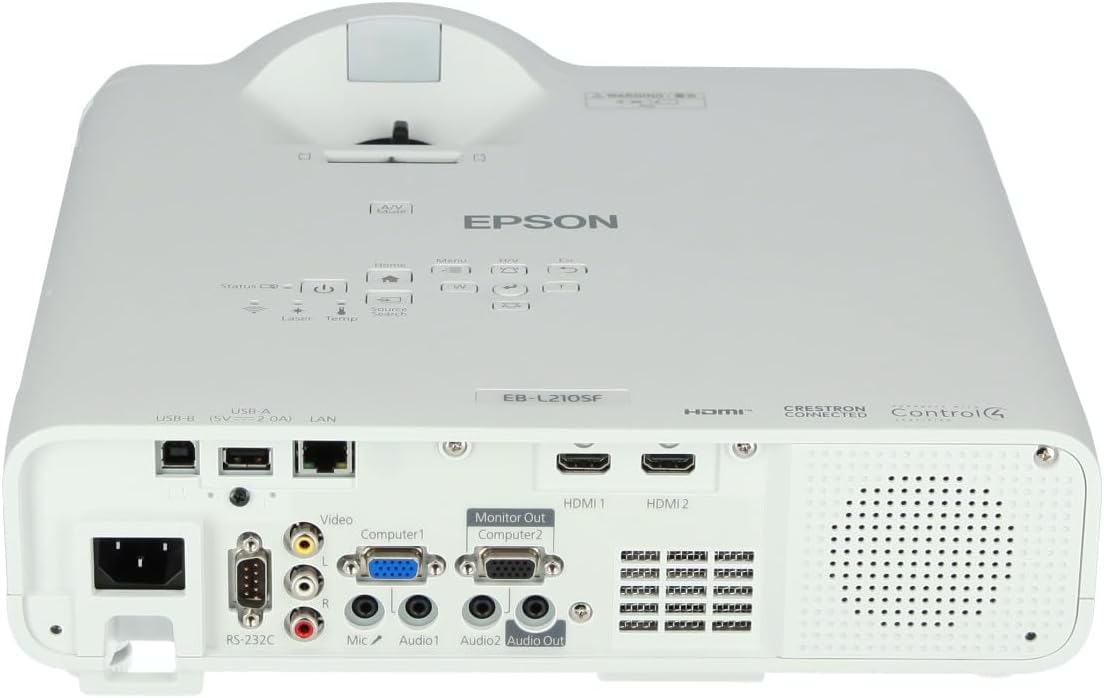
شکل 3: پورته view of the projector, highlighting the control panel with buttons for power, menu, source selection, and navigation.
- د بریښنا تڼۍ: پروجیکټر چالان یا بند کړئ.
- د سرچینې لټون: د شته معلوماتو سرچینو له لارې تیریږي.
- د مینو تڼۍ: Opens the on-screen display (OSD) menu.
- Navigation Buttons (Arrow keys): د مینو انتخابونو له لارې د نیویګیټ کولو لپاره کارول کیږي.
- تڼۍ داخل کړئ: په مینو کې انتخابونه تاییدوي.
- Esc Button: له اوسني مینو څخه وځي یا پخوانۍ سکرین ته راستنیږي.
- د کور تڼۍ: Accesses the home screen or quick settings.
- A/V خاموشه: Temporarily mutes audio and blanks the screen.
2. Selecting an Input Source
فشار ورکړئ د سرچینې لټون button on the control panel or remote control to cycle through the connected input sources (e.g., HDMI 1, HDMI 2, Computer 1, Video). The projector will automatically detect and display the active source.
3. Adjusting Image and Audio Settings
فشار ورکړئ مینو button to access the projector's on-screen display (OSD) menu. Use the navigation buttons to browse categories such as:
- انځور: Adjust brightness, contrast, color, tint, sharpness, and color temperature.
- سیګنال: Configure input signal settings, aspect ratio, and overscan.
- ترتیبات: General projector settings like language, display options, and power management.
- آډیو: Adjust volume, mute, and audio input selection.
یو اختیار غوره کړئ او فشار ورکړئ ننوتل to modify its value. Press Esc د مینو څخه د وتلو لپاره.
ساتنه
۱. د پروجیکټر پاکول
- بهر: Wipe the projector's exterior with a soft, dry, lint-free cloth. For stubborn dirt, dampen the cloth slightly with water, then wipe dry.
- لینز: Gently wipe the lens with a lens cleaning cloth or lens paper. Avoid using abrasive materials or excessive force.
- د هوا فلټر: Regularly check and clean the air filter to prevent dust buildup, which can affect performance and cause overheating. Refer to the projector's on-screen menu for filter maintenance reminders.
۱. د لیزر رڼا سرچینه
The Epson EB-L210SF uses a laser light source, which offers a long operational life and does not require lamp replacement. No user maintenance is typically required for the laser light source itself.
د ستونزو حل کول
که تاسو د خپل پروجیکټر سره ستونزې سره مخ شئ، لاندې عامې ستونزې او حل لارې وګورئ:
| ستونزه | احتمالي لامل / حل |
|---|---|
| هیڅ انځور نه دی وړاندې شوی |
|
| انځور تیاره یا له تمرکز څخه بهر دی |
|
| Image is distorted (trapezoidal) |
|
| غږ نشته |
|
| Projector is not wireless | The Epson EB-L210SF is not inherently a wireless projector. Wireless functionality typically requires an optional external wireless adapter, which is sold separately. Please consult Epson's official website or your retailer for compatible wireless adapters. |
| Overheating warning (Temp indicator) |
|
مشخصات
| فیچر | تفصیل |
|---|---|
| د ماډل شمیره | V11HA75080 |
| د ښودلو ریزولوشن | 1920 x 1080 (بشپړ HD) |
| د ارتباط ټیکنالوژي | HDMI, VGA, USB, LAN |
| د محصول ابعاد | 11.81 x 11.81 x 11.81 انچه |
| د توکي وزن | ۲.۴۵ پونډه |
| د رڼا سرچینه | لیزر |
| جوړونکی | ایپسن |
| وړاندیز شوي استعمالونه | څارنه |
| ځانګړی ځانګړنه | د رڼا وزن |
| بیټرۍ ته اړتیا ده | 1 AAAA (for remote control, not included with projector unit) |
| نیټه لومړی شتون لري | د ۲۰۲۳ کال د نومبر ۳۰مه |
تضمین او ملاتړ
د تضمین په اړه د تفصيلي معلوماتو لپاره، مهرباني وکړئ د تضمین کارت ته مراجعه وکړئ چې ستاسو د محصول سره شامل دی یا د ایپسن رسمي دفتر ته مراجعه وکړئ. webسایټ. د تضمین شرایط او مقررات ممکن د سیمې له مخې توپیر ولري.
For technical support, product registration, or to download the latest drivers and software, please visit the official Epson support website or contact Epson customer service in your region. Contact information can typically be found on the Epson webسایټ