پیژندنه
This manual provides detailed instructions for the setup, operation, maintenance, and troubleshooting of your Makeid L1 Portable Wireless Sticker Label Maker Machine. Please read this manual thoroughly before using the device to ensure proper function and longevity.
په بکس کې څه دي
ډاډ ترلاسه کړئ چې ټولې برخې په بسته کې شتون لري:
- Makeid L1 Label Maker Machine
- 4-meter roll of label tape
- د USB چارج کیبل
- د کارونکي لارښود (دا لاسوند)
محصول پای ته ورسیدview
Familiarize yourself with the key components of your Makeid L1 Label Maker.

انځور: اوورview of the Makeid L1 Label Maker, highlighting the power button, the lid for tape replacement, and the integrated cutter for crisp labels.
- د بریښنا تڼۍ: Located on the side, used to turn the device on/off.
- پوښ: Opens to access the tape compartment for loading and replacing label rolls.
- جوړ شوی کټر: Ensures clean and precise cuts of printed labels.
- Label Output Slot: چیرته چې چاپ شوي لیبلونه راڅرګندیږي.
- د چارج کولو بندر: USB port for recharging the device.
چمتو کول
1. د وسیلې چارج کول
Before first use, ensure the label maker is fully charged. Connect the provided USB charging cable to the device's charging port and a compatible USB power source (e.g., computer USB port, USB wall adapter). The indicator light will show charging status (refer to device specific light indicators for full/charging status).
۴. د لیبل ټیپ بارول
The Makeid L1 supports various label tape widths (9mm, 12mm, 16mm) and types (continuous, die-cut, transparent, white, colored, pattern). Ensure the tape is correctly oriented.
- Open the lid of the label maker.
- Insert the label roll into the compartment, ensuring the tape feeds out from the bottom and through the output slot.
- پوښ په خوندي توګه وتړئ.
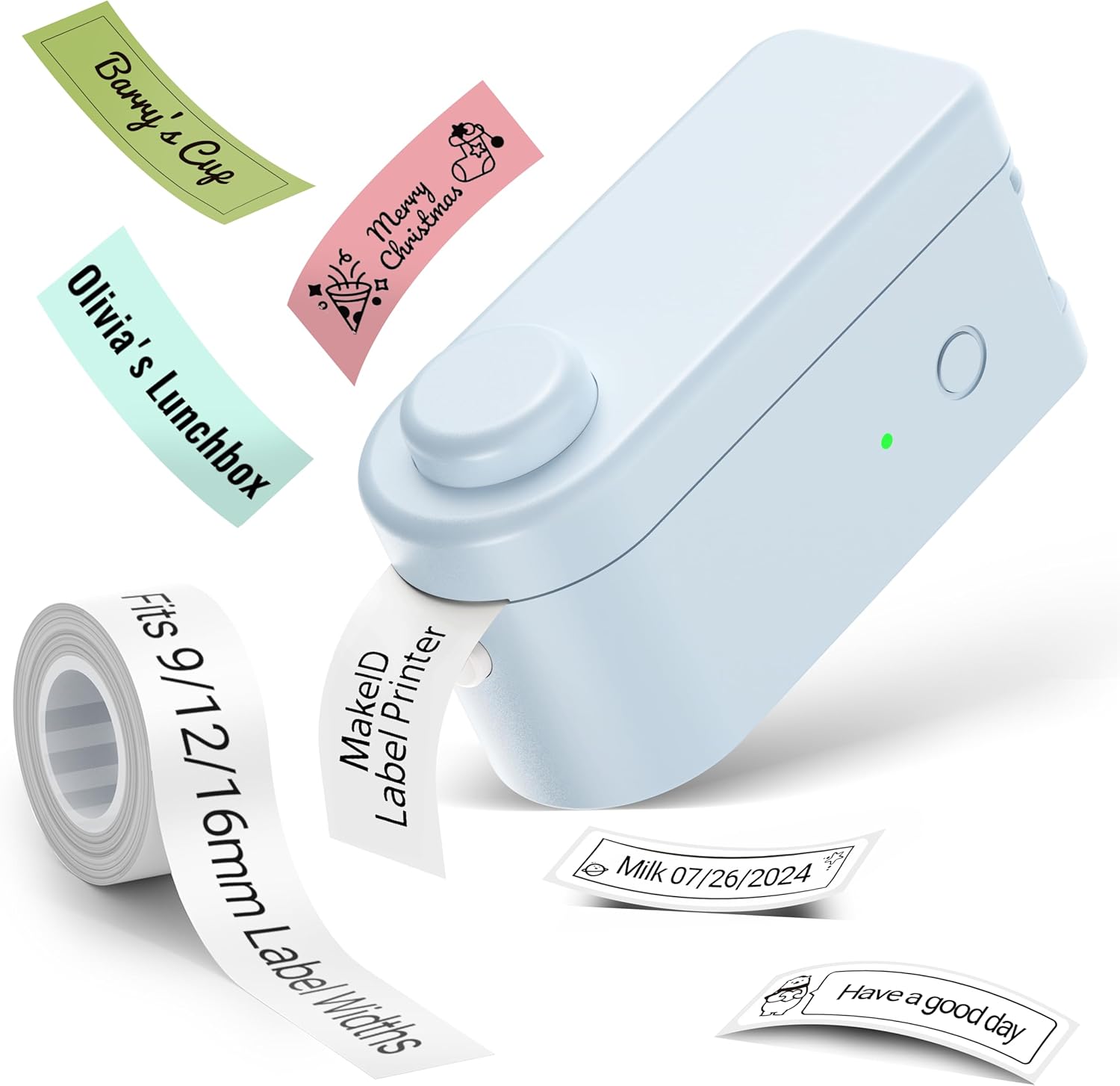
انځور: The Makeid L1 Label Maker demonstrating the label tape roll and examples of printed labels, including continuous and die-cut types.
۱. د اپلیکیشن ډاونلوډ او نصب کول
The Makeid L1 operates via a dedicated mobile application. لټون "MakeID-Life" on your device's app store.

انځور: Screenshots showing the "Get it on Google Play" and "Download on the App Store" buttons, indicating where to find the MakeID-Life application.
4. د بلوتوث جوړه کول
The label maker connects to your smartphone via Bluetooth.
- ډاډ ترلاسه کړئ چې ستاسو په سمارټ فون کې بلوتوټ فعال دی.
- Turn on the Makeid L1 Label Maker by pressing the power button. The indicator light will flash, indicating it's ready for pairing.
- Open the "MakeID-Life" app. The app will automatically search for nearby devices.
- Select "L1" from the list of available devices to connect. Once connected, the indicator light on the label maker will become solid.

انځور: A visual guide demonstrating the three steps for Bluetooth connection: turning on Bluetooth, selecting the L1 model within the app, and confirming the device connection.
عملیاتي لارښوونې
1. Designing Your Label
The "MakeID-Life" app offers extensive customization options:
- د متن داخلول: Type your desired text.
- فونټونه: Choose from 88 different font styles.
- نښې او نښې: Access over 600 icons and various symbols.
- کينډۍ: Utilize over 400 pre-designed templates for various purposes (e.g., kitchen, office, school).
- Borders & Frames: Add decorative borders.
- نورې دندې: Create barcodes, QR codes, tables, dates, and patterns.
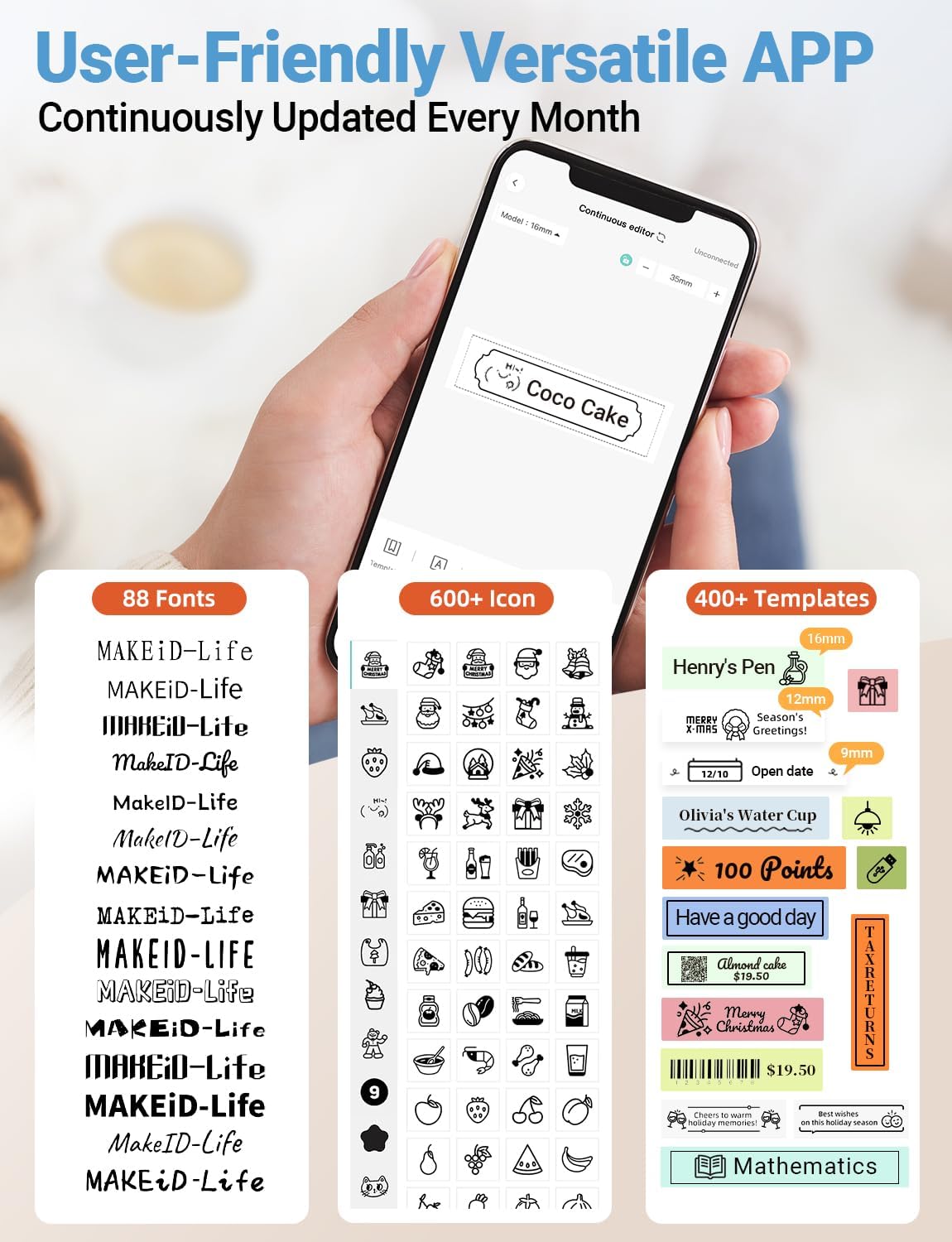
انځور: یو مفصل view of the MakeID-Life app interface, showcasing the wide selection of 88 fonts, over 600 icons, and more than 400 templates available for label customization.
2. د لیبلونو چاپول
Once your design is complete in the app:
- Review your label design on the app screen.
- په اپلیکیشن کې د "چاپ" تڼۍ باندې کلیک وکړئ.
- The label will be thermally printed and emerge from the output slot.
۵.۳. د لیبلونو پرې کول
The Makeid L1 features a built-in cutter for clean edges.
- After printing, gently pull the label forward slightly.
- Press the cutting button (refer to the Product Overview image for location) to cleanly cut the label.

انځور: Illustration of the Makeid L1's built-in cutter, demonstrating how it provides professional and safe cutting of labels, eliminating messy torn edges.
4. Types of Label Printing
The L1 supports two primary types of label printing:
- Continuous Labels: Ideal for custom lengths, allowing you to print text of any length and cut it precisely.
- Die-Cut Labels: Pre-sized labels with specific shapes, perfect for consistent labeling of items like jars or files.

انځور: Visual representation of continuous labels, which can be cut to any length, and die-cut labels, which are pre-shaped for specific applications.
ساتنه
د چاپ سر پاکول
To ensure optimal print quality, periodically clean the thermal print head.
- Turn off the label maker and disconnect it from the power source.
- Open the lid and remove the label tape.
- Gently wipe the print head with a soft, lint-free cloth dampened with isopropyl alcohol. Do not use water or abrasive cleaners.
- Allow the print head to dry completely before reinserting the tape and closing the lid.
ذخیره کول
Store the label maker in a cool, dry place away from direct sunlight and extreme temperatures. Remove the label tape if storing for extended periods.
د ستونزو حل کول
د عامو ستونزو او د هغوی د حل لارو لپاره لاندې جدول ته مراجعه وکړئ.
| ستونزه | احتمالي لامل | د حل لاره |
|---|---|---|
| وسیله نه ورځي. | ټیټ بیټرۍ. | د ورکړل شوي USB کیبل په کارولو سره وسیله چارج کړئ. |
| د بلوتوث له لارې نشي وصل کېدای. | Bluetooth is off on phone; device not in pairing mode; app issue. | Ensure Bluetooth is enabled on your phone. Turn the label maker off and on again to re-enter pairing mode. Restart the "MakeID-Life" app. |
| Poor print quality / Faded prints. | Print head dirty; incorrect label tape; low battery. | Clean the print head. Ensure you are using Makeid compatible thermal label tape. Charge the device. |
| Label tape not feeding. | Tape incorrectly loaded; tape jammed. | Open the lid and re-insert the label tape correctly, ensuring it's not jammed. |
| Labels are not cutting cleanly. | Cutter blade dull or obstructed. | Ensure no debris is obstructing the cutter. If issues persist, contact customer support. |
مشخصات
Detailed technical specifications for the Makeid L1 Label Maker Machine:
| فیچر | تفصیل |
|---|---|
| برانډ | مکید |
| د ماډل نوم | L1 |
| د ارتباط ټیکنالوژي | بلوتوث |
| د چاپ ټیکنالوژي | حرارتي |
| د چاپګر محصول | مونوکروم |
| قرارداد | 203 x 203 DPI (also 300 x 300 DPI for other variants) |
| د رسنیو اعظمي اندازه | 0.63 انچه (16mm) |
| مطابقت لرونکې وسیلې | Smartphones (Android & iOS) |
| د کنټرول طریقه | اپلیکیشن |
| هډوتري برسیر | USB |
| د بریښنا سرچینه | 1 لیتیم آئن بیټرۍ (شامل ده) |
| د محصول ابعاد | ۶۳" ژوروالی x ۵۵.۲" ژوروالی x ۳۰.۲۴" ژوروالی (۱۶۰ x ۱۴۰.۲ x ۷۶.۸ سانتي متره) |
| د توکي وزن | ۰.۹۸۶ اونس (۲۷.۹۴ ګرامه) |
| ځانګړي ځانګړتیاوې | Continuous & Pre-cut Label Tapes, Waterproof, Oil-proof, Friction Resistant, Light Resistant, No Fading, Rich Font Icon Pattern, Portable, Inkless, Wireless, Rechargeable, Creative Print Functions (Barcode, Text, Picture, QR 2D Code, Table, Date, Border, Icon, Shape, Pattern, Template) |
تضمین او ملاتړ
The Makeid L1 Label Maker comes with a د ټول عمر تضمین. For technical support, warranty claims, or further assistance, please contact Makeid customer service through the official Makeid webسایټ یا ستاسو د محصول په بسته بندۍ کې چمتو شوي د اړیکو معلومات.
د اضافي سرچینو او FAQs لپاره، لیدنه وکړئ Makeid Store on Amazon.
د خوندیتوب معلومات
- مه جلا کوئ یا هڅه مه کوئ چې وسیله پخپله ترمیم کړئ.
- وسیله د اوبو او لوړ رطوبت څخه لرې وساتئ.
- Use only original or certified compatible label tapes and charging cables.
- د ماشومانو د لاسرسي څخه لرې وساتئ.
- د وسیلې د خورا تودوخې یا مستقیم لمر وړانګو ته د افشا کولو څخه ډډه وکړئ.


