1. پیژندنه
Thank you for choosing the BEITONG Asura 2 Pro+ PC Gaming Controller. This manual provides essential information for setting up, operating, and maintaining your controller. Please read it thoroughly to ensure optimal performance and a satisfying gaming experience.
2. د بسته محتويات
- BEITONG Asura 2 Pro+ Gaming Controller
- 2.4GHz بې سیم ترلاسه کونکی
- د USB-C چارج کیبل
- د کارن لارښود
3. د محصول ترتیب
Familiarize yourself with the buttons and features of your BEITONG Asura 2 Pro+ controller:

انځور 3.1: Detailed diagram of the BEITONG Asura 2 Pro+ controller, highlighting the Home button, Indicator Light, Back button, Start button, Left Stick (LS), Right Stick (RS), Turbo button, Shift button, D-pad, A/B/X/Y buttons, LB/RB/LT/RT triggers, M1/M2 macro buttons, USB-C charging port, and 2.4G wireless USB dongle storage.
- د کور تڼۍ: Powers on/off, enters pairing mode.
- د رڼا شاخص: Shows connection status, battery level, and mode.
- Back/Start Buttons: Standard menu navigation.
- Left Stick (LS)/Right Stick (RS): Hall Effect joysticks for precise movement. Press down for L3/R3.
- د توربو تڼۍ: د چټک تڼۍ فشار لپاره د ټربو فعالیت فعالوي.
- د شفټ تڼۍ: Used for mode switching and advanced functions.
- ډي پیډ: لارښوونه.
- د A/B/X/Y تڼۍ: Mechanical buttons for primary actions.
- LB/RB/LT/RT Triggers: Hall Effect triggers for precise analog input.
- M1/M2 Macro Buttons: Programmable back paddles for custom commands.
- د USB-C چارج کولو بندر: د چارج کولو او تار لرونکي اتصال لپاره.
- 2.4G Wireless USB Dongle Storage: Convenient storage for the wireless receiver.
4. تنظیم او ارتباط
The BEITONG Asura 2 Pro+ supports multiple connection methods:
4.1. 2.4GHz Wireless Connection (PC, Steam Deck, Android TV Box)
- Insert the 2.4GHz wireless receiver into an available USB port on your device (PC, Steam Deck, Android TV Box).
- فشار ورکړئ او ونیسئ د کور تڼۍ on the controller until the indicator light flashes rapidly, indicating pairing mode.
- یوځل چې وصل شي، د شاخص رڼا به قوي شي.
4.2. Bluetooth 5.0 Connection (PC, Nintendo Switch, Android, iOS)
- ډاډ ترلاسه کړئ چې ستاسو په وسیله بلوتوټ فعال شوی.
- فشار ورکړئ او ونیسئ د کور تڼۍ on the controller until the indicator light flashes rapidly.
- On your device, search for Bluetooth devices and select "BEITONG Asura 2 Pro+" to pair.
- یوځل چې وصل شي، د شاخص رڼا به قوي شي.
۳.۳. د تار سره نښلول (کمپیوټر)
- Connect the USB-C charging cable to the controller and the other end to an available USB port on your PC.
- کنټرولر به په اتوماتيک ډول وپیژندل شي او د کارولو لپاره چمتو شي.

انځور 4.1: The BEITONG Asura 2 Pro+ controller demonstrating its compatibility with various platforms including PC, Laptop, Nintendo Switch, Steam Deck, Mobiles, and Android TV & TV Box.
5. عملیاتي لارښوونې
۶.۱. اساسي کنټرولونه
The controller features standard gamepad buttons for intuitive gaming. The Hall Effect joysticks and triggers provide enhanced precision and durability, preventing stick drift and offering accurate input down to 0.1mm.

انځور 5.1: Illustration of the 'Dual Hall' high precision control technology for both Hall Sticks and Hall Triggers, emphasizing millimetre response times and 0.1mm pressing accuracy.
۲. د ټربو فعالیت
The Turbo function allows for rapid, repeated presses of a button. To activate:
- فشار ورکړئ او ونیسئ د ټربو ت buttonۍ.
- While holding Turbo, press the desired action button (e.g., A, B, X, Y, LB, RB, LT, RT).
- Release both buttons. The selected action button will now rapidly repeat its input when held down.
- د غیر فعالولو لپاره، پروسه تکرار کړئ.

انځور 5.2: Visual guide on how to set the Turbo function, showing the Turbo button and an example of activating Turbo for the 'B' button.
5.3. Motion Control (6-Axis Gyroscope)
The controller features a 6-axis gyroscope for motion sensing games, particularly useful on Nintendo Switch and PC titles that support motion input. This allows for intuitive control based on the physical movement of the controller.

انځور 5.3: Depiction of the 6-axis gyroscope enabling somatosensory control for PC and Nintendo Switch, offering full flexibility for motion-sensing games.
6. Customization with BEITONG Gamepad Assistant
Unlock the full potential of your controller with the BEITONG Gamepad Assistant software. This application allows for extensive customization of various settings:
- Macro Key Mapping: Program M1/M2 back paddles to any button or complex command sequences.
- Overclocking Mode: Adjust polling rate for faster response times (up to 600Hz on PC).
- Joystick Dead Zone: Fine-tune joystick sensitivity and eliminate unwanted input.
- د توربو سرعت: Customize the rapid-fire rate of the Turbo function.
- د وایبریشن ځواک: Adjust the intensity of the dual rumble motors.
- د RGB رڼا اغیزې: Personalize the controller's lighting.
- Joystick/Trigger Calibration: Ensure optimal performance and accuracy.
انځور 6.1: اوورview of highly customizable gamepad functions accessible through the BEITONG Gamepad Assistant, including stick sensitivity, vibration intensity, key customization, and turbo frequency.
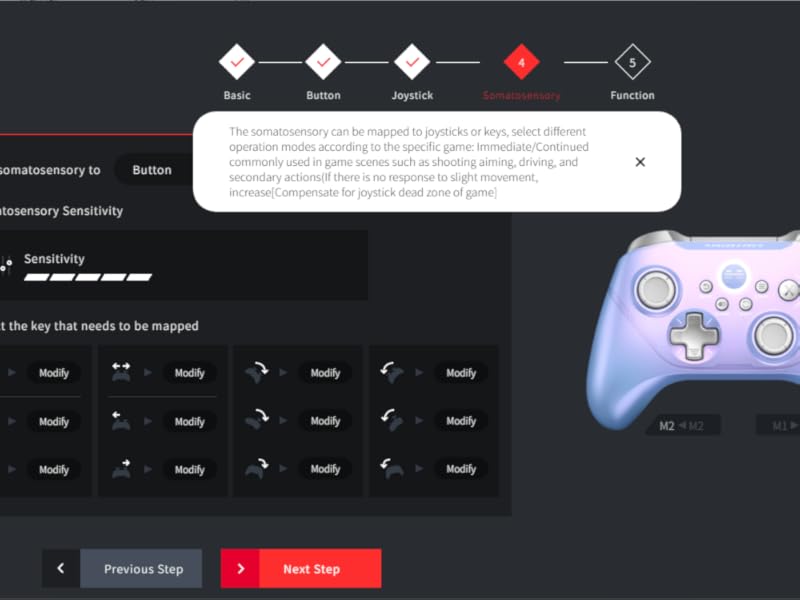
انځور 6.2: Screenshot of the BEITONG Gamepad Assistant interface for button customization, showing options for normal and extended buttons (M1/M2) and macro settings.
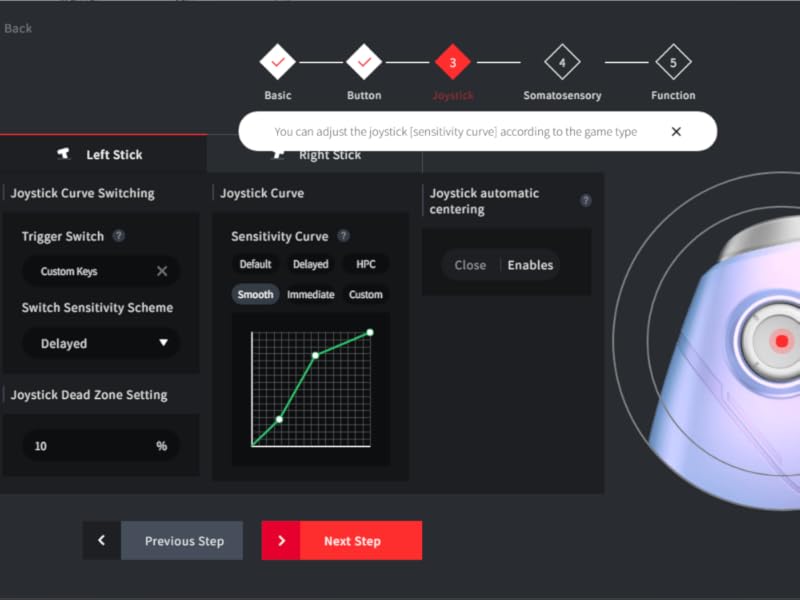
انځور 6.3: Screenshot of the BEITONG Gamepad Assistant for joystick settings, allowing adjustment of joystick sensitivity curves and dead zone settings.
۷. چارج کول او بیټرۍ
The controller is equipped with a 600mAh battery, providing 12-17 hours of gameplay on a 2-hour charge. Use the provided USB-C cable to charge the controller. You can continue playing while the controller is charging via a wired connection.
8. ساتنه
- کنټرولر د وچ، نرم ټوکر سره پاکولو سره پاک وساتئ.
- کنټرولر د سختې تودوخې، رطوبت، یا مستقیم لمر وړانګو سره مخ کیدو څخه ډډه وکړئ.
- Do not attempt to disassemble or repair the controller yourself, as this will void the warranty.
9. ستونزه حل کول
9.1. Controller Not Connecting
- ډاډ ترلاسه کړئ چې کنټرولر چارج شوی.
- For 2.4GHz, verify the receiver is properly inserted and the controller is in pairing mode.
- For Bluetooth, ensure Bluetooth is enabled on your device and the controller is discoverable.
- هڅه وکړئ چې کنټرولر او خپل وسیله دواړه بیا پیل کړئ.
9.2. Input Lag or Disconnections
- Ensure the controller is within range of the receiver/Bluetooth device.
- د نورو بېسیم وسیلو مداخله کمه کړئ.
- For critical gaming, consider using a wired connection.
۵.۳. هغه تڼۍ چې ځواب نه ورکوي
- وګورئ چې د کنټرولر بیټرۍ ټیټه ده که نه.
- Reset the controller using the reset hole (refer to Image 3.1 for location).
- If the left stick isn't working, ensure you didn't accidentally press the SHIFT key, which can alter its function.
- Use the BEITONG Gamepad Assistant to calibrate joysticks and triggers.
10. مشخصات
| فیچر | مشخصات |
|---|---|
| د ماډل شمیره | Asura 2Pro Plus |
| ارتباط | ۲.۴GHz بېسیم، بلوتوث ۵.۰، USB-C وایرډ |
| مطابقت | PC, Android, iOS, Nintendo Switch, Steam Deck (Does NOT support Mac/Xbox/PS4/PS5) |
| جوی سټیکونه او محرکونه | Hall Effect (Anti-drift, 0.1mm accuracy) |
| تڼۍ | Mechanical (0.7mm trigger stroke) |
| د رای ورکولو کچه | Up to 600Hz (Overclocking mode on PC) |
| د بیټرۍ ظرفیت | 600mAh |
| د بیټرۍ ژوند | 12-17 ساعته (نږدې) |
| د چارج کولو وخت | 2 ساعته (نږدې) |
| د حرکت کنټرول | ۳-محور ګیروسکوپ |
| د میکرو تڼۍ | 2 (M1/M2, customizable) |
11. تضمین او ملاتړ
BEITONG provides a limited warranty for this product against defects in materials and workmanship under normal use. For warranty claims or technical support, please contact the BEITONG technology team through their official channels or the retailer where you purchased the product. Please retain your proof of purchase for warranty service.
ویډیو 11.1: An official video from BEITONG showcasing the Asura 2 Pro Game Controller, highlighting its design, features, and performance.


