پیژندنه
The Nonstop NSA2-BK Station A is a versatile bedside companion designed to enhance your daily routine. This device integrates a wireless Bluetooth speaker, an alarm clock, and a multi-functional charging station, providing convenience and relaxation in one compact unit. It features soothing soundscapes for improved sleep and multiple charging options for your devices.

شکل 1: مخکی view of the Nonstop NSA2-BK Station A, displaying the digital clock, alarm settings, and charging indicators.
کلیدي ځانګړتیاوې
- Wireless Bluetooth Speaker: Enjoy enhanced stereo sound for music, videos, and apps from your Bluetooth-enabled devices.
- Relaxation Soundscapes: Improve sleep quality with built-in soothing sounds, including gentle ocean waves, calming rain, and noise-masking ambient sounds.
- Wireless Qi Charging: Conveniently charge Qi-compatible smartphones by simply placing them on the top surface of the unit.
- Dual USB Universal Charging: Equipped with two USB ports to charge a variety of devices, including smartphones, iPads, Kindles, and wireless headphones.

Figure 2: Illustration of the relaxation sound features, showing icons for Gentle Waves, Soothing Rain, and White Noise.
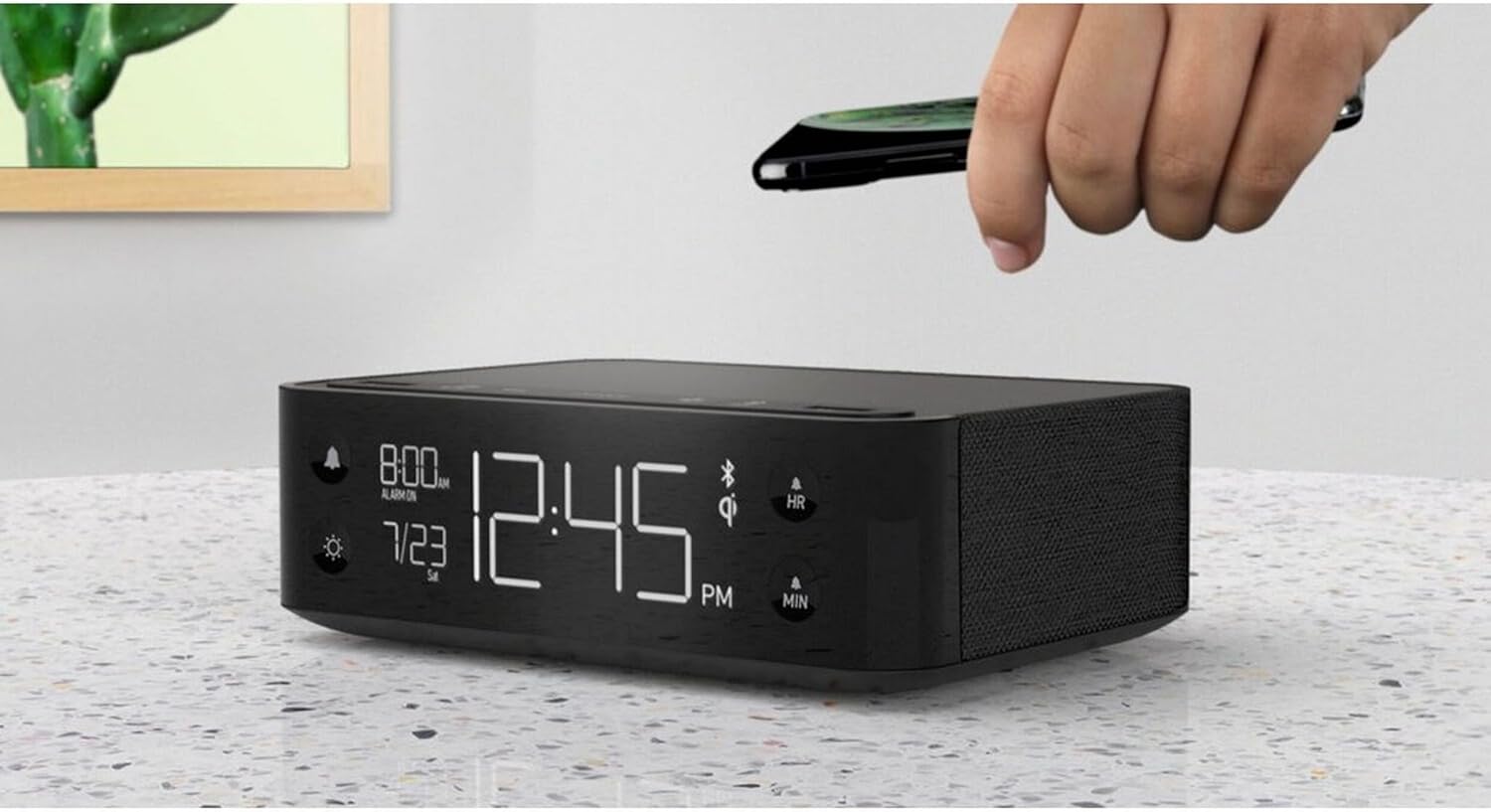
Figure 3: A smartphone being placed on the top surface of the Station A for wireless charging.
چمتو کول
1. د بریښنا پیوستون
- Unpack the Nonstop NSA2-BK unit and all accessories from the packaging.
- Connect the provided power adapter to the DC input port on the back of the unit.
- Plug the power adapter into a standard electrical outlet. The display will illuminate, indicating the unit is powered on.
2. Initial Clock Setting
Upon first power-up, the clock may display a default time. Refer to the "Operating Instructions" section for detailed steps on setting the current time and date.
3. د بلوتوث جوړه کول
- ډاډ ترلاسه کړئ چې ستاسو په ګرځنده وسیله (سمارټ فون، ټابلیټ، او نور) کې بلوتوټ فعال دی.
- On the Nonstop NSA2-BK, press the Bluetooth pairing button (refer to button layout in "Operating Instructions" if available, otherwise assume a standard Bluetooth icon button). The Bluetooth indicator on the display will flash.
- On your mobile device, search for available Bluetooth devices. Select "Nonstop NSA2-BK" from the list.
- Once paired, the Bluetooth indicator on the unit will become solid, and you will hear an audible confirmation.
4. Wireless Qi Charging Setup
No specific setup is required for wireless charging beyond connecting the unit to power. Simply place your Qi-compatible device on the designated charging pad on top of the unit. Ensure the device is centered for optimal charging.
عملیاتي لارښوونې
د وخت او نیټې ترتیب کول
- فشار ورکړئ او ونیسئ د وخت وخت button (or equivalent, often combined with HR/MIN buttons).
- د کارولو HR (ساعت) او MIN (Minute) buttons to adjust the time.
- فشار ورکړئ د وخت وخت button again to confirm and move to date setting (if applicable).
- د کارولو HR او MIN buttons to adjust the month and day.
- مطبوعاتي د وخت وخت د وتلو لپاره
د الارم تنظیم او کارول
- فشار ورکړئ او ونیسئ د الارم سیټ button (bell icon). The alarm time will flash.
- د کارولو HR او MIN د مطلوب الارم وخت تنظیم کولو لپاره تڼۍ.
- مطبوعاتي د الارم سیټ بیا د تایید لپاره.
- د الارم فعال/غیر فعالولو لپاره، فشار ورکړئ په الارم روان / بند button (bell icon). An alarm indicator will appear/disappear on the display.
- کله چې د الارم غږ کیږي ، فشار ورکړئ لنډول button (if available, or any button except alarm off) for a temporary pause. Press the په الارم روان / بند button to turn off the alarm completely.
Using Bluetooth Speaker
- Ensure the unit is paired with your device (see "Bluetooth Pairing" in Setup).
- Play audio from your paired device. Sound will be output through the NSA2-BK speaker.
- Adjust volume using the volume controls on your paired device or on the NSA2-BK unit (if available).
Playing Relaxation Sounds
- فشار ورکړئ غږ button (or similar, possibly a wave/rain icon).
- Press repeatedly to cycle through available soundscapes (Ocean Waves, Rain, Ambient Sounds).
- فشار ورکړئ او ونیسئ غږ button to turn off the soundscape.
Using Charging Functions
- Wireless Qi Charging: Place your Qi-compatible smartphone centrally on the top charging pad. A charging indicator on the display will illuminate.
- د USB چارج کول: Connect your device's USB charging cable to one of the two USB ports on the back or side of the unit. Charging will begin automatically.
د ښودنې روښانتیا تنظیم کول
- فشار ورکړئ DIMMER button (sun icon).
- Press repeatedly to cycle through different brightness levels for the display.
ساتنه
- پاکول: Disconnect the power before cleaning. Use a soft, dry cloth to wipe the exterior of the unit. Do not use liquid cleaners or abrasive materials.
- ذخیره کول: که چیرې یونټ د اوږدې مودې لپاره ذخیره کوئ، نو له بریښنا څخه یې جلا کړئ او په یخ او وچ ځای کې یې وساتئ.
- د مایعاتو څخه ډډه وکړئ: واحد د اوبو یا ډیر رطوبت څخه لرې وساتئ.
- وینټیلیشن: د یونټ شاوخوا مناسب هوا ورکول ډاډمن کړئ ترڅو د ډیر تودوخې مخه ونیول شي. د هوا د توییدو لارې مه بندوئ.
د ستونزو حل کول
| ستونزه | احتمالي لامل | د حل لاره |
|---|---|---|
| واحد فعال نه دی. | د بریښنا اډاپټر وصل شوی نه دی یا آوټ لیټ فعال نه دی. | ډاډ ترلاسه کړئ چې د بریښنا اډاپټر په خوندي ډول په واحد او د کار کولو بریښنایی سایټ کې ولګول شوی. |
| د بلوتوث وسیله نشي جوړه کیدی. | Unit is not in pairing mode; device is too far; another device is already connected. | Ensure the NSA2-BK is in pairing mode. Move device closer. Disconnect any previously paired devices. |
| بېسیم چارج کول کار نه کوي. | Device is not Qi-compatible; device not centered; foreign objects on pad; thick phone case. | Verify device supports Qi wireless charging. Re-position device centrally. Remove foreign objects or thick phone cases. |
| د USB چارج کول کار نه کوي. | Cable is faulty; device is not compatible; unit is overloaded. | Try a different USB cable. Ensure device is compatible. Avoid charging too many high-power devices simultaneously. |
| الارم نه غږېږي. | الارم فعال شوی نه دی؛ غږ ډېر ټیټ دی. | Ensure the alarm is set and activated (alarm indicator visible). Increase the unit's volume. |
مشخصات
- نښه: بې وقفه
- ماډل: NSA2-BK
- رنګ: Black, Ocean
- د توکي وزن: ۲.۴۵ پونډه
- د هارډویر انٹرفیس: USB
- مطابقت لرونکي وسایل: iPad, Smartphones, Kindle, Wireless Headphones (via USB/Qi)
- ټول USB پورټونه: 2
- واټtage: 10 watts (for charging)
- UPC: 840148709171
- ASIN: B0C8LDWF57
- لومړی شتون لري: د ۲۰۲۴ کال د جولای ۹ مه
تضمین او ملاتړ
Specific warranty details for the Nonstop NSA2-BK are typically provided with the product packaging or on the manufacturer's official webسایټ. مهرباني وکړئ د جامع تضمین معلوماتو لپاره دې سرچینو ته مراجعه وکړئ.
For technical support, troubleshooting assistance beyond this manual, or inquiries regarding parts and service, please contact Nonstop customer support through their official webسایټ یا د اړیکې معلومات چې ستاسو د محصول په اصلي اسنادو کې چمتو شوي دي.
Note: Always retain your proof of purchase for warranty claims.


