1. پیژندنه
Welcome to the user manual for your new DOVIICO Military Smart Watch HK87. This manual provides essential information for setting up, operating, and maintaining your device. Please read it thoroughly to ensure optimal performance and longevity of your smartwatch.
The DOVIICO HK87 is designed for durability and functionality, featuring IP68 waterproofing, shock resistance, and dust protection, making it suitable for various outdoor activities. It offers comprehensive health monitoring, multiple sports modes, and convenient communication features.
۲. په بکس کې څه دي؟
د بکس خلاصولو پر مهال، مهرباني وکړئ تصدیق کړئ چې لاندې لیست شوي ټول توکي شتون لري:
- 1 x DOVIICO Smart Watch HK87
- 1 ایکس مقناطیسي چارج کیبل
- ۱ x د کارونکي لارښود (دا سند)
3. محصول ختم شوview
Familiarize yourself with the components of your DOVIICO Smart Watch HK87.
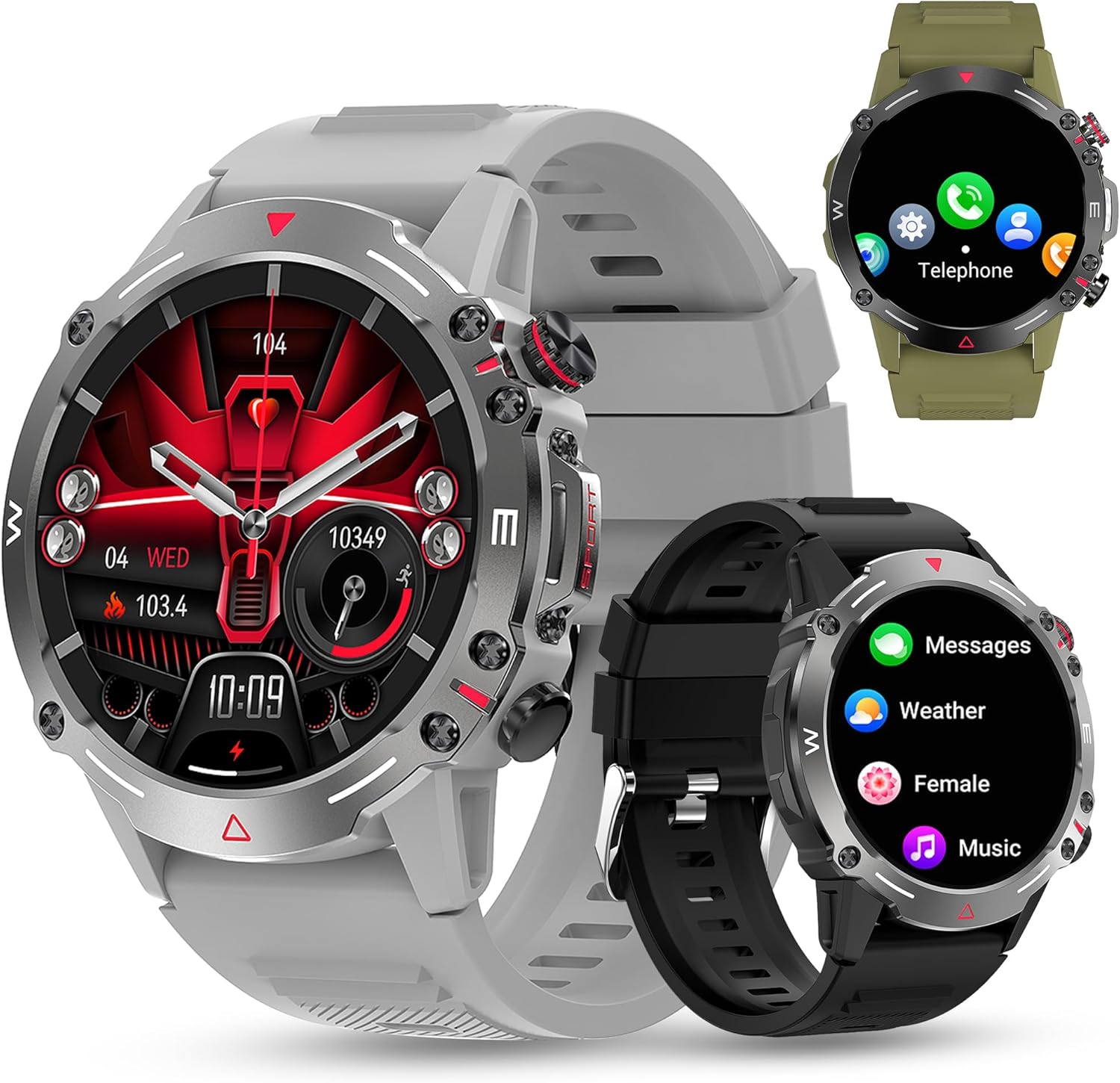
شکل 3.1: مخکی view of the DOVIICO Smart Watch HK87, illustrating its robust design and various display options.

شکل 3.2: تفصيلي view of the 1.43-inch AMOLED HD screen and the integrated heart rate sensor located on the watch's underside.
مهمې برخې:
- 1.43" AMOLED HD Display: High-resolution touch screen for clear visuals and easy navigation.
- د غاړې تڼۍ: For power, menu access, and quick functions.
- د زړه ضربان سینسر: Located on the back for continuous heart rate monitoring.
- د اړیکو چارج کول: د چارج کولو کیبل د نښلولو لپاره په شا کې مقناطیسي ټکي.
- سپیکر او مایکروفون: For Bluetooth calls and AI voice assistant.
4. ترتیب کول
۲.۲ د سمارټ واچ چارج کول
د لومړني کارونې دمخه، خپل سمارټ واچ په بشپړه توګه چارج کړئ.
- Connect the USB end of the magnetic charging cable to a power adapter (not included) or a computer's USB port.
- Align the magnetic end of the charging cable with the charging contacts on the back of the watch. The magnets will snap it into place.
- د ساعت ښودنه به د چارج کولو حالت په ګوته کړي. بشپړ چارج معمولا شاوخوا 2 ساعته وخت نیسي.

شکل 4.1: The watch display showing the charging indicator and battery life expectations.
۳.۳ د اپلیکیشن نصب او جوړه کول
To unlock the full functionality of your smartwatch, you need to install the companion app on your smartphone and pair the devices. The watch is compatible with Android 4.4 and above, and iOS 8.4 and above.
- اپلیکیشن ډاونلوډ کړئ: Scan the QR code provided in the watch's quick start guide or search for the designated app (e.g., "FitCloudPro" or similar, check packaging for exact name) in your phone's app store (Google Play Store for Android, Apple App Store for iOS).
- بلوتوث فعال کړئ: ډاډ ترلاسه کړئ چې ستاسو په سمارټ فون کې بلوتوټ فعال دی.
- اپلیکیشن خلاص کړئ: نصب شوی اپلیکیشن لانچ کړئ او د حساب جوړولو یا ننوتلو لپاره په سکرین کې لارښوونې تعقیب کړئ.
- وسیله اضافه کړئ: د اپلیکیشن دننه، "وسیله" یا "وسیله اضافه کړئ" برخې ته لاړ شئ. اپلیکیشن به د شته سمارټ واچونو لټون وکړي.
- خپل ساعت غوره کړئ: Select "HK87" or the corresponding device name from the list. Confirm the pairing request on both your phone and the watch if prompted.
- اجازه ورکول: Grant all necessary permissions requested by the app (e.g., location, notifications, contacts) to ensure full functionality.
مهم: If you experience pairing issues, ensure the watch is sufficiently charged and not paired with another device. Restarting both the watch and your phone can often resolve connectivity problems.
5. عملیاتي لارښوونې
5.1 بنسټیز نیویګیشن
- پاور آن/بند: د بریښنا د فعالولو یا بندولو لپاره د غاړې تڼۍ فشار ورکړئ او ونیسئ.
- د ویښیدو سکرین: د سکرین د راویښولو لپاره خپل لاس پورته کړئ یا د غاړې تڼۍ فشار ورکړئ.
- پورته/ښکته/کیڼ/ښي خوا ته سوائپ کړئ: د مینو، خبرتیاوو، او چټکو ترتیباتو له لارې نیویګیټ وکړئ.
- ټایپ: یو توکي غوره کړئ یا یو عمل تایید کړئ.
۴.۳ بلوتوث زنګونه او خبرتیاوې
Once paired, your smartwatch can handle calls and display notifications.
- Answering/Dialing Calls: Use the watch's dial pad or contact list to make calls. When a call comes in, you can answer or reject it directly from the watch.
- د پیغام خبرتیاوې: Receive alerts for SMS, WhatsApp, Instagram, Facebook, and other app messages. Swipe down from the main screen to view وروستي خبرتیاوې.
5.3 سپورت موډونه
The watch offers over 100 sports modes to track your physical activity.

شکل 5.1: A visual representation of the diverse sports modes available on the smartwatch.
- Navigate to the "Sports" menu on your watch.
- Select your desired activity (e.g., Running, Cycling, Hiking).
- Tap to start tracking. The watch will record data such as steps, distance, calories burned, and heart rate.
- Tap again to pause or hold to end the activity.
5.4 د روغتیا څارنه
The DOVIICO HK87 provides continuous monitoring of key health metrics.
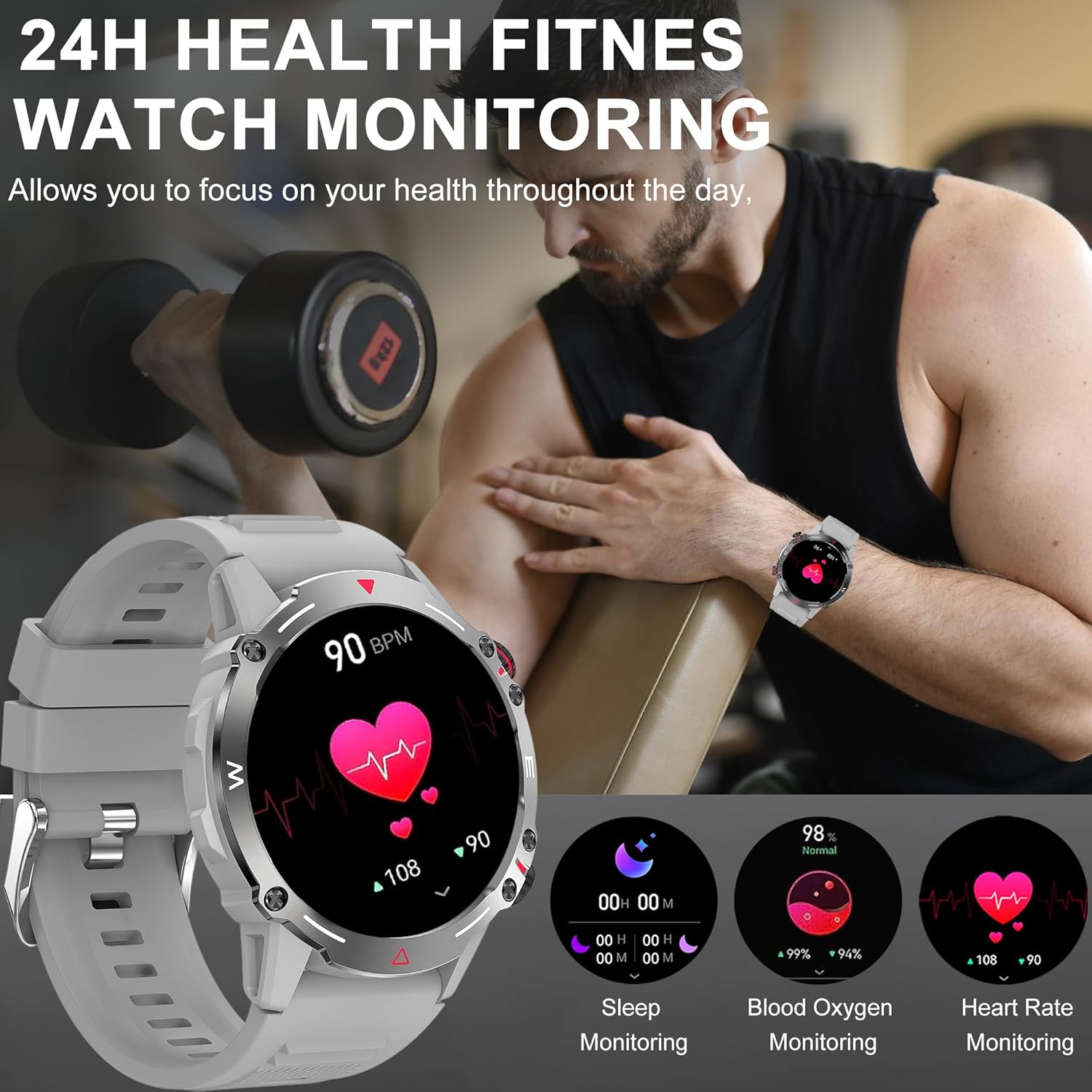
شکل 5.2: The watch interface showing real-time health data, including heart rate, blood oxygen, and sleep.
- د زړه ضربان څارنه: دا ساعت په دوامداره توګه ستاسو د زړه ضربان تعقیبوي. View په اپلیکیشن کې اوسني او تاریخي معلومات.
- د وینې اکسیجن څارنه: د خپلې وینې د اکسیجن د اشباع کچه اندازه کړئ.
- د خوب څارنه: Automatically tracks your sleep patterns (deep sleep, light sleep, wake time). Review په اپلیکیشن کې د خوب تفصيلي تحلیل.
- د وینې فشار څارنه: د وینې فشار اټکل وړاندې کوي. یادونه: This is not a medical device. Measurement data is for reference only and should not be used for medical diagnosis or treatment.

شکل 5.3: The sleep monitoring screen on the smartwatch, providing insights into sleep duration and quality.
5.5 اضافي ځانګړتیاوې
- د مصنوعي ذهانت غږ مرستیال: Activate the voice assistant for hands-free control.
- NFC: For compatible NFC functions (e.g., access control, check local availability and setup).
- د موسیقۍ کنټرول: په خپل سمارټ فون کې د موسیقۍ غږول کنټرول کړئ (غږول، بندول، ټریکونه پریښودل).
- ریموټ کیمره: د خپل تلیفون کیمرې لپاره خپل ساعت د ریموټ شټر په توګه وکاروئ.
- د هوا وړاندوینه: Get real-time weather updates (requires app synchronization).
- الارمونه او یادونې: Set alarms, sedentary reminders, and drink water reminders through the app.
- د ښځینه فزیولوژیکي دوره: Track and monitor physiological cycles (requires setup in the app).
6. اصلاح کول
۴.۲ د څار مخونو بدلول
خپل ساعت د مختلفو لید مخونو سره شخصي کړئ.
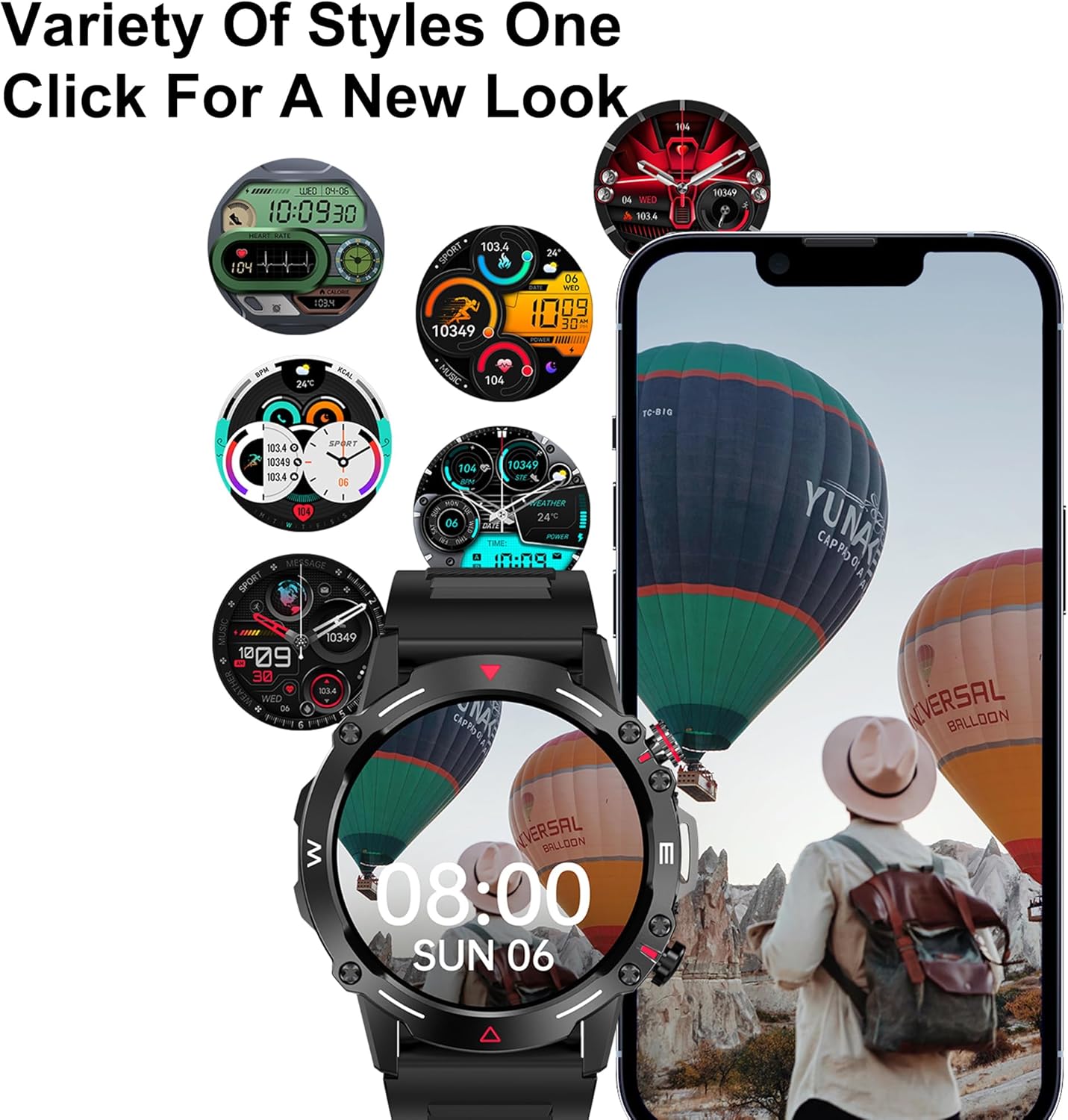
شکل 6.1: A selection of customizable watch faces available for the smartwatch.
- په څار کې: Press and hold the main screen, then swipe left or right to browse pre-installed watch faces. Tap to select.
- Via the App: Open the companion app, navigate to the "Dial Market" or "Watch Faces" section. You can download and apply additional watch faces, and even customize some with your own photos.
۲. بیټرۍ او چارج کول
The DOVIICO HK87 is equipped with a 410mAh battery, offering extended usage.
- د بیټرۍ ژوند: Expect 7-10 days of typical daily use and up to 45 days of standby time.
- د چارج کولو وخت: د بشپړ چارج لپاره نږدې 2 ساعته.
- د چارج کولو طریقه: Use the provided magnetic charging cable. Ensure proper alignment of the charging contacts.
To maximize battery life, consider adjusting screen brightness, reducing notification frequency, and disabling features not actively in use.
8. ساتنه
۵.۲ د اوبو ضد کول (IP68)
The DOVIICO HK87 has an IP68 waterproof rating, meaning it is resistant to dust and can withstand immersion in water up to 1.5 meters for up to 30 minutes.
- دا د ورځني کارونې لپاره مناسب دی، لکه د لاسونو مینځل، باران، او کم لامبو وهل.
- Avoid hot water, saunas, or diving, as steam and high pressure can compromise the seal.
- د اوبو لاندې تڼۍ مه چلوئ.
- د اوبو سره د تماس وروسته، ساعت د نرم ټوکر سره وچ کړئ.
8.2 پاکول
- Regularly clean your watch and strap to prevent skin irritation and maintain appearance.
- سکرین او بدن د نرم، دamp, lint-free ټوکر.
- د تسمې لپاره، که اړتیا وي، نرم صابون او اوبه وکاروئ، بیا یې په ښه توګه ومینځئ او د اغوستلو دمخه یې په بشپړه توګه وچ کړئ.
- د سختو کیمیاوي موادو یا خړوبولو موادو کارولو څخه ډډه وکړئ.
9. ستونزه حل کول
| ستونزه | احتمالي حل |
|---|---|
| ساعت نه چالانېږي. | ډاډ ترلاسه کړئ چې ساعت په بشپړه توګه چارج شوی دی. لږترلږه د 10 دقیقو لپاره چارجر سره وصل شئ. |
| د سمارټ فون سره جوړه نشي کیدی. |
|
| خبرتیاوې نه ترلاسه کیږي. |
|
| د روغتیا په اړه ناسم معلومات. |
|
| د بیټرۍ لنډ ژوند. |
|
10. مشخصات
Detailed technical specifications for the DOVIICO Military Smart Watch HK87.

شکل 10.1: Physical dimensions of the DOVIICO Smart Watch HK87.
| فیچر | تفصیل |
|---|---|
| د ماډل شمیره | HK87 |
| ښودل | 1.43-inch AMOLED HD Touch Screen, 466*466 Resolution |
| ابعاد | ۰.۷۸ x ۰.۷۸ x ۰.۰۹ انچه (۲۰ ملي متره قطر، ۲.۵ ملي متره ضخامت) |
| د توکي وزن | 5 اونس |
| د بیټرۍ ظرفیت | 410mAh لیتیم آیون |
| د بیټرۍ ژوند | ۵-۷ ورځې (معمولي استعمال)، ۱۵ ورځې (سټنډ بای) |
| د چارج کولو وخت | نږدې 2 ساعته |
| ارتباط | بلوتوث 5.0 |
| د پنروک درجه | IP68 |
| مطابقت | Android 4.4 او پورته، iOS 8.4 او پورته |
| سینسرونه | د زړه ضربان، د وینې اکسیجن، د خوب څارنه |
| ځانګړي ځانګړتیاوې | Bluetooth Call, AI Voice Control, NFC, Alipay offline payment, Custom Dials, 100+ Sports Modes, Weather Forecast, Music Control, Remote Camera, Female Physiological Cycle Tracking |
11. د خوندیتوب معلومات
- د ساعت جلا کولو یا ترمیم کولو هڅه مه کوئ.
- ساعت د سخت تودوخې او مستقیم لمر وړانګو څخه لرې وساتئ.
- ساعت د قوي مقناطیسي ساحو سره د مخ کیدو څخه ډډه وکړئ.
- This device is not a medical instrument. Health data is for reference only and should not be used for medical diagnosis or treatment. Consult a medical professional for health concerns.
- د ماشومانو د لاسرسي څخه لرې وساتئ.
12. تضمین او ملاتړ
DOVIICO products are designed for quality and reliability. For warranty information, please refer to the warranty card included with your purchase or contact DOVIICO customer support.
If you encounter any issues or have questions regarding your DOVIICO Smart Watch HK87, please contact our customer support team.
- د پیرودونکي ملاتړ: Refer to your product packaging or the DOVIICO official webد تماس جزیاتو لپاره سایټ.
- آنلاین سرچینې: Visit the DOVIICO webد FAQs، تازه شوي لارښودونو، او سافټویر ډاونلوډونو لپاره سایټ.