1. محصول ختم شوview
The ION Audio Highlander is a high-powered, all-weather portable Bluetooth speaker designed to deliver rich sound and deep bass even at high volumes. Its durable construction makes it suitable for various environments, ensuring your music can accompany you wherever you go.
کلیدي ځانګړتیاوې:
- High-Power Audio: Delivers 120 Watts of speaker maximum output power for impactful sound.
- باس بوسټ: Enhances low frequencies for maximum impact.
- Bluetooth 5.0 Enabled: Allows wireless streaming and control of your music from compatible devices.
- IPX5 د اوبو مقاومت: Designed to withstand splashes and rain, making it safe for outdoor use.
- Rechargeable 50-Hour Battery: Provides extended playtime on a single charge.
- جوړ شوي لاستي او څرخونه: اسانه ترانسپورت اسانه کوي.
2. د بسته محتويات
ډاډ ترلاسه کړئ چې لاندې ټول توکي ستاسو په کڅوړه کې شتون لري:
- ION Audio Highlander Portable Speaker
- د بریښنا کیبل
3. د تنظیم کولو لارښود
3.1 د بیټرۍ چارج کول
Before first use, fully charge the Highlander speaker. The battery life is approximately 50 hours, but initial charging may take several hours.
- Connect the included power cable to the power input on the back of the Highlander speaker.
- د بریښنا کیبل بله پای په معیاري دیوال آوټ لیټ کې ولګوئ.
- The charging indicator light will illuminate. The light will change or turn off once charging is complete.
3.2 بریښنا کول / بندول
To power the speaker on or off, locate the power button on the control panel.
- د فعالولو لپاره: د څو ثانیو لپاره د بریښنا تڼۍ فشار ورکړئ او ونیسئ تر هغه چې ښودنه روښانه شي.
- د بریښنا بندولو لپاره: Press and hold the Power button again for a few seconds until the display turns off.
3.3 د بلوتوټ جوړه کول
Follow these steps to connect your Bluetooth device to the Highlander speaker:
- Ensure the Highlander speaker is powered on and in Bluetooth mode. The Bluetooth indicator on the display will flash, indicating it's ready to pair.
- On your Bluetooth device (smartphone, tablet, laptop), go to its Bluetooth settings.
- لټون available devices. Select "ION Highlander" from the list.
- Once paired, the Bluetooth indicator on the speaker will stop flashing and remain solid. You can now play audio through the speaker.
- To disconnect, turn off Bluetooth on your device or select "Forget This Device" in your device's Bluetooth settings.
4. عملیاتي لارښوونې
4.1 د کنټرول پینلview
The top panel of the Highlander speaker features various controls for managing audio playback and settings.

- د بریښنا تڼۍ: سپیکر آن یا بند کړئ.
- د حجم نوب: د ټول حجم کچه تنظیموي.
- د بلوتوت تڼۍ: د بلوتوث جوړه کولو حالت پیل کوي.
- د باس بوسټ بټن: د باس بوسټ ځانګړتیا فعال یا غیر فعالوي.
- د ښودلو سکرین: Shows current mode, battery status, and other information.
4.2 Adjusting Volume and Bass Boost
- حجم: Rotate the main volume knob clockwise to increase volume and counter-clockwise to decrease it.
- باس بوسټ: Press the "Bass Boost" button to enhance the bass output. Press it again to return to normal audio.
۵.۳ د لېږد وړتیا ځانګړتیاوې
The Highlander is designed for easy transport:
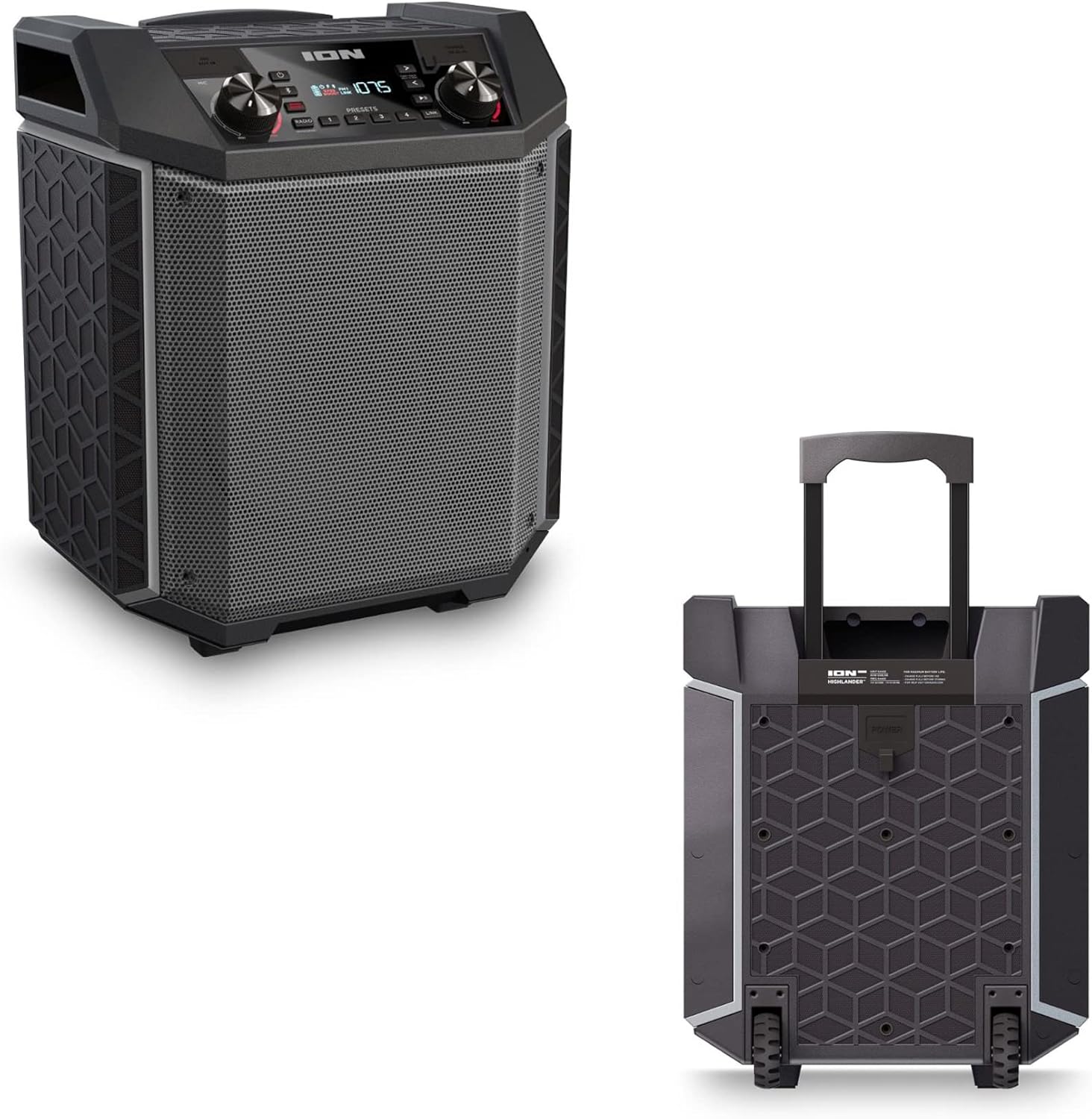

- د وتلو وړ لاسي: Pull up the integrated handle to roll the speaker like luggage.
- څرخونه: Use the built-in wheels for smooth movement across various surfaces.
۵.۲ د اوبو مقاومت (IPX5)
The Highlander speaker is IPX5 water-resistant, meaning it can withstand splashes of water from any direction. It is suitable for use by the pool or in light rain.

مهم: Do not submerge the speaker in water. Ensure all port covers are securely closed when exposed to water.
5. ساتنه
5.1 پاکول
- تل سپیکر بند کړئ او د پاکولو دمخه یې د بریښنا سرچینې څخه جلا کړئ.
- د بهرنۍ سطحې د پاکولو لپاره نرم، وچ ټوکر وکاروئ.
- د سختې خاورې لپاره، په روښانه توګه دampټوکر د اوبو سره ومینځئ. د سختو کیمیاوي موادو، محلولونو، یا د کثافاتو پاکوونکو کارولو څخه ډډه وکړئ.
- Do not spray cleaning liquids directly onto the speaker.
5.2 ذخیره کول
- سپیکر په یخ او وچ ځای کې د مستقیم لمر وړانګو او سختې تودوخې څخه لرې وساتئ.
- If storing for an extended period, ensure the battery is partially charged (around 50%) to maintain battery health. Recharge every few months if not in use.
5.3 د بیټرۍ پاملرنه
- د بیټرۍ په مکرر ډول له بشپړې وچولو څخه ډډه وکړئ.
- بیټرۍ د ډیر تودوخې یا یخنۍ سره مه اخلئ.
- If the battery performance significantly degrades, contact customer support for assistance.
6. ستونزه حل کول
If you encounter issues with your Highlander speaker, refer to the table below for common problems and solutions.
| ستونزه | احتمالي حل |
|---|---|
| سپیکر نه چالانېږي. |
|
| د بلوتوت آلې سره جوړه نشي. |
|
| غږ نشته یا ټیټ غږ. |
|
| د غږ تحریف. |
|
7. مشخصات
| فیچر | تفصیل |
|---|---|
| د ماډل نوم | لوړ پوړی |
| برانډ | ION |
| د سپیکر ډول | بهر |
| د ارتباط ټیکنالوژي | بلوتوث 5.0 |
| د بریښنا سرچینه | د بیټرۍ چلول |
| د بیټرۍ ژوند | 50 ساعته |
| د اوبو د مقاومت کچه | IPX5 (د اوبو مقاومت) |
| د سپیکر اعظمي تولید ځواک | 120 واټ |
| د محصول ابعاد | ۱۶"د x ۲۶"وچ x ۴۷"ح |
| د توکي وزن | ۲.۴۵ پونډه |
| مواد | Water-resistant plastic or rubber, with a black coating |
| شاملې برخې | د بریښنا کیبل |
| UPC | 657768542732 |
8. تضمین او ملاتړ
The ION Audio Highlander speaker comes with a Limited Warranty. For specific details regarding warranty coverage, duration, and terms, please refer to the warranty information provided with your purchase or visit the official ION Audio webسایټ
For technical support, troubleshooting assistance beyond this manual, or warranty claims, please contact ION Audio customer support through their official channels. Keep your proof of purchase handy when contacting support.


