1. د خوندیتوب مهمې لارښوونې
مهرباني وکړئ د دې وسیلې کارولو دمخه ټولې لارښوونې په دقت سره ولولئ. دا لارښود د راتلونکي حوالې لپاره وساتئ.
- دا وسیله یوازې د کورنۍ کارولو لپاره ده.
- وسیله په اوبو یا نورو مایعاتو کې مه ډوبوئ.
- Keep the appliance away from water sources, especially when charging.
- Do not use the appliance if the cord or plug is damaged. Contact customer support for repair.
- Always ensure the appliance is switched off before cleaning or performing maintenance.
- د ماشومانو له لاسرسي لرې وساتئ. دا وسیله لوبو نه ده.
- د حرکت کولو برخو سره د تماس څخه ډډه وکړئ.
- په خارښ شوي پوستکي یا خلاص زخمونو کې ټرمر مه کاروئ.
- Only use the charging adapter supplied with the appliance.
2. محصول ختم شوview
The HTC AT-206A is a rechargeable hair trimmer designed for precise grooming tasks such as edging, outlining, dry shaving, and light shaping around areas like the neck, ears, and sideburns.

Image 2.1: HTC AT-206A Trimmer and its retail packaging, showing the device and included accessories.
اجزا:
- Trimmer Unit (HTC AT-206A)
- د چارج کیبل
- د پاکولو برش
- د غوړولو د تیلو بوتل
- کمب ضمیمه
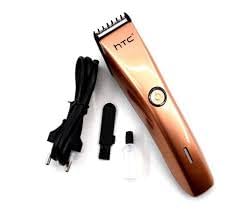
Image 2.2: The HTC AT-206A trimmer displayed with its charging cable, cleaning brush, oil bottle, and comb attachment.
3. تنظیم او چارج کول
3.1 ابتدايي چارج کول
- Before first use, fully charge the trimmer for approximately 8-10 hours.
- ډاډ ترلاسه کړئ چې ټرامر بند دی.
- Connect the charging cable to the trimmer's charging port.
- اډاپټر په مناسب بریښنایی پلورنځي کې ولګوئ.
- The charging indicator light (if present) will illuminate to show charging is in progress.
- Once fully charged, disconnect the charger from the outlet and the trimmer.
3.2 Attaching the Comb Attachment
- ډاډ ترلاسه کړئ چې ټرامر بند دی.
- Align the comb attachment with the trimmer blade.
- Gently push the comb attachment onto the blade until it clicks into place.
- To remove, gently pull the comb attachment away from the blade.
4. عملیاتي لارښوونې
4.1 بنسټیز عملیات
- ډاډ ترلاسه کړئ چې تریمر چارج شوی.
- د ټرمر د فعالولو لپاره د بریښنا تڼۍ فشار ورکړئ.
- Press the power button again to turn the trimmer off.
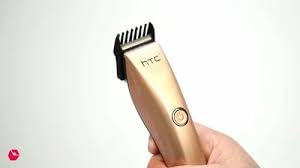
Image 4.1: The HTC AT-206A trimmer held in hand, demonstrating its ergonomic design for ease of use.
۵.۲ د پرې کولو تخنیکونه
- For best results, use the trimmer on clean, dry hair.
- تریمر د پوستکي په وړاندې په لږ زاویه کې ونیسئ.
- د ویښتانو د ودې په لور ورو او په ثابت ډول ټریمر حرکت ورکړئ.
- Use the comb attachment for longer hair lengths (0.5mm-13mm).
- For edging and outlining, use the trimmer without the comb attachment for a closer trim.
- Stretch the skin taut with your free hand to ensure a smooth surface for trimming.
5. ساتنه او پاکول
منظم پاکول او ساتنه به غوره فعالیت ډاډمن کړي او ستاسو د ټرمر ژوند به وغځوي.
۱۲.۲ د تیغونو پاکول
- Ensure the trimmer is switched off and disconnected from the charger.
- Use the provided cleaning brush to remove any loose hairs from the blades.
- For a more thorough clean, you may carefully detach the blade head (refer to specific instructions if provided with your model for blade removal).
- Do not rinse the entire trimmer under water unless explicitly stated as waterproof.
۵.۲ په تیغونو غوړول
- After cleaning, apply 1-2 drops of the provided lubricating oil onto the blades.
- د څو ثانیو لپاره ټریمر چالان کړئ ترڅو غوړ په مساوي ډول وویشل شي.
- هر اضافي غوړ په نرم ټوکر سره پاک کړئ.
- Oiling the blades regularly (e.g., after every few uses) helps maintain cutting efficiency and prevents rust.
5.3 ذخیره کول
Store the trimmer in a cool, dry place, away from direct sunlight and moisture. Ensure it is fully charged before storing for extended periods.
6. ستونزه حل کول
If you encounter any issues with your trimmer, refer to the following common problems and solutions:
- ټرمر نه چالانېږي:
Ensure the trimmer is fully charged. Check if the charging cable is properly connected and the power outlet is functional. - Poor trimming performance / pulling hair:
The blades may be dull or clogged with hair. Clean and oil the blades as described in the Maintenance section. Ensure the trimmer is adequately charged. - بیټرۍ چارج نه کوي:
Ensure the trimmer is charged for the recommended duration. If the issue persists, the battery may need replacement. Contact customer support. - ډیر شور یا وایبریشن:
The blades might be misaligned or require oiling. Clean and oil the blades. If the problem continues, discontinue use and contact customer support.
7. مشخصات
| فیچر | مشخصات |
|---|---|
| د ماډل شمیره | AT-206A (SA-144) |
| د بریښنا سرچینه | د چارج وړ بیټرۍ |
| د تیغ مواد | Stainless Steel (Metal) |
| Cutting Length Range | 0.5mm - 13mm (with comb attachment) |
| ابعاد (L x W x H) | 18.7 x 4.9 x 11.2 سانتي متره |
| وړاندیز شوي استعمالونه | Dry Shaving, Edging, Light Shaping, Outlining (Neck, Ears, Sideburns, Face) |
| رنګ | تور |
| جوړونکی | چین |
8. تضمین او ملاتړ
This product is covered by a standard manufacturer's warranty. Please refer to the product packaging or contact your retailer for specific warranty terms and conditions.
For technical support, troubleshooting assistance, or warranty claims, please contact the retailer or manufacturer directly. Keep your proof of purchase for any warranty-related inquiries.


