1. محصول ختم شوview
The VANTRUE Wireless Remote Control provides convenient access to essential dashcam functions, allowing users to quickly lock video files, take snapshots, and control the microphone without diverting attention from the road. This enhances safety and ease of use for compatible VANTRUE dashcam models.

Image 1: The VANTRUE Wireless Remote Control, a compact black device with a microphone icon and a warning triangle, featuring a green indicator light.
2. مطابقت
This remote control is specifically designed for use with the following VANTRUE dashcam models:
- VANTRUE N5
- VANTRUE N4 Pro
- VANTRUE S1 Pro
- VANTRUE E1
- VANTRUE E2
- VANTRUE E3
یادونه: This remote control is not compatible with other dashcam models not listed above.
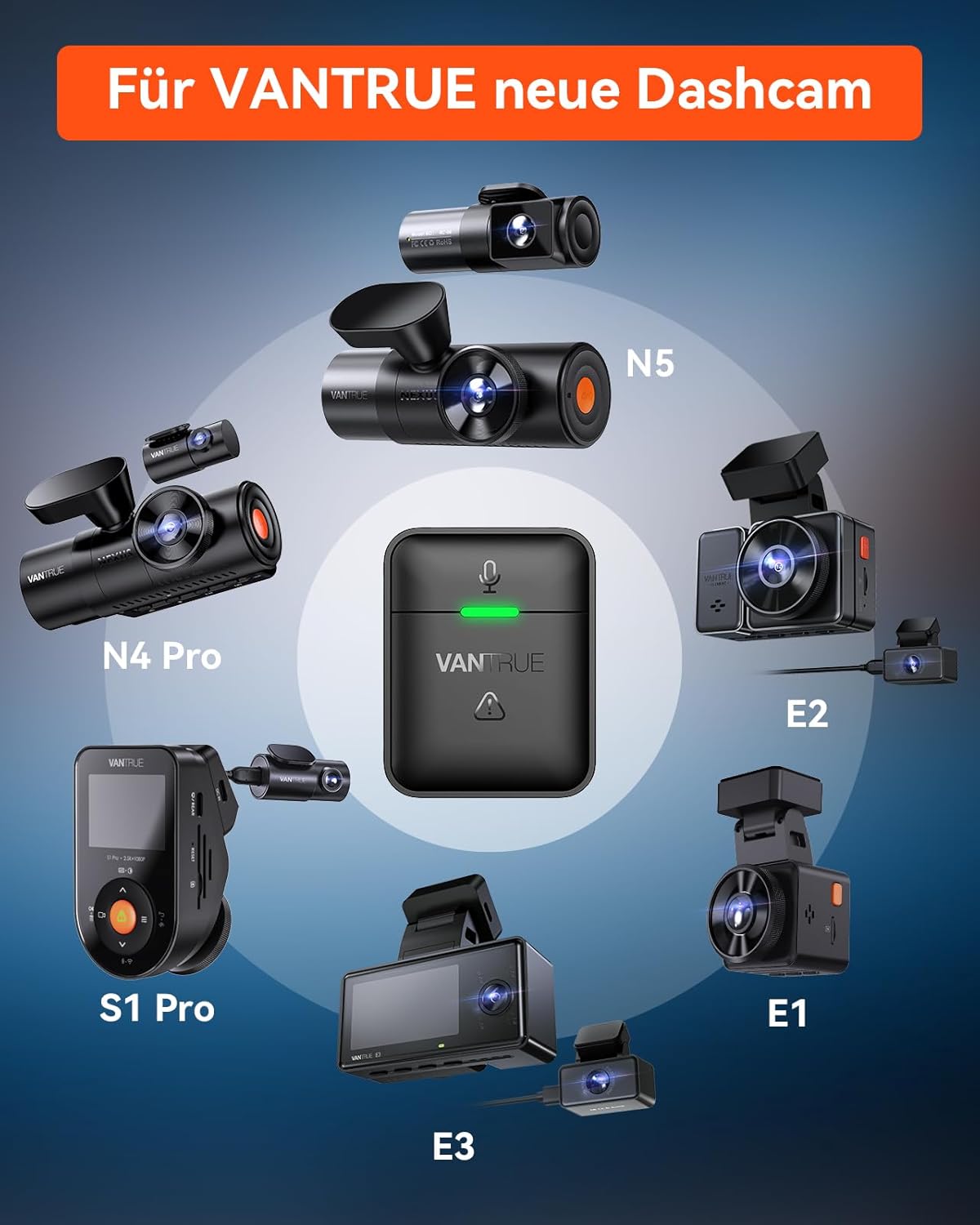
Image 2: Diagram illustrating the compatibility of the remote control with various VANTRUE dashcam models, including N5, N4 Pro, S1 Pro, E1, E2, and E3.
3. د بسته محتويات
مهرباني وکړئ د لاندې توکو لپاره بکس وګورئ:
- VANTRUE Wireless Remote Control
- د 3M چپکونکي پیډ
- CR2032 Lithium-ion Battery (pre-installed)

Image 3: Contents of the package, showing the remote control, a 3M adhesive pad, and a Panasonic CR2032 3V battery.
4. ترتیب او نصب کول
4.1 د بیټرۍ معلومات
The remote control comes with a pre-installed CR2032 battery. The battery is not rechargeable. If the green indicator light does not flash when you press the button, the battery may be depleted and needs replacement.
4.2 د نصب کولو ځای
An adhesive pad is located on the back of the remote control for easy mounting. You can place the remote control in various convenient locations within your vehicle, such as:
- په ډشبورډ کې
- Near the steering wheel
- In the car's armrest box
Choose a location that is easily accessible and does not obstruct your view or interfere with driving. The remote has an effective range of approximately 9.8 feet (3 meters).

Image 4: Illustration of suggested installation locations for the remote control within a car, highlighting its compact dimensions (1.49 inches height, 1.18 inches width, 1.04 inches depth) and a 9.8 feet range.
5. عملیات
The remote control features a single button for multiple functions, making it simple to operate while driving.
- واحد مطبوعات: Quickly locks the current video clip to prevent it from being overwritten. This is crucial for preserving footage of incidents or important events.
- ډبل پریس: Takes a snapshot (still image) from the dashcam's view.
- اوږد پریس: Toggles the microphone on or off, allowing you to control audio recording as needed.

Image 5: Visual guide to the remote control's functions: Audio ON/OFF (microphone icon), Snapshot (camera icon), and Emergency Lock (padlock icon), all activated by pressing the single button.
6. ساتنه
6.1 د بیټرۍ بدلول
When the green indicator light on the remote control no longer flashes upon pressing the button, it indicates that the CR2032 battery is depleted and needs to be replaced. To replace the battery:
- Carefully open the battery compartment on the remote control.
- زوړ CR2032 بیټرۍ لرې کړئ.
- یو نوی CR2032 بیټرۍ دننه کړئ، د سم قطبیت ډاډ ترلاسه کړئ.
- د بیټرۍ کڅوړه په خوندي ډول وتړئ.
د ځایی مقرراتو سره سم په مسؤلیت سره کارول شوي بیټرۍ تصفیه کړئ.
7. ستونزه حل کول
۵.۱ ریموټ کنټرول ځواب نه ورکوي
- بیټرۍ چیک کړئ: If the green light does not flash when you press the button, the battery is likely depleted. Replace the CR2032 battery as described in the Maintenance section.
- مطابقت: Ensure your dashcam model is listed as compatible (N5, N4 Pro, S1 Pro, E1, E2, E3). This remote will not work with non-compatible models.
- قربت: Ensure the remote control is within approximately 9.8 feet (3 meters) of the dashcam for optimal signal reception.
- لاسوهنه: Minimize potential wireless interference from other electronic devices in the vehicle.
7.2 Functions Not Working Correctly
- Dashcam Firmware: Ensure your dashcam's firmware is up to date. Refer to your dashcam's user manual or the VANTRUE official webد فرم ویئر تازه لارښوونې لپاره سایټ.
- ریموټ بیا جوړه کړئ: If issues persist, try re-pairing the remote control with your dashcam according to your dashcam's specific instructions for accessory pairing.
8. مشخصات
| فیچر | تفصیل |
|---|---|
| برانډ | ارزښت لري |
| د ماډل نوم | Wireless Remote Control for N5, N4 Pro, S1 Pro, E1, E2, E3 |
| رنګ | تور |
| د ارتباط ټیکنالوژي | بې سیم (وائی فای) |
| مطابقت لرونکې وسیلې | VANTRUE N5, N4 PRO, S1 PRO, E1, E2, E3 Dashcams |
| د بیټرۍ ډول | Lithium-ion (CR2032) |
| بیټرۍ د چارج وړ | نه |
| د نصب کولو ډول | چپکۍ غر |
| ځانګړي ځانګړتیاوې | Quick video lock, microphone control, snapshot function |
9. تضمین او ملاتړ
The VANTRUE wireless remote control comes with an د 18 میاشتو تضمین د پیرود نیټې څخه.
If you have any questions, encounter issues, or require technical assistance, please do not hesitate to contact VANTRUE customer support. We are committed to providing prompt assistance and will respond to your inquiries within 24 hours.
For support, please visit the official VANTRUE webسایټ ته مراجعه وکړئ یا د خپل محصول بسته بندۍ سره چمتو شوي د اړیکو معلوماتو ته مراجعه وکړئ.


