پیژندنه
This manual provides essential information for the safe and efficient operation of your TECNO Pova 5 Pro 5G smartphone. Please read it thoroughly before using your device to ensure optimal performance and longevity.

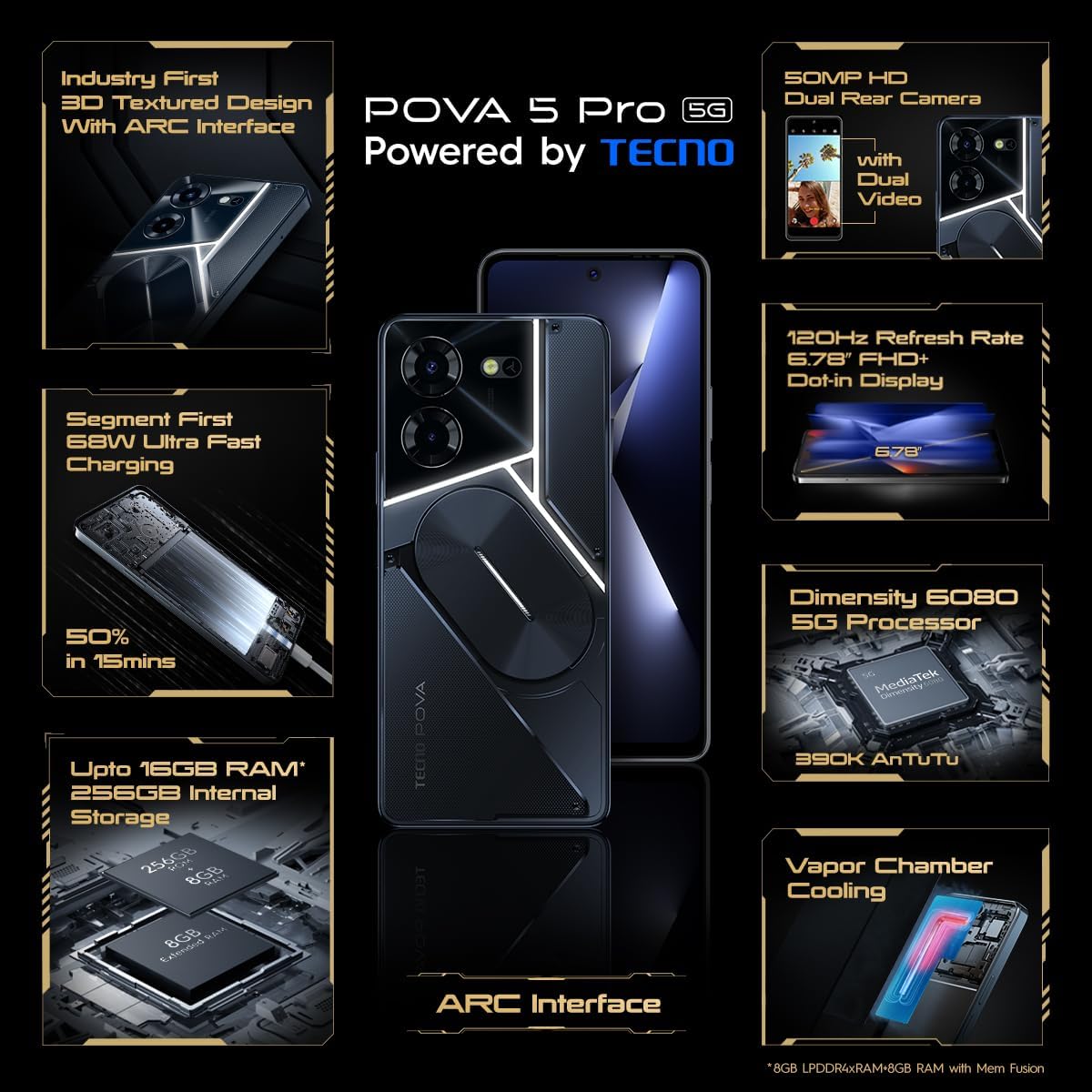
Image: The TECNO Pova 5 Pro 5G smartphone, showcasing its design and key feature of 68W Ultra Fast Charging.
په بکس کې څه دي
ډاډ ترلاسه کړئ چې ټول توکي په بسته بندۍ کې شتون لري:
- سمارټ فون
- 68 د بریښنا اډیپټر
- د ډول-C کیبل
- د TPU پوښ
- د سیم Ejector وسیله

Image: A flat lay of the TECNO Pova 5 Pro 5G packaging contents, showing the smartphone, 68W power adapter, USB-C cable, TPU protective cover, and the SIM ejector tool.
چمتو کول
ابتدايي ترتیب
- سیم/ایس ډي کارت دننه کړئ: Locate the SIM tray on the side of the device. Use the provided SIM ejector tool to open the tray. Insert your Nano-SIM card(s) and/or microSD card into the designated slots. Ensure the tray is fully reinserted.
- پاور آن: Press and hold the Power button (located on the right side) until the TECNO logo appears.
- د پردې پرامپټونو تعقیب کړئ: The device will guide you through initial setup, including language selection, Wi-Fi connection, Google account setup, and security settings.
د وسیله چارج کول
The TECNO Pova 5 Pro 5G supports 68W Ultra Fast Charging.
- د ټایپ-سي کیبل د تلیفون په ښکته کې د چارج کولو پورټ سره وصل کړئ.
- د کیبل بل پای د 68W بریښنا اډاپټر سره وصل کړئ.
- د بریښنا اډاپټر په دیوال کې ولګوئ.
- A full charge typically takes approximately 45 minutes, with 50% charge achievable in about 15 minutes.
انځور: یوه روښانه مخ view of the TECNO Pova 5 Pro 5G smartphone, highlighting its display and front camera.
د وسیله چلول
بنسټیز نیویګیشن
- ټچ سکرین: د انتخاب لپاره ټایپ کړئ، د سکرول کولو لپاره سوائپ کړئ، د زوم کولو لپاره پنچ کړئ.
- د بریښنا تڼۍ: د سکرین د ویښولو/خوبولو لپاره فشار ورکړئ. د بریښنا بندولو یا بیا پیلولو لپاره فشار ورکړئ او ونیسئ.
- د حجم تڼۍ: د رسنیو حجم، د زنګ وهلو حجم، یا د رینګټون حجم تنظیم کړئ.
د کیمرې کارول
The device features a 50MP AI Dual Rear Camera and a 16MP Selfie Camera.
- د کور سکرین یا ایپ دراز څخه د کیمرې ایپ خلاص کړئ.
- Select desired mode (Photo, Video, Portrait, etc.).
- د عکسونو اخیستلو یا د ویډیو ثبت پیل/بندولو لپاره د شټر تڼۍ کلیک وکړئ.
- Utilize AI enhancements for optimized scene recognition and image quality.
ARC Interface and Notifications
The TECNO Pova 5 Pro 5G features a unique multi-color ARC interface with backlighting.
- The ARC interface provides customizable light effects for notifications, incoming calls, gaming, and music playback.
- Access settings to personalize the light patterns and colors for different alerts.

انځور: شاته برخه view of the TECNO Pova 5 Pro 5G, showcasing its distinctive 3D textured design and the illuminated ARC interface.

انځور: یو مفصل view of the TECNO Pova 5 Pro 5G's ARC interface, illustrating the multi-color backlighting feature.
ساتنه
- د بیټرۍ پاملرنه: To prolong battery life, avoid exposing the device to extreme temperatures. Do not fully discharge the battery regularly.
- پاکول: د سکرین او بدن پاکولو لپاره له نرم، لینټ څخه پاک ټوکر څخه کار واخلئ. د سختو کیمیاوي موادو یا کثافاتو موادو کارولو څخه ډډه وکړئ.
- د سافټویر تازه معلومات: Regularly check for and install system updates to ensure optimal performance, security, and access to new features. Navigate to Settings > System > System update.
- د ذخیرې مدیریت: په دوره یي ډول غیر ضروري پاک کړئ fileد کافي ذخیره کولو ځای او د وسیلې سرعت ساتلو لپاره.
د ستونزو حل کول
- وسیله نه فعاله کیږي: Ensure the battery is charged. Connect the device to the charger for at least 15 minutes before attempting to power on again. If the issue persists, perform a forced restart by holding the Power button for 10-15 seconds.
- د چارج کولو مسلې: Verify that the charging cable and adapter are securely connected and undamaged. Try using a different outlet.
- د اپلیکیشن کریش کول/کنګل کول: Close the problematic app and reopen it. If the issue continues, clear the app's cache and data in Settings > Apps. As a last resort, uninstall and reinstall the app.
- د شبکې کمزوری اتصال: Check if Airplane Mode is off. Restart the device. If using mobile data, ensure your SIM card is properly inserted and your data plan is active.
- ډیر ګرمول: Avoid using the device in direct sunlight or during intensive tasks for extended periods. Close background applications.
مشخصات
| فیچر | مشخصات |
|---|---|
| د ماډل نوم | Pova 5 Pro 5G |
| عملیاتي سیسټم | Android 13.0 |
| پروسیسر | Dimensity 6080 (2.4 GHz Octa-Core) |
| RAM | 8 GB (expandable up to 16 GB with Memory Fusion) |
| داخلي ذخیره | 256 GB (UMCP) |
| ښودل | 6.78-inch FHD+ Dot-in Display |
| د تازه کولو نرخ | 120 Hz |
| شاته کیمره | 50 MP AI Dual Camera |
| مخکینۍ کیمره | 16 MP Selfie Camera |
| بیټرۍ | 5000 mAh لیتیم پولیمر |
| چارج کول | 68W Ultra Fast Charging |
| ابعاد | 16.9 x 7.7 x 16.9 سانتي متره |
| وزن | 214 ګرامه |
| ارتباط | 5G (10 bands supported), NFC, Bluetooth 5.1 |

Image: An internal diagram or view of the TECNO Pova 5 Pro 5G, illustrating its vapor chamber cooling system for efficient heat dissipation.
تضمین او ملاتړ
Your TECNO Pova 5 Pro 5G comes with a manufacturer's warranty. Please refer to the warranty card included in your product packaging for specific terms and conditions.
For technical support, service, or warranty claims, please contact TECNO customer service. TECNO maintains a large service network with over 1200 service centers in India.
You can find more information and support resources by visiting the official Tecno store on Amazon: Tecno Store


