پیژندنه
Welcome to the user manual for your new Candy Smart Pro Washing Machine. This appliance is designed to provide efficient and convenient laundry care with advanced features such as intelligent KG detection, delayed start, and remote control via the Simply-Fi app. Please read this manual carefully before using the appliance to ensure safe and optimal operation.

شکل 1: مخکی view of the Candy Smart Pro Washing Machine, showcasing its sleek white design and central control panel.
د خوندیتوب معلومات
د وسیلې د ټپي کیدو یا زیان څخه د مخنیوي لپاره تل لاندې خوندیتوب احتیاطي تدابیر په پام کې ونیسئ:
- ډاډ ترلاسه کړئ چې وسیله په سمه توګه مینځل کیږي.
- ماشومانو ته اجازه مه ورکوئ چې د کالو مینځلو ماشین سره لوبې وکړي یا یې وکاروي.
- د پاکولو یا هر ډول ساتنې ترسره کولو دمخه وسیله خلاص کړئ.
- هغه توکي مه مینځئ چې د اور اخیستونکو موادو سره ککړ شوي وي.
- د واشنګ ماشین شاوخوا ساحه د خنډونو څخه پاکه وساتئ.
په بکس کې څه دي
Upon unpacking your Candy Smart Pro Washing Machine, please ensure all the following components are present:
- د کارن لارښود
- ډرین نلی
- د مینځلو ماشین واحد
تنظیم او نصب کول
ستاسو د مینځلو ماشین د فعالیت او اوږد عمر لپاره سم نصب کول خورا مهم دي. سپارښتنه کیږي چې دا وسیله د یو وړ تخنیکر لخوا نصب شي.
1. خلاصول او موقعیت ورکول
- په احتیاط سره ټول بسته بندي مواد لرې کړئ.
- Remove the transport bolts from the rear of the machine. These bolts secure the drum during transit and must be removed before operation. Refer to the diagram below for bolt locations.
- د مینځلو ماشین په یوه کلک او هموار سطحه کېږدئ. ډاډ ترلاسه کړئ چې د واحد شاوخوا د هوا د جریان او لاسرسي لپاره کافي ځای شتون لري.

شکل 2: Dimensions of the washing machine: 85cm height, 60cm width, 53cm depth. Ensure sufficient space for installation.
2. Water and Drain Connections
- Connect the water inlet hose to a cold water tap. Ensure a tight seal to prevent leaks.
- Insert the drain hose into a suitable drain pipe or sink, ensuring it is securely positioned to prevent dislodgement during operation.
3. بریښنایی پیوستون
- د برېښنا تار په یوه ځمکه تړلي برېښنايي آلې کې ولګوئ. د تمدید تارونو یا اډاپټرونو څخه کار مه اخلئ.
عملیاتي لارښوونې
Your Candy Smart Pro washing machine offers a variety of programs and smart features for optimal laundry care.
د کنټرول پینل ختم شوview

شکل 3: The control panel features a program selector dial, a digital display, and touch buttons for various functions.
- د پروګرام انتخاب کوونکي ډایل: د مطلوب مینځلو پروګرام غوره کولو لپاره کارول کیږي.
- ډیجیټل ډیزاین: د پروګرام موده، د تېروتنې کوډونه، او غوره شوي انتخابونه ښیي.
- د فعالیت تڼۍ: Allow selection of temperature, spin speed, delayed start, and other special functions.
د کالو مینځلو بار کول

شکل 4: Open the door and load laundry into the drum, ensuring not to overload the machine.
Open the washing machine door and load your laundry into the drum. Do not overload the machine; leave enough space for clothes to tumble freely. The intelligent KG detector will automatically adjust water and electricity consumption based on the load weight.
د مینځلو پروګرام غوره کول
- Turn the program selector dial to choose the appropriate wash program for your laundry type (e.g., Cotton, Synthetics, Delicates).
- Adjust the temperature and spin speed using the corresponding buttons on the control panel if desired.
- د کارولو لپاره ځنډول پیل function, press the relevant button and set the desired delay time (up to 24 hours).
- د دورې پیل کولو لپاره د پیل / وقفې تڼۍ فشار ورکړئ.
Simply-Fi App Connectivity
The Candy Smart Pro washing machine can be controlled remotely via the Simply-Fi app (Wi-Fi + BLE connection). This allows you to manage cycles, receive washing advice, and monitor the appliance from your smartphone.
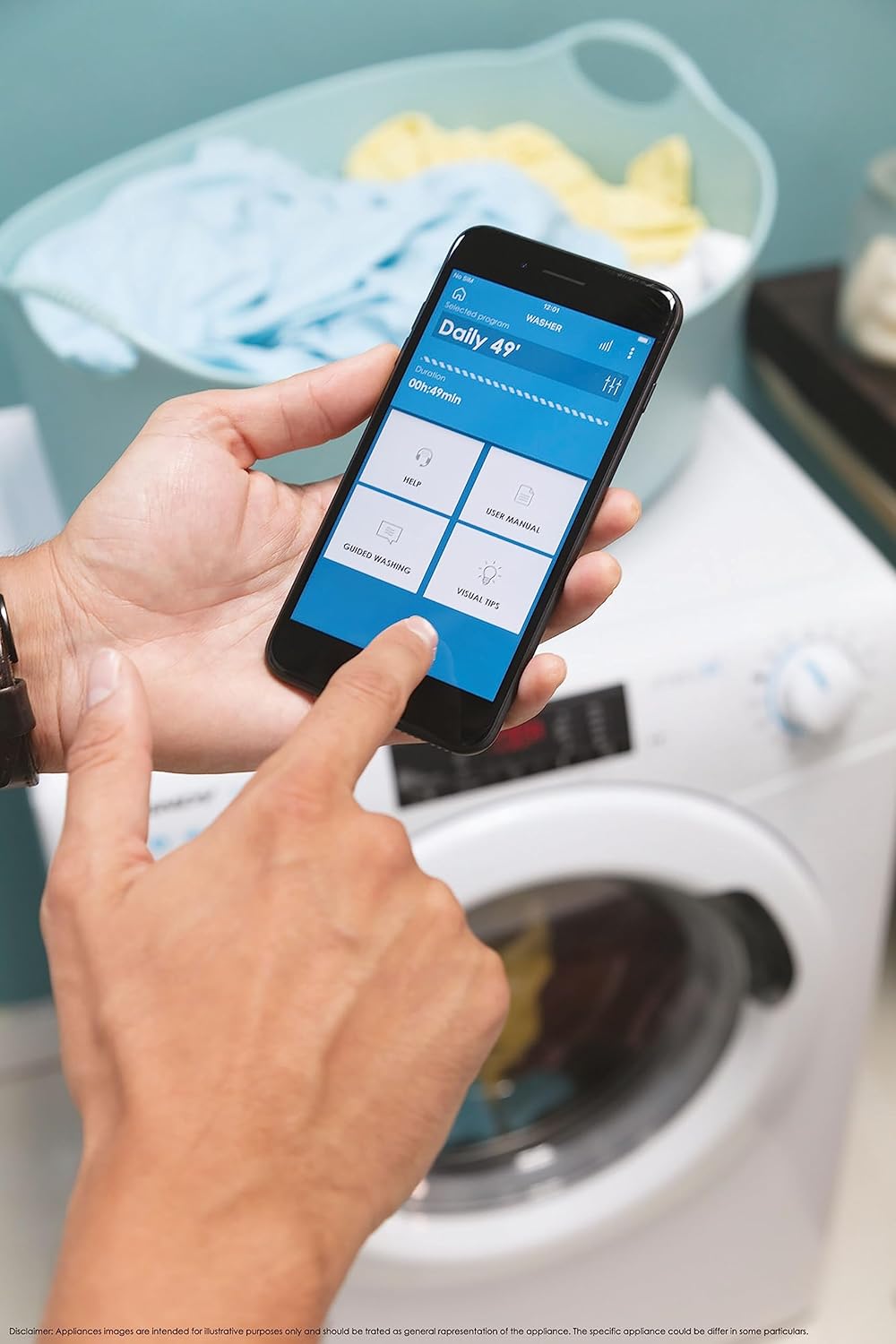
شکل 5: Control your washing machine remotely using the Simply-Fi app on your smartphone.
- Download the Simply-Fi app from your smartphone's app store.
- د اپلیکیشن دننه لارښوونې تعقیب کړئ ترڅو خپل د مینځلو ماشین ستاسو د کور وای فای شبکې سره وصل کړئ.
- Once connected, you can access additional programs, monitor cycle status, and receive maintenance reminders.
ساتنه
Regular maintenance ensures the efficiency and extends the lifespan of your washing machine.
د صابون ډسپنسر پاکول
- د صابون ډسپنسر دراز څخه وباسئ.
- Remove any residue and rinse thoroughly under running water.
- دراز بیا دننه کړئ.
د فلټر پاکول
- د ماشین په ښکته مخ کې د فلټر پوښ ومومئ.
- د پاتې اوبو د راټولولو لپاره لاندې یو کم سطحي کانتینر کېږدئ.
- Unscrew the filter slowly to drain water, then remove and clean it of lint and debris.
- فلټر بیرته په خوندي ډول دننه کړئ.
د ډرم پاکول
- Run a hot wash cycle with no laundry and a washing machine cleaner or a cup of white vinegar to remove odors and residue.
Smart Check-Up Function
Utilize the Smart Check-Up function via the Simply-Fi app to monitor the health of your washing machine. It provides notifications for errors or malfunctions, helping you maintain the appliance effectively.
د ستونزو حل کول
د پیرودونکو خدماتو سره د اړیکې نیولو دمخه، مهرباني وکړئ لاندې عامې ستونزې او د هغوی حل لارې وګورئ:
| ستونزه | احتمالي لامل | د حل لاره |
|---|---|---|
| ماشین نه پیل کیږي | Power cord unplugged, door not closed properly, delayed start active. | Check power connection, ensure door is latched, cancel delayed start. |
| ډیر کمښت/شور | د ټرانسپورټ بولټونه نه دي لرې شوي، ماشین هموار نه دی، بار یې نا مساوي دی. | Remove transport bolts, adjust leveling feet, redistribute laundry inside drum. |
| د اوبو لیک | Hoses loose, drain filter clogged, excessive detergent. | Check hose connections, clean drain filter, use appropriate amount of detergent. |
| د اپلیکیشن ارتباط مسلې | Wi-Fi signal weak, app not updated, incorrect pairing. | Ensure strong Wi-Fi signal, update app, re-pair device following app instructions. |
مشخصات
| فیچر | تفصیل |
|---|---|
| برانډ | کینډی |
| ماډل | CSO 1295TW4/1-S |
| ظرفیت | 9 کیلوګرامه |
| ابعاد (HxWxD) | 85 x 60 x 53 سانتي متره |
| وزن | 65 کیلوګرامه |
| د انرژي موثریت ټولګي | B |
| د اعظمي سپن سرعت | 1200 RPM |
| ارتباط | Wi-Fi + BLE (Simply-Fi App) |
| د کنټرول ډول | لمس کول، ډایل کول |
تضمین او ملاتړ
Your Candy Smart Pro Washing Machine is covered by a manufacturer's warranty. For specific details regarding the warranty period and terms, please refer to the documentation provided with your purchase or visit the official Candy webسایټ
For technical assistance, spare parts, or to schedule a service appointment, please contact Candy customer support. Have your model number (CSO 1295TW4/1-S) and serial number ready when contacting support.
د راستنیدو پالیسي: که تاسو غواړئ چې یو محصول د ترلاسه کولو وروسته د 30 ورځو دننه بیرته ورکړئ ځکه چې تاسو خپل نظر بدل کړی دی، مهرباني وکړئ د پرچون پلورونکي په اړه د بیرته راستنیدو پالیسي وګورئ. website. If you have received a defective or damaged product, please refer to the retailer's help page on defective or damaged products.


