1. پیژندنه
The EMOS GoSmart MR16 WiFi LED Reflector Bulb offers an advanced lighting solution with WiFi connectivity and compatibility with the Tuya/EMOS GoSmart application. Designed for modern households, this smart bulb provides flexible and intelligent lighting. It allows adjustment of light color from warm white to cool white (2700-6500 K) and RGB colors, catering to various lighting needs and creating the appropriate atmosphere for any occasion. Easy integration into existing smart home systems and control via mobile devices or voice assistants make it a convenient and user-friendly option for optimizing room lighting.
EMOS, a brand of Legrand, is committed to 'Making Life Easy' by providing high-quality electrical products that are carefully tested for quality and performance.

Image 1.1: EMOS brand philosophy emphasizing quality and ease of use.
2. د خوندیتوب معلومات
- Ensure the power is turned off before installing or replacing the bulb.
- Do not use in fully enclosed luminaires as this may shorten the bulb's lifespan.
- دا بلب یوازې د کور دننه کارونې لپاره ډیزاین شوی.
- Avoid looking directly into the light source when it is on.
- د ماشومانو د لاسرسي څخه لرې وساتئ.
- If the bulb is damaged, do not attempt to repair it. Contact customer support.
3. د بسته محتويات
په کڅوړه کې لاندې توکي شامل دي:
- 1x EMOS GoSmart MR16 WiFi LED Reflector Bulb (Model ZQW832R)

Image 3.1: The EMOS GoSmart MR16 bulb with its packaging, showing dimensions (50mm diameter, 57mm height) and GU10 base type.
4. ترتیب کول
4.1 فزیکي نصب کول
- ډاډ ترلاسه کړئ چې د رڼا فکسچر ته بریښنا په اصلي سویچ کې بنده ده.
- Carefully insert the EMOS GoSmart MR16 bulb into a compatible GU10 socket.
- Twist the bulb clockwise until it is securely seated.
- Turn the power back on. The bulb should light up.
۳.۳ د اپلیکیشن ډاونلوډ او جوړه کول
To control your EMOS GoSmart MR16 bulb, you need to download the EMOS GoSmart or Tuya Smart app.
- اپلیکیشن ډاونلوډ کړئ: Scan the QR code on the product packaging or search for "EMOS GoSmart" or "Tuya Smart" in the Apple App Store or Google Play Store.
- نوم لیکنه/ننوتل: اپلیکیشن پرانیزئ او د نوي حساب لپاره راجستر کړئ یا که تاسو دمخه یو حساب لرئ نو ننوتل وکړئ.
- وسیله اضافه کړئ: In the app, tap the "+" icon to add a new device. Select "Lighting" or "Light Source" and then choose the appropriate bulb type (MR16/GU10).
- وائی فای سره وصل کړئ: Ensure your mobile device is connected to a 2.4 GHz Wi-Fi network. The bulb will typically blink rapidly to indicate pairing mode. Follow the in-app instructions to connect the bulb to your Wi-Fi network.
- تایید: Once successfully paired, the bulb will stop blinking and appear in your device list within the app.

Image 4.1: The EMOS GoSmart app interface on a smartphone, showing options for downloading the app from Apple App Store or Google Play, and compatibility with Amazon Alexa and Google Assistant. The image also highlights Wi-Fi connectivity.
For more information and support, visit the EMOS GoSmart webسایټ: https://a.smart321.com/emoseu
۵.۲ د سمارټ کور ادغام
The EMOS GoSmart MR16 bulb is compatible with popular voice assistants:
- ایمیزون الیکسا: Enable the "Tuya Smart" or "EMOS GoSmart" skill in your Alexa app and link your account.
- د ګوګل معاون: Link your "Tuya Smart" or "EMOS GoSmart" account in the Google Home app.
You can then control your bulb using voice commands such as "Alexa, turn on the living room light" or "Hey Google, change the bedroom light to blue."
5. چلول
Control your EMOS GoSmart MR16 bulb conveniently through the EMOS GoSmart or Tuya Smart app.
5.1 اساسي دندې
- آن/بند: د بلب د فعالولو یا بندولو لپاره په اپلیکیشن کې د بریښنا آیکون باندې کلیک وکړئ.
- دیمینګ: په اپلیکیشن کې د سلایډر په کارولو سره د روښانتیا کچه له ۱٪ څخه تر ۱۰۰٪ پورې تنظیم کړئ.
5.2 Color and White Temperature Adjustment
The bulb offers a wide range of colors (RGB) and adjustable white temperatures (2700K warm white to 6500K cool white).
- د رنګ انتخاب: Use the color wheel in the app to choose any desired RGB color.
- White Temperature: Switch to the white light mode and adjust the slider to select your preferred white temperature, from warm and relaxing to cool and concentration-promoting.

Image 5.1: The EMOS GoSmart MR16 bulb and the app interface showing the color selection wheel and brightness/saturation sliders.

انځور ۶: پخوانیamples of various lighting moods achievable with the bulb: Warm (Living Room & Bedroom), Neutral (Dining Room & Kitchen), Cold (Bathroom & Study), and RGB (Party, Decoration & Mood Lighting).
5.3 Smart Scenarios and Automation
The app allows you to create custom scenes and automation rules:
- صحنې: Set predefined lighting configurations (e.g., "Movie Night," "Reading," "Party") with specific colors, brightness, and white temperatures.
- مهالویش: Program the bulb to turn on/off or change settings at specific times of the day.
- اتومات: Integrate the bulb with other smart home devices or conditions (e.g., turn on when motion is detected, or adjust based on sunrise/sunset).
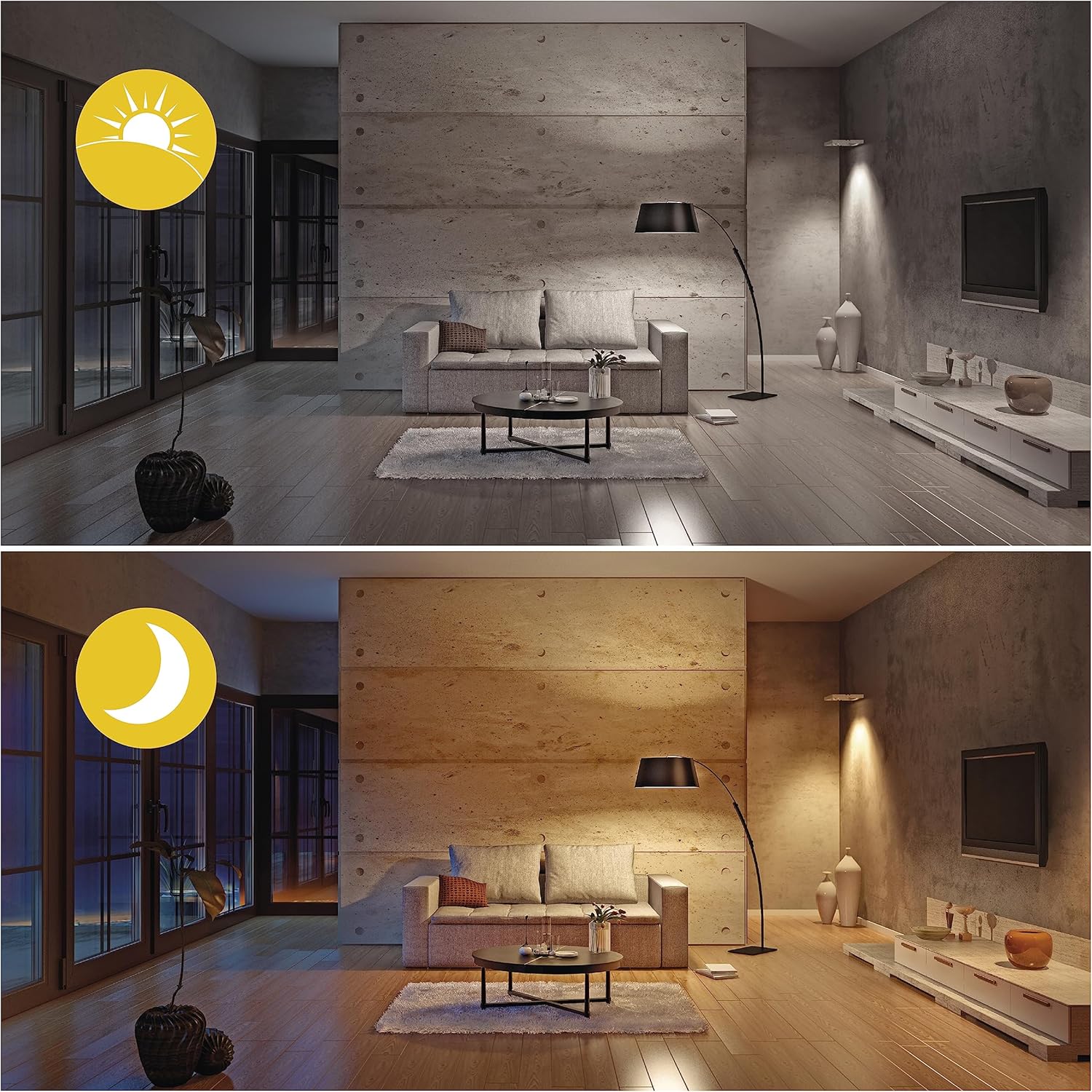
Image 5.3: Illustration of day and night lighting scenarios, demonstrating the bulb's adaptability to different times and needs.
6. ساتنه
- پاکول: ډاډ ترلاسه کړئ چې بلب بند او یخ دی مخکې له دې چې پاک شي. په نرم او وچ ټوکر سره یې پاک کړئ. مایع یا د کثافاتو پاکوونکي مه کاروئ.
- ذخیره کول: که چیرې بلب د اوږدې مودې لپاره ذخیره کوئ، نو دا په خپل اصلي بسته بندۍ کې په یخ او وچ ځای کې وساتئ.
7. ستونزه حل کول
- Bulb not responding: Check if the bulb is properly installed and the power is on. Ensure your Wi-Fi network is active and stable. Try turning the bulb off and on at the switch to re-enter pairing mode if necessary.
- د اتصال مسلې: Ensure your router is within range and broadcasting a 2.4 GHz Wi-Fi signal. The bulb does not support 5 GHz Wi-Fi. If the bulb loses connection after a power outage, it should automatically reconnect to your smartphone without re-pairing.
- App cannot find the device: Make sure Bluetooth is enabled on your phone during the pairing process (if the app uses it for initial discovery). Reset the bulb by cycling its power off and on several times until it blinks rapidly, then try pairing again.
- د غږ کنټرول کار نه کوي: Verify that the EMOS GoSmart/Tuya Smart skill/service is correctly linked in your Alexa or Google Home app. Ensure your voice commands are clear and match the device names set in the app.
8. مشخصات
| فیچر | مشخصات |
|---|---|
| د ماډل شمیره | ZQW832R |
| برانډ | EMOS |
| ډول | د LED انعکاس بلب |
| د کیپ ډول | GU10 |
| د بریښنا مصرف | 4.8 واټ |
| د انډیشینټ مساوي | 35 واټ |
| روښانه فلکس | 400 Lumens |
| د رنګ د حرارت درجه | 2700-6500 Kelvin (Tunable White) + RGB |
| د رنګ رینډینګ انډیکس (CRI) | 80 |
| dimmable | Yes (10% - 100%) |
| اوسط عمر | 20,000 ساعته |
| والیtage | 230 وولټ (AC) |
| ارتباط | Wi-Fi 2.4 GHz |
| ابعاد (L x W x H) | 5 x 5 x 5.65 سانتي متره |
| وزن | 24 ګرامه |
| د انرژي موثریت ټولګي | G |

Image 8.1: Key features of the EMOS GoSmart MR16 bulb, including power consumption, brightness, dimmability, and smart scenario capabilities.

Image 8.2: The EU Energy Label for the EMOS ZQW832R bulb, indicating an energy efficiency class of G and an energy consumption of 5 kWh per 1000 hours.
For detailed product data sheet and energy information, refer to: https://eprel.ec.europa.eu/qr/1441808
9. تضمین او ملاتړ
EMOS products are designed for reliability and performance. For warranty information, please refer to the documentation provided with your purchase or contact your retailer. For technical support or further inquiries, please visit the official EMOS webسایټ یا د دوی د پیرودونکي خدماتو څانګې سره اړیکه ونیسئ.


