1. پیژندنه
This user manual provides detailed instructions for the installation, operation, and maintenance of your Xprinter XP-D200N Thermal Receipt Printer. The XP-D200N is a high-speed thermal printer designed for reliable and efficient receipt printing in various business environments. Please read this manual thoroughly before using the printer to ensure proper functionality and to prevent damage.
2. د خوندیتوب معلومات
To ensure safe operation and prevent damage to the printer or injury to yourself, please observe the following safety precautions:
- Always use the provided power adapter. Using an incorrect adapter may damage the printer and void the warranty.
- پرنټر د اوبو، رطوبت، یا ډیرې تودوخې سره مه مخ کوئ.
- پرنټر په مستقیم لمر وړانګو یا د تودوخې سرچینو ته نږدې کېښودلو څخه ډډه وکړئ.
- Do not attempt to disassemble or repair the printer yourself. Refer all servicing to qualified personnel.
- ډاډ ترلاسه کړئ چې پرنټر په یوه مستحکم او هموار سطحه کې ځای پر ځای شوی دی.
- Keep the printer away from dust and debris to maintain optimal performance.
3. د بسته محتويات
مهرباني وکړئ د خپل کڅوړې محتويات وګورئ. که کوم توکي ورک یا زیانمن شوي وي، سمدلاسه خپل پلورونکي سره اړیکه ونیسئ.
- Xprinter XP-D200N Thermal Receipt Printer
- د بریښنا اډاپټر
- د بریښنا تار
- USB کیبل
- Thermal Paper Roll (starter)
- د کارونکي لارښود (دا لاسوند)
4. محصول ختم شوview
The Xprinter XP-D200N is a compact and efficient thermal receipt printer. Below are images illustrating its key components and design.
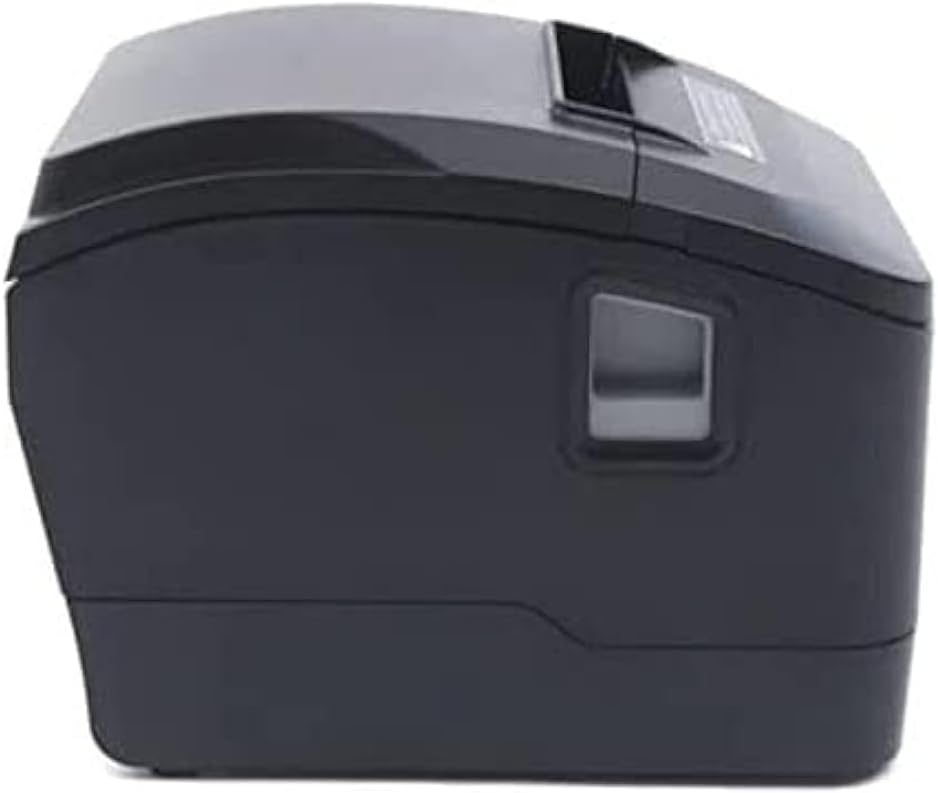
شکل 4.1: مخکینۍ خوا view of the Xprinter XP-D200N Thermal Receipt Printer. This image shows the sleek, black casing and the paper output slot.
شکل 4.2: اړخ view of the Xprinter XP-D200N Thermal Receipt Printer. This perspective highlights the compact design and the power switch on the right side.

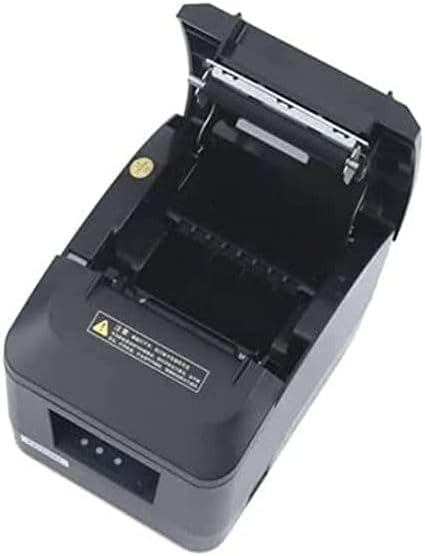
شکل 4.3: پورته view of the Xprinter XP-D200N Thermal Receipt Printer with the cover open, revealing the thermal paper roll compartment and the print head mechanism. This view is essential for paper loading and maintenance.
5. ترتیب کول
5.1 د بریښنا نښلول
- ډاډ ترلاسه کړئ چې د پرنټر بریښنا سویچ په بند حالت کې دی.
- Connect the power adapter to the power input port on the back of the printer.
- Plug the power cord into the power adapter, then into a standard electrical outlet.
کمپیوټر سره پیوستول
The XP-D200N supports both USB and LAN connectivity.
د USB پیوستون:
- Connect one end of the USB cable to the USB port on the printer.
- د USB کیبل بل پای ستاسو په کمپیوټر کې موجود USB پورټ سره وصل کړئ.
LAN (Ethernet) Connection:
- Connect an Ethernet cable to the LAN port on the printer.
- د ایترنیټ کیبل بله پای ستاسو د شبکې روټر یا سویچ سره وصل کړئ.
- Refer to the printer's advanced settings or driver utility for network configuration (e.g., IP address settings).
۴.۳ د تودوخې کاغذ بارول
- Open the printer cover by pressing the release button or lifting the cover latch. (Refer to Figure 4.3).
- Insert the thermal paper roll into the compartment with the paper feeding from the bottom and the leading edge extending towards the front of the printer. Ensure the paper is aligned correctly.
- د کاغذ یوه کوچنۍ اندازه د کټر څخه وباسئ.
- د پرنټر پوښ په کلکه وتړئ تر هغه چې په خپل ځای کې راشي.
5.4 د ډرایور نصب کول
After connecting the printer, you will need to install the appropriate drivers on your computer. Drivers are typically provided on a CD included with the printer or can be downloaded from the official Xprinter webسایټ. د نصبولو پرمهال په سکرین کې لارښوونې تعقیب کړئ.
6. عملیاتي لارښوونې
6.1 بریښنا کول / بندول
- To power on: Ensure the power cord is connected, then flip the power switch to the ON position. The indicator light will illuminate.
- To power off: Flip the power switch to the OFF position.
۸ اساسي چاپ
Once the printer is connected and drivers are installed, you can print receipts from your point-of-sale (POS) software or other applications. Select the Xprinter XP-D200N as your default printer in your application's print settings.
6.3 د حالت شاخصونه
The printer features indicator lights (usually on the front panel) that provide information about its status:
- د بریښنا شاخص: Solid light indicates the printer is powered on.
- د تېروتنې شاخص: Flashing or solid light indicates an error (e.g., paper out, cover open, print head overheat). Refer to the troubleshooting section.
- Paper Out Indicator: Illuminates when the paper roll is empty or nearly empty.
7. ساتنه
۵.۱ د چاپ سر پاکول
د چاپ سر منظم پاکول د چاپ غوره کیفیت تضمینوي او د چاپګر عمر اوږدوي.
- پرنټر بند کړئ او د بریښنا تار یې قطع کړئ.
- د پرنټر پوښ خلاص کړئ.
- د پنبې سواب په نرمۍ سره وکاروئampened with isopropyl alcohol (70% or higher) to gently wipe the thermal print head surface. Avoid touching the print head with bare hands.
- Allow the print head to dry completely before closing the cover and reconnecting power (approximately 2-3 minutes).
7.2 عمومي پاکول
د پرنټر بهرنۍ برخه د نرم، d سره پاک کړئamp ټوکر د کثافاتو پاکوونکي یا محلول مه کاروئ.
۴.۱ د کاغذ رول بدلول
When the paper out indicator illuminates or print quality degrades, it's time to replace the paper roll. Follow the steps in Section 5.3 "Loading Thermal Paper".
8. ستونزه حل کول
| ستونزه | احتمالي لامل | د حل لاره |
|---|---|---|
| پرنټر نه چالانېږي. | No power, faulty power adapter/cord. | Check power connections. Ensure power switch is ON. Test outlet. |
| No printing. | Paper out, cover open, incorrect driver, incorrect printer selected, cable disconnected. | Load paper, close cover, check USB/LAN connection, verify driver installation, select correct printer in software. |
| د چاپ کیفیت کمزوری (کمزوري، تشې کرښې). | Dirty print head, low quality thermal paper, print head damage. | Clean print head (Section 7.1). Replace thermal paper. If problem persists, contact support. |
| د کاغذ جام. | د کاغذ ناسم بارول، بهرنۍ شی. | Turn off printer, open cover, carefully remove jammed paper. Reload paper correctly. |
| Error indicator light is on/flashing. | General error, paper out, cover open. | Check for paper out, ensure cover is closed. Power cycle the printer. If error persists, consult manufacturer's support. |
9. مشخصات
| نښه: | ایکسپرنټر |
| ماډل: | XP-D200N |
| د چاپګر ډول: | د حرارتی رسید چاپګر |
| د چاپ طریقه: | مستقیم حرارتي |
| د چاپ سرعت: | 220 mm/sec (as per product description) |
| د رسنیو اعظمي اندازه: | ۴.۴۳ سانتي متره (۴۴.۳ ملي متره) |
| ارتباط: | USB، LAN (ایترنیټ) |
| د بریښنا ننوتل: | 24V – 2.5A |
| د چاپګر محصول: | مونوکروم |
| ځانګړي ځانګړتیاوې: | Sleek, Compact, Lightweight Design, High Print Quality, Durability, Low Noise, Automatic Paper Cutting |
| د محصول ابعاد: | 18.4 x 14 x 13.5 سانتي متره |
| د توکي وزن: | 1.63 کیلو ګرامه |
10. تضمین او ملاتړ
The Xprinter XP-D200N Thermal Receipt Printer comes with a standard manufacturer's warranty. For specific warranty terms and conditions, please refer to the warranty card included with your product or visit the official Xprinter website. For technical support, driver downloads, or service inquiries, please contact your local dealer or the Xprinter customer support team through their official channels.
د تازه معلوماتو او ملاتړ سرچینو لپاره، مهرباني وکړئ لیدنه وکړئ: www.xprinter.net


