پیژندنه
د پیرودلو لپاره مننهasing the JTEMAN Cell Phone Stand with Wireless Bluetooth Speaker and Alarm Clock. This multi-functional device is designed to enhance your daily routine by combining essential features into one compact and stylish unit. It serves as a high-quality Bluetooth speaker, a reliable alarm clock with a clear display, and a stable, adjustable stand for your mobile devices. Please read this manual carefully to ensure proper use and optimal performance.
د خوندیتوب معلومات
- وسیله د سختې تودوخې، مستقیم لمر وړانګو، یا لوړې رطوبت سره مه مخ کوئ.
- د قوي تاثیراتو سره د وسیله له مینځه وړلو یا تابع کولو څخه ډډه وکړئ.
- Keep away from water and other liquids. If the device comes into contact with liquid, disconnect it immediately and allow it to dry completely before reuse.
- هڅه مه کوئ چې وسیله پخپله جلا کړئ، ترمیم کړئ یا تعدیل کړئ. ټولې خدمتونه وړ پرسونل ته راجع کړئ.
- یوازې چمتو شوی چارجینګ کیبل یا تصدیق شوی معادل وکاروئ.
- د ماشومانو د لاسرسي څخه لرې وساتئ.
د بسته محتويات
- JTEMAN Cell Phone Stand with Wireless Bluetooth Speaker and Alarm Clock (Model: JT-L36)
- د ډول - سي چارج کیبل
- د کارن لارښود
محصول پای ته ورسیدview
Familiarize yourself with the components and controls of your JTEMAN device:
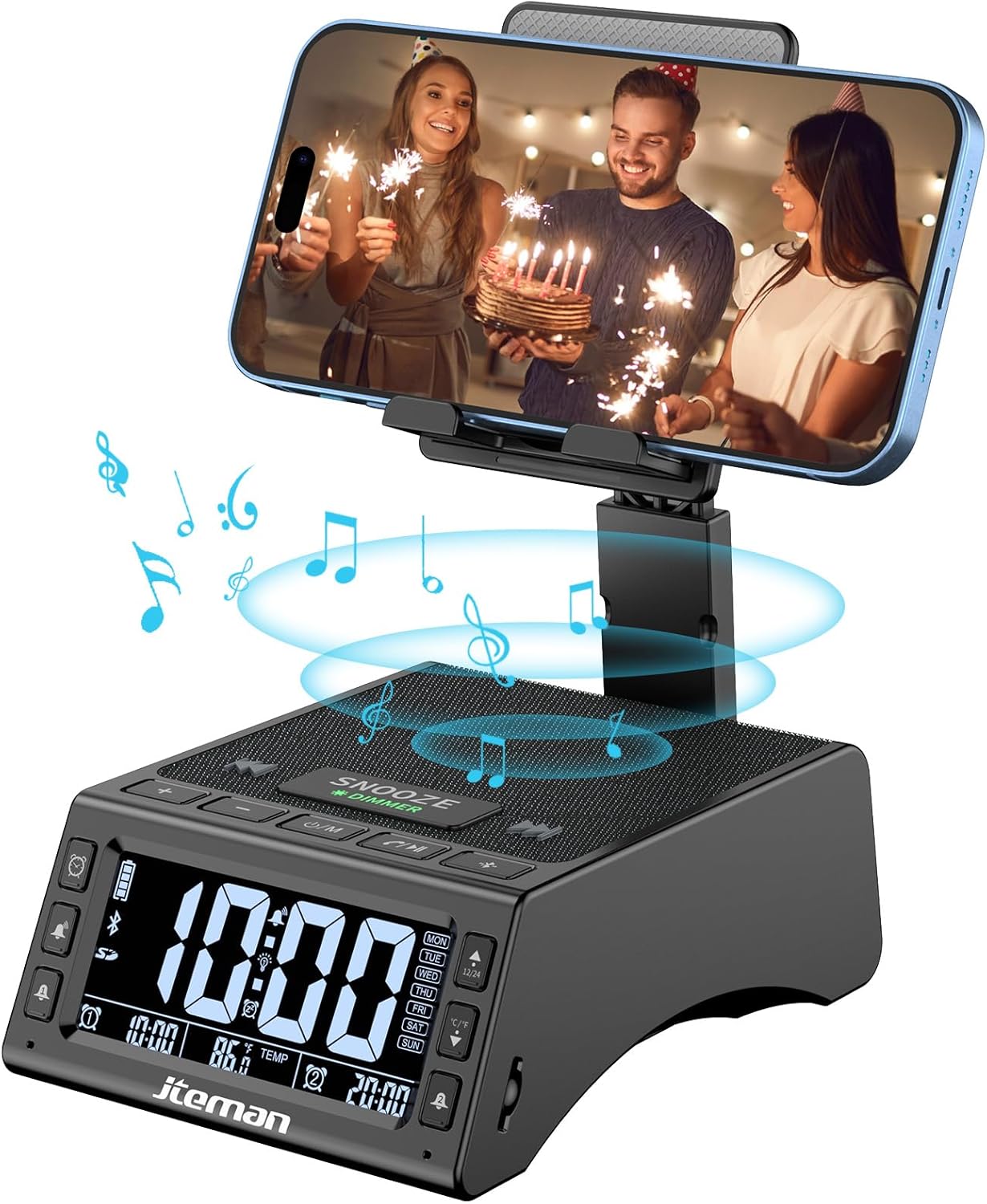
شکل 1: مخکی view of the JTEMAN device with a smartphone on the adjustable stand, displaying the time and temperature.

شکل 2: پایview highlighting the multi-functional aspects including Bluetooth speaker, 12/24H time display, temperature display, foldable phone stand, TF card support, microphone, charging station, dual alarm clocks, and 9 ringtones.
کنټرولونه او بندرونه:
- د ښودلو سکرین: Shows time, temperature, day of the week, and alarm indicators.
- د سنوز/کمولو تڼۍ: Press to snooze an active alarm (5 minutes); long press to adjust display brightness (4 levels).
- Power On/Off/Mode Button: Long press to power on/off; short press to cycle through modes (Bluetooth, TF Card).
- Play/Pause/Answer Button: Controls music playback; answers/ends calls.
- د غږ لوړولو/راتلونکي ټریک تڼۍ: Increases volume; short press for next track.
- د غږ کمولو/مخکینی ټریک تڼۍ: Decreases volume; short press for previous track.
- د بلوتوټ جوړه کولو تڼۍ: د بلوتوث جوړه کولو حالت پیل کوي.
- Alarm 1 & Alarm 2 Buttons: For setting and managing dual alarms.
- مایکروفون: د لاسونو پرته زنګ وهلو لپاره.
- د ټایپ-سي ان پټ پورټ: د وسیله چارج کولو لپاره.
- د ډول - C محصول پورټ: د بهرنیو وسایلو د چارجولو لپاره.
- د TF کارت سلاټ: د TF کارت څخه مستقیم موسیقي غږولو لپاره.
- د تنظیم وړ تلیفون سټینډ: Foldable and extendable for various viewing angles. Features anti-slip pads and base for stability.
چمتو کول
۱. ابتدايي چارج کول
- Connect the provided Type-C charging cable to the د ټایپ-سي ان پټ پورټ په وسیله.
- Connect the other end of the cable to a compatible USB power adapter (not included) and plug it into a wall outlet.
- The display will indicate charging status. Fully charge the device before first use.

Figure 3: The device connected via Type-C for charging itself and an external phone.
۲. د وخت او نیټې ټاکل
- Upon powering on, the device should automatically synchronize the current time.
- If manual adjustment is needed, refer to the detailed instructions in the full user manual (included in the package).
- To switch between 12/24 hour format or °F/°C temperature display, use the dedicated buttons or refer to the full manual.

Figure 4: The HD display showing time, temperature, and alarm settings with brightness adjustment levels.
عملیاتي لارښوونې
1. Using the Phone Stand
- The integrated phone stand can be pulled up from the back of the unit.
- Adjust the height and angle of the stand to your preferred viewing position. The stand is designed to be stable and strong, accommodating devices from 4.0 to 13 inches.
- When not in use, the stand can be folded back into the unit for a compact form factor.

Figure 5: Demonstrates the adjustable height and angle of the phone stand, along with its anti-slip features and foldable design.
۳. د بلوتوث سپیکر فعالیت
- پاور آن: Long press the Power On/Off/Mode button. The device will enter Bluetooth pairing mode, indicated by a flashing Bluetooth icon on the display.
- جوړه کول: On your smartphone or other Bluetooth-enabled device, search for “JT-L36” in the Bluetooth settings and select it to pair. A confirmation sound will indicate successful pairing.
- د موسیقۍ غږول: Once paired, you can play audio from your device through the JTEMAN speaker. Use the Play/Pause, Volume Up/Next Track, and Volume Down/Previous Track buttons to control playback.
۵.۳. د TF کارت پلے بیک
- د آډیو سره یو TF کارت (شامل نه دی) دننه کړئ files into the TF Card Slot.
- The device will automatically switch to TF Card mode and begin playing music. If not, short press the Mode button to select TF Card mode.
4. Alarm Clock Features
- د الارم ترتیب کول: Use the Alarm 1 and Alarm 2 buttons to set up to two independent alarms. Follow the on-screen prompts to set the time and alarm frequency (e.g., Mon-Fri, Sat-Sun, Mon-Sun).
- د سنوش دنده: When an alarm sounds, press the large SNOOZE button on top to activate a 5-minute snooze.
- د روښانتیا سمون: Long press the SNOOZE/DIMMER button to cycle through four levels of display brightness, including an off setting for minimal light disturbance.
5. د لاسونو څخه وړیا تلیفون کول
- When a call comes in while your phone is connected via Bluetooth, press the Play/Pause/Answer button to answer the call.
- د روښانه اړیکو لپاره جوړ شوي مایکروفون وکاروئ.
- Press the Play/Pause/Answer button again to end the call.
۶.۱. د بهرنیو وسایلو چارج کول
- Connect your external device (e.g., smartphone, tablet) to the د ټایپ-C د محصول پورټ on the JTEMAN unit using a compatible charging cable.
- The JTEMAN device will provide power to charge your external device.
ساتنه
- وسیله د نرم او وچ ټوکر سره پاکه کړئ. د کثافاتو پاکوونکي یا محلول مه کاروئ.
- ډاډ ترلاسه کړئ چې ټول بندرونه د دوړو او کثافاتو څخه پاک دي.
- کله چې د اوږدې مودې لپاره نه کارول کیږي، وسیله په یخ او وچ ځای کې وساتئ.
د ستونزو حل کول
| ستونزه | احتمالي لامل | د حل لاره |
|---|---|---|
| وسیله فعاله نه ده. | Low battery; power adapter/cable issue. | Charge the device fully. Check power adapter and cable connections. |
| له سپیکر څخه غږ نه راځي. | Volume too low; not paired correctly; wrong mode. | Increase volume on both device and connected phone. Re-pair Bluetooth. Ensure correct mode (Bluetooth/TF Card). |
| د بلوتوث جوړه جوړه ناکامه کیږي. | Device too far; pairing mode not active; interference. | Ensure device is in pairing mode and within 10 meters. Turn off other Bluetooth devices. Try restarting both devices. |
| الارم نه غږېږي. | Alarm not set; alarm volume too low; alarm disabled. | Verify alarm settings and ensure it's enabled. Increase alarm volume. |
| Phone not charging via output port. | Cable issue; device battery low; incompatible device. | Ensure the JTEMAN device is charged. Try a different charging cable. Confirm your phone is compatible with Type-C charging. |
مشخصات
| برانډ | JTEMAN |
| د ماډل شمیره | JT-L36 |
| د محصول ابعاد | 6.1 x 4.3 x 2.1 انچه |
| د توکي وزن | ۲.۴۵ پونډه |
| رنګ | تور |
| هډوتري برسیر | USB 2.0 |
| ټول USB پورټونه | 2 (Type-C Input, Type-C Output) |
| مطابقت | 4.0-13 inch devices |
تضمین او ملاتړ
JTEMAN products are manufactured with high standards of quality. For specific warranty information, please refer to the warranty card included in your product packaging or visit the official JTEMAN website. If you encounter any issues or have questions not covered in this manual, please contact JTEMAN customer support through the contact information provided on the product packaging or webسایټ
مهرباني وکړئ د تضمین ادعاګانو لپاره د پیرود ثبوت وساتئ.


