د خوندیتوب مهمې لارښوونې
Please read these instructions carefully before operating the unit and retain them for future reference.
- دا وسیله د څاڅکو یا څاڅکو اوبو ته مه ښکاره کوئ.
- په وسایلو کې د مایعاتو ډک شوي شیان مه کېږدئ، لکه ګلدانونه.
- د هوا مناسبه هوا ورکول ډاډمن کړئ. د هوا د بهېدو هیڅ لاره مه بندوئ.
- د تودوخې کومې سرچینې ته نږدې مه نصب کړئ لکه ریډیټرونه، د تودوخې راجسترونه، بخارۍ، یا نور وسایل (په شمول ampلایفیر) چې تودوخه تولیدوي.
- یوازې د جوړونکي لخوا مشخص شوي ضمیمې / لوازم وکاروئ.
- دا وسیله د بریښنایی طوفانونو په جریان کې یا کله چې د اوږدې مودې لپاره نه کارول کیږي خلاص کړئ.
- ټول خدمتونه وړ خدماتي پرسونل ته راجع کړئ. خدمت کول اړین دي کله چې وسیله په هر ډول زیانمنه شوې وي.
محصول پای ته ورسیدview
The Muse M17CB is a compact dual PLL FM/MW digital alarm clock radio designed for reliable timekeeping and audio playback. It features a clear 0.9-inch white LED display with a dimmer function and a 24-hour time format. Users can set two independent alarms, choosing to wake up to either the radio or a buzzer. The digital tuner allows for 6 preset stations (3 FM and 3 MW) for quick access to your favorite broadcasts. Additional functions include SNAP, SLEEP, and SNOOZE for enhanced user convenience.
مخکی View

د انځور تفصیل: This image displays the front of the Muse M17CB alarm clock radio. It features a prominent 0.9-inch white LED display showing "12:00". Above the display are various control buttons and two rotary knobs. The buttons include P.1, P.2, P.3, DIM., O/SOURCE, and a large SNOOZE button. The left rotary knob is for VOLUME, and the right is for TUNING/SET. A small "muse" logo tag is visible on the left side.
د سرلیک پینل کنټرولونه

د انځور تفصیل: دا انځور له پورته څخه ښکته وړاندې کوي view of the Muse M17CB alarm clock radio, highlighting the control panel. It shows two large rotary knobs for Volume and Tuning/Set, along with several push buttons: P.1, P.2, P.3 (for radio presets), DIM. (dimmer), O/SOURCE (power/source selection), and a large circular SNOOZE button. The layout is clear and intuitive.
د شا پینل پیوستون

د انځور تفصیل: This image shows the rear panel of the Muse M17CB alarm clock radio. It clearly displays the "AC~" power input socket, the "FM ANT." wire antenna, and an "AUX IN" 3.5mm jack for connecting external audio devices. A speaker grille is also visible on the right side.
چمتو کول
د بریښنا پیوستون
- Unpack the Muse M17CB unit and all accessories.
- Connect the AC power cord to the "AC~" input on the rear of the unit.
- د بریښنا تار بل پای په معیاري دیوال آوټ لیټ کې ولګوئ.
- د LED ښودنه به روښانه شي، چې دا په ګوته کوي چې واحد بریښنا ترلاسه کوي.
د انتن سیټ اپ
- For optimal FM reception, fully extend the FM wire antenna located at the back of the unit.
- Adjust the position of the antenna for the best possible signal reception.
عملیاتي لارښوونې
د وخت تنظیم کول
- ډاډ ترلاسه کړئ چې واحد فعال دی.
- فشار ورکړئ او ونیسئ TUNING/SET knob for approximately 2 seconds until the hour digits flash on the display.
- وګرځوئ TUNING/SET د ساعت تنظیم کولو لپاره غوټۍ.
- فشار ورکړئ TUNING/SET knob once to confirm the hour; the minute digits will flash.
- وګرځوئ TUNING/SET د دقیقو تنظیم کولو لپاره غوټۍ.
- فشار ورکړئ TUNING/SET knob again to confirm the minutes and exit time setting mode.
- وخت په 24 ساعتونو کې ښودل کیږي.
Setting the Alarm (Alarm 1 and Alarm 2)
دا واحد دوه خپلواک الارمونه لري (الارم ۱ او الارم ۲).
- فشار ورکړئ مخ 1 تڼۍ (د الارم ۱ لپاره) یا مخ 2 button (for Alarm 2) once. The alarm icon and hour digits will flash.
- وګرځوئ TUNING/SET knob to adjust the alarm hour.
- فشار ورکړئ TUNING/SET knob to confirm the hour; the minute digits will flash.
- وګرځوئ TUNING/SET knob to adjust the alarm minutes.
- فشار ورکړئ TUNING/SET knob to confirm the minutes. The alarm source (radio or buzzer) will flash.
- وګرځوئ TUNING/SET knob to select either راډیو or بزر as the alarm sound.
- فشار ورکړئ TUNING/SET knob to confirm the alarm source. The alarm volume will flash (if radio is selected).
- وګرځوئ حجم knob to set the desired alarm volume (for radio alarm).
- فشار ورکړئ TUNING/SET knob to save the alarm settings. The corresponding alarm icon will appear on the display, indicating the alarm is active.
د الارم غیر فعالولو لپاره، اړونده فشار ورکړئ مخ 1 or مخ 2 تڼۍ تر هغه وخته پورې چې د الارم آیکون له نندارې څخه ورک شي.
د راډیو عملیات (ایف ایم/میګاواټه)
- فشار ورکړئ O/SOURCE button to turn on the radio. Press it repeatedly to cycle between FM, MW, and AUX modes.
- وګرځوئ TUNING/SET knob to manually tune to a desired frequency.
- د سټیشنونو لپاره د اتوماتیک سکین کولو لپاره، فشار ورکړئ او ونیسئ TUNING/SET knob for 2 seconds. The radio will scan and stop at the next available station.
Setting and Recalling Presets (P.1, P.2, P.3)
- د مخکینۍ سیټ ذخیره کولو لپاره: Tune to the desired station. Press and hold one of the preset buttons (مخ 1, مخ 2، یا مخ 3) for 2 seconds until the display confirms the preset is saved.
- د پریزیټ یادولو لپاره: Briefly press the desired preset button (مخ 1, مخ 2، یا مخ 3) to tune to the stored station.
Dimmer فعالیت
فشار ورکړئ DIM button repeatedly to adjust the brightness of the LED display to your preference (e.g., High, Medium, Low, Off).
Snooze فعالیت
کله چې الارم غږیږي، لوی فشار ورکړئ لنډول د الارم د لنډمهاله خاموشولو لپاره تڼۍ. الارم به شاوخوا 9 دقیقې وروسته بیا غږ شي.
د خوب فعالیت
د خوب فعالیت تاسو ته اجازه درکوي چې راډیو ته ویده شئ، کوم چې به د یوې ټاکلې مودې وروسته په اتوماتيک ډول بند شي.
- پداسې حال کې چې راډیو غږیږي، فشار ورکړئ مخ 3 button (often doubles as SLEEP function) repeatedly to cycle through available sleep timer durations (e.g., 90, 60, 30, 15 minutes, or OFF).
- راډیو به د ټاکل شوې مودې وروسته په اتوماتيک ډول بنده شي.
SNAP Function
The specific operation of the SNAP function is not detailed in the provided product description. Please refer to the full printed manual included with your device for instructions on using the SNAP feature.
مرستندویه ان پټ (AUX IN)
یو بهرنۍ آډیو وسیله (د مثال په توګه، MP3 پلیر، سمارټ فون) سره وصل کړئ اکس ان jack on the rear of the unit using a 3.5mm audio cable. Press the O/SOURCE button repeatedly until "AUX" appears on the display to switch to auxiliary input mode. Audio from the connected device will play through the alarm clock's speaker.
ساتنه
- پاکول: د واحد بهرنۍ برخه پاکولو لپاره نرم، وچ ټوکر وکاروئ. د کثافاتو پاکوونکي، موم، یا محلول مه کاروئ.
- ذخیره کول: If the unit is not used for an extended period, unplug it from the power outlet and store it in a cool, dry place.
- د رطوبت څخه ډډه وکړئ: Keep the unit away from water and high humidity.
د ستونزو حل کول
| ستونزه | احتمالي لامل | د حل لاره |
|---|---|---|
| بریښنا نشته / ښودل بند دي | د برېښنا تار په سمه توګه نه دی تړل شوی. | Ensure the AC power cord is securely plugged into the unit and a working wall outlet. |
| د راډیو ضعیف استقبال | د ایف ایم انتن غځول شوی یا په سمه توګه موقعیت نلري. | Fully extend and adjust the position of the FM wire antenna for better reception. Try moving the unit to a different location. |
| الارم غږ نه کوي | الارم فعال شوی نه دی یا په غلط ډول تنظیم شوی دی. | Verify that the alarm icon is displayed. Recheck alarm time and source settings. Ensure alarm volume is not set to minimum if radio alarm is selected. |
| Display too bright/dim | د ډیمر ترتیب تنظیم کولو ته اړتیا لري. | فشار ورکړئ DIM د روښانتیا کچې له لارې د سایکل کولو لپاره په مکرر ډول تڼۍ. |
مشخصات
- ماډل: M17CB
- ښکاره کول: 0.9-inch White LED with Dimmer
- د وخت بڼه: 24-ساعت
- تونر: Digital FM/MW PLL
- پریسیسټونه: 6 (3 FM + 3 MW)
- الارمونه: دوه ګونی الارم (راډیو یا بزر)
- دندې: SNAP, SLEEP, SNOOZE
- د بریښنا سرچینه: د AC بریښنا
- ابعاد: 13 سانتي متره (اوږدوالی) x 11 سانتي متره (عرض) x 6.5 سانتي متره (قد)
- رنګ: فیروزه
- مواد: Resin or Plastic
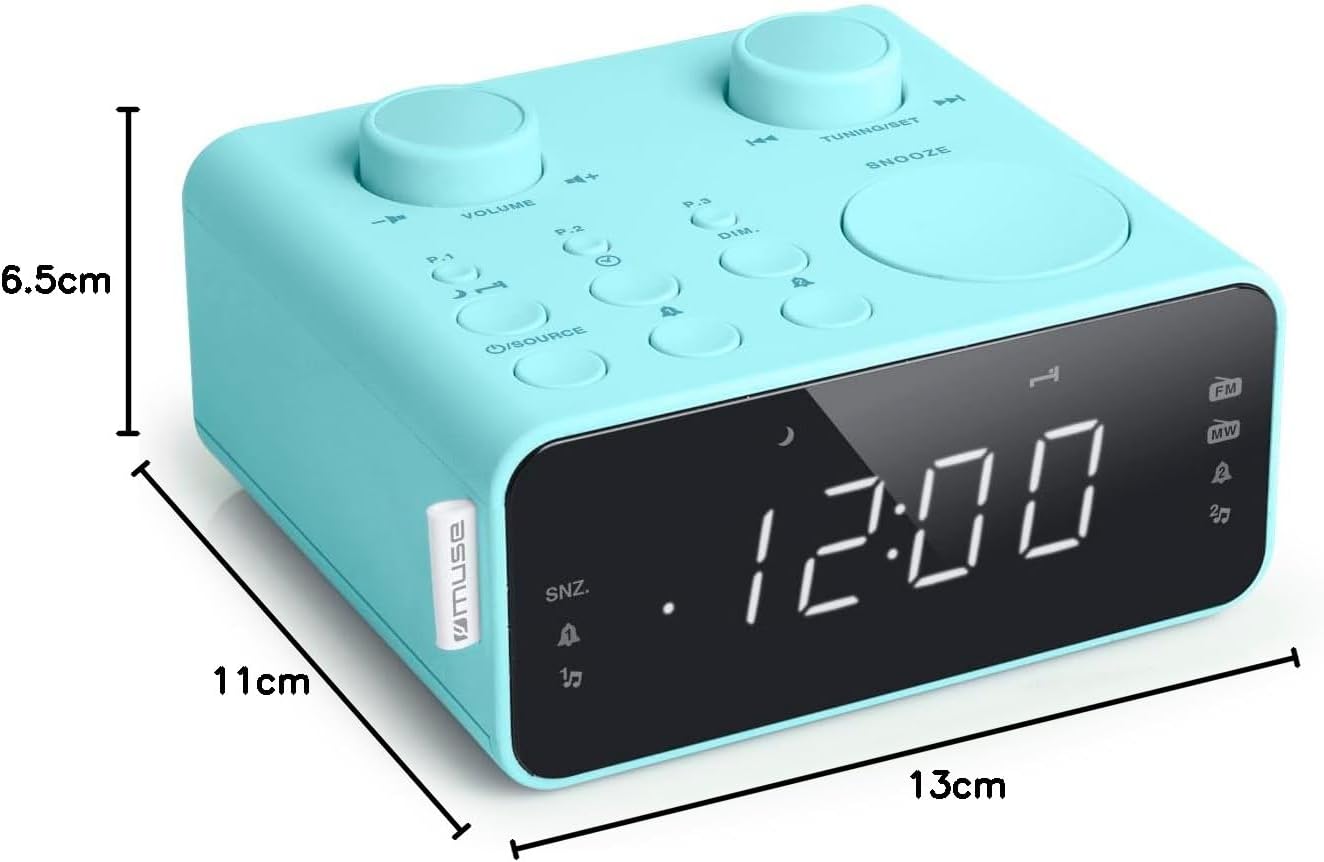
د انځور تفصیل: This image illustrates the dimensions of the Muse M17CB alarm clock radio. It shows the unit with measurements indicating a length of 13cm, a width of 11cm, and a height of 6.5cm.
تضمین او ملاتړ
For warranty information and technical support, please refer to the warranty card included with your product or visit the official Muse webسایټ. د پیرود ثبوت په توګه د پیرود رسید وساتئ.
The product includes a user manual (as indicated by "Pièces incluses: Manuel du propriétaire").


