د ایمیزون اکو شو 21 کارن لارښود
ماډل: ایکو شو ۱۱
1. پیژندنه
Welcome to your new Amazon Echo Show 21. This smart display is designed to be the central hub for your home, offering a large Full HD screen for entertainment, organization, and communication. With built-in Fire TV and Alexa, you can stream content, manage your smart home, make video calls, and keep your family organized with customizable widgets.

Figure 1.1: Amazon Echo Show 21 Overview
The Echo Show 21 integrates seamlessly into your daily life, providing a visual and interactive experience for all your Alexa commands.
۲. پیل کول: تنظیم کول
۲.۱ په بکس کې څه دي
- د ایکو شو ۸ وسیله
- Alexa Voice Remote with batteries (2 AAA included)
- Power adapter (30W) and 5 ft. cord (white)
- Wall mount, anchors, screws, mounting template
- د چټک پیل لارښود
2.2 ابتدايي ترتیب
The Echo Show 21 is designed for simple setup. You will need a Wi-Fi connection.
- پاور آن: د بریښنا اډاپټر خپل ایکو شو ۸ سره وصل کړئ او د دیوال آوټ لیټ سره یې ولګوئ. وسیله به په اتوماتيک ډول فعاله شي.
- د وای فای اتصال: Follow the on-screen instructions to connect your device to your Wi-Fi network. Amazon Wi-Fi simple setup can automatically connect your device if you are a Prime member and have previously saved your Wi-Fi credentials.
- د ایمیزون حساب ننوتل: د خپل ایمیزون حساب اسنادو سره ننوتل.
- شخصي کول: Customize your home screen, set up profiles, and configure your preferred settings.
- ریموټ جوړه: The included Alexa Voice Remote should pair automatically. If not, follow the on-screen instructions or refer to the quick start guide for manual pairing.
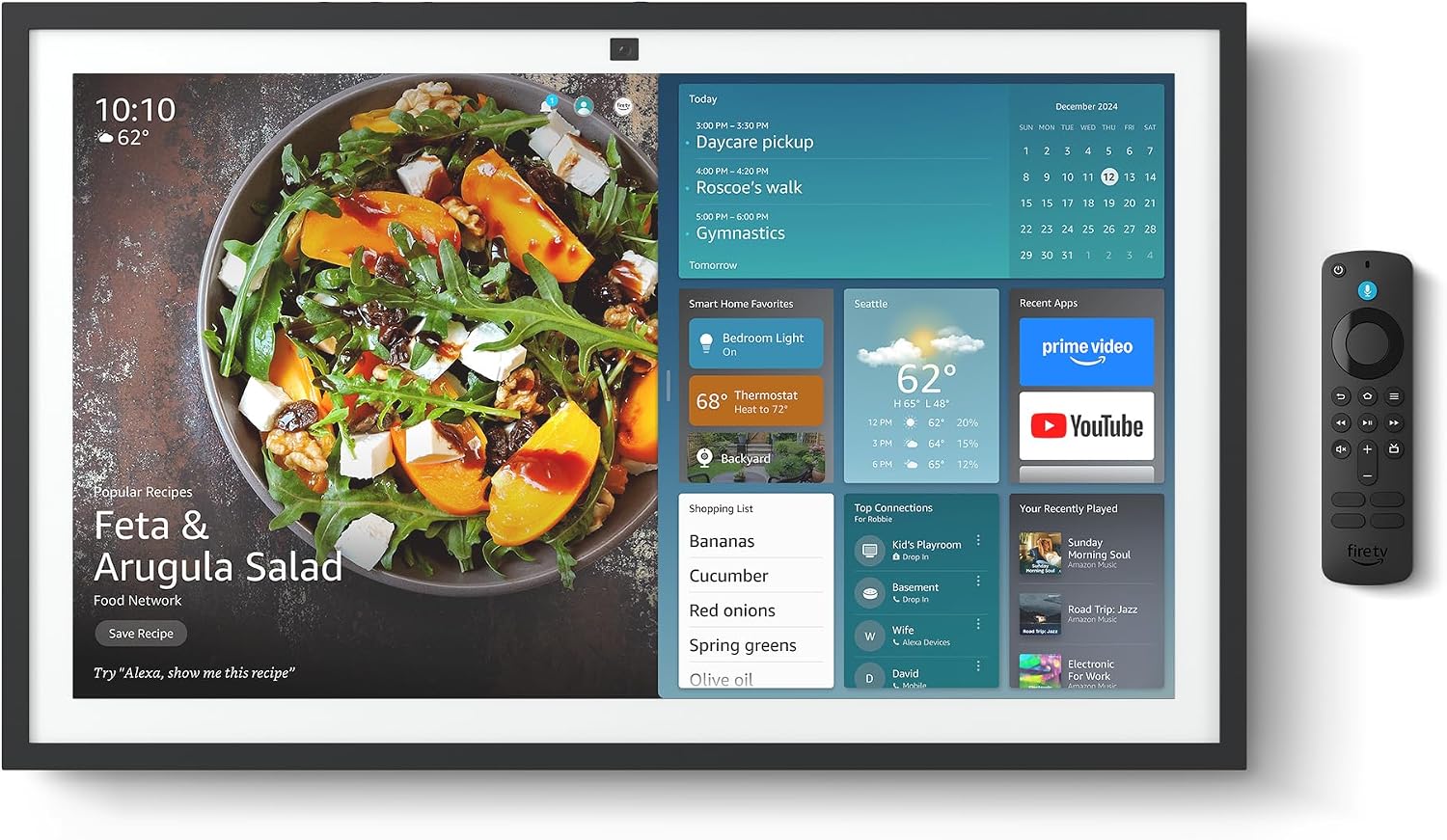
Figure 2.1: Echo Show 21 with Alexa Voice Remote
2.3 د نصبولو اختیارونه
The Echo Show 21 can be wall-mounted using the included hardware or placed on a stand (sold separately). Wall mounting requires an electric drill.
۳. ستاسو د ایکو شو ۸ چلول
۲.۳ د الیکسا سره د غږ کنټرول
Your Echo Show 21 is primarily controlled by voice using Alexa. Simply say the wake word "Alexa" followed by your command or question.
- عمومي حکمونه: "Alexa, what's the weather?", "Alexa, set a timer for 10 minutes."
- موسيقي او آډیو: "Alexa, play pop music," "Alexa, play my morning playlist."
- Video & Entertainment: "Alexa, open Prime Video," "Alexa, play The Boys on Netflix."
3.2 Fire TV Integration
Enjoy endless entertainment with built-in Fire TV. Use the included Alexa Voice Remote or voice commands to navigate.

Figure 3.1: Fire TV Interface
- Access thousands of apps like Prime Video, Netflix, YouTube, Apple TV.
- Stream movies, TV shows, and live content.
- The Fire TV remote allows for traditional navigation and playback control.
3.3 Home Screen & Widgets
The 21-inch display is ideal for organizing your day with customizable widgets.

Figure 3.2: Customizable Home Screen Widgets
- Keep important information like calendars, shopping lists, and weather in view.
- Personalize your home screen with family photos.
۴.۳ د سمارټ کور کنټرول
Control compatible smart devices using your voice or the smart home dashboard.

Figure 3.3: Smart Home Dashboard
- Turn lights on/off, adjust thermostats, or view د کیمرې ژوندۍ خپرونې.
- Supports Zigbee, Matter, and Thread Border Router for broad compatibility.
۵.۴ ویډیو زنګ وهل
Connect with family and friends using the 13 MP camera with auto-framing, wide field of vision, 3.3x zoom, and noise reduction.

Figure 3.4: Echo Show 21 as a Digital Photo Frame
The camera can also be used to display your favorite memories as a digital photo frame.
4. ساتنه
د خپل ایکو شو 21 د اوږد عمر او غوره فعالیت ډاډمن کولو لپاره، د ساتنې دا لارښوونې تعقیب کړئ:
- د سکرین پاکول: د سکرین د نرم، لینټ نه پاک ټوکر څخه کار واخلئ ترڅو په نرمۍ سره سکرین پاک کړئ. د سختو داغونو لپاره، لږ څهampټوکر د اوبو سره. په سکرین باندې مستقیم د کثافاتو پاکوونکو یا سپریو څخه ډډه وکړئ.
- د وسیلې بدن پاکول: Wipe the exterior surfaces with a dry, soft cloth. Do not use harsh chemicals or solvents.
- وینټیلیشن: Ensure the device's ventilation openings are not blocked to prevent overheating.
- د سافټویر تازه معلومات: Your Echo Show 21 receives automatic software security updates. Ensure your device is connected to Wi-Fi to receive these updates.
5. ستونزه حل کول
If you encounter issues with your Echo Show 21, try the following common solutions:
- وسیله ځواب نه ورکوي: Try saying "Alexa" again clearly. If unresponsive, unplug the power adapter for a few seconds and then plug it back in to restart the device.
- د وای فای اتصال نشته: Check your router and modem to ensure they are working correctly. Restart your router. On the Echo Show 21, go to Settings > Network to re-select your Wi-Fi network and re-enter the password.
- د غږیز مسلې: Ensure the volume is not muted or too low. Say "Alexa, turn up the volume." Check audio settings in the device menu.
- کیمره کار نه کوي: Ensure the physical camera shutter is open and the mic/camera-off button is not activated (red light indicates off).
- ریموټ ځواب نه ورکوي: Check the batteries in the Alexa Voice Remote. If necessary, replace them. Re-pair the remote if it becomes disconnected.
6. تخنیکي مشخصات
| فیچر | مشخصات |
|---|---|
| اندازه | ۶۵.۹"W x ۴۰.۵"H x ۱۴.۱"D |
| وزن | 10.7 lb |
| ښودل | 21” with 1920 x 1080 resolution (landscape or portrait) |
| کیمره | 13 MP + Shutter |
| آډیو | Two 2” woofers + two 0.6” tweeters |
| د وائی فای ارتباط | Wi-Fi 6E (802.1ax), Tri-band, dual-antenna (MIMO). Supports 802.11a/b/g/n/ac. |
| د سمارټ کور حب | زیګبي + ماده + د تار سرحد روټر |
| پروسیسر | Octa-core SoC with Amazon AZ2 neural network engine |
| سینسرونه | ALS RGB + Accelerometer |
| ژبه | انګلیسي او هسپانوي |

Figure 6.1: Echo Show 15 vs. Echo Show 21 Dimensions
۳.۴. د محرمیت ځانګړتیاوې
د ایکو شو ۱۱ د محرمیت کنټرولونو څو طبقو سره ډیزاین شوی:
- Mic/Camera-Off Button: د مایکروفونونو او کیمرې د بریښنایی بندولو لپاره یو فزیکي تڼۍ.
- د کیمرې شټر: A built-in physical shutter to cover the camera lens.
- د ویښتو کلمې ټیکنالوژي: Alexa devices only begin recording and sending audio to the cloud after detecting the wake word.
- د سټریمینګ شاخصونه: بصري شاخصونه هغه وخت ښیې کله چې آډیو یا ویډیو کلاوډ ته خپریږي.
- Voice Recording Control: وړتیا لري view او خپل غږیز ریکارډونه حذف کړئ.

Figure 7.1: Mic/Camera-Off Button and Camera Shutter
د نورو جزیاتو لپاره، د الیکسا د محرمیت مرکز ته مراجعه وکړئ.
۳. د لاسرسي ځانګړتیاوې
د ایکو شو ۸ کې د لاسرسي مختلف ځانګړتیاوې شاملې دي ترڅو الیکسا ستاسو وړتیاو سره سم شخصي کړي:
- د الیکسا لپاره ټایپ کړئ: د سکرین ټایلونو یا کیبورډ له لارې د ټچ له لارې الیکسا ته لاسرسی ومومئ.
- تطبیقي اورېدل: د الیکسا ځواب ورکولو دمخه د خبرو پای ته رسولو لپاره ډیر وخت ورکوي.
- د خبرو کولو غوره کچه: کنټرول کړئ چې الیکسا څومره ګړندی یا ورو خبرې کوي.
- سرلیک ورکول: Alexa Captioning, Call Captioning, and Closed Captioning provide text for supported content.
- وښایاست او ووایاست: Helps users who are blind or visually impaired identify products.
- غږView د سکرین ریډر: د هغو پیرودونکو لپاره لاسرسی برابروي چې ړانده یا د لید کمزوري دي.
- د سکرین میګنیفیر: زوم ان/آؤټ کړئ او د سکرین شاوخوا یې وګرځئ.
- کینډل په لوړ غږ لوستل: الیکسا ته ووایه چې خپل د کینډل کتابونه په لوړ غږ ولولي.
- په ریښتیني وخت کې متن: په ویډیو کال کې ژوندی متن ولیکئ.
These features can be enabled via Settings > Accessibility on your device.
9. تضمین او ملاتړ
9.1 د محصول تضمین
Your Echo Show 21 comes with a د 1 کال محدود تضمین او خدمت. Optional 1-year, 2-year, and 3-year extended warranties are available for U.S. customers, sold separately.
Use of Echo Show 21 and Fire TV on Echo Show 21 is subject to their respective terms of service.
9.2 د پیرودونکي ملاتړ
For further assistance, troubleshooting, or to learn more about your device, please visit the Amazon support webسایټ یا د ایمیزون پیرودونکي خدماتو سره اړیکه ونیسئ.


