1. پیژندنه
This manual provides detailed instructions for the installation, operation, and maintenance of your COMMAX CDV-77M 7-inch Fine View Monitor. Please read this manual thoroughly before using the product to ensure proper function and safety. Keep this manual for future reference.
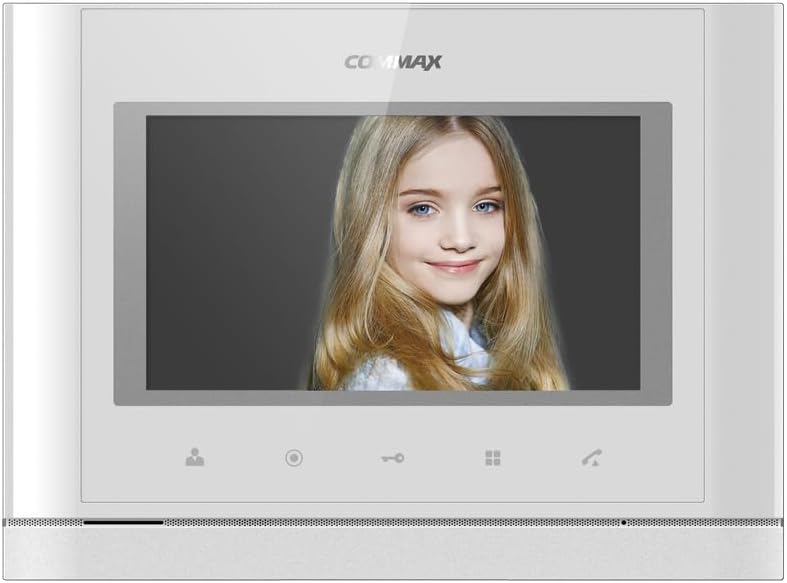
مخکی view of the COMMAX CDV-77M monitor, showcasing its 7-inch TFT LCD screen and sleek design. The screen is active, displaying an image.
2. د محصول ب Featuresې
- 7-inch TFT LCD screen for clear video display.
- Supports video communication and door lock release functions.
- Expandable system: Connects with up to 2 door cameras, 2 additional monitors, and 2 interphones.
- PAL/NTSC video format conversion capability.
- Hand-free operation for convenience.
- Wall-mounted design for easy installation.
3. د خوندیتوب معلومات
مهرباني وکړئ د محصول د زیان مخنیوي او د کارونکي خوندیتوب ډاډمن کولو لپاره لاندې خوندیتوب احتیاطي تدابیر په پام کې ونیسئ:
- واحد د اوبو یا ډیر رطوبت سره مه مخ کوئ.
- د واحد د مستقیم لمر وړانګو یا د تودوخې سرچینو ته نږدې کېښودلو څخه ډډه وکړئ.
- د واحد د پرانیستلو یا ترمیمولو هڅه مه کوئ. ټولې خدمتونه وړ پرسونل ته راجع کړئ.
- ډاډ ترلاسه کړئ چې د بریښنا سرچینه د ټاکل شوي حجم سره سمون لريtage (AC 100-240V, 50/60Hz).
- واحد د قوي مقناطیسي ساحو څخه لرې وساتئ.
- Operate within the specified temperature range of 0℃ to 40℃.
4. نصب کول
4.1 د بسته محتويات
ډاډ ترلاسه کړئ چې ټولې برخې شتون لري:
- COMMAX CDV-77M Monitor Unit
- د دیوال پورته کولو بریکٹ
- د سکرو او اینکرونو نصب کول
- د کارونکي لارښود (دا لاسوند)
- د بریښنا کیبل
۴.۳ د مانیټر نصبول
The CDV-77M monitor is designed for wall-mounted installation. Choose a suitable location indoors, away from direct sunlight and moisture.
- Secure the wall mounting bracket to the desired location using the provided screws and anchors.
- ډاډ ترلاسه کړئ چې بریکٹ په مساوي ډول او په خوندي ډول تړل شوی دی.
- Refer to the dimensions diagram for proper spacing and fit:

Technical drawing showing the dimensions of the COMMAX CDV-77M monitor: 244 mm width and 180 mm height.
4.3 د تارونو نښلول
Before making any connections, ensure the power supply is disconnected.
- Door Camera Connection: Connect the door camera using a 4-wire cable. The maximum recommended distance is 28 meters (using 0.5Ø wire).
- Interphone Connection: Connect the interphone unit using a 4-wire cable.
- Additional Monitor Connection: If connecting additional monitors, refer to the specific wiring diagram provided with your system.
- د بریښنا پیوستون: Connect the AC 100-240V, 50/60Hz power cable to the monitor and a suitable power outlet.
After all connections are made, carefully attach the monitor unit to the wall mounting bracket.
5. عملیاتي لارښوونې
Familiarize yourself with the monitor's controls:

Detailed diagram illustrating the front panel of the COMMAX CDV-77M monitor, with labels for the TFT LCD, Speaker, Microphone, Power Switch, and control buttons: Monitoring, Interphone, Door Release, Menu, and Talk.
- پاور آن/بند: Use the Power Switch located on the side/bottom of the unit.
- د تلیفون ترلاسه کول: When a visitor calls from the door camera, the monitor will display their image and ring. Press the د ت Talkۍ تtonۍ to communicate.
- څارنه: فشار ورکړئ د څارنې تtonۍ ته view the feed from the connected door camera at any time.
- د دروازې خلاصول: During a call or while monitoring, press the د دروازې خوشې کولو تڼۍ to unlock the connected door.
- Interphone Communication: فشار ورکړئ Interphone Button to initiate communication with another connected interphone or monitor.
- مینو نیویگیشن: د کارولو د مینو تڼۍ to access settings and adjustments for the monitor.
6. ساتنه
- پاکول: Use a soft, dry cloth to clean the monitor screen and casinج. د کثافاتو پاکوونکي یا محلولونه مه کاروئ.
- د دوړو لرې کول: Regularly dust the unit to prevent accumulation, especially around ventilation areas.
- د مایعاتو څخه ډډه وکړئ: Do not spray liquids directly onto the monitor.
7. ستونزه حل کول
| ستونزه | احتمالي لامل | د حل لاره |
|---|---|---|
| مانیټر ته بریښنا نشته. | Power cable disconnected; power outlet faulty; power switch off. | Check power cable connection; test outlet with another device; ensure power switch is on. |
| No video from door camera. | Camera cable loose or damaged; camera faulty. | Check camera wiring connections; ensure camera is powered and functioning. |
| No audio during communication. | Microphone/speaker faulty; wiring issue. | Check audio wiring; ensure volume settings are appropriate. |
| Door lock not releasing. | Door lock wiring issue; lock mechanism faulty. | Verify door lock wiring; test door lock mechanism independently. |
که چیرې د دې حل لارو هڅه کولو وروسته هم ستونزه دوام ومومي، مهرباني وکړئ د پیرودونکو ملاتړ سره اړیکه ونیسئ.
8. مشخصات
| فیچر | تفصیل |
|---|---|
| ماډل | CDV-77M |
| د سکرین اندازه | 7 انچ TFT LCD |
| د بریښنا سرچینه | AC 100-240V، 50/60Hz |
| د غره ډول | د وال ایښودل شوی ډول |
| د عملیاتي حرارت درجه | 0℃ ~ 40℃ |
| Wiring (Door Camera) | 4 wires (Distance: 28m with 0.5Ø wire) |
| Wiring (Interphone) | 4 تارونه |
| Max. ارتباطات | 2 Cameras, 2 Monitors, 2 Interphones |
| مصرف | Max. 15W / Standby 3W |
| ابعاد (W×H×D) | 244mm × 180mm × 18mm |
| د ویډیو بڼه | PAL/NTSC convertible |
9. تضمین او ملاتړ
For warranty information, please refer to the warranty card included with your product or contact your local COMMAX distributor. For technical support or service inquiries, please visit the official COMMAX webسایټ یا د دوی د پیرودونکي خدماتو څانګې سره اړیکه ونیسئ.
جوړونکی: کوومیکس
د لومړي شتون نیټه: ۹ اګست ۲۰۲۲


