1. پیژندنه
Thank you for choosing the ALLmeter Pinless Moisture Meter Model ALL019-DEFBA. This device is designed for non-invasive measurement of moisture content in various materials such as wood, walls, drywall, and masonry. Its advanced technology ensures accurate readings without causing damage to surfaces. This manual provides detailed instructions for the proper use, maintenance, and troubleshooting of your moisture meter to ensure optimal performance and longevity.
۱.۱. د خوندیتوب مهم معلومات
- د وسیله چلولو دمخه ټولې لارښوونې په دقت سره ولولئ.
- د وسیلې د خلاصولو یا بدلولو هڅه مه کوئ. دننه د کارونکي لپاره د خدمت وړ برخې نشته.
- وسیله د اوبو او لوړې رطوبت څخه لرې وساتئ ترڅو د زیان مخه ونیول شي.
- د اوږدې مودې لپاره د خورا تودوخې یا مستقیم لمر وړانګو ته د وسیلې له څرګندولو څخه ډډه وکړئ.
- Remove batteries if the device will not be used for an extended period to prevent battery leakage.
- بیټرۍ او وسیله د ځایی مقرراتو سره سم له منځه یوسئ.
3. د بسته محتويات
ډاډ ترلاسه کړئ چې لاندې ټول توکي ستاسو په بسته کې شامل دي:
- ALLmeter Pinless Moisture Meter (Model ALL019-DEFBA)
- AAA Batteries (3 pieces)
- د کارن لارښود
- کڅوړه کیږدئ

Image 3.1: The ALLmeter Pinless Moisture Meter package contents, showing the meter, three AAA batteries, a user manual, and a gray carry pouch.
4. محصول ختم شوview
4.1 وسیله وسیله

انځور 4.1.1: مخکی view of the ALLmeter Pinless Moisture Meter, highlighting its ergonomic design, large LCD display, and central control panel.
4.2 د کنټرول بټن
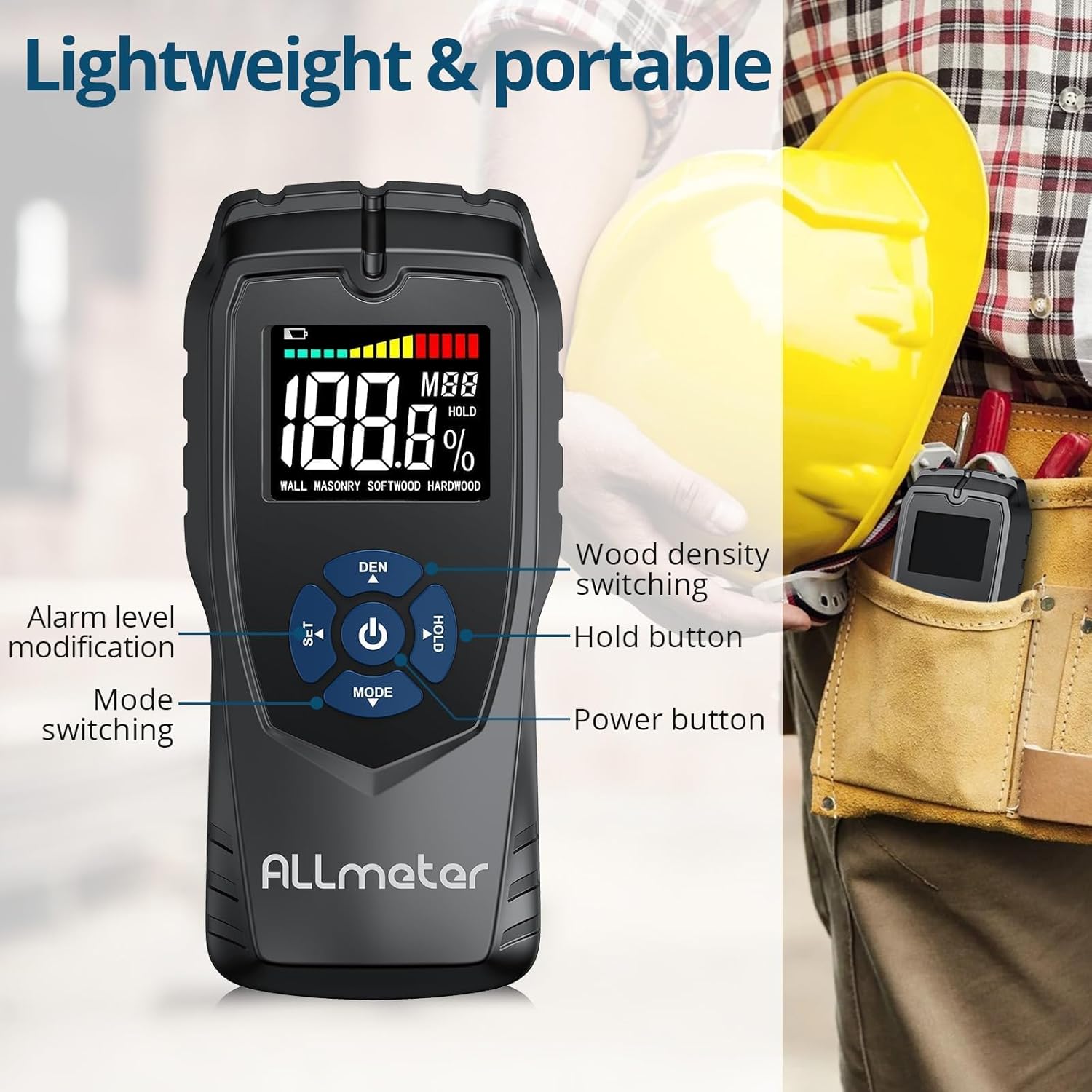
انځور ۲: تفصیلي view of the control buttons on the ALLmeter Pinless Moisture Meter. These include SET (for alarm level modification), DEN (for wood density switching), Power, HOLD, and MODE (for switching measurement modes).
- د بریښنا تڼۍ (⑂): د وسیله د چالانولو یا بندولو لپاره فشار ورکړئ.
- MODE Button (▼): Press to cycle through different measurement modes (WALL, MASONRY, SOFTWOOD, HARDWOOD).
- SET Button (▲): Used to adjust alarm levels or other settings.
- DEN Button (▲): Used to switch between different wood density grades when in wood measurement modes.
- تڼۍ ونیسئ: په ښودنه کې اوسنی لوستل کنګل کوي. د خوشې کولو لپاره بیا فشار ورکړئ.
4.3 د عناصرو ښودل

Image 4.3.1: The LCD display of the ALLmeter Pinless Moisture Meter, indicating low battery, moisture bar display, moisture value, wood density grade (MBB), data hold symbol (HOLD), and current measuring mode.
- د ټیټ بیټرۍ نښې: Icon appears when battery power is low.
- Moisture Bar Display: Graphical representation of moisture level.
- Moisture Value: Digital display of the measured moisture percentage.
- Wood Density Grade (MBB): Indicates the selected wood density setting.
- Data Hold Symbol (HOLD): Appears when the HOLD function is active.
- Measuring Mode Indication: Displays the currently selected material mode (e.g., WALL, MASONRY, SOFTWOOD, HARDWOOD).
5. ترتیب کول
5.1 د بیټرۍ نصب کول
- د وسیلې په شا کې د بیټرۍ د برخې پوښ ومومئ.
- د خونې د خلاصولو لپاره پوښ سلائډ یا خلاص کړئ.
- درې (3) AAA بیټرۍ دننه کړئ، د سم قطبیت (+/-) ډاډ ترلاسه کړئ لکه څنګه چې د خونې دننه ښودل شوي.
- د بیټرۍ کمپارټ پوښ په خوندي ډول بدل کړئ.
6. عملیاتي لارښوونې
۸ پاور آن/بند
- To turn on: Press the Power button (⑂). The display will illuminate.
- To turn off: Press and hold the Power button (⑂) for approximately 2 seconds. The device also features an auto power-off function to conserve battery life after a period of inactivity.
۵.۲ د اندازه کولو حالت غوره کول
- After powering on, press the MODE button (▼) repeatedly to cycle through the available material modes: WALL, MASONRY, SOFTWOOD, HARDWOOD.
- Select the mode that corresponds to the material you intend to measure.
6.3 اندازه کول
- Ensure the correct measurement mode is selected.
- Place the back of the meter (the sensing plate area) flat against the surface of the material you wish to measure. Ensure full contact.
- The moisture reading will be displayed instantly on the LCD screen.
- Move the meter across the surface to check for variations in moisture content.
6.4 فعالیت ساتل
- While taking a measurement, press the HOLD button to freeze the current reading on the display. This is useful for reading measurements in hard-to-reach areas.
- Press the HOLD button again to release the reading and resume live measurement.
6.5 Audible Alarm Settings
- The device features an audible alarm that activates when the measured moisture level exceeds a preset threshold for the selected material.
- To adjust the alarm threshold, press the SET button (▲). Follow the on-screen prompts to increase or decrease the alarm percentage.
6.6 Wood Density Adjustment (DEN)
- When in SOFTWOOD or HARDWOOD mode, the DEN button (▲) can be used to cycle through different wood density grades (MBB) for more accurate readings based on the specific wood type. Refer to wood density charts for your material.
7. Measurement Modes and Ranges
The ALLmeter Pinless Moisture Meter provides distinct measurement ranges and visual indicators for different moisture levels across various materials.

Image 7.1: The visual moisture alarm system and a table detailing the 'Dry', 'Mid', and 'Wet' moisture percentage ranges for Wall, Masonry, Softwood, and Hardwood materials.
7.1 Moisture Level Indicators
- شین: Indicates a Dry moisture level.
- ژیړ: Indicates a Mid-range moisture level.
- سور: Indicates a Wet moisture level, potentially requiring attention.
7.2 Measurement Ranges by Material
| د اندازه کولو طریقه | وچ | منځنی | لوند |
|---|---|---|---|
| وال | <8٪ | 8-11.9٪ | ≥12% |
| معمارۍ | <17٪ | 17-19.9٪ | ≥20% |
| سافټوډ | <13٪ | 13-17.9٪ | ≥18% |
| هارډ ووډ | <12٪ | 12-15.9٪ | ≥16% |
7.3 Non-Invasive Measurement Principle
The ALLmeter Pinless Moisture Meter utilizes advanced inductive surveying technology. This method allows for moisture detection without penetrating the material surface, preventing damage. Unlike destructive surveying methods that require pins or probes, the pinless meter provides quick and clean readings.

Image 7.3.1: A visual comparison between inductive (pinless) surveying, which leaves no marks, and destructive (pin-type) surveying, which creates small holes in the material.
7.4 Multiple Applications
This moisture meter is versatile and suitable for a wide range of applications in home inspection, construction, and woodworking:

انځور ۶: پخوانیamples of the meter's application on various materials including walls, masonry, softwood, and hardwood.
8. ساتنه
- پاکول: وسیله په نرم، وچ ټوکر سره پاک کړئ. د کثافاتو پاکوونکي یا محلولونه مه کاروئ.
- ذخیره کول: Store the meter in its carry pouch in a cool, dry place when not in use. Avoid areas with extreme temperatures or high humidity.
- د بیټرۍ بدلول: کله چې د ټیټ بیټرۍ شاخص په ډسپلې کې څرګند شي نو بیټرۍ بدل کړئ.
9. ستونزه حل کول
| ستونزه | احتمالي لامل | د حل لاره |
|---|---|---|
| وسیله فعاله نه ده | مړه یا په غلط ډول نصب شوي بیټرۍ | د بیټرۍ قطبي والی وګورئ؛ د نوي AAA بیټرۍ سره بدل کړئ. |
| ناسم لوستل | Incorrect measurement mode selected; poor contact with surface; device malfunction. | Ensure correct mode is selected for the material; press the meter firmly and flat against the surface; if problem persists, contact customer support. |
| ښودنه خالي ده یا ځلیږي | د بیټرۍ ټیټوالی؛ د وسیلې خرابوالی. | بیټرۍ بدل کړئ؛ که ستونزه دوام ومومي، د پیرودونکو ملاتړ سره اړیکه ونیسئ. |
| د اوریدو وړ الارم کار نه کوي | Alarm disabled or volume too low; device malfunction. | Check alarm settings using the SET button; ensure moisture level exceeds threshold; if problem persists, contact customer support. |
10. تخنیکي مشخصات
| مشخصات | ارزښت |
|---|---|
| د ماډل شمیره | ALL019-DEFBA |
| برانډ | ALLmeter |
| د اندازه کولو اصول | Pinless, Inductive |
| Sensing Depth | 5 سانتي متره |
| Sensing Plate Size | 5 x 6 سانتي متره |
| دقت | ±4% |
| ښودل | LCD Color Display with Analog Bar |
| د بریښنا سرچینه | 3 x AAA بیټرۍ |
| د بریښنا بند | هو |
| د اوریدو وړ الارم | هو |
| د توکي وزن | ۳۰۰ ګرامه (۰.۳ کیلوګرامه) |
| د کڅوړې ابعاد | 19.4 x 8.8 x 4.2 سانتي متره |
۷. تضمین او د پیرودونکو ملاتړ
For warranty information, technical assistance, or customer support, please refer to the contact details provided with your purchase documentation or visit the official ALLmeter website. Please have your model number (ALL019-DEFBA) and purchase date available when contacting support.

