1. پیژندنه
This manual provides detailed instructions for the safe and efficient operation of your MARKLIFE P50 Portable Bluetooth Thermal Label Maker Machine. Please read this manual thoroughly before using the device and retain it for future reference. The P50 is designed for creating various labels using thermal printing technology, connecting wirelessly via Bluetooth to mobile devices or via USB to Windows PCs.
2. د بسته محتويات
ډاډ ترلاسه کړئ چې لاندې ټول توکي ستاسو په کڅوړه کې شامل دي. که کوم توکي ورک یا زیانمن شوي وي، مهرباني وکړئ د پیرودونکو ملاتړ سره اړیکه ونیسئ.
- MARKLIFE P50 لیبل جوړونکی ماشین
- 3 Label Tapes (2 rolls of 1.57" x 1.18" white gap labels, 1 roll of 2" x 2" circle gap labels)
- د USB-C چارج کیبل
- د کارونکي لارښود (دا لاسوند)
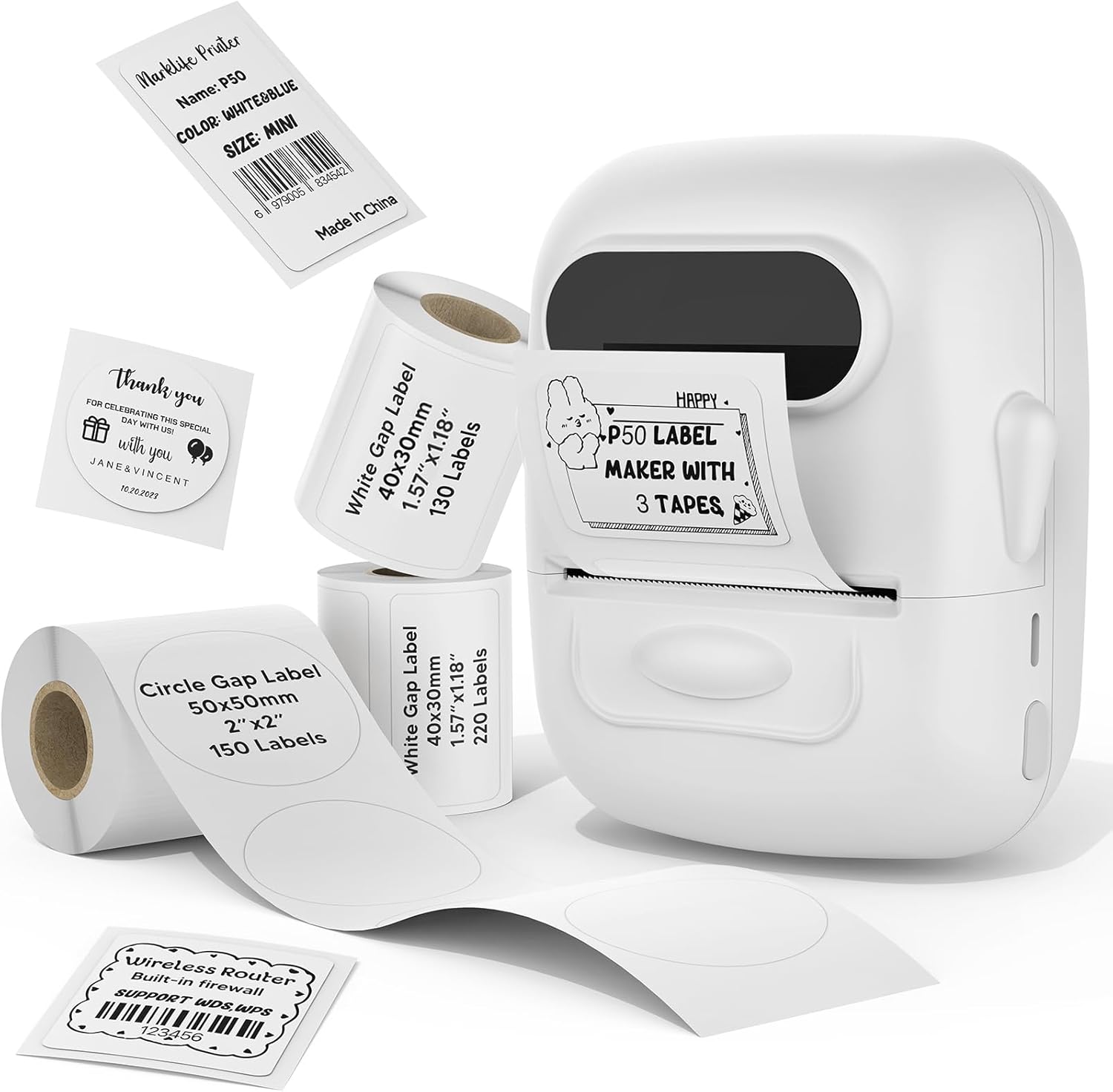
Image: The MARKLIFE P50 label maker machine shown with various label rolls and printed labels, including a barcode label (example: 6979005834542) and a "Thank You" label. This illustrates the device and its primary function of printing labels.
3. محصول ختم شوview
The MARKLIFE P50 is a compact and portable thermal label printer designed for various labeling needs. It connects wirelessly via Bluetooth to your smartphone or tablet, and also supports USB connection to Windows PCs. The device utilizes thermal printing technology, meaning it does not require ink cartridges, only thermal label paper.
کلیدي ځانګړتیاوې:
- حرارتي چاپ: No ink required, prints in black and white.
- د بیسیم اتصال: Bluetooth 4.0 for mobile devices (Android & iOS).
- د کمپیوټر مطابقت: USB connection and online software for Windows PCs.
- پراخه لیبل مطابقت: Supports label widths from 0.59 inches to 2.24 inches.
- وړ وړ ډیزاین: Lightweight and equipped with a built-in 1200mAh rechargeable battery for on-the-go use.
- Smart App Functions: Features voice and image recognition, barcode scanning, PDF batch printing, and photo printing on labels.

Image: A hand placing the compact MARKLIFE P50 label maker into a small handbag, emphasizing its portable design. Icons indicate its portability, built-in 1200mAh battery, and Type-C charging capability.
4. ترتیب کول
4.1 د وسیلې چارج کول
Before initial use, fully charge the P50 label maker. Connect the provided USB-C cable to the charging port on the device and the other end to a compatible USB power adapter (not included) or a computer USB port. The charging indicator light will provide status feedback.
۴.۲ د لیبل رولونه بارول
- Open the label compartment cover.
- Insert the label roll with the printing surface facing upwards, ensuring it is aligned correctly within the guides.
- Pull a small portion of the label paper out past the printing slot.
- Close the label compartment cover firmly.
- Press the power button twice quickly to initiate automatic label calibration. The printer will feed a small amount of label paper to detect the label size.

Image: A visual guide demonstrating the process of loading label rolls into the P50 label maker. It also illustrates the compatible label widths, ranging from 0.59 inches to 2.24 inches, and contrasts it with fixed-size label makers.
۴.۲ د اپلیکیشن نصب او د بلوتوټ جوړه کول
- اپلیکیشن ډاونلوډ کړئ: لټون "MARKLIFE" in your mobile device's app store (iOS App Store or Google Play Store) and install the official application.
- پاور آن: Press and hold the power button on the P50 label maker until the indicator light turns on.
- بلوتوث فعال کړئ: ډاډ ترلاسه کړئ چې ستاسو په ګرځنده وسیله کې بلوتوټ فعال دی.
- جوړه کول: Open the MARKLIFE app. The app should automatically detect the P50 printer. Follow the on-screen prompts to connect. No Wi-Fi connection is required for mobile pairing.
5. عملیاتي لارښوونې
5.1 Basic Label Creation and Printing (Mobile App)
- Ensure the P50 is powered on and connected to the MARKLIFE app via Bluetooth.
- Within the app, select a template or create a new label design. The app offers various templates for clothing labels, price labels, cable labels, jewelry labels, address labels, and ingredient labels.
- Customize your label with text, images, barcodes, or QR codes.
- Adjust print density and photo quality settings as needed.
- مخکېview the label to ensure accuracy.
- Tap the "Print" button in the app to send the design to the P50 label maker.

Image: The P50 label printer positioned next to a laptop and a smartphone, demonstrating its connectivity with both mobile and PC devices. The laptop screen displays label design software, and the smartphone shows the MARKLIFE app interface.
۵.۴ د اپلیکیشن پرمختللې ځانګړتیاوې
- Voice and Image Recognition: Convert spoken words or images into editable text for your labels.
- د بارکوډ سکین کول: Scan existing barcodes (e.g., 0123456789005) to generate new ones or integrate them into your designs.
- PDF Batch Printing: Print multiple labels from a PDF document.
- د عکس چاپول: Insert and print photos directly onto labels.
- OCR Scanner: Use your phone's camera as an OCR scanner within the app to extract text from documents for labeling.
- د بادل ذخیره کول: Save your label designs to the cloud for easy access and reprinting.
۳.۲ د کمپیوټر اتصال (وینډوز)
For Windows PC users, connect the P50 label maker via the USB-C cable. Download and install the dedicated software from the official MARKLIFE website. This software allows for label design and printing directly from your computer.
5.4 بیچ چاپ کول
The P50 supports batch printing, allowing you to print multiple copies of the same label or a series of different labels efficiently. This feature is managed through the MARKLIFE app or PC software.

Image: The P50 label maker actively printing a continuous roll of labels, demonstrating its batch printing capability. The labels shown are price tags with barcodes (example: 123456), indicating efficient production for business use.
6. ساتنه
- د چاپ سر پاکول: Regularly clean the thermal print head with a soft, lint-free cloth lightly dampened with isopropyl alcohol. Ensure the device is powered off and cool before cleaning.
- بهرنۍ پاکوالی: Wipe the exterior of the device with a soft, dry cloth. Avoid using abrasive cleaners or solvents.
- ذخیره کول: د لیبل جوړونکی په یخ او وچ ځای کې د مستقیم لمر وړانګو او سختې تودوخې څخه لرې وساتئ.
- د بیټرۍ پاملرنه: د بیټرۍ د ژوند اوږدولو لپاره، د بیټرۍ په مکرر ډول د بشپړ چارج کولو څخه ډډه وکړئ. وسیله په منظم ډول چارج کړئ، حتی که د اوږدې مودې لپاره نه کارول کیږي.
- د لیبل ذخیره کول: د تودوخې لیبلونه په یخ او تیاره ځای کې وساتئ ترڅو د وخت څخه مخکې له منځه تللو یا تخریب مخه ونیول شي.
7. ستونزه حل کول
7.1 عام مسایل او حلونه
| ستونزه | احتمالي لامل | د حل لاره |
|---|---|---|
| پرنټر نه چالانېږي | د بیټرۍ ټیټوالی یا د بریښنا ستونزه. | Charge the device using the provided USB-C cable. Ensure the charging cable and adapter are functioning correctly. |
| د بلوتوث له لارې د نښلولو توان نلري | بلوتوث بند دی، وسیله له حد څخه بهر ده، یا د اپلیکیشن ستونزه. |
|
| د چاپ ضعیف کیفیت یا خالي لیبلونه | Incorrect label loading, dirty print head, or low-quality labels. |
|
| Labels not feeding correctly or jamming | Improper label loading or foreign objects in the paper path. |
|
8. مشخصات
| فیچر | تفصیل |
|---|---|
| د ماډل نوم | P50 LABEL PRINTER |
| برانډ | مارکلایف |
| د چاپ ټیکنالوژي | حرارتي |
| د چاپګر محصول | مونوکروم (تور او سپین) |
| د ارتباط ټیکنالوژي | بلوتوث، USB |
| مطابقت لرونکې وسیلې | Android, iOS mobile devices, Windows PC |
| د کنټرول طریقه | اپلیکیشن |
| د رسنیو اعظمي اندازه | 2.24 انچه (57mm) |
| د ملاتړ شوي لیبل پلنوالی | ۵۲.۳ انچه - ۶۲.۲ انچه (۱۳۲۹ ملي متره - ۱۵۷۹ ملي متره) |
| بیټرۍ | د 1200mAh ریچارج وړ بیټرۍ جوړه شوې |
| د چارج کولو بندر | د USB ډول-C |
| د محصول ابعاد | 4 x 3 x 2 انچه (نږدې) |
| د توکي وزن | 6 اونس (تقریبا) |
9. تضمین او ملاتړ
9.1 محدود تضمین
The MARKLIFE P50 Label Maker Machine comes with a limited warranty. Please refer to the warranty card included in your package or contact MARKLIFE customer support for specific terms and conditions. This warranty typically covers manufacturing defects under normal use.
9.2 د پیرودونکي ملاتړ
For technical assistance, troubleshooting, or warranty claims, please contact MARKLIFE customer support through the official website or the contact information provided in your product packaging. Please have your model number (P50) and purchase details ready when contacting support.


