1. پیژندنه
This manual provides essential instructions for the safe and efficient operation of your Casio XJ-M255 DLP Projector. Please read this manual thoroughly before using the projector and retain it for future reference. The Casio XJ-M255 is a WXGA conference room projector featuring 3,000 ANSI Lumens brightness, 1280x800 native resolution, and 3D capability, designed for clear and vibrant presentations.
2. د خوندیتوب معلومات
- Optical Radiation Warning: This product emits potentially hazardous optical radiation. Do not stare at the operating lamp. Direct exposure to the light source may be harmful to the eye.
- وینټیلیشن: Ensure adequate ventilation around the projector. Do not block ventilation openings. Overheating can cause malfunction or damage.
- د بریښنا رسول: Use only the specified power supply (100-240V ~ 50/60Hz). Ensure the power cable is securely connected and not damaged.
- مایع او رطوبت: Keep the projector away from water or other liquids. Do not operate in high humidity environments.
- پاکول: د پاکولو دمخه د بریښنا تار جلا کړئ. نرم او وچ ټوکر وکاروئ. د کثافاتو پاکوونکو څخه ډډه وکړئ.
- خدمت کول: د دې محصول پخپله خدمت کولو هڅه مه کوئ. ټول خدمتونه وړ خدماتي پرسونل ته راجع کړئ.
3. د بسته محتويات
ډاډ ترلاسه کړئ چې ټول توکي په کڅوړه کې شتون لري:
- Casio XJ-M255 DLP Projector
- HDMI کیبل
- د بریښنا کیبل
- ریموټ کنټرول
۲. پروجیکټر اوورview
4.1 مخ View
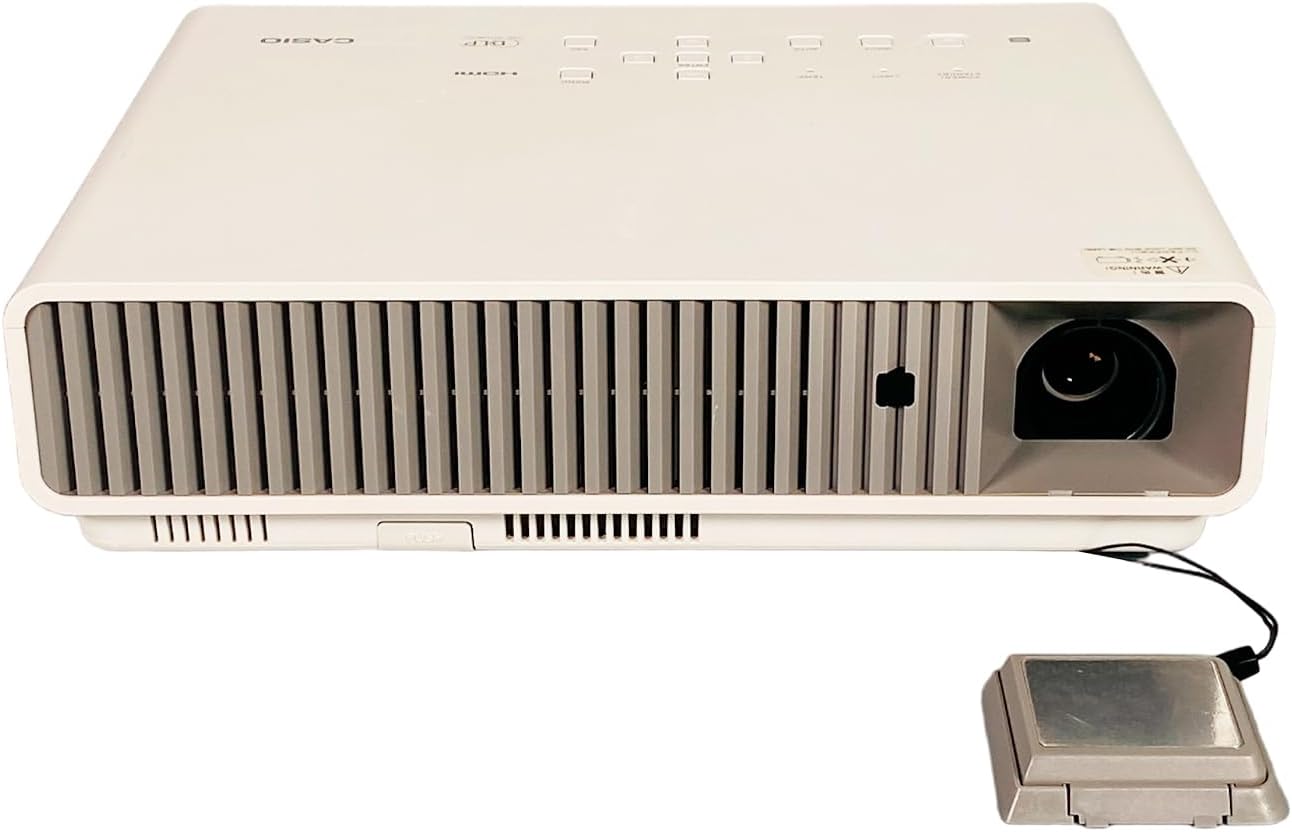
شکل 4.1: The front of the projector features the projection lens on the right and extensive ventilation grilles across the front to ensure proper airflow during operation.
4.2 شاته View (Input/Output Ports)

شکل 4.2: The rear panel includes a comprehensive set of connectivity options: USB-A, LAN, Computer (VGA) input, HDMI input, Video (RCA) input, S-Video input, Serial port, and Audio In/Out jacks. The power input is located on the far right.
4.3 پورته View (د تضمین اداره)

شکل 4.3: The top surface features the control panel with buttons for Power/Standby, Light, Temp, Input selection, Auto adjustment, Enter, Menu, and ESC. The HDMI and DLP logos are also visible.
4.4 اړخ View (Focus and Zoom)

شکل 4.4: One side of the projector houses the manual focus and zoom adjustment rings, allowing for precise image clarity and size control.
4.5 د محصول لیبل

شکل 4.5: The product label provides critical information including the model number (XJ-M255), electrical requirements (100-240V ~ 50/60Hz, 2.3-1.0A), and various regulatory compliance marks.
5. ترتیب کول
5.1 ځای پرځای کول
Place the projector on a stable, flat surface or mount it securely. Ensure the projector is positioned at an appropriate distance from the screen to achieve the desired image size. Maintain clear space around the ventilation grilles to prevent overheating.
5.2 د بریښنا نښلول
- Connect the power cable to the projector's power input port (refer to Figure 4.2).
- د بریښنا کیبل بله پای په یوه ځمکني بریښنایی پلورنځي کې ولګوئ.
۵.۳ د ان پټ وسیلو نښلول
Connect your video source (e.g., laptop, Blu-ray player) to the projector using the appropriate cable. The Casio XJ-M255 supports multiple input types:
- HDMI: د لوړ تعریف ډیجیټل ویډیو او آډیو لپاره.
- کمپیوټر (VGA): د انالوګ کمپیوټر سیګنالونو لپاره.
- Video (RCA) / S-Video: For standard definition analog video.
- USB-A: For certain data or wireless dongle connections.
- لین: د شبکې اتصال او کنټرول لپاره.
5.4 ابتدايي پاور آن
After connecting power and input devices, press the بریښنا / سټینډ بای button on the projector's control panel (Figure 4.3) or the remote control to turn on the projector.
۴. د پروجیکټر چلول
۸ پاور آن/بند
- د فعالولو لپاره: فشار ورکړئ بریښنا / سټینډ بای button once. The power indicator light will illuminate.
- د بریښنا بندولو لپاره: فشار ورکړئ بریښنا / سټینډ بای button twice. The projector will enter a cool-down cycle before shutting down completely. Do not unplug the projector during the cool-down cycle.
6.2 Focus and Zoom Adjustment
وګرځوئ تمرکز ring (Figure 4.4) on the side of the projector until the image appears sharp and clear. Adjust the زوم ring (Figure 4.4) to achieve the desired image size on your screen.
۶.۲ د ننوتنې سرچینې انتخاب
فشار ورکړئ داخلول button on the control panel or remote control to cycle through available input sources (HDMI, Computer, Video, S-Video, etc.). Select the input corresponding to your connected device.
6.4 د مینو نیویګیشن
فشار ورکړئ مینو button to access the on-screen display (OSD) menu. Use the arrow buttons to navigate through options and the ننوتل button to select. Press ESC to exit a menu or return to the previous level.
۳.۲ د ښودنې اساسي ترتیبات
د OSD مینو دننه، تاسو کولی شئ ترتیبات تنظیم کړئ لکه:
- روښانتیا/ تضاد: د غوره انځور لید لپاره تنظیم کړئ.
- د اړخ نسبت: Select between 16:10 (native), 4:3, or other options to match your content.
- د کیسټون سمون: که چیرې پروجیکټر په بشپړ ډول د سکرین سره عمودي نه وي، د ټراپیزایډل تحریف سم کړئ.
۴.۶ درې بعدي فعالیت
The Casio XJ-M255 is 3D capable. To utilize 3D features, ensure your input source provides 3D content and you are using compatible 3D glasses (sold separately). Refer to the OSD menu for specific 3D settings and modes.
7. ساتنه
۴.۱ د لینز پاکول
Gently wipe the projector lens with a soft, lint-free cloth specifically designed for optical surfaces. Avoid using excessive force or abrasive materials, which can scratch the lens.
7.2 وینټیلیشن
Regularly check and clean the projector's ventilation grilles to prevent dust buildup. Blocked vents can lead to overheating and reduced performance. Use a soft brush or compressed air to clear dust.
7.3 ذخیره کول
When not in use for extended periods, store the projector in a cool, dry place, protected from dust and extreme temperatures. Use the original packaging or a protective case if available.
8. ستونزه حل کول
- هیڅ انځور ندی ښودل شوی:
- ډاډ ترلاسه کړئ چې پروجیکټر فعال دی او د بریښنا شاخص روښانه دی.
- Verify the input cable (HDMI, VGA) is securely connected to both the projector and the source device.
- Select the correct input source using the داخلول تڼۍ
- Check if the source device is outputting a signal.
- انځور تیاره دی:
- تنظیم کړئ تمرکز ring on the projector lens.
- ډاډ ترلاسه کړئ چې پروجیکټر د سکرین څخه په سمه فاصله کې دی.
- ریموټ کنټرول کار نه کوي:
- په ریموټ کنټرول کې بیټرۍ وګورئ او بدل کړئ.
- ډاډ ترلاسه کړئ چې د ریموټ او پروجیکټر د IR ریسیور ترمنځ هیڅ خنډ شتون نلري.
- Projector Overheating Warning:
- ډاډ ترلاسه کړئ چې د هوا د بهېدو جالونه بند شوي نه دي.
- د هوا له لارې هر ډول دوړې پاکې کړئ.
- پروجیکټر په ښه هوا لرونکي ځای کې وکاروئ.
9. مشخصات
| فیچر | مشخصات |
|---|---|
| ماډل | Casio XJ-M255 |
| ټیکنالوژي ښکاره کول | DLP |
| اصلي حل | 1280 x 800 (WXGA) |
| روښانتیا | 3,000 د ANSI Lumens |
| د اړخ نسبت | 16:10 (اصلي) |
| د تناسب تناسب | 1,800:1 |
| Video Modes Supported | 720p, 1080i, 1080p/60, 576i, 576p, 480p, 480i |
| د 3D وړتیا | هو |
| ارتباط | HDMI, VGA, USB-A, LAN, Video (RCA), S-Video, Serial, Audio In/Out |
| د بریښنا رسول | 100-240V ~ 50/60Hz, 2.3-1.0A |
| ابعاد (W x D x H) | 12.25 x 9.61 x 3.31 انچه (نږدې) |
| وزن | 8.6 پونډه (تقریبا) |
10. تضمین او ملاتړ
For warranty information and technical support, please refer to the documentation provided at the time of purchase or contact your authorized Casio dealer or service center. Keep your purchase receipt as proof of purchase for warranty claims.