د تیرا پورټ ایبل ای وي چارجر P01 کارونکي لارښود
Model: P01 (ZA05-U007K series) | Brand: Tera
1. پیژندنه
This manual provides detailed instructions for the safe and efficient use of your Tera Portable EV Charger P01. This Level 1 & 2 J1772 charger is designed for electric vehicles, offering flexible charging options with NEMA 14-50 and 5-15 compatibility, Wi-Fi connectivity, and a 25FT cable. Please read this manual thoroughly before operation and retain it for future reference.
2. د خوندیتوب معلومات
خبرداری: د دې خوندیتوب لارښوونو په تعقیب کې پاتې راتلل ممکن د اور، بریښنا شاک، ټپي کیدو، یا محصول یا ملکیت ته زیان ورسوي.
- Ensure the charging unit is properly grounded.
- که کیبل یا نښلونکی خراب شوی وي نو چارجر مه کاروئ.
- چارجر په اوبو یا نورو مایعاتو کې مه ډوبوئ.
- د عملیاتو پرمهال ماشومان د چارج کولو ساحې څخه لرې وساتئ.
- Only use the charger with compatible electric vehicles (J1772 EVs).
- د پاکولو یا هر ډول ساتنې ترسره کولو دمخه بریښنا قطع کړئ.
- The charger is ETL & Energy Star certified, indicating adherence to high safety and energy efficiency standards.
The Tera EV Charger is designed with multiple protection features including overvoltage, overload, overheat, ground, earth leakage, and short circuit protection. It also features IP66 and Type 4 protection for water and dust resistance.

Image: Safety and Reliability features of the Tera EV Charger, highlighting ETL and FCC certifications, IP66 rating, and 24/7 support.
3. د بسته محتويات
ډاډ ترلاسه کړئ چې ټول توکي په کڅوړه کې شتون لري:
- Portable EV Charger (1 unit)
- J1772 Cable Wall Mount Box Holder (1 unit)
- د ذخیره کولو کڅوړه (۱ واحد)
- EV Charger Screw Kit (1 set)
- د کارن لارښود (1 کاپي)

Image: Contents of the Tera Portable EV Charger P01 package, showing the main unit, connectors, wall mount, storage bag, and screw kit.
4. ترتیب کول
4.1 د پورټ ایبل کارول
For portable use, simply connect the NEMA 14-50 plug to a compatible 240V outlet or use the appropriate adapter for a 120V outlet (if applicable, verify product specifications for 5-15 compatibility). Ensure the outlet is rated for the charger's current draw.

Image: The Tera Portable EV Charger P01 and its storage bag, illustrating its portability.
4.2 دیوال نصب کول
The charger can be permanently installed using the included wall mount box holder. Choose a suitable location near your parking spot with access to a compatible electrical outlet.
- Select a sturdy wall surface.
- Use the screw kit to securely attach the J1772 Cable Wall Mount Box Holder to the wall.
- د چارجر واحد په هولډر کې نصب کړئ.
- Ensure the charging cable can reach your vehicle's charging port without strain.

Image: The Tera Portable EV Charger P01 installed on a wall, showcasing its fixed-use capability.
5. عملیاتي لارښوونې
۵.۱ ستاسو د EV سره نښلول
- ډاډ ترلاسه کړئ چې چارجر د بریښنا سرچینې سره نښلول شوی.
- د خپل موټر د چارج کولو بندر خلاص کړئ.
- Insert the J1772 connector firmly into the vehicle's charging port until it clicks into place.
- The charger will begin the charging process automatically if in "Plug-and-Play" mode.
۳.۳ سمارټ LED سکرین ښودنه
The integrated LED screen provides real-time charging information:
- Ampزمانه: Current charging rate (e.g., 32A).
- د چارج سرعت: Indication of charging progress.
- ننوتۍ جلدtage: اوسنۍ ټوکtage from the power source (e.g., 240V).
- د ځنډ وخت: If scheduled charging is active.
- د چارج کولو تمرینونه: د حالت شاخصونه.
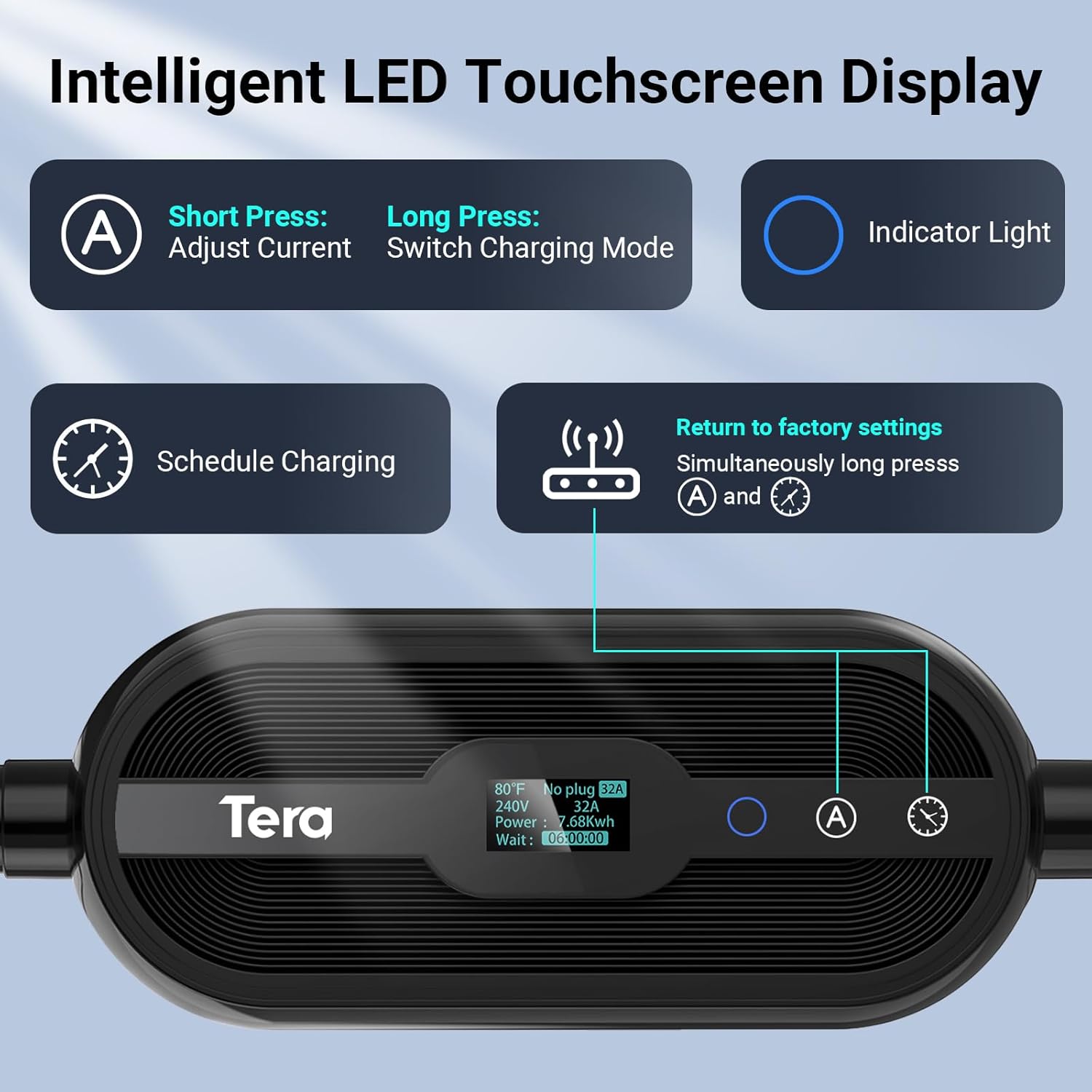
انځور: تفصیلي view of the Tera EV Charger's LED touchscreen, illustrating the controls for current adjustment, charging mode selection, and scheduling.
۳.۴ د حافظې فعالیت سره د تنظیم وړ جریان
The charger supports adjustable current settings from 8A to 32A. The system remembers the last used current setting for continuous use. It will only revert to the default 12 amps after a reboot.
- Short Press 'A' Button: Adjust current (8A, 15A, 24A, 32A).
- Long Press 'A' Button: Switch charging mode (Plug-and-Play or APP Start).
Note: Hybrid vehicles may automatically reduce current based on their maximum allowed value.
5.4 App Control (Smart Life)
The Tera EV Charger can be controlled via the Smart Life app, offering advanced features:
- Reserve Charging: Schedule charging times to take advantagد برښنا د لوړ نرخونو څخه.
- د چارج څارنه: View د ریښتیني وخت چارج کولو حالت.
- View Expenses & Historical Records: Track your charging costs and history.
- Full-Charge Notifications: Receive alerts when your vehicle is fully charged.
Download the Smart Life app from the د اپلیکیشن پلورنځی or د ګوګل پلی پلورنځي.

Image: The Smart Life app interface on a smartphone, demonstrating remote control and monitoring capabilities for the Tera EV Charger.
۵.۳ د چارج کولو مهالویش
You can schedule charging via the touchscreen, the Smart Life app, or your vehicle's onboard system. Scheduling allows you to charge during off-peak hours to save on costs.
- ټچ سکرین: Use the clock button to set delay times (1-12 hours).
- اپلیکیشن: Utilize the "Schedule" function within the Smart Life app.
- Vehicle Onboard System: Refer to your vehicle's manual for scheduling options.
Video: A demonstration of the Tera EV Charger's APP User Guide, showing how to control and schedule charging via the mobile application.
6. ساتنه
- Regularly inspect the charging cable and connector for any signs of wear or damage.
- د چارجر واحد پاک او له دوړو او کثافاتو څخه پاک وساتئ. د پاکولو لپاره نرم، وچ ټوکر وکاروئ.
- Ensure the charging port on your vehicle is clean before connecting the charger.
- Store the charger in its storage bag when not in use, especially for portable applications, to protect it from environmental elements.
7. ستونزه حل کول
| مسله | احتمالي لامل / حل |
|---|---|
| د لمس تڼۍ بې ځوابه دي | Ensure the connector is pulled out from the vehicle. Touch buttons will not respond if the charging gun is inserted. |
| Charging not starting (APP Start mode) | If your mode is set to "APP Start", pull out the charging gun, long-press the 'A' button to switch to "Plug-and-Play" mode, then re-insert. |
| Abnormal behavior when adjusting current via App | Pause the charging process before making current adjustments via the App. |
| چارجر نه چالانېږي | Check the power outlet and ensure the NEMA 14-50 plug is fully inserted. Verify power supply to the outlet. |
| د تېروتنې شاخص رڼا | Refer to the LED indicator guide for specific error codes (e.g., flashing patterns for over voltage, ground fault, over-current, leakage, over-temperature). Disconnect and reconnect the charger. If the issue persists, contact customer support. |
Video: A short demonstration on how to reset the Tera EV Charger, which can resolve certain operational issues.
8. مشخصات
- ماډل: P01 (ZA05-U007K series)
- ننوتۍ جلدtage: 110V / 240V
- د تنظیم وړ جریان: 8A، 15A، 24A، 32A
- اعظمي ځواک: 7.68 kWh (at 32A, 240V)
- د کیبل اوږدوالی: 25 FT (Pure Copper)
- د نښلونکي ډول: J1772 EVs
- د پلګ ډول: NEMA 14-50 (with 5-15 compatibility, verify with manufacturer)
- تصدیقونه: ETL, Energy Star, FCC, UL2231-1/-2, UL 991, UL 2231, UL 2251, UL1998 & UL 2594
- د ساتنې کچه: IP66, Type 4 (Waterproof)
- د حرارت درجه: -22 °F څخه تر 122 °F (-30 ° C څخه تر 50 ° C)
- ابعاد: ۷.۱۳ x ۳.۷ x ۲.۰۵ انچه (پیکج)
- وزن: ۲.۴۵ پونډه
9. تضمین او ملاتړ
Tera is a US-based brand with over 20 years of legacy. They offer a 2-year warranty on this product.
- تضمین: 2-تضمین
- تخنیکي ملاتړ: د ژوند تخنیکي ملاتړ.
- د پیرودونکو خدمت: 24/7 email support and phone support from 7 AM to 6 PM PST, Monday to Friday (excluding public holidays).
For assistance, please refer to the contact information provided with your product or visit the official Tera webسایټ

Image: Tera's commitment as a US-based brand, emphasizing design, development, and support in the USA.


