1. پیژندنه
The Emerson EMT-1200 Multimedia Recorder is designed to effortlessly digitize and preserve your cherished memories by converting various media formats into modern digital files. This manual provides comprehensive instructions for setting up, operating, and maintaining your device.
۲. په بکس کې څه دي؟
- Emerson EMT-1200 Multimedia Recorder
- د AC ځواک اډیپټر
- د چټک پیل لارښود
- د AV کیبل
- د کارن لارښود
3. محصول ختم شوview
The Emerson EMT-1200 is a versatile multimedia recorder featuring a 4.3-inch LCD screen, multiple input/output options, and app integration for seamless media conversion and playback.

Image: The Emerson EMT-1200 Multimedia Recorder shown with various media sources like phones, DVDs, and USB drives, highlighting its multi-functionality.
مهمې ځانګړتیاوې او برخې:
- دوه انچه LCD سکرین: د مخکې لپارهviewing recordings and navigating menus.
- Audio In (RCA): Red and white ports for stereo audio input.
- Video In (RCA): Yellow port for composite video input.
- HD Out (HDMI): د بهرنیو نندارتونونو سره د نښلولو لپاره.
- USB پورټ: د USB ډرایو د نښلولو لپاره.
- د کارت سلاټ: د SD کارتونو داخلولو لپاره.
- ډي وي ډي/سي ډي ډرایو: For disc media.
- د بریښنا تڼۍ: د دې لپاره چې وسیله فعاله/بنده کړئ.
- د وتلو تڼۍ: To open/close the disc tray.
- د ثبت بټن: To start/stop recording.
- Navigation Buttons (ENTER, RETURN, UP/DOWN/LEFT/RIGHT): د مینو کنټرول لپاره.

انځور: پورته view of the Emerson EMT-1200, highlighting the 4.3-inch LCD screen and the central control panel with navigation and function buttons.

انځور: مخکینۍ برخه view of the Emerson EMT-1200, showing the Audio In, Video In, HD Out, and USB ports on the left side.

انځور: اړخ view of the Emerson EMT-1200 with the DVD/CD tray open, ready for disc insertion.
4. ترتیب کول
- Place the Recorder: Position the EMT-1200 on a clean, stable surface.
- بریښنا وصل کړئ: Connect the AC power adapter to the DC IN 5V port on the recorder and plug the adapter into a wall outlet or surge protector.
- پاور آن: Press the Power button on the device. The Emerson logo will appear on the screen.
Video: This video demonstrates the basic setup process for the Emerson EMT-1200 Multimedia Recorder, including connecting power and initial boot-up.
5. عملیاتي لارښوونې
5.1 Recording from VHS
- Connect VHS Player: Use the AV cable to connect the LINE OUT ports of your VHS player to the AUDIO IN (Red/White) and VIDEO IN (Yellow) ports on the EMT-1200.
- Insert VHS Tape: Place the VHS tape you wish to record into your VHS player.
- سرچینه وټاکئ: On the EMT-1200, navigate to the main menu and select "Video -> USB/Card" or "Video -> DVD" depending on your desired output.
- ثبت کول پیل کړئ: Begin playback on your VHS player, then press the REC button on the EMT-1200 to start recording. Press REC again to stop.

Image: The Emerson EMT-1200 connected to a VHS player via AV cables, illustrating the process of converting VHS tapes to digital formats.
Video: This video demonstrates how to record content from a VHS player to the Emerson EMT-1200 Multimedia Recorder.
5.2 Recording from DVD/CD
- Insert Source Disc: Eject the disc tray and insert the DVD or CD you wish to record from. Close the tray.
- سرچینه وټاکئ: From the main menu, select "CD/DVD -> USB/Card" or "CD/DVD -> Memory" based on your desired storage.
- ثبت کول پیل کړئ: Play the content on the disc, then press the REC button on the EMT-1200 to start recording. Press REC again to stop.
Video: This video guides you through the process of recording content from a DVD to the Emerson EMT-1200 Multimedia Recorder.
Video: This video demonstrates how to record audio from a CD to the Emerson EMT-1200 Multimedia Recorder.
5.3 Recording from USB/SD Card
- ذخیره داخل کړئ: Insert a USB drive into the USB port or an SD card into the CARD slot.
- سرچینه وټاکئ: From the main menu, select "USB/Card -> DVD" or "USB/Card -> CD" to transfer files from your USB/SD to a disc.
- ثبت کول پیل کړئ: Follow the on-screen prompts to select files and initiate the transfer.
Video: This video explains how to record files from a USB drive to a DVD using the Emerson EMT-1200 Multimedia Recorder.
۳.۱ لیږدول Files from iOS/Android App
- اپلیکیشن ډاونلوډ کړئ: Download the "Friendly Memories" app from the App Store (iOS) or Google Play Store (Android).
- وائی فای سره وصل کړئ: Power on the EMT-1200. On your smartphone/tablet, go to Wi-Fi settings and connect to the device's Wi-Fi network (e.g., "DVD_SERVER_XXXX"). Enter the password found in your user manual.
- د لاسرسي اجازه: In your phone's settings, ensure the "Friendly Memories" app has access to the photos and videos you wish to transfer.
- پورته کول Files: Open the "Friendly Memories" app, select the files you want to transfer, and choose your desired destination (USB, SD Card, or DVD) on the EMT-1200.

Image: An iPhone displaying the "Friendly Memories" app interface, connected wirelessly to the Emerson EMT-1200 for file لیږدول.
Video: This video demonstrates how to use the iOS app to transfer files to the Emerson EMT-1200 Multimedia Recorder.
5.5 Media Playback & HD Output
- د نندارې سره وصل شئ: Connect an HDMI cable from the HD OUT port on the EMT-1200 to your TV or monitor's HDMI input.
- ان پټ غوره کړئ: On your TV/monitor, select the corresponding HDMI input source.
- Select Media Player: On the EMT-1200, navigate to the main menu and select "Media Player".
- سرچینه غوره کړئ: Select the source (USB, Card, or CD/DVD) where your media files ساتل کیږي.
- رسنۍ پلی کړئ: Browse and select the desired file لوبه کول

Image: The Emerson EMT-1200 connected to a larger TV screen via HDMI, allowing users to view their digitized media on an external display.
Video: This video demonstrates the media player functionality and HD output capabilities of the Emerson EMT-1200 Multimedia Recorder.
6. ترتیبات
Access the "Setup" menu from the main menu to configure various device settings:
- د ثبت بڼه: Choose between MPG (for Blu-ray players) or MP4 (for computers and DVD players).
- DVD Burn Type: Select "Data" for data-only files or "Video" for video format compatible with DVD/Blu-ray players.
- د ثبت کیفیت: Adjust the recording quality to High, Medium, or Low. Note that higher quality results in larger file sizes and longer recording times.
- Auto Stop Timer: Set a preset time (e.g., 30 minutes, 60 minutes, 2 hours) for the recording to stop automatically.
- Auto Chapter: Enable this feature to automatically break recordings into chapters at specified intervals (e.g., 5, 10, or 15 minutes).
- د رنګ سیسټم: Set the video color system (e.g., NTSC).
- د OSD ژبه: Select the On-Screen Display language (English, Deutsch, Français, Nederlands, Español).
- نیټه ټاکل: Adjust the current date.
- د وخت ترتیب: اوسنی وخت تنظیم کړئ.
- ډیفالټ ترتیبات: ټول تنظیمات د دوی فابریکې ډیفالټ ته تنظیم کړئ.
7. ستونزه حل کول
If you encounter issues with your Emerson EMT-1200, please refer to the following common troubleshooting tips:
- ځواک نشته: Ensure the AC power adapter is securely connected to both the device and a working power outlet.
- په ښودنه کې هیڅ سیګنال نشته: Verify all AV or HDMI cables are correctly connected to both the recorder and the external display. Ensure the correct input source is selected on your TV/monitor.
- د ثبت کولو مسلې: Check that the source media (VHS, DVD, etc.) is playing correctly. Ensure the destination media (USB, SD card, blank DVD) has sufficient space and is compatible with the device.
- د اپلیکیشن اتصال ستونزې: Confirm your smartphone/tablet is connected to the EMT-1200's Wi-Fi network and the correct password has been entered. Check app permissions for media access.
- Disc Ejection Issues: If a disc does not eject, ensure the device is powered on and press the Eject button firmly. Do not force the disc tray.
For more detailed troubleshooting, please consult the full user manual or visit the Emerson support webسایټ
8. مشخصات
| فیچر | تفصیل |
|---|---|
| برانډ | ایمرسن |
| د ماډل نوم | EMT-1200 |
| ځانګړی ځانګړنه | USB Recording (DVR) |
| قرارداد | 1280×720 |
| د نښلونکي ډول | مایکرو USB |
| د ارتباط ټیکنالوژي | USB |
| د توکي وزن | 1 پونډه |
| د محصول ابعاد | ۷۱"لیتر x ۲۳.۶"واټه x ۲۴.۴"هوا |
| د ویډیو د تولید پریکړه | 1080p |
| مطابقت لرونکې وسیلې | Television, Smartphone |
| د کنټرولر ډول | د تڼۍ کنټرول |
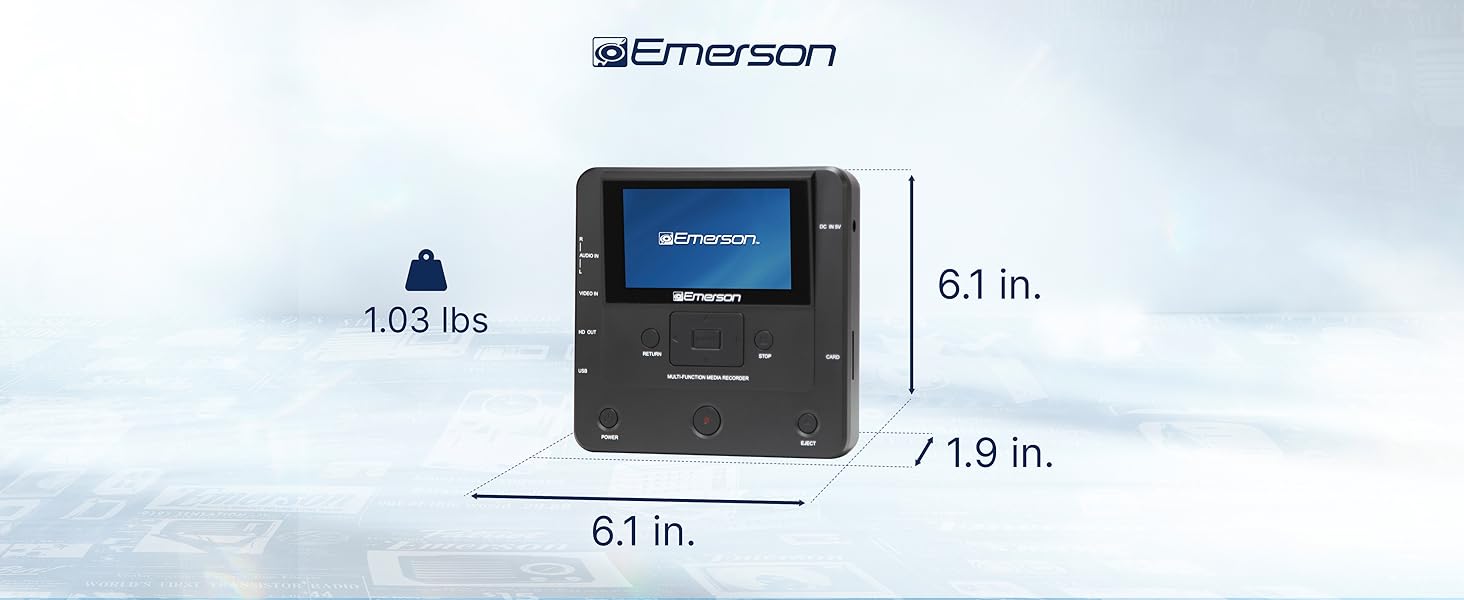
Image: The Emerson EMT-1200 Multimedia Recorder with its dimensions labeled: 6.1 inches Length, 1.9 inches Width, 6.1 inches Height, and a weight of 1.03 pounds.
9. ساتنه
To ensure the longevity and optimal performance of your Emerson EMT-1200 Multimedia Recorder, follow these maintenance guidelines:
- پاکول: د وسیلې بهرنۍ برخه پاکولو لپاره نرم، وچ ټوکر وکاروئ. د مایع پاکوونکو، ایروسولونو یا محلولونو کارولو څخه ډډه وکړئ.
- ذخیره کول: وسیله په یخ او وچ ځای کې د مستقیم لمر وړانګو او سختې تودوخې څخه لرې وساتئ.
- د ډیسک پاملرنه: Handle discs by their edges to avoid fingerprints and scratches. Keep discs in their protective sleeves when not in use.
- وینټیلیشن: Ensure the device's ventilation openings are not blocked to prevent overheating.
10. تضمین او ملاتړ
Your Emerson EMT-1200 Multimedia Recorder comes with a limited warranty to ensure your satisfaction.
- د تضمین موده: 1 Year Parts, 90 Days Labor.
- جوړونکی: Naxa Electronics Inc.
For warranty claims, product updates, extended support documentation, or frequently asked questions, please visit the official Emerson Audio webسایټ یا د پیرودونکي ملاتړ سره اړیکه ونیسئ.


