د خوندیتوب مهم معلومات
Read all instructions before using this product. Keep this manual for future reference. Adhere to all warnings on the product and in the operating instructions. Do not use this apparatus near water. Clean only with a dry cloth. Do not block any ventilation openings. Install in accordance with the manufacturer's instructions. Do not install near any heat sources such as radiators, heat registers, stoves, or other apparatus (including amplifiers) that produce heat. Only use attachments/accessories specified by the manufacturer. Unplug this apparatus during lightning storms or when unused for long periods of time. Refer all servicing to qualified service personnel. Servicing is required when the apparatus has been damaged in any way, such as power-supply cord or plug is damaged, liquid has been spilled or objects have fallen into the apparatus, the apparatus has been exposed to rain or moisture, does not operate normally, or has been dropped.
محصول پای ته ورسیدview
The Vivitar Singimals Kids Karaoke Speaker with Microphone (Model SNG200-ELPH-STK-6, Elliot the Elephant) is designed to provide an engaging karaoke experience for children. It features Bluetooth v5.1 connectivity, a 5W speaker, multicolor LED lighting, and a built-in rechargeable battery offering up to 12 hours of playtime.

Image: The Vivitar Singimals Kids Karaoke Speaker, featuring the Elliot the Elephant design, shown with its wired microphone attached. The speaker has a handle on top and control buttons on the front panel.
د بسته محتويات
- Singimals Kids Karaoke Speaker (Elliot the Elephant)
- واړه مایکروفون
- د USB چارج کیبل
- د کارن لارښود
چمتو کول
د سپیکر چارج کول
- Locate the USB charging port on the speaker.
- ورکړل شوی USB چارجینګ کیبل د سپیکر د چارج کولو پورټ سره وصل کړئ.
- د USB کیبل بل پای د یو مناسب USB بریښنا اډاپټر (شامل نه دی) یا د کمپیوټر USB پورټ سره وصل کړئ.
- د چارج کولو شاخص څراغ به د چارج کولو پرمهال روښانه شي او کله چې په بشپړ ډول چارج شي نو بند شي.
- بشپړ چارج تر شپږو ساعتونو پورې د لوبې وخت چمتو کوي.
د مایکروفون سره وصل کول
- Insert the microphone's 3.5mm jack into the MIC input port on the speaker.
- Ensure the microphone's ON/OFF switch is set to the "ON" position for use.

Image: A close-up of the top rear panel of the speaker, highlighting the USB, Micro SD, 5V 1A power, and MIC input ports. This illustrates where to connect the charging cable and microphone.
عملیاتي لارښوونې
بریښنا کول / بند کول
Locate the ON/OFF switch on the speaker's control panel. Slide it to "ON" to power on the device. Slide it to "OFF" to power off.
بلوتوث پیوستون
- Power on the karaoke speaker. It will automatically enter Bluetooth pairing mode, indicated by a flashing blue LED.
- په خپل سمارټ فون، ټابلیټ، یا بل بلوتوث فعال شوي وسیله کې، د بلوتوث ترتیباتو ته لاړ شئ.
- لټون available devices and select "Singimals" from the list.
- Once connected, the blue LED will stop flashing and remain solid. You can now play music from your device through the speaker.
د مایکروفون کارول
After connecting the microphone and ensuring its switch is "ON", speak or sing into the microphone. Your voice will be amplified through the speaker. Adjust the microphone volume using the dedicated controls if available, or the main volume controls.
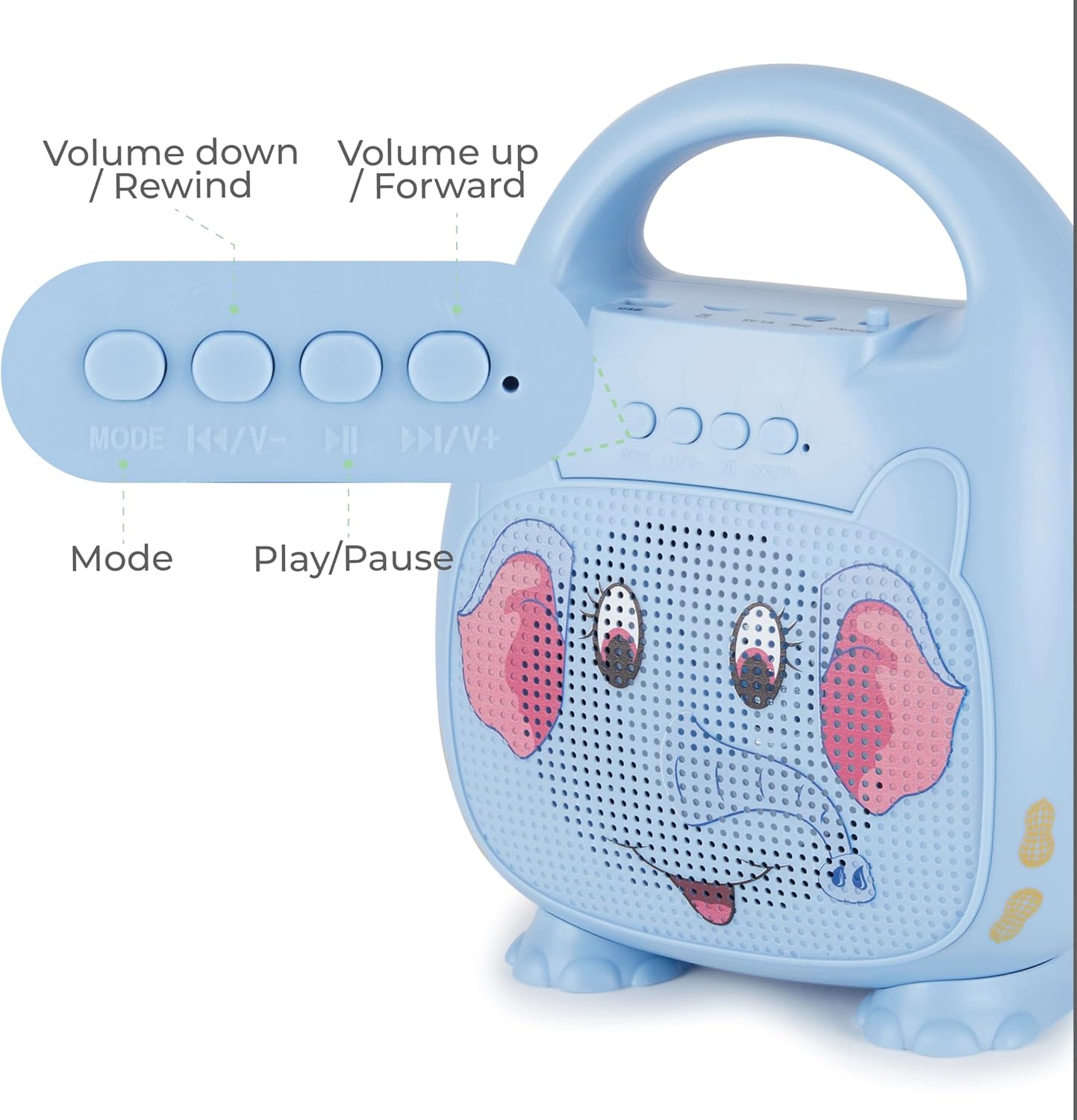
انځور: یو مفصل view of the control panel on the speaker, showing buttons for Mode selection, Volume Down/Rewind, Play/Pause, and Volume Up/Forward. This illustrates how to navigate music and adjust settings.
د کنټرول تڼۍ
- لارښوونه: د بلوتوث، USB، او مایکرو SD حالتونو ترمنځ د بدلولو لپاره فشار ورکړئ.
- |<< / V-: Press to go to the previous track. Press and hold to decrease volume.
- >||: د میوزیک غږولو یا بندولو لپاره فشار ورکړئ.
- >>| / V+: Press to go to the next track. Press and hold to increase volume.
د LED رڼا
The speaker features multicolor LED lighting that pulses and changes with the music, enhancing the karaoke experience. The lights activate automatically when the speaker is powered on.
ساتنه
پاکول
Wipe the speaker and microphone with a soft, dry cloth. Do not use liquid cleaners or abrasive materials.
ذخیره کول
وسیله په یخ او وچ ځای کې د مستقیم لمر وړانګو او سختې تودوخې څخه لرې وساتئ.
د بیټرۍ پاملرنه
To prolong battery life, fully charge the speaker before first use and at least once every three months if not used regularly.
د ستونزو حل کول
| ستونزه | د حل لاره |
|---|---|
| سپیکر نه چالانېږي. | Ensure the battery is charged. Connect the USB charging cable and allow it to charge for at least 30 minutes before attempting to power on again. Check the ON/OFF switch. |
| د مایکروفون څخه هیڅ غږ نشته. | Verify the microphone is securely plugged into the MIC port. Ensure the microphone's ON/OFF switch is in the "ON" position. Increase the volume on the speaker. |
| د بلوتوث له لارې نشي وصل کېدای. | Ensure the speaker is in Bluetooth pairing mode (flashing blue LED). Turn off and on Bluetooth on your device. Move your device closer to the speaker. Forget "Singimals" from your device's Bluetooth list and try pairing again. |
| د غږ تحریف. | Reduce the volume on both the speaker and your connected device. Ensure there are no obstructions between your Bluetooth device and the speaker. |
مشخصات
- ماډل: SNG200-ELPH-STK-6
- نښه: ژوندی
- ارتباط: بلوتوث v5.1
- د سپیکر محصول: 5W
- د بریښنا سرچینه: د بیټرۍ چلول (۱ لیتیم آیون بیټرۍ، شامله ده)
- د لوبې وخت: تر 12 ساعتونو پورې
- د چارج کولو بندر: USB
- مواد: فلزي، پلاستيک
- د محصول ابعاد: 8.7 x 4.7 x 9.4 انچه
- د توکي وزن: ۷.۹۶ پونډه (۳.۶۲ کیلوګرامه)
- مطابقت لرونکي وسایل: Smartphone, Tablet, Personal Computer
تضمین او ملاتړ
For warranty information and customer support, please refer to the official Vivitar webسایټ ته مراجعه وکړئ یا د دوی د پیرودونکو خدماتو څانګې سره اړیکه ونیسئ. د پیرود ثبوت په توګه د پیرود رسید وساتئ.
جوړونکی: ساکر انټرنیشنل، شرکت.
اضافي معلومات
د محصول ویډیوګانې
No official seller videos are available for embedding in this manual.


