1. پیژندنه
This manual provides detailed instructions for the setup, operation, and maintenance of your boAt Aavante Bar 490 Bluetooth Soundbar. Please read this manual thoroughly before using the product to ensure proper functionality and to maximize your audio experience.

Image 1.1: The boAt Aavante Bar 490 Bluetooth Soundbar in Classic Black.
2. د بسته محتويات
ډاډ ترلاسه کړئ چې لاندې ټول توکي ستاسو په بسته کې شامل دي:
- boAvante Bar 490 Soundbar
- د چارج کیبل
- د کارونکي لارښود (دا لاسوند)
- د تضمین کارت
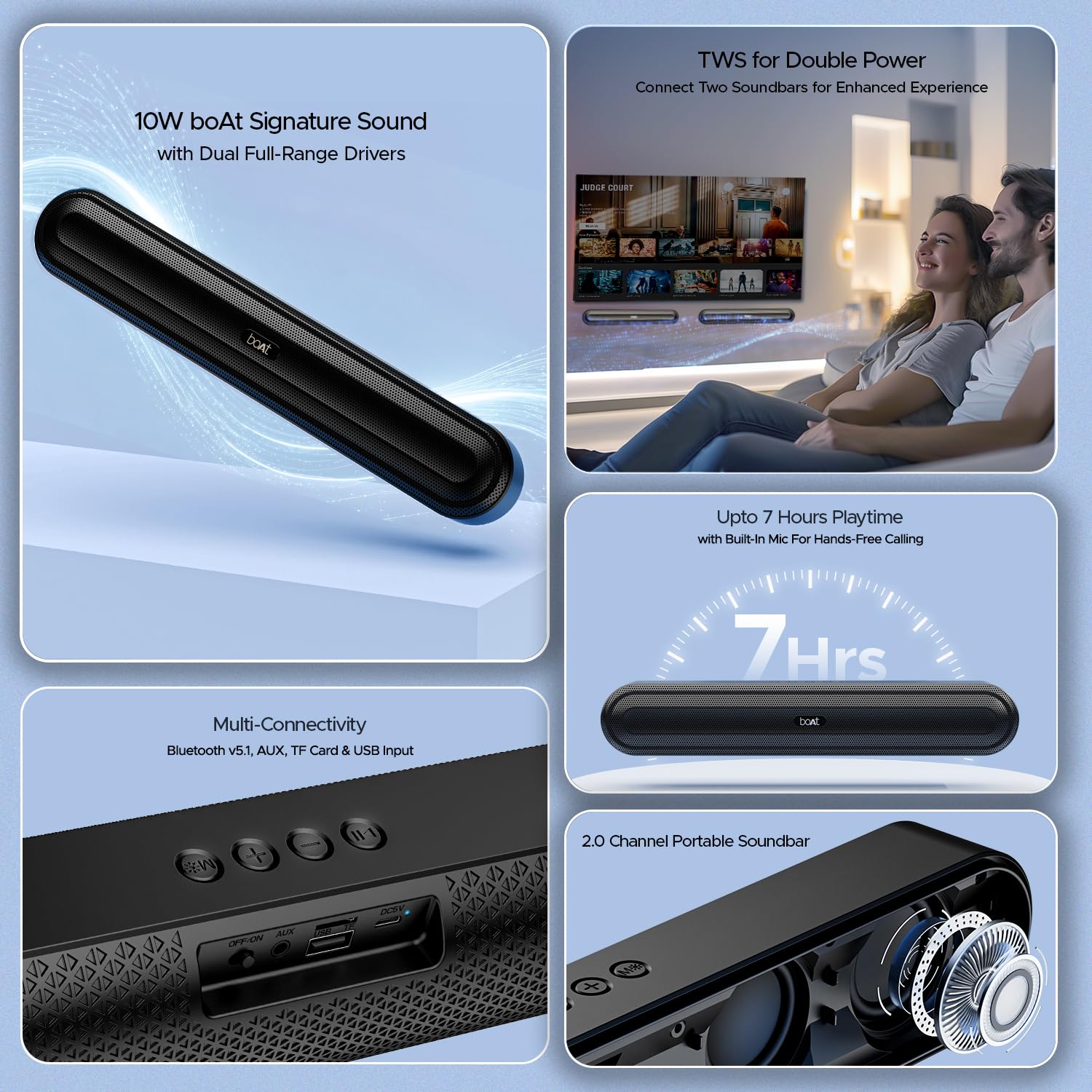
انځور 2.1: اوورview of the boAt Aavante Bar 490 and its key features, including package contents.
3. محصول ختم شوview
۵. کنټرولونه او بندرونه
Familiarize yourself with the control buttons and connectivity ports on your Aavante Bar 490.

انځور ۳.۱: نږدې انځور view of the control buttons and multi-connectivity ports (Bluetooth v5.1, AUX, TF Card, USB Input) on the soundbar.
- د بریښنا تڼۍ: Press and hold to power on/off. Short press to switch modes.
- حجم ښکته (-): حجم کم کړئ.
- حجم پورته (+): حجم زیات کړئ.
- د پلی کولو/پاز بټن: موسیقي غږ کړئ یا بند کړئ. زنګونه ځواب کړئ/پای ته ورسوئ.
- د حالت تڼۍ (M): Switch between input modes (Bluetooth, AUX, USB, TF Card).
- بند/آن سویچ: د بریښنا اصلي سویچ.
- د ایکس پورټ: د تار لرونکي آډیو اتصال لپاره.
- USB پورټ: د USB ډرایو پلې بیک لپاره.
- د TF کارت سلاټ: د TF کارت پلې بیک لپاره.
- DC5V پورټ: د وسیله چارج کولو لپاره.
4. ترتیب کول
۴.۱. د غږ بار چارج کول
Before first use, fully charge the soundbar. Connect the provided charging cable to the DC5V port on the soundbar and the other end to a compatible USB power adapter (not included). The LED indicator will show charging status and turn off when fully charged. A full charge provides up to 7 hours of playback.

Image 4.1: The boAt Aavante Bar 490 highlighting its up to 7 hours of playtime on a single charge.
4.2. بریښنا فعال/بند
- Ensure the OFF/ON switch at the back is in the "ON" position.
- Press and hold the Power button on the top panel for 3 seconds to power on the soundbar.
- To power off, press and hold the Power button again for 3 seconds.
4.3. د بلوتوث جوړه کول
- Power on the soundbar. It will automatically enter Bluetooth pairing mode (indicated by a flashing LED).
- په خپل وسیله (سمارټ فون، ټابلیټ، او نور) کې، بلوتوټ فعال کړئ او د شته وسایلو لټون وکړئ.
- Select "Aavante Bar 490" from the list.
- یوځل چې جوړه شي، د LED شاخص به قوي نیلي شي، او تاسو به د تایید غږ واورئ.
The soundbar supports Bluetooth v5.1 for stable and efficient wireless connection up to 10 meters.
۴. TWS (ریښتینی بې سیم سټیریو) جوړه کول
For an enhanced stereo experience, you can pair two Aavante Bar 490 soundbars together.
- Ensure both Aavante Bar 490 units are powered on and in Bluetooth pairing mode (not yet connected to any device).
- On one of the soundbars, double-press the Mode button (M). It will search for the other unit.
- Once successfully paired, you will hear a confirmation tone, and the LED indicators on both units will synchronize.
- Now, connect your device to one of the paired soundbars via Bluetooth as described in Section 4.3. Both soundbars will play audio in stereo.

Image 4.2: Illustration of two boAt Aavante Bar 490 soundbars connected via TWS for an enhanced audio experience.
4.5. Other Connectivity Modes
Press the Mode button (M) to cycle through the following input options:
- د اکس موډ: Connect an audio device using a 3.5mm AUX cable to the AUX port.
- د USB حالت: Insert a USB flash drive into the USB port. The soundbar will automatically play audio files.
- د TF کارت حالت: Insert a TF (microSD) card into the TF card slot. The soundbar will automatically play audio files.
5. عملیاتي لارښوونې
5.1. د میوزیک غږول
- پلی کول / ودرول: د پلی/پاز تڼۍ لنډ فشار ورکړئ.
- د حجم سمون: د حجم پورته (+) یا د حجم ښکته (-) تڼۍ لنډ فشار ورکړئ.
- بله لار: د حجم لوړولو (+) تڼۍ اوږد فشار ورکړئ.
- مخکینی لار د حجم کمولو (-) تڼۍ اوږد فشار ورکړئ.
5.2. د لاسونو څخه وړیا تلیفون کول
کله چې د بلوتوث له لارې وصل شي، جوړ شوی مایکروفون د لاسونو څخه پاک زنګونو ته اجازه ورکوي.
- زنګ ووهئ: د پلی/پاز تڼۍ لنډ فشار ورکړئ.
- ټلیفون پای: د زنګ وهلو په جریان کې د پلی/پاز تڼۍ لنډ فشار ورکړئ.
- زنګ رد کړئ: د پلی/پاز تڼۍ اوږده فشار ورکړئ.
6. ساتنه
- Keep the soundbar away from water, moisture, and extreme temperatures.
- وسیله د نرم او وچ ټوکر سره پاکه کړئ. د کثافاتو پاکوونکي یا محلول مه کاروئ.
- Avoid dropping or subjecting the soundbar to strong impacts.
- په یخ او وچ ځای کې ذخیره کړئ کله چې د اوږدې مودې لپاره نه کارول کیږي.
7. ستونزه حل کول
| ستونزه | احتمالي لامل | د حل لاره |
|---|---|---|
| ساؤنډ بار نه چالانېږي. | Low battery; OFF/ON switch is off. | Charge the soundbar; ensure OFF/ON switch is in the "ON" position. |
| د بلوتوث له لارې جوړه نشي کیدی. | Soundbar not in pairing mode; device Bluetooth is off; too far from device. | Ensure soundbar is in pairing mode; enable Bluetooth on your device; move closer to the soundbar (within 10m). |
| غږ نشته. | حجم ډېر ټیټ دی؛ د ننوتلو ناسم حالت؛ کیبل په سمه توګه نه دی وصل شوی. | Increase volume; switch to correct input mode (Bluetooth, AUX, USB, TF); check cable connections. |
| د TWS جوړه ناکامه شوه. | One or both units already connected to a device; units too far apart. | Disconnect both units from any Bluetooth devices; ensure they are close to each other during TWS pairing. |
8. مشخصات
- د موډل نوم: Aavante Bar 490
- د سپیکر ډول: ساؤنډ بار
- آډیو تولید: 2.0 چینل
- د تولید ځواک: 10W RMS
- چلوونکي: Dual Full-Range Drivers
- د بلوتوت نسخه: v5.1
- بلوتوث حدود: تر 10 مترو پورې
- ارتباط: بلوتوټ، AUX، USB، TF کارت
- د بیټرۍ ژوند: تر 7 ساعتونو پورې
- د بیټرۍ ډول: لیتیم پولیمر (۱ x ۱۲ ولټ شامل دی)
- جوړ شوی مایکروفون: هو (د لاسونو پرته زنګ وهلو لپاره)
- د کنټرول طریقه: ټچ بټن
- د محصول ابعاد: ۳۰.۶D x ۴۵.۱W x ۳۰.۶H سانتي متره
- د توکي وزن: 650 ګرامه

Image 8.1: Dimensions of the boAt Aavante Bar 490 soundbar.
9. تضمین او ملاتړ
The boAt Aavante Bar 490 comes with a standard د 1 کلن محدود تضمین د پیرود نیټې څخه. مهرباني وکړئ د تفصيلي شرایطو او مقرراتو لپاره شامل شوي تضمین کارت ته مراجعه وکړئ.
For technical support, service, or warranty claims, please contact boAt customer service:
- بریښنالیک: info@imaginemarketingindia.com
- جوړونکی: د امیجن مارکیټنګ محدودیت
- پته: Unit no. 204 & 205, 2nd floor, D-wing & E-wing, Corporate Avenue, Andheri Ghatkopar Link Road, Mumbai, Maharashtra-400093, India
You can also download the boAt Hearables App for additional features and user guides. Scan the QR code below:

Image 9.1: QR code to download the boAt Hearables App for additional features and support.
۹. د محصول ویډیوګانې
ویډیو ۵.۲: یوه لنډه وړاندېview شوکasing the boAt Aavante Bar 490 Bluetooth Soundbar's features, including 10W RMS sound, dual full-range drivers, 7 hours playback, multi-connectivity, and hands-free calling. This video is provided by the seller.
ویډیو ۱: لنډه کتنهview of the boAt Aavante Bar 490, highlighting its 10W RMS Signature Sound, dual drivers, and Bluetooth 5.1 connectivity. This video is provided by the seller.


