1. پیژندنه
The Zebronics Astra 30 is a portable Bluetooth speaker designed for a versatile audio experience. It features 14W output, dual 52mm drivers, dual passive radiators for enhanced bass, and multiple connectivity options including Bluetooth v5.3, FM radio, AUX, USB, and mSD card support. This manual provides instructions for setting up, operating, and maintaining your speaker.
2. د بسته محتويات
مهرباني وکړئ د لاندې توکو لپاره په بسته کې وګورئ:
- Speaker - 1 unit
- د چارج کولو کیبل - ۱ واحد
- User manual - 1 unit
3. محصول ختم شوview
د سپیکر د برخو او کنټرولونو سره ځان بلد کړئ.

انځور 3.1: مخکی view of the Zebronics Astra 30 speaker, showcasing its sleek black design and speaker grille.
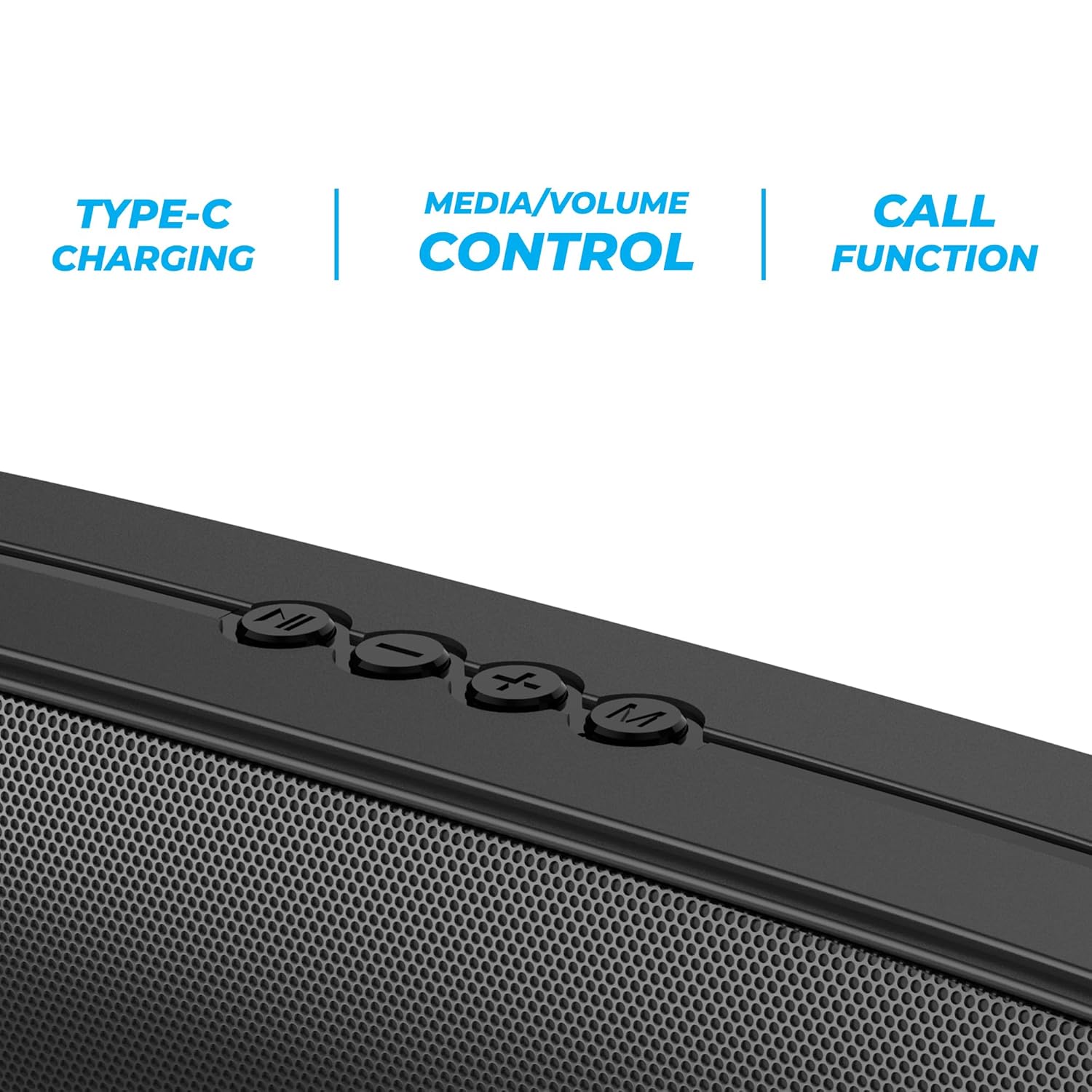
انځور 3.2: Close-up of the control panel buttons on the top of the speaker, including power, volume, and mode controls.

انځور 3.3: شاته view of the speaker showing the multi-connectivity ports: USB, Micro SD slot, AUX input, and Type-C charging port.
4. ترتیب کول
۳.۱ د سپیکر چارج کول
Before initial use, fully charge the speaker. The Zebronics Astra 30 features a built-in rechargeable battery with Type-C charging.
- Connect the provided Type-C charging cable to the charging port on the speaker.
- د کیبل بل پای د USB بریښنا اډاپټر (شامل نه دی) یا د کمپیوټر USB پورټ سره وصل کړئ.
- The charging indicator will illuminate during charging and turn off once fully charged.
A full charge takes approximately 4 hours and provides up to 12 hours of playback time at 50% volume.

انځور 4.1: Illustration indicating the speaker's 12-hour playback capability on a single charge.
4.2 بریښنا کول / بندول
To power on or off the speaker, press and hold the power button located on the control panel until you hear an audible prompt or see the indicator light change.
5. عملیاتي لارښوونې
5.1 د بلوتوټ جوړه کول
The Zebronics Astra 30 uses Bluetooth v5.3 for wireless audio streaming.
- سپیکر چالان کړئ. دا به په اتوماتيک ډول د بلوتوث جوړه کولو حالت ته ننوځي، چې د چمکونکي LED لخوا ښودل کیږي.
- په خپل سمارټ فون، ټابلیټ، یا بل وسیله کې بلوتوث فعال کړئ.
- لټون "ZEB-ASTRA 30" in the list of available Bluetooth devices.
- Select "ZEB-ASTRA 30" to connect. Once paired, the speaker will confirm with an audible tone, and the LED will stop flashing.
- که چیرې د پټنوم غوښتنه وشي، "0000" ولیکئ.
۶.۵ ریښتینی بې سیم سټیریو (TWS) فعالیت
Connect two Zebronics Astra 30 speakers for a true wireless stereo experience.
- Ensure both ZEB-ASTRA 30 speakers are powered on and not connected to any Bluetooth device.
- On one of the speakers (this will be the primary speaker), press and hold the TWS button (often combined with the Mode button) until you hear a pairing tone.
- The two speakers will automatically connect to each other. Once connected, you will hear a confirmation tone.
- اوس، خپل وسیله د بلوتوث له لارې لومړني سپیکر سره وصل کړئ لکه څنګه چې په 5.1 برخه کې تشریح شوي. آډیو به د دواړو سپیکرونو له لارې په سټیریو کې غږیږي.

انځور 5.1: Visual representation of two Zebronics Astra 30 speakers connected via TWS for stereo sound.
5.3 FM راډیو حالت
د جوړ شوي ایف ایم راډیو کارولو لپاره:
- په سپیکر کې ځواک.
- Press the 'M' (Mode) button to switch to FM radio mode.
- د شته ایف ایم سټیشنونو د اتومات سکین کولو او خوندي کولو لپاره، د پلی/پاز تڼۍ کېکاږئ او ونیسئ. سپیکر به په اتوماتيک ډول سټیشنونه سکین او ذخیره کړي.
- Use the Previous/Next track buttons to navigate between saved stations.
- For optimal reception, ensure the charging cable is connected as an antenna.
۶.۳ د AUX ان پټ حالت
Connect external audio devices using the AUX input:
- په سپیکر کې ځواک.
- د AUX حالت ته د بدلولو لپاره د 'M' (موډ) تڼۍ کېکاږئ.
- د ۳.۵ ملي میتر آډیو کیبل یوه پای (شامل نه ده) د سپیکر د AUX پورټ سره وصل کړئ.
- بل پای د خپل وسیلې د آډیو آوټ پټ سره وصل کړئ (د مثال په توګه، سمارټ فون، MP3 پلیر).
- آډیو به اوس ستاسو د وصل شوي وسیلې څخه د سپیکر له لارې غږیږي.
5.5 USB and Micro SD Card Playback
غږ غږول files directly from a USB pen drive or Micro SD card:
- په سپیکر کې ځواک.
- Insert a USB pen drive (up to 32GB) or a Micro SD card into the respective slot.
- سپیکر به په اتوماتيک ډول د ذخیره کولو وسیله کشف کړي او د آډیو غږول به پیل کړي files. If not, press the 'M' (Mode) button to switch to USB or SD card mode.
- د پلې بیک کنټرولولو لپاره د پلې/پاز او مخکیني/راتلونکي ټریک تڼۍ وکاروئ.
5.6 د کال فعالیت
کله چې د بلوتوث له لارې سمارټ فون سره وصل شي، نو سپیکر د لاسونو څخه پاک زنګ وهلو لپاره کارول کیدی شي.
- ځواب / پای کال: یو ځل د Play/Pause تڼۍ کېکاږئ.
- زنګ رد کړئ: د Play/Pause تڼۍ فشار او ونیسئ.
- وروستنۍ شمیره بیا ولیکئ: د Play/Pause تڼۍ دوه ځله فشار ورکړئ.
5.7 Volume and Media Control
The speaker features integrated controls for audio playback:
- حجم پورته کول: د '+' تڼۍ کېکاږئ.
- کموالی: د '-' تڼۍ کېکاږئ.
- بله لار: د '+' تڼۍ کېکاږئ او ونیسئ.
- مخکینی لار د '-' تڼۍ کېکاږئ او ونیسئ.
- پلی کول / ودرول: د Play/Pause تڼۍ کېکاږئ.
6. ساتنه
- سپیکر په نرم او وچ ټوکر پاک کړئ. سخت کیمیاوي مواد یا د کثافاتو پاکوونکي مه کاروئ.
- سپیکر د سختې تودوخې، مستقیم لمر وړانګو او رطوبت څخه لرې وساتئ.
- د سپیکر قوي تاثیراتو ته د غورځولو یا تابع کولو څخه ډډه وکړئ.
- سپیکر په یخ او وچ ځای کې وساتئ کله چې د اوږدې مودې لپاره نه کارول کیږي.
- The speaker is rated as waterproof. However, avoid submerging it in water for prolonged periods. Ensure the port cover is securely closed to maintain water resistance.
7. ستونزه حل کول
| ستونزه | احتمالي حل |
|---|---|
| سپیکر نه چالانېږي. | ډاډ ترلاسه کړئ چې بیټرۍ چارج شوې ده. سپیکر د ټایپ-سي کیبل په کارولو سره د بریښنا سرچینې سره وصل کړئ. |
| د بلوتوث له لارې جوړه نشي کیدی. |
|
| غږ نشته یا ټیټ غږ. |
|
| د ایف ایم راډیو استقبال کمزوری دی. | Ensure the Type-C charging cable is connected to act as an antenna. Try repositioning the speaker. |
| د TWS جوړه ناکامه شوه. |
|
8. مشخصات
| فیچر | تفصیل |
|---|---|
| د ماډل نوم | ZEB-ASTRA 30 |
| د تولید بریښنا | 14 واټ |
| د موټر چلوونکي اندازه | دوه ګونی ۸ ملي متره |
| بلوتوث نسخه | v5.3 |
| د ارتباط اختیارونه | Bluetooth, FM, AUX, USB, Micro SD |
| USB/Micro SD Max Capacity | 32GB |
| د بیټرۍ ژوند | تر 12 ساعتونو پورې (په 50٪ حجم کې) |
| د چارج کولو وخت | ۸ ساعته |
| د چارج کولو ډول | ټایپ-سي |
| د اوبو مقاومت | پنروک |
| د محصول ابعاد (د x څلویښتم x څلویښتم) | 5.7 x 35.4 x 6.5 سانتي متره |
| د توکي وزن | 645 ګرامه |
| خنډ | 3 اوهم |
| د سیګنال څخه تر شور پورې نسبت | 75 dB |

انځور 8.1: Graphic highlighting the 14W RMS output and dual 52mm drivers of the Zebronics Astra 30 speaker.
9. تضمین او ملاتړ
The Zebronics Astra 30 speaker comes with a د 1 کال محدود تضمین د پیرود نیټې څخه. مهرباني وکړئ د تضمین ادعاوو لپاره خپل د پیرود رسید وساتئ.
For technical support, service, or warranty inquiries, please contact Zebronics customer service. Contact details can typically be found on the official Zebronics webپه سایټ یا ستاسو د محصول په بسته بندۍ کې.
جوړونکی: زیبرونکس انډیا پرائیویټ لمیټډ
Address: 13/7, Smith Road, Royapettah, Chennai-600002


