1. پیژندنه
Welcome to the user manual for your Beafon SL270 Basic Mobile Phone. This guide provides essential information to help you set up, operate, maintain, and troubleshoot your device. Please read this manual carefully to ensure proper use and to maximize the phone's features.

Figure 1: Beafon SL270 Basic Mobile Phone in its charging cradle.
The Beafon SL270 is designed for ease of use, featuring a large display and essential functions for reliable communication.
2. ترتیب کول
2.1 د بسته محتويات
مخکې له دې چې تاسو پیل کړئ، ډاډ ترلاسه کړئ چې ټول توکي په کڅوړه کې شتون لري:
- Beafon SL270 Mobile Phone
- بیټرۍ (۱ لیتیم آیون)
- د چارج کیبل
- Charging Cradle (if included)
- د کارن لارښود
2.2 د بیټرۍ نصب کول
- د تلیفون شاته پوښ په نرمۍ سره د نوچ څخه خلاصولو سره لرې کړئ.
- Insert the Lithium-ion battery, ensuring the gold contacts align with the phone's terminals.
- د شا پوښ بدل کړئ، په ټینګه سره فشار ورکړئ تر هغه چې دا په خپل ځای کې راشي.
2.3 د سیم کارت نصب کول
The Beafon SL270 uses a standard SIM card. Ensure your SIM card is activated by your network provider.
- د بیټرۍ لرې کولو سره، د سیم کارت سلاټ ومومئ.
- Carefully insert the SIM card into the slot with the gold contacts facing down and the cut corner aligned correctly.
- بیټرۍ او د شا پوښ بیا نصب کړئ.
2.4 ابتدايي چارج کول
د لومړي ځل کارولو دمخه، د تلیفون بیټرۍ په بشپړه توګه چارج کړئ.
- Connect the charging cable to the phone or place the phone in the charging cradle.
- د چارجینګ کیبل بله پای د بریښنا په ځای کې ولګوه.
- The battery indicator on the screen will show charging progress. A full charge may take several hours.
2.5 بریښنا کول / بندول
- د فعالولو لپاره: د پاور/پای کال تڼۍ (سور تڼۍ) فشار ورکړئ او ونیسئ تر هغه چې سکرین روښانه شي.
- د بریښنا بندولو لپاره: Press and hold the Power/End Call button until the power-off options appear, then select 'Power off'.
3. عملیاتي لارښوونې
۵.۱ په مینو کې نیویګیټ کول
Use the navigation keys (up, down, left, right) and the central OK/Select button to move through the phone's menu. The left and right soft keys (below the screen) perform functions indicated on the display.

Figure 2: The Beafon SL270 features a large display for enhanced readability and comfort.
3.2 تلیفونونه کول او ترلاسه کول
- د تلیفون کولو لپاره: د کیپډ په کارولو سره د تلیفون شمیره دننه کړئ او د زنګ تڼۍ (شنه تڼۍ) فشار ورکړئ.
- د تلیفون ترلاسه کولو لپاره: Press the Call button (green button) when the phone rings.
- د تلیفون پای ته رسولو لپاره: Press the End Call button (red button).
3.3 Contacts and Photo Contacts
You can save frequently used numbers in your phone's contact list. The Beafon SL270 supports Photo Contacts, allowing you to assign a picture to up to 8 contacts for easy identification.
- Go to the 'Contacts' menu.
- Select 'Add New Contact' or 'Edit Contact'.
- Enter the name and number. For Photo Contacts, select the option to add a photo from your gallery or take a new one.
Figure 3: The Beafon SL270 allows for up to 8 photo contacts, making it easier to identify callers.
۴.۴ د SOS بیړني تڼۍ
The Beafon SL270 features a dedicated SOS emergency button on the back of the device. This function allows you to quickly contact pre-set emergency numbers in critical situations.
- Setting up SOS Numbers: Navigate to the 'SOS Settings' in the menu. You can set up to 5 emergency contacts.
- د SOS فعالول: In an emergency, press and hold the SOS button on the back of the phone. The phone will automatically call and send an SMS to the pre-set numbers in sequence until a connection is made.

Figure 4: The SOS emergency button on the back of the Beafon SL270 allows for quick dialing of pre-selected emergency contacts.
3.5 Messaging (SMS)
د متن پیغامونو لیږلو او ترلاسه کولو لپاره:
- Go to the 'Messages' menu.
- د نوي SMS لیکلو لپاره 'پیغام ولیکئ' غوره کړئ.
- د ترلاسه کوونکي شمیره دننه کړئ یا د اړیکو څخه غوره کړئ، بیا خپل پیغام ولیکئ.
- 'لیږل' فشار ورکړئ.
3.6 Camera and Light Signal
The phone is equipped with a camera for basic photo capture and a light signal feature.
- کمره: Access the camera from the main menu. Point and shoot to capture images.
- د رڼا سیګنال: The phone can provide a visual light signal for incoming calls or messages, useful in noisy environments or for users with hearing impairments. This feature can usually be enabled or disabled in the phone's settings under 'Call Settings' or 'Notification Settings'.

Figure 5: The Beafon SL270 provides a light signal for incoming calls or messages.
3.7 نورې ب Featuresې
- بلوتوث: For connecting to wireless headsets or other Bluetooth devices.
- ایف ایم راډیو: خپل د خوښې راډیو سټیشنونه واورئ.
- د الارم ساعت: د یادونې لپاره الارمونه تنظیم کړئ.
4. ساتنه
۴.۱ د خپل تلیفون پاکول
د خپل تلیفون په غوره حالت کې ساتلو لپاره:
- د تلیفون سطحې پاکولو لپاره نرم، وچ ټوکر وکاروئ.
- د سختو کیمیاوي موادو، پاکولو محلولونو، یا قوي صابون کارولو څخه ډډه وکړئ.
- Do not expose the phone to excessive dust, moisture, or extreme temperatures.
4.2 د بیټرۍ پاملرنه
- د بیټرۍ په مکرر ډول د بشپړ چارج کولو څخه ډډه وکړئ.
- د بشپړ چارج کیدو وروسته تلیفون د اوږدې مودې لپاره په چارجر پورې وصل مه پریږدئ.
- If the phone will not be used for a long time, charge the battery to about 50% before storing it.
4.3 د سافټویر تازه معلومات
While specific software update information is not available, it is generally recommended to keep your device's software updated to ensure optimal performance and security. Check the manufacturer's website or contact support for any available updates.
5. ستونزه حل کول
If you encounter issues with your Beafon SL270, try the following solutions:
| ستونزه | احتمالي لامل | د حل لاره |
|---|---|---|
| تلیفون نه چالانیږي | بیټرۍ وچه شوې یا په سمه توګه نه ده نصب شوې. | بیټرۍ چارج کړئ. ډاډ ترلاسه کړئ چې بیټرۍ په سمه توګه داخل شوې ده. |
| د شبکې سیګنال نشته | SIM card issue, out of network coverage. | Check SIM card installation. Move to an area with better network coverage. Contact your service provider. |
| زنګونه نشي وهلی/ترلاسه کولی | No network, incorrect number, call barring. | Check signal strength. Verify the number. Check call barring settings. |
| Sound issues (no sound/low volume) | Volume too low, speaker/earpiece blocked. | Adjust volume. Clean speaker/earpiece openings. |
| Phone freezes/unresponsive | د سافټویر لنډمهاله ستونزه. | Remove and reinsert the battery to restart the phone. |
If the problem persists after trying these solutions, please contact Beafon customer support.
6. مشخصات
Detailed technical specifications for the Beafon SL270:
| فیچر | تفصیل |
|---|---|
| برانډ | Beafon |
| د ماډل شمیره | B0CJ6KX594 |
| د سکرین اندازه | ۷۸۷ انچه |
| د ښودلو ډول | LCD |
| قرارداد | 480 x 320 |
| د ارتباط ټیکنالوژي | بلوتوث، وای فای، USB |
| د بېسیم شبکې ټیکنالوژي | وای فای |
| بې سیم کیریر | ټول بار وړونکي (خلاص شوي) |
| د شا کیمرې ریزولوشن | ۲ میګاپکسله |
| ځانګړي ځانګړتیاوې | Wi-Fi, USB, Touchscreen, Camera, Flash, Radio |
| بیټرۍ | ۱ لیتیم آیون (شامل دی) |
| د ماډل کال | 2023 |
| حافظه | 1 (unit not specified, typically GB or MB for basic phones) |
| د پرزو شتون | معلومات شتون نلري |
| د سافټویر تازه معلومات تر هغه وخته پورې تضمین شوي دي | معلومات شتون نلري |
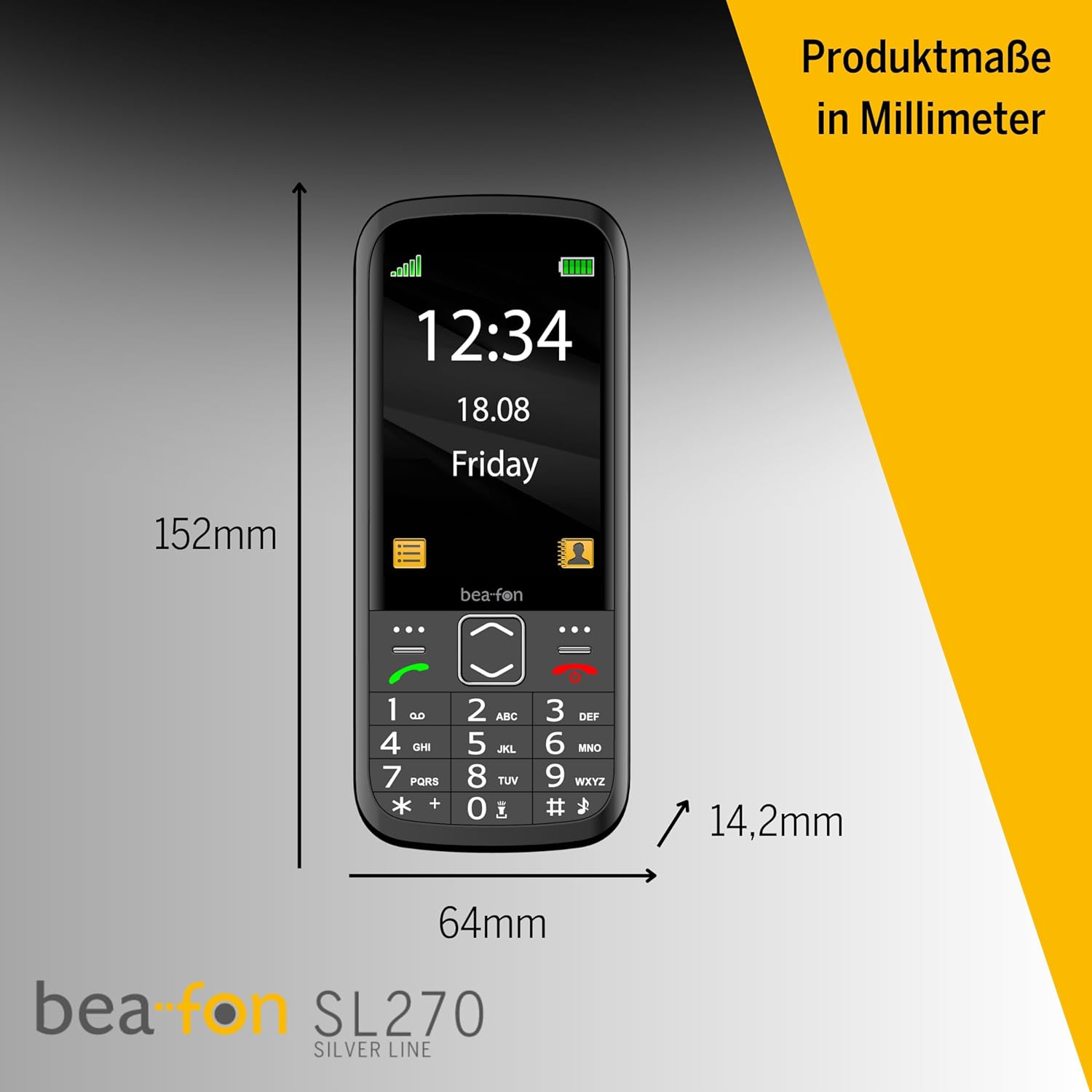
Figure 6: Product dimensions of the Beafon SL270 in millimeters.
7. تضمین او ملاتړ
7.1 د تضمین معلومات
For detailed warranty information, please refer to the warranty card included with your product or visit the official Beafon webسایټ. تضمین معمولا د پیرود نیټې څخه د یوې ټاکلې مودې لپاره د تولید نیمګړتیاوې پوښي.
7.2 د پیرودونکي ملاتړ
If you require further assistance, have questions not covered in this manual, or need technical support, please contact Beafon customer service. Contact details can usually be found on the official Beafon webپه سایټ یا د محصول په بسته بندۍ کې.
- آنلاین ملاتړ: Visit the official Beafon webد FAQs، ملاتړي مقالو، او اړیکو فورمو لپاره سایټ.
- د تلیفون ملاتړ: Check the Beafon webد سیمه ایزو پیرودونکو خدماتو د تلیفون شمیرو لپاره سایټ.


