1. پیژندنه
This manual provides essential instructions for the safe and efficient operation of your eKids Disney Wish Karaoke Machine, Model WH-555. Please read this manual thoroughly before using the device and retain it for future reference.

انځور 1.1: مخکی view of the eKids Disney Wish Karaoke Machine with its wired microphone.
2. د خوندیتوب معلومات
د خوندي عملیاتو ډاډ ترلاسه کولو لپاره ، مهرباني وکړئ لاندې احتیاطي تدابیر ونیسئ:
- Do not expose the unit to extreme temperatures, direct sunlight, or moisture.
- یونټ په اوبو یا نورو مایعونو کې مه ډوب کوئ.
- د چارج کولو لپاره یوازې چمتو شوي USB کیبل وکاروئ.
- واحد د تودوخې سرچینو لکه ریډیټرونو، د تودوخې راجسترونو، بخاریو، یا نورو وسایلو څخه لرې وساتئ (په شمول د ampلایفیر) چې تودوخه تولیدوي.
- د واحد د جلا کولو یا ترمیم کولو هڅه مه کوئ. ټول خدمتونه وړ خدماتو پرسونل ته راجع کړئ.
- دا محصول د لویانو تر څارنې لاندې د ماشومانو لخوا د کارولو لپاره دی.
3. د بسته محتويات
ډاډ ترلاسه کړئ چې ټول توکي په کڅوړه کې شتون لري:
- eKids Disney Wish Karaoke Machine (Model WH-555)
- واړه مایکروفون
- د USB چارج کیبل
4. محصول ختم شوview
Familiarize yourself with the various parts and controls of your karaoke machine.
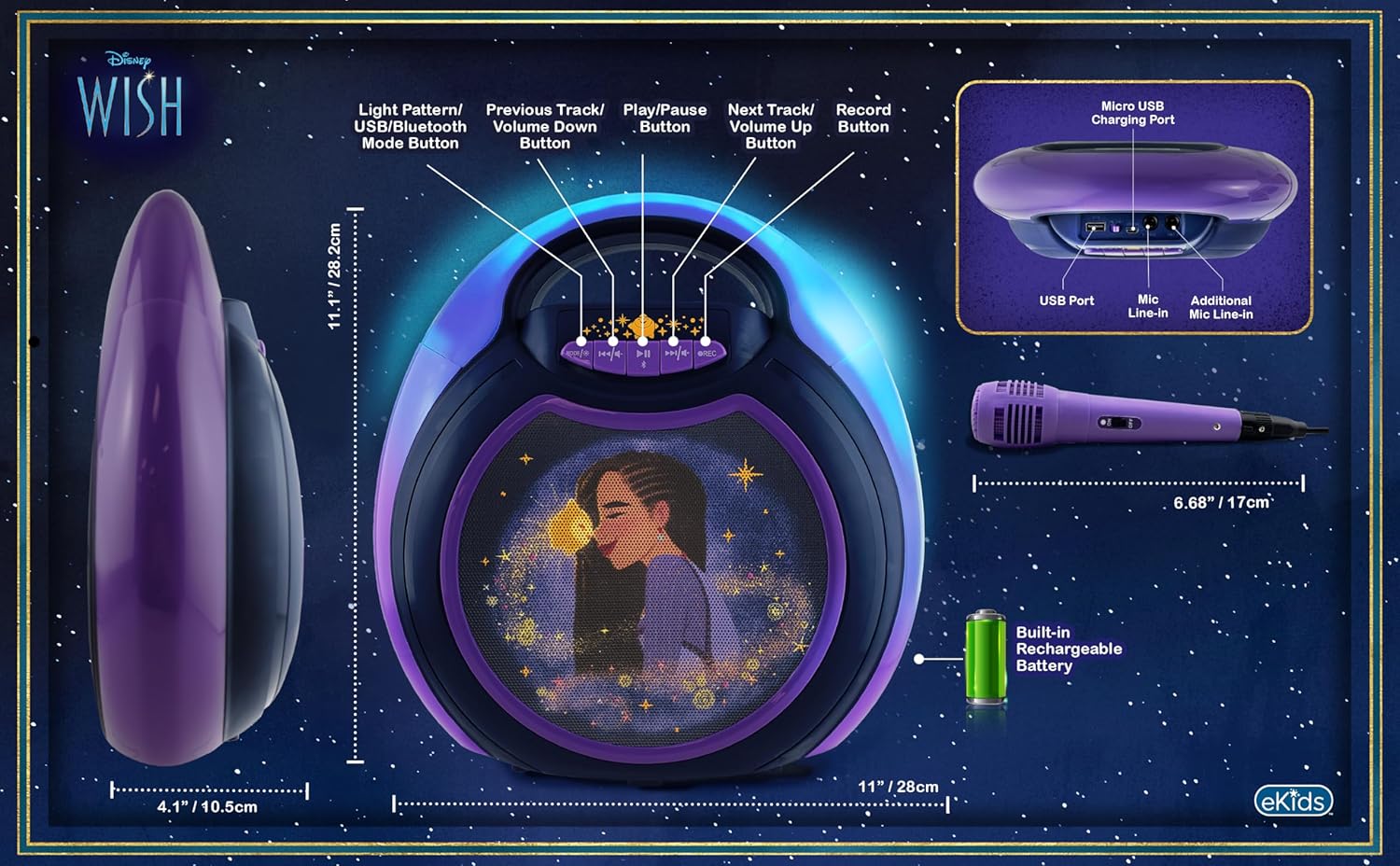
Image 4.1: Diagram of the eKids Disney Wish Karaoke Machine's controls, ports, and dimensions.
کنټرولونه او بندرونه:
- MODE / # Button: Switches between input modes (Bluetooth, USB) and adjusts light patterns.
- مخکینی ټریک / د غږ کمولو تڼۍ: Navigates to the previous track or decreases volume.
- چلول / وقف تtonۍ: آډیو غږوي یا بندوي.
- راتلونکی ټریک / د حجم لوړولو تڼۍ: Navigates to the next track or increases volume.
- د REC تtonۍ: Initiates recording (requires USB flash drive).
- د مایکرو USB چارج کولو بندر: د داخلي بیټرۍ چارج کولو لپاره.
- USB پورټ: For connecting a USB flash drive for recording or playback.
- Mic Line-in: Primary port for the included wired microphone.
- Additional Mic Line-in: For connecting a second microphone (not included) for duets.
5. ترتیب کول
5.1 د واحد چارج کول
Before first use, fully charge the karaoke machine. Connect the provided USB charging cable to the Micro USB Charging Port on the unit and to a standard USB power adapter (not included) or a computer's USB port. The charging indicator will illuminate during charging and turn off when fully charged.
۴.۱ د مایکروفون نښلول
Plug the wired microphone's connector into the 'Mic Line-in' port on the karaoke machine. For duet performances, an additional microphone (not included) can be connected to the 'Additional Mic Line-in' port.

انځور ۵.۱: اړخ view of the karaoke machine with the wired microphone connected.
6. عملیاتي لارښوونې
6.1 بریښنا کول / بندول
فشار ورکړئ او ونیسئ MODE / # د واحد د فعالولو یا بندولو لپاره تڼۍ.
6.2 د بلوتوټ جوړه کول
When the unit is powered on, it will automatically enter Bluetooth pairing mode. The indicator light will flash. On your compatible device (smartphone, tablet, etc.), enable Bluetooth and select "eKids Wish Karaoke" from the list of available devices. A confirmation tone will sound when pairing is successful.

Image 6.1: Bluetooth compatibility with various devices.
6.3 غږول غږول
Once paired via Bluetooth, start playing music from your connected device. Use the لوبه / وقفه, مخکینی لار / حجم ښکته، او بله لاره / حجم پورته buttons on the karaoke machine to control playback.
۳.۳ د مایکروفون کارول
Ensure the microphone is connected to the 'Mic Line-in' port. Adjust the microphone's volume using the dedicated switch on the microphone itself. Sing into the microphone while music plays from the speaker.
6.5 Recording Performances
To record your singing, insert a USB flash drive (not included) into the USB Port. Press the REC button to start recording. Press it again to stop recording. Recordings will be saved to the USB flash drive. Refer to the Product Overview (Image 4.1) for the location of the USB port.
6.6 Light Show Modes
فشار ورکړئ MODE / # button repeatedly to cycle through different color-changing LED light show patterns.
6.7 د حجم کنټرول
Adjust the main speaker volume using the مخکینی لار / حجم ښکته او بله لاره / حجم پورته buttons. The microphone has its own volume control switch.
7. ساتنه
7.1 پاکول
واحد د نرم او وچ ټوکر سره پاک کړئ. مایع پاکوونکي یا د کثافاتو موادو څخه کار مه اخلئ.
7.2 ذخیره کول
کله چې په کارولو کې نه وي، نو دا واحد په یخ او وچ ځای کې وساتئ، د مستقیم لمر وړانګو او سختې تودوخې څخه لرې.
8. ستونزه حل کول
- ځواک نشته: Ensure the unit is charged. Connect the USB charging cable and allow it to charge for a period.
- غږ نشته: Check that the volume on both the karaoke machine and the connected Bluetooth device is turned up. Ensure the microphone is properly connected and its switch is on.
- بلوتوث نه نښلي: Make sure Bluetooth is enabled on your device and the karaoke machine is in pairing mode. Try unpairing and re-pairing the device. Ensure no other devices are currently connected to the karaoke machine.
- ثبت کار نه کوي: Verify that a compatible USB flash drive is inserted into the USB port and has sufficient free space.
9. مشخصات
| د ماډل شمیره | WH-555 |
| ابعاد | 11.07 x 4.14 x 11.11 انچه |
| وزن | ۲.۴۵ پونډه |
| د بریښنا سرچینه | د بیټرۍ چلول (د چارج وړ) |
| والیtage | 3 ولټه |
| ارتباط | بلوتوث، USB |
| د سپیکر شمیره | 1 |
| ځانګړي ځانګړتیاوې | Light Up Speaker, Recording Function |
10. تضمین او ملاتړ
د تضمین معلوماتو او د پیرودونکو ملاتړ لپاره، مهرباني وکړئ هغه اسناد وګورئ چې ستاسو د پیرود سره شامل دي یا رسمي eKids ته مراجعه وکړئ. webسایټ. د تضمین ادعاوو لپاره د پیرود ثبوت وساتئ.


