1. پیژندنه
This manual provides detailed instructions for the setup, operation, and customization of your BIGBIG WON Rainbow 2 SE Wireless Controller. This multi-platform controller is compatible with Nintendo Switch, Windows 10 & 11 PCs, Android 7.0+ devices, and iOS 14.0+ devices. Please read this manual thoroughly to ensure proper use and to maximize your gaming experience.

انځور 1.1: مخکی view of the BIGBIG WON Rainbow 2 SE Wireless Controller.
2. د بسته محتويات
ډاډ ترلاسه کړئ چې لاندې ټول توکي ستاسو په بسته کې شامل دي:
- 1 x BIGBIG WON Rainbow 2 SE Gamepad
- 3 pairs of interchangeable joysticks (short, middle, high)
- 1 x 4-way D-pad
- 1 x 8-way D-pad
- ۱ x ۲.۴ جي USB ډونګل
- 1 x د ډول-C کیبل
- 1 x د کارونکي لارښود

Image 2.1: All components included in the BIGBIG WON Rainbow 2 SE package.
3. محصول ختم شوview
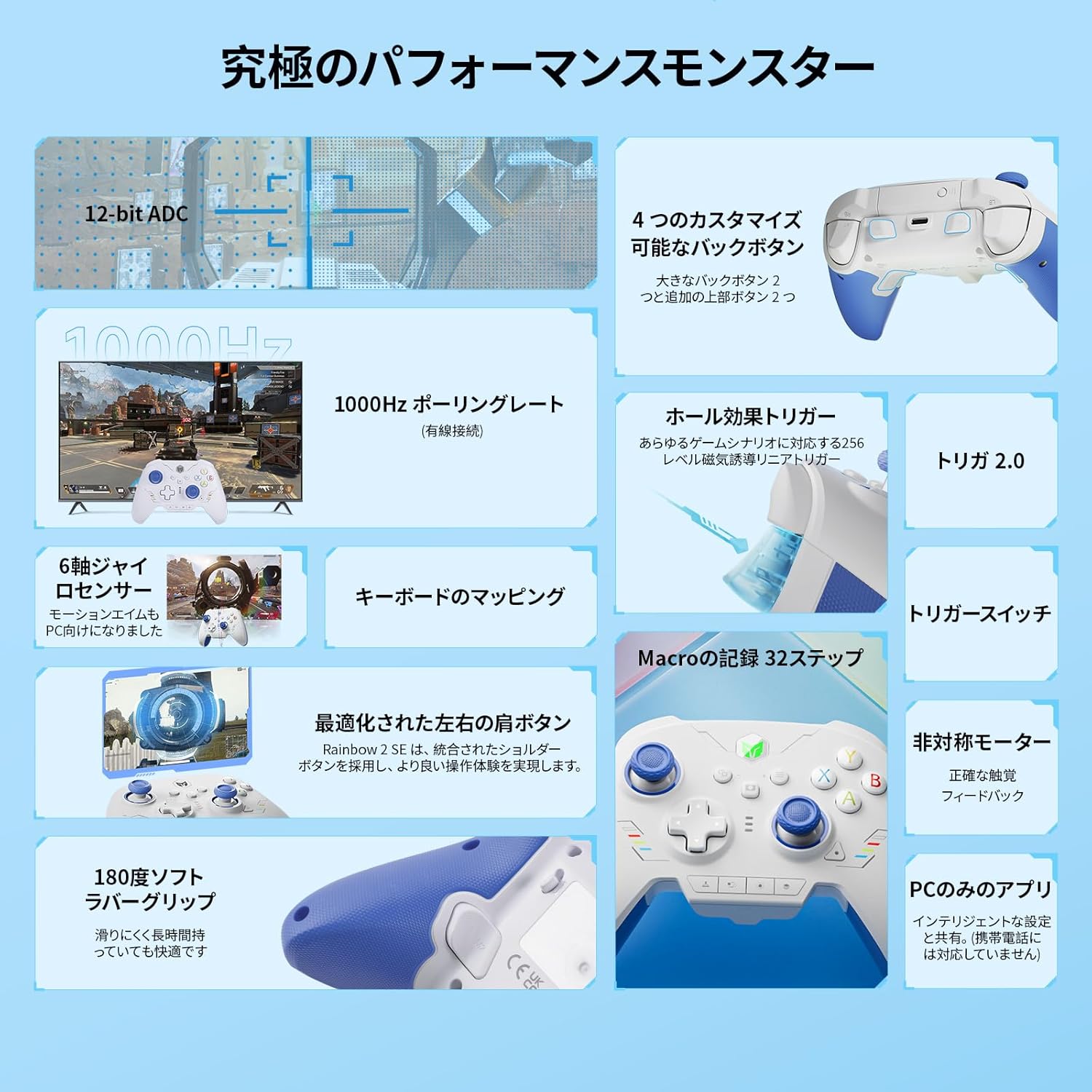
The Rainbow 2 SE controller features a robust design with various customizable elements to enhance your gaming experience. It includes Hall-effect triggers, 12-bit ADC joysticks, and multiple connectivity options.
3.1 کلیدي ځانګړتیاوې
- د څو پلیټ فارم مطابقت: Supports Switch, Windows 10/11, Android 7.0+, iOS 14.0+.
- څو اړخیز ارتباط: 2.4G wireless, Bluetooth, and wired USB connections.
- Advanced Motion Control: BIGBIG WON's GYROCON+ Tech for PC motion control.
- Precision Triggers: 256-level Hall-effect triggers with trigger-stop switches.
- د اصلاح وړ تڼۍ: 2 back buttons and 2 top additional buttons for Macro, Turbo, and Remapping.
- High-Resolution Joysticks: 12-bit ADC joysticks with 2000 levels axis resolution and 0 deadzone.
- د تبادلې وړ اجزا: 3 sets of joysticks and 4-way & 8-way D-pads.
- PC Application: Dedicated PC App for advanced customization (not supported on mobile).
- دوه ګونی موټرو وایبریشن: 255-level adjustable vibration feedback.
- Keyboard Mapping: Supports keyboard mapping for advanced in-game skills.

انځور 3.1: اوورview of the controller's multi-platform compatibility and key features.
3.2 د کنټرولر ترتیب
The controller's layout is familiar to standard gamepads, with additional customizable buttons and features.
انځور 3.2: مخکی view of the controller highlighting its buttons and analog sticks.
۵.۴ د محصول رسمي ویډیو
ویډیو ۱: یو رسمي اوورview of the BIGBIG WON Rainbow 2 SE Wireless Gaming Controller, showcasinد هغې ډیزاین او ځانګړتیاوې.
۴. تنظیم او پیوستون
د بریښنا پيوستون
- Connect the Type-C cable to the controller's USB-C port.
- Plug the other end of the Type-C cable into your PC or compatible device.
- The controller will automatically be recognized. The wired polling rate is 1000Hz.
۳.۲.۱ ۲.۴ جي بېسیم اتصال
- Insert the 2.4G USB dongle into an available USB port on your PC or compatible device.
- Press the HOME button on the controller to power it on. The controller will automatically connect to the dongle.
- The 2.4G wireless polling rate is 125Hz. The wireless range is approximately 30 feet.
4.3 د بلوتوث اتصال
- د کنټرولر د فعالولو لپاره د کور تڼۍ کېکاږئ.
- On your device (Switch, Android, iOS), navigate to Bluetooth settings and search for available devices.
- Select "BIGBIG WON Rainbow 2 SE" from the list to pair.
- The Bluetooth wireless polling rate is 125Hz.
4.4 Platform Switching
The controller supports both X-input (for PC/Android) and Switch modes. The default mode is X-input.
- After connecting to a device, you may need to switch to the corresponding mode for normal operation. Refer to your device's settings for specific instructions.
- د بدلولو لپاره: After connecting, enable "Settings - Controllers and Sensors - Pro Controller Wired Connection" on your Nintendo Switch.
- For Steam: It is recommended to block Steam output to protect the controller's original input.
5. Customization & Advanced Features
5.1 PC Application
The BIGBIG WON PC App allows for extensive customization of your controller. This application is supported on PC only and is not available for mobile devices.
- Adjust motion control sensitivity.
- Configure joystick and trigger dead zones and sensitivity.
- Program Macros.
- تڼۍ بیا نقشه کړئ.

Image 5.1: The PC application interface for customizing controller settings.
۵.۲ د اصلاح وړ تڼۍ
The controller features 2 back buttons and 2 top additional buttons that can be programmed for Macro, Turbo, or Remapping functions.
- میکرو: Record up to 32 steps for complex command sequences.
- توربو: Enable rapid-fire functionality for specific buttons.
- بیا جوړونه: Assign any button's function to another customizable button.

Image 5.2: Diagram illustrating the location and functionality of the customizable back and top buttons.
۳.۶ د حرکت کنټرول
Leverage BIGBIG WON's 3rd generation GYROCON+ Tech for motion control on PC. Native motion control is supported on Switch.

Image 5.3: Visual representation of motion control functionality with the controller.
5.4 Hall-Effect Triggers & Trigger Stops
The 256-level Hall-effect triggers provide precise control. Utilize the trigger-stop switches for different gaming scenarios:
- Short Pull: Ideal for shooting games (e.g., APEX) for quick response.
- Long Pull: Suitable for racing games (e.g., Forza Horizon 5) for analog control.

انځور 5.4: شاته view of the controller showing the trigger-stop switches and their application.
5.5 Joystick & D-pad Customization
The controller comes with 3 pairs of interchangeable joysticks (short, middle, high) and both 4-way and 8-way D-pads to suit various game genres and personal preferences.
- Short Joystick: For faster input, suitable for fighting games.
- Middle Joystick: Standard for general gaming.
- High Joystick: For increased precision, ideal for FPS games.
- 4-way D-pad: Standard for most games.
- 8-way D-pad: Specifically designed for fighting games (FTG).

Image 5.5: Illustration of the different joystick heights and D-pad types.
5.6 د وایبریشن ترتیبات
Adjust the dual motor vibration intensity to your preference. The controller offers 255 levels of vibration feedback.
5.7 Keyboard Mapping
The Rainbow 2 SE supports keyboard mapping, allowing you to assign keyboard functions to controller buttons for executing advanced in-game skills through simple settings in the PC App.

Image 5.6: Controller shown alongside a keyboard, illustrating keyboard mapping capabilities.
6. ساتنه او پاملرنه
- کنټرولر د نرم او وچ ټوکر سره پاک وساتئ. د کثافاتو پاکوونکو یا محلولونو څخه ډډه وکړئ.
- کنټرولر په یخ او وچ ځای کې د مستقیم لمر وړانګو او سختې تودوخې څخه لرې وساتئ.
- د کنټرولر له غورځولو یا د قوي اغیزو سره مخ کیدو څخه ډډه وکړئ.
- If the glossy plastic surfaces accumulate fingerprints, gently wipe them with a microfiber cloth.
7. ستونزه حل کول
- کنټرولر نه نښلي: Ensure the controller is powered on and fully charged. Verify the 2.4G dongle is properly inserted or Bluetooth is enabled and paired. Check platform mode settings.
- Input lag/delays: Ensure the 2.4G dongle is not obstructed and is plugged into an easily accessible port (preferably at the back of a PC to avoid accidental bumps). For wired connection, ensure the cable is securely connected.
- د جوی سټیک څرخېدل: The controller features BIGBIG WON adaptive calibration to reduce drift. If drift persists, use the PC App for recalibration.
- Controller unresponsive: Press and hold the HOME button for 10 seconds until the controller vibrates to perform a reset.
- PC App not working: Ensure you are using the PC App on a Windows PC, as it is not supported on mobile devices.
8. مشخصات
| فیچر | مشخصات |
|---|---|
| برانډ | BIGBIG WON (Black Shark) |
| د ماډل نوم | BIGBIG WON-Rainbow 2 SE |
| مطابقت | PC (Windows 10&11), Switch, Android 7.0+, iOS 14.0+ |
| ارتباط | ۲.۴ جي بېسیم، بلوتوث، وایرډ (USB ډول-سي) |
| د تار له لارې د رای ورکولو کچه | 1000Hz |
| د بې سیم رای ورکولو نرخ | 125Hz (2.4G & Bluetooth) |
| د بیسیم رینج | تر 30 فوټو پورې |
| د بیټرۍ ژوند | تر 8 ساعتونو پورې |
| د چارج وخت | نږدې 2.5 ساعته |
| جویسټکس | 12-bit ADC, 0 Deadzone, 3 interchangeable sets |
| محرکونه | 256-level Hall-effect, Trigger-stop switches |
| ډي پیډونه | Interchangeable 4-way & 8-way |
| وایبریشن | Dual Motor, 255-level adjustable |
| د حرکت کنټرول | GYROCON+ Tech (PC), Native (Switch) |
| PC App Support | Yes (PC only, not mobile) |
| د توکي وزن | 2.12 اونس |
| د محصول ابعاد | 5.91 x 3.94 x 1.57 انچه |
9. تضمین او ملاتړ
BIGBIG WON offers a 30-day free replacement or full refund, along with lifetime before-sale and after-sale service for all your queries.
For further assistance, support, or community engagement, please visit the official BIGBIG WON Discord server:


