پیژندنه
This manual provides detailed instructions for the installation, operation, and maintenance of your KiriNavi Qualcomm Android 11 Car Radio. Please read this manual thoroughly before using the product to ensure proper functionality and safety.
This head unit is designed as a stereo replacement for Ford Expedition Limited models from 2018 to 2023, specifically compatible with the SYNC3 system. It features a 14.4-inch display, built-in Wireless Carplay, and Wired Android Auto, powered by a Qualcomm Octa-Core CPU with 8GB RAM and 128GB ROM for high performance and stability.
د بسته محتويات
ډاډ ترلاسه کړئ چې ټولې برخې په بسته کې شتون لري:
- KiriNavi Car Radio Head Unit (14.4 Inch)
- د بریښنا کیبلونه
- د کارونکي لارښود (دا لاسوند)
- Additional necessary installation accessories (if applicable, not specified in input)
تنظیم او نصب کول
The KiriNavi Car Radio is designed for factory OEM fit, requiring no modification for installation in compatible Ford Expedition models (2018-2023) with SYNC3. Professional installation is recommended.
د نصب کولو دمخه چک لیست:
- د نصبولو پیل کولو دمخه ډاډ ترلاسه کړئ چې د موټر سوځول بند دي او بیټرۍ منقطع شوې ده.
- Gather all necessary tools (e.g., trim removal tools, screwdrivers, wire strippers).
- Familiarize yourself with the vehicle's existing dashboard layout and wiring.
د نصبولو مرحلې:
- Carefully remove the existing head unit and dashboard trim. Refer to your vehicle's service manual for specific instructions.
- Connect the provided power cables and other necessary wiring harnesses to the new KiriNavi head unit. Ensure all connections are secure.
- Integrate the new head unit with the vehicle's existing systems. This unit is designed to retain original features such as Sirius XM radio, Microsoft SYNC System, Heated Steering Wheel Control, Massage Seat Control, Physical Climate Control, 360 Cameras and Reverse Camera, Sound System, and Steering Wheel Control.
- Carefully mount the new 14.4-inch display into the dashboard opening.
- Reconnect the vehicle's battery and test the unit's functionality before fully reassembling the dashboard.
- د ډشبورډ ټرم بیا سره یوځای کړئ.

شکل 1: Comparison showing the vehicle's dashboard before and after the installation of the KiriNavi 14.4-inch head unit. The new unit seamlessly integrates into the existing console, replacing the original display and controls.
عملیاتي لارښوونې
بنسټیز عملیات:
The unit operates on Android 11, providing a familiar smartphone-like interface. Navigate using the 14.4-inch QHD 2K 2560 x 1440 IPS Touch Screen.
ارتباط:
- Wireless CarPlay & Wired Android Auto: Connect your compatible smartphone for seamless integration of navigation, music, and communication apps.
- بلوتوث 5.0: Pair your phone for hands-free calling and audio streaming. The Bluetooth connection is designed for stability.
- Wi-Fi & 4G Network: Connect to a Wi-Fi hotspot or insert a 4G SIM card (if supported by the specific model) to access online content, navigation, and app downloads (e.g., YouTube, Netflix, Facebook).

شکل 2: The KiriNavi head unit displaying the user interface for Wireless CarPlay and Android Auto, demonstrating voice command integration for tasks like playing music or finding a restaurant.

شکل 3: The KiriNavi head unit's screen showing the Bluetooth phone interface for making calls and a separate image illustrating internet browsing via Wi-Fi, with various app icons.
نیویگیشن:
The unit features built-in GPS + GLONASS for high-precision navigation. It supports both online and offline maps, including popular applications like Apple Maps, Google Maps, and Waze. Ensure the GPS antenna is properly installed for optimal signal reception.
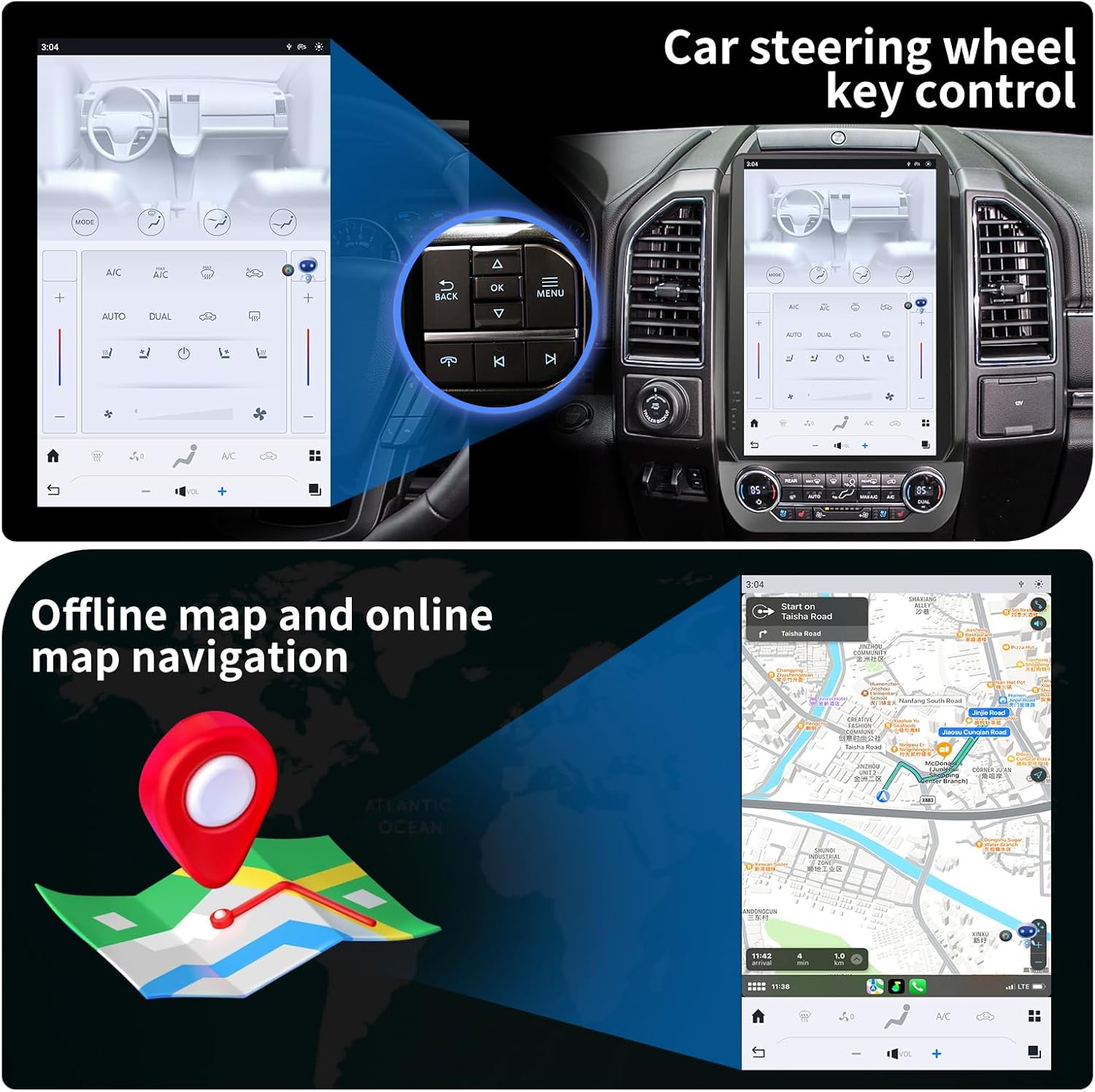
شکل 4: The KiriNavi head unit showing a navigation map on the screen, alongside an inset image highlighting the vehicle's steering wheel controls, which can be configured to operate the head unit.
ملټي میډیا پلے بیک:
Enjoy music and videos via USB, AUX IN, or streaming services. The unit supports various audio and video formats. You can save your favorite FM radio stations for easy access.
د سټیرینګ ویل کنټرول:
The unit supports learning original steering wheel buttons, allowing for convenient remote control of functions such as volume, track changes, and hands-free calling.
د سپیټ سکرین فعالیت:
The 14.4-inch display supports split-screen mode, enabling you to run two applications simultaneously, such as navigation and video playback.

شکل 5: The KiriNavi head unit demonstrating its split-screen capability, showing a navigation map on one side and a video playing on the other, allowing for simultaneous use of two applications.
ساتنه
- پاکول: د سکرین او بهرنۍ برخې پاکولو لپاره نرم، وچ ټوکر وکاروئ. د کثافاتو پاکوونکو یا محلولونو څخه ډډه وکړئ.
- د سافټویر تازه معلومات: Periodically check for software updates to ensure optimal performance and access to new features. Updates can typically be performed via Wi-Fi.
- د چاپیریال شرایط: د واحد د سختې تودوخې، د اوږدې مودې لپاره د مستقیم لمر وړانګو، یا ډیر رطوبت سره د مخ کیدو څخه ډډه وکړئ.
د ستونزو حل کول
| ستونزه | احتمالي لامل | د حل لاره |
|---|---|---|
| واحد فعال نه دی. | د برېښنا اتصال خراب شوی؛ فیوز چاودېدلی؛ د موټر د بیټرۍ ستونزه. | د برېښنا د کیبل ټولې اتصالونه وګورئ. د موټر فیوزونه وګورئ. ډاډ ترلاسه کړئ چې د موټر بیټرۍ چارج شوې ده. |
| غږ نشته. | غږ ډېر ټیټ دی؛ خاموش فعال شوی دی؛ د سپیکر د تارونو ستونزه؛ د غږ ناسمه سرچینه. | Increase volume. Check if mute is active. Verify speaker connections. Select correct audio input. |
| د GPS سیګنال کمزوری یا ناسم دی. | GPS antenna not properly installed or obstructed; Poor satellite reception area. | ډاډ ترلاسه کړئ چې د GPS انتن په خوندي ډول وصل دی او روښانه دی view of the sky. Move to an open area. |
| د بلوتوث اتصال ستونزې. | Device not in pairing mode; Interference; Out of range. | Ensure Bluetooth is enabled on both devices and in pairing mode. Reduce distance between devices. Restart both devices. |
| د ټچ سکرین بې ځوابه. | د سافټویر خرابوالی؛ د سکرین زیان. | نرم ری سیٹ ترسره کړئ (د ری سیٹ اختیار لپاره د وسیلې ترتیباتو ته مراجعه وکړئ). که ستونزه دوام ومومي، د ملاتړ سره اړیکه ونیسئ. |
مشخصات
| فیچر | تفصیل |
|---|---|
| د ماډل نوم | For Ford Expedition Interceptor 2018-2023 |
| عملیاتي سیسټم | Android 11 |
| CPU | Qualcomm Octa Core |
| RAM | 8GB |
| ROM | 128GB |
| د ښودلو اندازه | ۷۸۷ انچه |
| د ښودلو ریزولوشن | QHD 2K 2560 x 1440 IPS Touch Screen |
| ارتباط | Bluetooth 5.0, Wi-Fi, 4G LTE (SIM card support), USB |
| نیویګیشن | GPS + GLONASS, Supports Apple Maps, Google Maps, Waze |
| د موټر ادغام | Wireless CarPlay, Wired Android Auto, Retains SYNC3, Sirius XM, Heated Steering Wheel, Massage Seat, Climate Control, 360/Reverse Cameras, Sound System, Steering Wheel Control |
| شاملې برخې | Car Radio Head Unit, Power Cables |
| د توکي وزن | ۲.۴۵ پونډه |
| د کڅوړې ابعاد | 17.87 x 12.56 x 7.87 انچه |
د تضمین معلومات
This KiriNavi Car Radio comes with a ۱-کلن تضمین from the date of purchase. This warranty covers manufacturing defects and malfunctions under normal use. It does not cover damage caused by improper installation, accident, misuse, abuse, neglect, or unauthorized modification.
مهرباني وکړئ د تضمین ادعاګانو لپاره د پیرود ثبوت وساتئ.
د پیرودونکي ملاتړ
For technical assistance, troubleshooting, or warranty inquiries, please contact KiriNavi customer support. Refer to the contact information provided with your product packaging or visit the official KiriNavi webسایټ
When contacting support, please have your product model number (For Ford Expedition Interceptor 2018-2023) and purchase details ready.


