1. محصول ختم شوview
The MONOKEI Standard Keyboard is a mechanical keyboard designed for a versatile typing experience. It features a durable construction, hot-swappable switches, and multiple connectivity options.
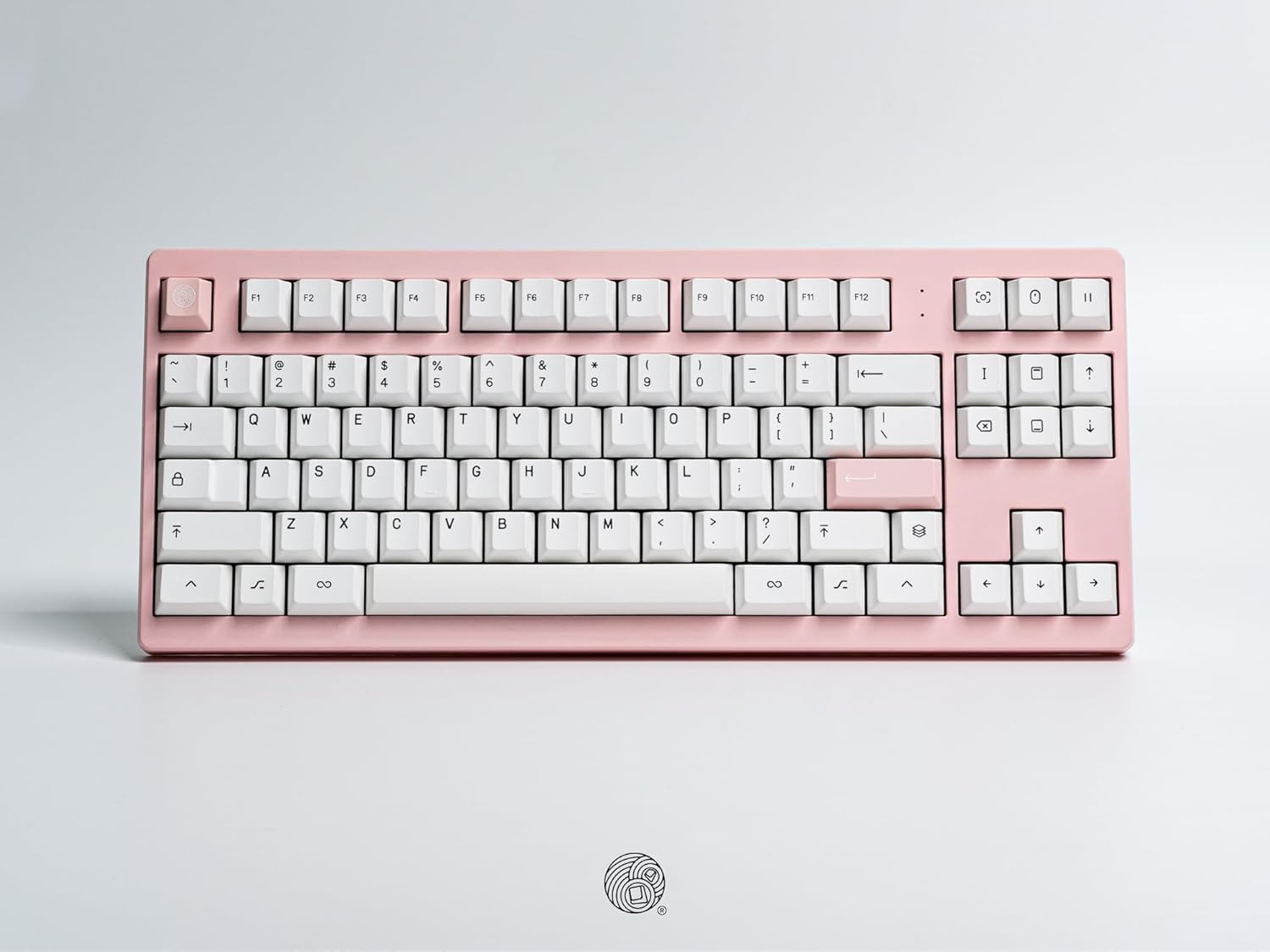
یو سر view of the MONOKEI Standard Keyboard, showcasing its full layout in a blush pink casing with white PBT keycaps. The keyboard features a standard 87-key layout, including function keys, arrow keys, and a navigation cluster.
2. ترتیب کول
۳.۱ د بکس خلاصول او محتوا
Carefully remove the keyboard and accessories from the packaging. The box should contain:
- MONOKEI Standard Keyboard
- USB-C کیبل
- کیکیپ پلر
۳.۱ لومړنۍ اړیکه
The MONOKEI Standard Keyboard supports both wired and wireless (Bluetooth) connectivity.
د تار نښلول:
- ورکړل شوی USB-C کیبل په کیبورډ کې پورټ سره وصل کړئ.
- د USB-C کیبل بل پای ستاسو په کمپیوټر کې موجود USB پورټ سره وصل کړئ.
- کیبورډ به ستاسو د عملیاتي سیسټم لخوا په اتوماتيک ډول وپیژندل شي.
بې سیم (بلوتوث) پیوستون:
- Ensure the keyboard is charged or connected via USB-C for initial setup.
- Turn on the keyboard's Bluetooth mode (refer to the Operating section for specific key combinations).
- On your device (PC, laptop, smartphone, tablet), navigate to Bluetooth settings.
- لټون available devices and select 'MONOKEI Standard' to pair.
- د جوړه کولو پروسې بشپړولو لپاره هر ډول د پردې پرامپټس تعقیب کړئ.
2.3 چارج کول
Connect the USB-C cable to the keyboard and a power source (e.g., computer USB port, wall adapter). The keyboard can operate for up to 30 days on a full charge in wireless mode.
3. عملیاتي لارښوونې
۵.۱ اساسي کلیدي دندې
The MONOKEI Standard Keyboard features a standard 87-key layout. All alphanumeric keys, symbols, and basic modifiers (Shift, Ctrl, Alt, Fn) function as expected.
3.2 Special Function Keys
The F1-F12 keys may have secondary functions when pressed in combination with the 'Fn' key. Refer to the keycap legends for specific media controls or system functions.
3.3 Operating System Mode Switching
The keyboard may default to a specific operating system layout (e.g., Mac). To switch between operating system modes (e.g., Windows/Mac), use the designated hotkey combination. Consult the included quick start guide for the specific key sequence.
۴.۴ د جوړو وسیلو ترمنځ بدلول
If multiple devices are paired via Bluetooth, use the designated function keys (often Fn + 1, 2, or 3) to switch between them quickly.
4. ساتنه
۷.۲ د کیبورډ پاکول
To clean the keyboard, power it off and disconnect it from your device. Use a soft, lint-free cloth lightly dampد اوبو یا نرم پاکولو محلول سره مینځل. په مستقیم ډول په کیبورډ باندې د مایعاتو سپری کولو څخه ډډه وکړئ. د کی کیپونو ترمنځ د پاکولو لپاره، د فشار شوي هوا یا کوچني برش څخه کار واخلئ.
۶.۲ د کیلي کیپ او سویچ بدلول
The MONOKEI Standard Keyboard features hot-swappable sockets, allowing for easy replacement of switches without soldering. To replace keycaps or switches:
- د ورکړل شوي کیلي کیپ پلر په کارولو سره په نرمۍ سره کیلي کیپ لرې کړئ.
- Once the keycap is removed, use a switch puller (not included, but often bundled with replacement switches) to carefully extract the switch from its socket.
- د نوي سویچ پنونه د PCB سوري سره سم کړئ او په کلکه فشار ورکړئ تر هغه چې دا په خپل ځای کې راشي.
- Place the desired keycap onto the new switch stem.
یادونه: Opening the keyboard casing may void the warranty. Exercise caution if considering internal modifications.
5. ستونزه حل کول
۵.۳ د اتصال مسلې
- کیبورډ د بلوتوث له لارې نه نښلي: Ensure Bluetooth is enabled on both the keyboard and your device. Try unpairing and re-pairing the keyboard. Ensure the keyboard is sufficiently charged.
- Wired connection not recognized: Try a different USB port or cable. Ensure the cable is fully inserted into both the keyboard and the computer.
۸.۴ کیلي ځواب نه ورکوي
- انفرادي کیلي: If a single key is not responding, the switch may be faulty or improperly seated. Try removing the keycap and switch, then re-inserting the switch firmly. If the issue persists, consider replacing the switch.
- Multiple keys: Ensure the keyboard is properly connected (wired or wireless). Restart your computer or device. If using wireless, check battery level.
5.3 د چارج کولو مسلې
- Ensure the USB-C cable is securely connected to both the keyboard and a working power source.
- یو بل USB-C کیبل یا د بریښنا اډاپټر هڅه وکړئ.
6. مشخصات
| فیچر | تفصیل |
|---|---|
| د محصول ابعاد | ۱.۷۲ x ۶.۳ x ۴.۷۶ انچه (۶.۳" لیتر x ۱.۷۲" واټ x ۴.۷۶" هات) |
| د توکي وزن | ۲.۴۵ پونډه |
| مواد | Polybutylene Terephthalate (PBT Keycaps) |
| د ارتباط ټیکنالوژي | بلوتوټ ، USB-C |
| ځانګړي ځانګړتیاوې | Hot-Swappable, Long-lasting PBT keycaps, Wired, Wireless |
| شاملې برخې | Keycap Puller, USB Cable |
| مطابقت لرونکې وسیلې | لپ ټاپ، کمپیوټر، سمارټ فون، ټابلیټ |
7. تضمین او ملاتړ
7.1 د تضمین معلومات
MONOKEI products are manufactured to high-quality standards. For specific warranty terms and conditions, please refer to the warranty card included with your product or visit the official MONOKEI webسایټ. د تضمین ادعاوو لپاره د پیرود ثبوت وساتئ.
7.2 د پیرودونکي ملاتړ
If you encounter any issues or have questions not covered in this manual, please contact MONOKEI customer support. You can find more information and contact details on the official MONOKEI store page:

