پیژندنه
This manual provides essential information for the safe and efficient operation, installation, and maintenance of your BYECOLD Smart Bathroom Mirror. Please read these instructions thoroughly before installation and use, and retain them for future reference.

Image: The BYECOLD Smart Bathroom Mirror showcasing its illuminated frame and integrated smart display.
د خوندیتوب معلومات
احتیاط:
- Although designed to minimize breakage hazards, do not use excessive force to break the glass.
- Keep the mirror away from direct contact with water to maintain its waterproof functionality.
- The anti-fog feature helps prevent slipping hazards by keeping the mirror clear.
- که چیرې د بریښنا تارونه وي، نو د وړ مسلکي لخوا د بریښنا مناسب نصب کول ډاډمن کړئ.
ترتیب او نصب کول
د نصبولو اختیارونه
The mirror supports both plug-in and hardwire installation methods. For hardwiring, it is recommended to consult a professional electrician.

Image: Illustration of plug-in and hardwire installation options for the mirror.
ابتدايي پاور آن
After successful installation, connect the mirror to a power source. The mirror will typically power on automatically or can be activated via the touch sensor.
عملیاتي لارښوونې
ټچ کنټرولونه
The mirror features smart touch sensors for various functions. These are typically located on the mirror surface.

انځور: تفصیلي view of the touch sensor icons on the mirror surface.
- د رڼا کنټرول:
- یو کلیک: د LED څراغ فعال/بند کړئ.
- دوه ځله کلیک: Switch between 3 color temperatures (3000K warm, 4500K natural, 6000K white light).
- اوږد پریس: Adjust brightness from 10% to 100%. The mirror includes a memory function to recall your last brightness setting.

Image: The mirror demonstrating its three adjustable color temperatures.

Image: The mirror illustrating its dimmable brightness feature.
- د پاکولو دنده:
- اوږد پریس: Activate the defogging function.
- The defogger will automatically shut down after two hours of operation.
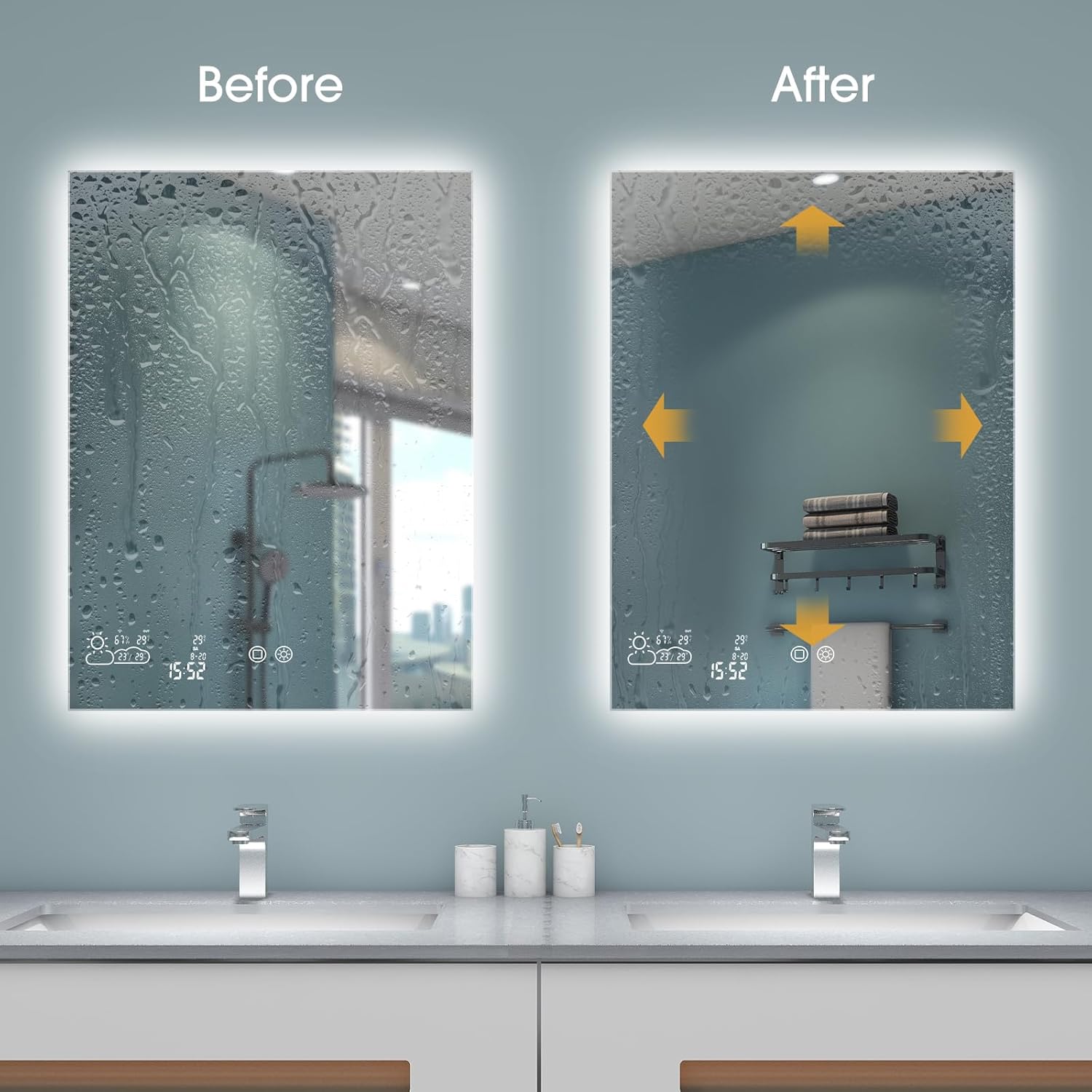
Image: A visual comparison showing the effectiveness of the mirror's defogging feature.
- Weather Display Control:
- دوه ځله کلیک: Turn the weather display on/off.
ارتباط
- بلوتوث
- Power on the mirror.
- Turn on Bluetooth on your phone and search for the speaker named "XM-518" or similar.
- Select and connect to the device.

Image: Visual guide for connecting a mobile device to the mirror's Bluetooth audio.
Video: Demonstrates the Bluetooth pairing process for the BYECOLD Smart Bathroom Mirror.
- Wi-Fi & App Connection (WiseMirror App):
- Download the WiseMirror App to your smartphone.
- Follow the in-app instructions to connect the mirror to your Wi-Fi network.
- Once connected, the mirror will display real-time weather updates, time, date, and indoor temperature.

Image: The mirror's display showing various smart features like weather, time, and temperature.
ویډیو: پایview of the BYECOLD Smart Bathroom Mirror's features, including Bluetooth connectivity and smart display.
ساتنه
د عکس پاکول
- Always turn off the mirror's power before cleaning.
- یو نرم استعمال کړئ، دamp ټوکر د نرم شیشې پاکونکي سره ومینځئ.
- Do not spray cleaner directly onto the mirror surface; apply it to the cloth first.
- Avoid abrasive cleaners or materials that could scratch the mirror surface or damage the integrated electronics.
د ستونزو حل کول
If you encounter issues with your BYECOLD Smart Bathroom Mirror, consider the following:
- ځواک نشته: Check the power connection. Ensure the plug is fully inserted or the hardwiring is correctly connected.
- څراغونه کار نه کوي: Verify the power supply. If connected via a wall switch, ensure the switch is on. Try cycling the power.
- ډیفوګر فعال نه کیږي: Ensure the defogging touch sensor is activated (long press). Check for power supply.
- د بلوتوټ اتصال مسلې: Ensure Bluetooth is enabled on your device and the mirror. Try restarting both devices. Confirm you are connecting to the correct device name (e.g., "XM-518").
- Wi-Fi/App Issues: Ensure your Wi-Fi network is 2.4GHz, as the mirror may not support 5GHz networks. Verify correct Wi-Fi password in the WiseMirror App. Try restarting your router and the mirror.
- د ښودلو نیمګړتیا: If the weather display or other smart features are not working correctly, try restarting the mirror. If the issue persists, contact customer service.
مشخصات
| فیچر | تفصیل |
|---|---|
| برانډ | BYECOLD |
| د ماډل شمیره | G1206MD |
| د محصول ابعاد | ۴.۴"لیتر x ۲.۲"واټه |
| د چوکاټ مواد | المونیم |
| ځانګړي ځانګړتیاوې | Color Changing, Fogless, Touch Sensor, Bluetooth, WiFi Enabled Weather Display, Memory Function |
| د پنروک درجه | IP54 |
| د توکي وزن | 38 پونډه |
| د نصب کولو ډول | دیوال غر |
تضمین او ملاتړ
BYECOLD offers the following support for your Smart Bathroom Mirror:
- 30-day replacement policy.
- د 45 ورځو پیسو بیرته ورکولو تضمین.
- د ترمیم یو کلن تضمین.
- 24-hour customer service for assistance and inquiries.
For further assistance or inquiries, please feel free to contact BYECOLD customer service.