1. پیژندنه
د پیرودلو لپاره مننهasing the Zenwire A10 Mini Portable Projector. This device is designed to provide a versatile and convenient projection experience, allowing you to display content from various sources, including smartphones, tablets, and computers. Please read this manual carefully before using the projector to ensure proper operation and to maximize its lifespan.
2. د خوندیتوب مهمې لارښوونې
- کله چې l وي، مستقیم د پروجیکټر لینز ته مه ګورئamp روانه ده
- د پروجیکټر شاوخوا مناسب هوا ورکول ډاډمن کړئ ترڅو د ډیر تودوخې مخه ونیول شي. د هوا د توییدو لارې مه بندوئ.
- یوازې هغه بریښنا اډاپټر وکاروئ چې د پروجیکټر سره چمتو شوی وي.
- پروجیکټر د اوبو، رطوبت او اور اخیستونکو موادو څخه لرې وساتئ.
- د پروجیکټر د جلا کولو یا ترمیم کولو هڅه مه کوئ. د مرستې لپاره د وړ خدماتو پرسونل سره اړیکه ونیسئ.
- پروجیکټر په یو ثابت، سطحه سطحه کې ځای پرځای کړئ.
- د بریښنا د طوفانونو په وخت کې یا کله چې د اوږدې مودې لپاره نه کارول کیږي، پروجیکټر خلاص کړئ.
3. د بسته محتويات
مهرباني وکړئ د بکس خلاصولو پر مهال د کڅوړې محتويات وګورئ. که کوم توکي ورک یا خراب وي، نو خپل پرچون پلورونکي سره اړیکه ونیسئ.
- Zenwire A10 Mini Portable Projector
- ریموټ کنټرول
- د بریښنا اډاپټر
- د کارن لارښود
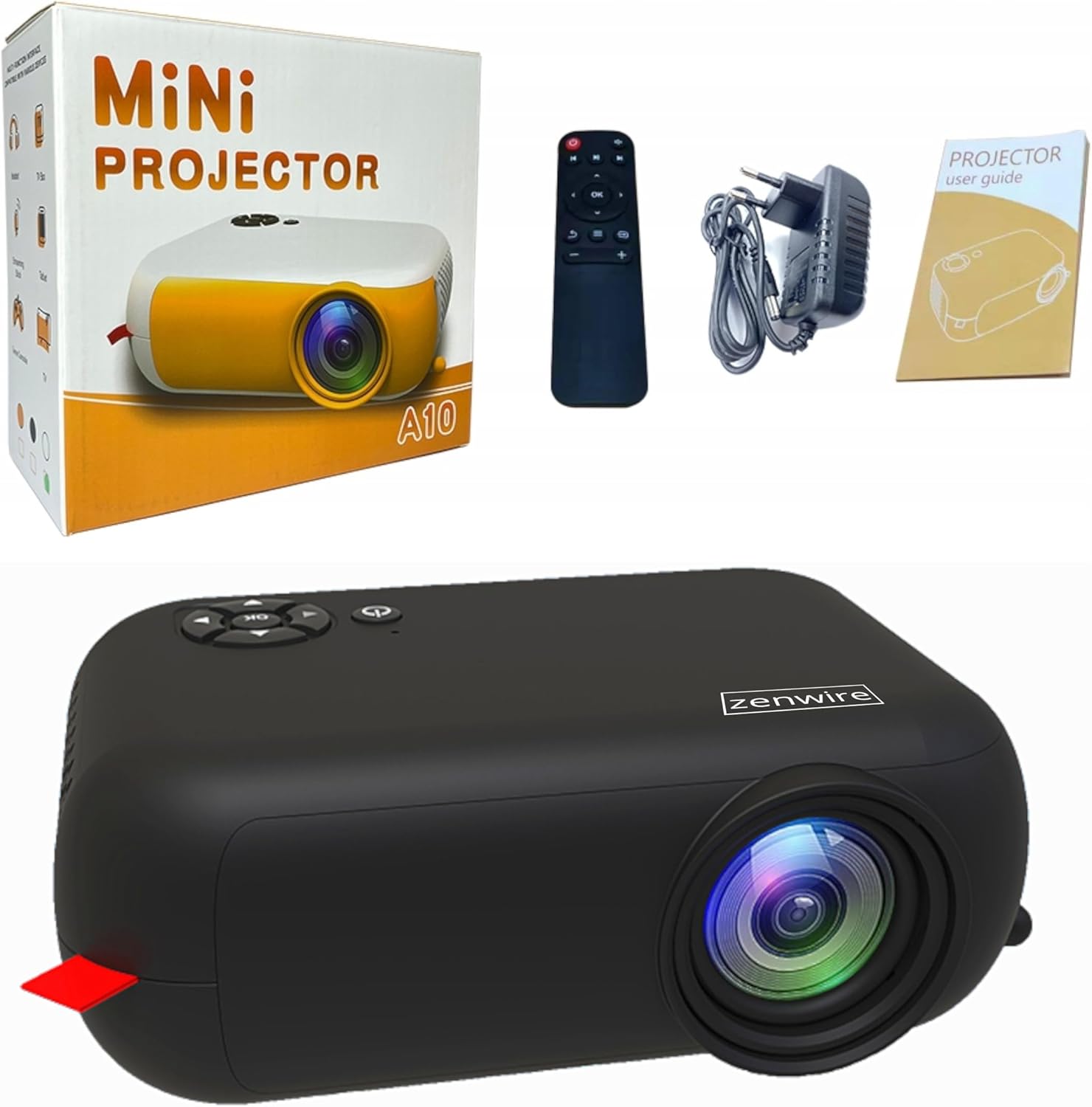
Image: Contents of the Zenwire A10 Mini Projector package, including the projector, remote control, power adapter, and user manual.
4. محصول ختم شوview
4.1 Projector Dimensions and Design
The Zenwire A10 is designed for portability, featuring a compact and lightweight form factor. Its dimensions are approximately 14cm x 10cm x 5.5cm, making it easy to carry and set up in various locations.

Image: The Zenwire A10 Mini Projector held in a hand, illustrating its compact size and portability.
۳.۲ بندرونه او کنټرولونه
The projector features a range of input and output ports for versatile connectivity, along with intuitive controls.

Image: Rear panel of the Zenwire A10 Mini Projector, showing the 5V-IN DC power input, IR receiver, USB port, 3.5mm audio jack, HDMI port, and SD card slot.
- 5V-IN DC: د پروجیکټر لپاره د بریښنا ان پټ.
- IR: د ریموټ کنټرول لپاره انفراریډ ریسیور.
- USB: د میډیا پلې بیک لپاره د USB ذخیره کولو وسایل وصل کړئ.
- د هیډفون جیک (3.5mm): بهرني سپیکرې یا هیډفونونه وصل کړئ.
- HDMI: Connect devices such as laptops, gaming consoles, or streaming sticks.
- SD: د میډیا پلې بیک لپاره مایکرو ایس ډی کارتونه دننه کړئ.
- د تمرکز څرخ: Adjust image sharpness (located on the side).
- د تضمین اداره: Buttons on top for navigation and selection.
5. ترتیب کول
5.1 د بریښنا نښلول
- ورکړل شوی بریښنا اډاپټر سره وصل کړئ 5V-IN DC په پروجکټور بندر.
- د بریښنا اډاپټر په دیوال کې ولګوئ.
- د پروجیکټر یا ریموټ کنټرول د فعالولو لپاره د بریښنا تڼۍ فشار ورکړئ.
5.2 Placement and Focus Adjustment
- Place the projector on a stable surface or mount it according to your preference. Ensure the projector lens is facing the projection surface (wall or screen).
- Adjust the distance between the projector and the screen to achieve your desired image size. The projector supports screen sizes up to 100 inches.
- Rotate the focus wheel (typically located near the lens) until the projected image appears clear and sharp.

Image: Diagram illustrating the Zenwire A10 Mini Projector's capability to project various screen sizes, from 13 inches up to 100 inches, depending on the projection distance.
۴. د پروجیکټر چلول
6.1 Wireless Connection (Miracast & Airplay)
The Zenwire A10 supports wireless screen mirroring via 2.4/5GHz WiFi, compatible with Android (Miracast) and iOS (Airplay) devices.
- ډاډ ترلاسه کړئ چې ستاسو پروجیکټر او موبایل وسیله د ورته وای فای شبکې سره وصل دي.
- On the projector's main menu, select the 'Screen Mirroring' or 'Wireless Display' option.
- د Android لپاره: On your Android phone/tablet, enable 'Wireless Display', 'Screen Mirroring', 'Smart View', or similar function (names may vary by device). Select the projector from the list of available devices.
- د iOS لپاره: On your iPhone/iPad, open Control Center and tap 'Screen Mirroring'. Select the projector from the list of available devices.
- The content from your mobile device should now be mirrored on the projector screen.
6.2 وائرډ پیوستون
The projector offers multiple wired input options for various devices.

Image: The Zenwire A10 Mini Projector connected to various devices such as smartphones, tablets, laptops, desktop computers, gaming consoles, and media players, highlighting its versatile connectivity.
- HDMI: Connect a laptop, PC, gaming console (e.g., Xbox, PlayStation), or streaming device (e.g., Amazon Fire TV Stick, Google Chromecast) using an HDMI cable. Select the HDMI input source on the projector.
- USB: Insert a USB flash drive or external hard drive into the USB port. The projector's media player will allow you to browse and play supported video, audio, and image files.
- مایکرو ایس ډی: Insert a Micro SD card into the SD card slot. Similar to USB, you can access media files through the projector's interface.
- د غږ وتل (۳.۵ ملي میتر جک): Connect external speakers or headphones to enhance the audio experience.
6.3 د مینو نیویګیشن
Use the remote control or the buttons on the projector to navigate through the on-screen menu. Select input sources, adjust picture settings (brightness, contrast, color), sound settings, and other system preferences.
7. ساتنه
- د عینکو پاکول: د پروجیکټر لینز په نرمۍ سره پاکولو لپاره د نظري لینزونو لپاره په ځانګړي ډول ډیزاین شوی نرم، لینټ نه پاک ټوکر وکاروئ. د کثافاتو پاکونکو یا ډیر ځواک کارولو څخه ډډه وکړئ.
- د دوړو لرې کول: Regularly clean the projector's exterior with a soft, dry cloth. Use a small brush or compressed air to clear dust from the ventilation openings to ensure proper airflow.
- ذخیره کول: کله چې په کارولو کې نه وي، پروجیکټر په یخ او وچ ځای کې وساتئ، د مستقیم لمر وړانګو او سختو تودوخې څخه لرې. د دوړو د راټولیدو او زیان مخنیوي لپاره اصلي بسته بندي یا محافظتي پوښ وکاروئ.
8. ستونزه حل کول
If you encounter issues with your Zenwire A10 projector, refer to the following common problems and solutions:
| ستونزه | احتمالي لامل | د حل لاره |
|---|---|---|
| په پرده هیڅ عکس نشته | برېښنا نه ده وصل شوې؛ د ننوتلو ناسمه سرچینه؛ وسیله په سمه توګه نه ده وصل شوې. | Check power cable; Select correct input source (HDMI, USB, etc.); Reconnect source device. |
| انځور غلی دی | تمرکز نه دی تنظیم شوی؛ پروجیکټر د سکرین څخه ډیر نږدې/لرې دی. | Adjust the focus wheel; Adjust projection distance. |
| غږ نشته | غږ ډېر ټیټ دی؛ خاموش شوی؛ بهرنۍ آډیو وسیله نه ده وصل شوې/غوره شوې. | Increase volume; Unmute; Check external speaker connection or select internal speaker. |
| د بې سیم اتصال مسلې | Not on same Wi-Fi network; Device not compatible; Interference. | Ensure both devices are on the same Wi-Fi; Verify device compatibility; Try moving closer to Wi-Fi router. |
9. مشخصات
| فیچر | تفصیل |
|---|---|
| برانډ | زینویر |
| د ماډل شمیره | A10 |
| د محصول ډول | Compact and Portable Projector |
| اصلي حل | 480 x 360p |
| د اعظمي ښودنې ریزولوشن | 1920 x 1080 (بشپړ HD) |
| روښانتیا | 1800lm / 60 ANSI |
| د تناسب تناسب | 2000:1 |
| د ښودلو ډول | LED |
| د ارتباط ټیکنالوژي | Wi-Fi (2.4/5GHz), HDMI, USB, Micro SD, 3.5mm Audio Jack |
| بې سیم ځانګړتیاوې | میراکاسټ، ایر پلی |
| مطابقت لرونکې وسیلې | Smartphones (Android, iOS), Tablets, Laptops, PCs, Gaming Consoles |
| وړاندیز شوي استعمالونه | کور سینما |
| ابعاد (تقریبا) | 14cm x 10cm x 5.5cm |
10. تضمین او ملاتړ
The Zenwire A10 Mini Portable Projector comes with a standard manufacturer's warranty. For specific warranty terms and conditions, please refer to the documentation provided at the time of purchase or contact your retailer. For technical support or service inquiries, please reach out to Zenwire customer service through their official webسایټ یا ستاسو د محصول سره چمتو شوي د اړیکو معلومات.


