پیژندنه
Thank you for choosing the Havit Gamenote MS1033 RGB Gaming Mouse. This manual provides essential information for setting up, operating, maintaining, and troubleshooting your new gaming mouse. Please read these instructions carefully to ensure optimal performance and longevity of your device.
محصول پای ته ورسیدview
The Havit Gamenote MS1033 is a high-performance gaming mouse designed for precision and customization. It features adjustable macros, vibrant RGB lighting, and a comfortable, non-slip design.

Image: The Havit Gamenote MS1033 RGB Gaming Mouse, showcasing its overall design and illuminated RGB elements.
کلیدي ځانګړتیاوې:
- RGB 16 Million Colors: Customizable lighting options to match your setup.
- Adjustable Macro: Program complex commands for enhanced gameplay.
- لوړ حساسیت: Up to 8000 DPI for precise tracking.
- Non-slip Surface Design: Ensures a secure grip during intense gaming sessions.
- د تڼۍ ژوند: Durable switches rated for 3 Million clicks.
- د تڼیو شمیر: 9 programmable buttons for versatile control.

انځور: یوه خوا view of the mouse, showing the strategically placed G1 and G2 buttons, along with a profile switch for quick adjustments.
د تنظیم کولو لارښوونې
Setting up your Havit Gamenote MS1033 mouse is a straightforward process.
- موږک سره وصل کړئ: Plug the USB connector of the mouse into an available USB port on your computer or gaming console.
- د ډرایور نصب کول: For most operating systems (Windows, macOS, Linux), the mouse will be recognized automatically as a plug-and-play device, and standard drivers will be installed. No additional software is typically required for basic functionality.
- د سافټویر نصب کول (اختیاري): To access advanced features such as macro programming and detailed RGB customization, you may need to download the official Havit Gamenote software from the manufacturer's webسایټ. د نصب او کارولو لپاره د سافټویر لارښوونو ته مراجعه وکړئ.
عملیاتي لارښوونې
The MS1033 mouse offers various functions for an enhanced user experience.
اساسي دندې:
- کیڼ کلیک: لومړنۍ کړنه.
- ښي کلیک: Secondary action, often for context menus.
- سکرول ویل: Scroll up/down, and click for middle-button functionality.
د DPI تعدیل:
The mouse features adjustable DPI (Dots Per Inch) settings, allowing you to change cursor sensitivity on the fly. Use the dedicated DPI button (often located behind the scroll wheel) to cycle through preset DPI levels. The current DPI level may be indicated by a change in the mouse's LED color or pattern.
د پروګرام وړ بټنونه:
The MS1033 has 9 buttons, many of which are programmable. These can be customized using the Havit Gamenote software to perform specific actions, launch applications, or execute macros.
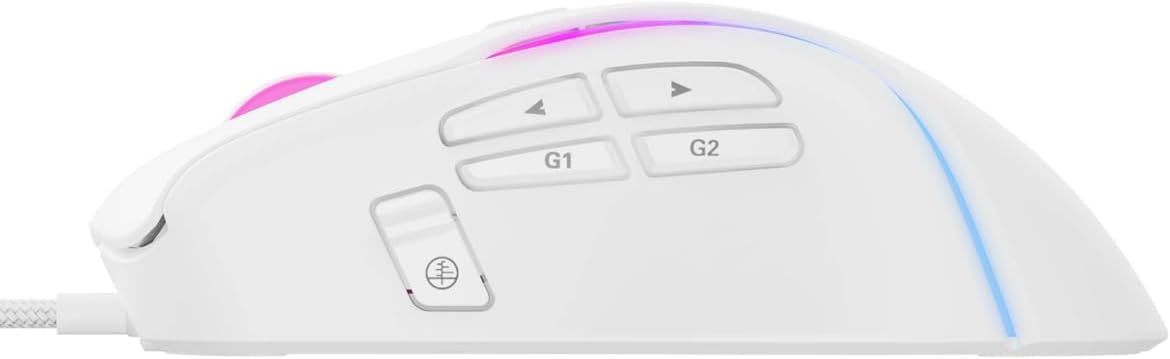
انځور: یو مفصل view of the side buttons, including G1, G2, and standard navigation buttons, which can be programmed for various functions.
د میکرو برنامه کول
The adjustable macro feature allows you to record a sequence of keystrokes and mouse clicks, then assign them to a single button. This is particularly useful for complex actions in games or repetitive tasks in productivity software.
- سافټویر نصب کړئ: Ensure the Havit Gamenote software is installed on your computer.
- Open Macro Editor: Launch the software and navigate to the macro editor section.
- ریکارډ میکرو: Start recording and perform the desired sequence of actions.
- Save and Assign: Save the recorded macro and assign it to one of the programmable buttons on your MS1033 mouse.
Refer to the software's help documentation for detailed instructions on macro creation and management.

Image: The mouse illuminated with RGB lighting, demonstrating its aesthetic appeal and highlighting its gaming-oriented design.
د RGB ر lightingا تنظیم کول
The MS1033 features dynamic RGB lighting with 16 million color options. You can customize the lighting effects, colors, and patterns to personalize your gaming setup.
- د سافټویر کنټرول: Use the Havit Gamenote software to access the full range of RGB customization options. This includes static colors, breathing effects, color cycles, and more.
- On-the-fly Switching: Some lighting modes may be switchable directly from the mouse using a dedicated button or a combination of buttons. Consult the software or manufacturer's website for specific key combinations.

انځور: له پورته څخه ښکته view of the mouse, highlighting the scroll wheel and the vibrant RGB lighting emanating from its body.
ساتنه
مناسب ساتنه ستاسو د لوبو موږک اوږد عمر او فعالیت تضمینوي.
- پاکول: Regularly clean the mouse with a soft, dry cloth. For stubborn dirt, slightly dampټوکر د اوبو یا نرم پاکولو محلول سره ومینځئ. د سختو کیمیاوي موادو یا خړوبونکو موادو څخه ډډه وکړئ.
- د سینسر ساتنه: د موږک په لاندې برخه کې نظري سینسر پاک او د دوړو یا کثافاتو څخه پاک وساتئ ترڅو دقیق تعقیب ډاډمن شي.
- د کیبل پاملرنه: د زیان څخه د مخنیوي لپاره د USB کیبل د تیزو کږو یا ډیر کشولو څخه ډډه وکړئ.
د ستونزو حل کول
If you encounter issues with your Havit Gamenote MS1033 mouse, try the following troubleshooting steps:
- موږک ځواب نه ورکوي:
- ډاډ ترلاسه کړئ چې د USB کیبل په خوندي ډول په یو کار کوونکي USB پورټ کې ولګول شوی دی.
- Try plugging the mouse into a different USB port or another computer to rule out port or system issues.
- خپل کمپیوټر یا کنسول بیا پیل کړئ.
- ناسم تعقیب:
- د موږک په ښکته برخه کې نظري سینسر پاک کړئ.
- ډاډ ترلاسه کړئ چې تاسو موږک په مناسب سطحه کاروئ (د مثال په توګه، د موږک پیډ). د ډیر انعکاس کونکي یا نا مساوي سطحو څخه ډډه وکړئ.
- د DPI ترتیبات آرامۍ کچې ته تنظیم کړئ.
- د RGB رڼا کار نه کوي:
- Check the Havit Gamenote software settings to ensure lighting is enabled and configured correctly.
- ډاډ ترلاسه کړئ چې موږک د USB پورټ څخه کافي بریښنا ترلاسه کوي.
- تڼۍ کار نه کوي:
- Verify button assignments in the Havit Gamenote software.
- Ensure no physical obstructions are preventing button presses.
If these steps do not resolve the issue, please contact Havit customer support.
مشخصات
Detailed technical specifications for the Havit Gamenote MS1033 RGB Gaming Mouse:
| برانډ | هیت |
| ماډل | MS1033 |
| د پيوستون ډول | وائرډ USB |
| د حرکت کشف ټیکنالوژي | نظري |
| د تڼیو شمیر | 9 |
| تڼۍ ژوند | 3 ملیونه کلیکونه |
| DPI (اعظمي) | 8000 DPI |
| د RGB رڼا | 16 Million Colors (LED Lights) |
| د موادو ډول | پلاستیک |
| د محصول ابعاد | 10 x 5 x 0.1 سانتي متره |
| د توکي وزن | 1 کیلوګرامه |
| مطابقت لرونکې وسیلې | Gaming Consoles, PCs |
| عملیاتي سیسټم | Console-specific OS (PlayStation, Xbox), PC compatible |
تضمین او ملاتړ
Havit products are designed for reliability and performance. For information regarding warranty coverage, please refer to the warranty card included with your product or visit the official Havit webسایټ
For technical support, driver downloads, or further assistance, please visit the Havit official support page or contact their customer service directly. Keep your purchase receipt and product model number (MS1033) handy when seeking support.


