1. پیژندنه
This manual provides detailed instructions for the installation, operation, and maintenance of your Jennov JS7015 5MP Dual-Band Wi-Fi Outdoor Security Camera. Please read this manual thoroughly before using the product to ensure correct usage and optimal performance.

Figure 1: Jennov JS7015 Outdoor Security Camera
The Jennov JS7015 is a 5-megapixel outdoor security camera featuring dual-band Wi-Fi connectivity (2.4GHz and 5GHz). It offers 360-degree viewing capabilities, PIR human detection, auto-tracking, 24/7 recording, and two-way audio for comprehensive outdoor surveillance.
2. د بسته محتويات
مهرباني وکړئ د ترلاسه کولو پرمهال د کڅوړې محتويات وګورئ. که کوم توکي ورک یا زیانمن شوي وي، د پیرودونکو ملاتړ سره اړیکه ونیسئ.
- Jennov JS7015 5MP Dual-Band Wi-Fi Outdoor Security Camera
- د بریښنا اډاپټر
- د سکرو او اینکرونو نصب کول
- د کارونکي لارښود (دا لاسوند)
3. محصول ختم شوview
د کیمرې د برخو سره ځان بلد کړئ.

Figure 2: Camera Pan and Tilt Mechanism
The camera features a motorized pan and tilt mechanism, allowing for a 355° horizontal rotation (pan) and a 60° vertical rotation (tilt). This enables comprehensive coverage of the surveillance area. The camera body houses the lens, infrared LEDs, white light LEDs, microphone, and speaker. Two external antennas provide enhanced Wi-Fi signal reception.
- د کیمرې لینز: د foo ویډیو نیولtage.
- انفراریډ LEDs: Provide illumination for black and white night vision.
- د سپینې رڼا LEDs: Provide illumination for color night vision and act as a spotlight.
- مایکروفون: د دوه اړخیزه اړیکو او ثبتولو لپاره آډیو نیسي.
- سپیکر: د دوه اړخیزو اړیکو او الارمونو لپاره آډیو تولیدوي.
- انتن: د وای فای اتصال لپاره.
- د بریښنا بندر: د بریښنا اډاپټر سره نښلوي.
- د بیا تنظیم تڼۍ: Used to reset the camera to factory settings (usually located near the SD card slot or under a cover).
- د SD کارت سلاټ: د محلي ویډیو ذخیره کولو لپاره (تر 128GB پورې ملاتړ کوي، شامل نه دي).
4. د تنظیم کولو لارښود
4.1 فزیکي نصب کول
The camera is designed for outdoor use and is IP66 waterproof. Choose a suitable location for mounting, ensuring a clear view of the area you wish to monitor and proximity to a power source.
- د نښه کولو ځایونه: د نصب کولو ټیمپلیټ (که چمتو شوی وي) یا د کیمرې بیس وکاروئ ترڅو په دیوال کې د سکرو سوري په نښه کړئ.
- سوراخونه: Drill holes at the marked positions. Insert wall anchors if mounting on masonry.
- خوندي کیمره: Attach the camera base to the wall using the provided screws.
- زاویه تنظیم کړئ: Loosen the adjustment screws (if any) to position the camera for optimal coverage before tightening.

شکل ۱۶: IP66 د اوبو ضد ډیزاین
The camera is built with waterproof materials and has an IP66 rating, making it suitable for outdoor installation and resistant to dust and water jets.
4.2 د بریښنا نښلول
ورکړل شوی بریښنا اډاپټر د کیمرې د بریښنا پورټ سره وصل کړئ او بیا یې د بریښنا آوټ لیټ سره وصل کړئ. کیمره به فعاله شي او د پیل کولو لړۍ به پیل کړي.
۳.۲ د اپلیکیشن ډاونلوډ او د حساب ثبتول
The Jennov JS7015 camera uses the EseeCloud application for remote access and control.
- اپلیکیشن ډاونلوډ کړئ: لټون "EseeCloud" in your smartphone's app store (Google Play Store for Android or Apple App Store for iOS) and download the application.
- حساب ثبت کړئ: Open the EseeCloud app and follow the on-screen instructions to register a new account using your email address or phone number.
۴.۳ اپلیکیشن ته د کیمرې اضافه کول
Ensure your smartphone is connected to the same Wi-Fi network (2.4GHz or 5GHz) that you intend to connect the camera to.
- اپلیکیشن خلاص کړئ: Launch the EseeCloud app and log in.
- وسیله اضافه کړئ: Tap the "+" icon or "Add Device" option.
- د وسیلې ډول غوره کړئ: Choose "Wi-Fi Camera" or similar option.
- د QR کوډ سکین کړئ: The app may prompt you to scan a QR code located on the camera or its packaging.
- د وائی فای ترتیب: Follow the app's instructions to enter your Wi-Fi network name (SSID) and password. The camera supports both 2.4GHz and 5GHz Wi-Fi bands.
- نښلول: The camera will attempt to connect to your Wi-Fi network. Once connected, it will appear in your device list within the app.
- پټنوم ترتیب کړئ: د امنیتي موخو لپاره د خپلې کیمرې لپاره یو قوي پاسورډ جوړ کړئ.
5. عملیاتي لارښوونې
5.1 ژوندی View او د پان/ټيلټ کنټرول
د EseeCloud اپلیکیشن څخه، د ژوندۍ خپرونې ته د لاسرسي لپاره خپله کیمره غوره کړئ view.
- ژوندی فیډ: View real-time video from your camera.
- پین/ټیټ: Use the directional controls within the app to remotely adjust the camera's horizontal (pan) and vertical (tilt) angles.
5.2 اتوماتیک تعقیب
کیمره کولی شي په اوتومات ډول په خپل ساحه کې حرکت کونکي شیان تعقیب کړي view.

شکل ۵.۲: په عمل کې اتومات تعقیب
Enable the auto-tracking feature in the app settings. The camera will then detect and follow moving targets until they leave the camera's view.
۶.۳ د حرکت کشف او الارمونه
The camera features advanced PIR (Passive Infrared) human detection to minimize false alarms.

Figure 5: PIR Human Detection and Alarm Options
When a human thermal profile is detected, the camera can trigger various alarms.
- د PIR کشف: Activates recording and sends notifications when a human is detected.
- د الارم غږ: Configure the camera to emit a siren sound upon detection.
- Spotlight Alarm: The integrated spotlight can be activated to deter intruders.
- خبرتیاوې: Receive instant alerts on your smartphone via the EseeCloud app.
۴.۴ دوه اړخیزه آډیو
د جوړ شوي مایکروفون او سپیکر په کارولو سره د کیمرې ته نږدې اشخاصو سره مستقیم اړیکه ونیسئ.

شکل ۴.۵: دوه اړخیزه آډیو اړیکه
Tap the microphone icon in the app to speak, and listen through the camera's speaker. This feature is useful for interacting with visitors or deterring unwanted guests.
5.5 ثبتول او ذخیره کول
دا کیمره د ۲۴/۷ دوامداره ثبت ملاتړ کوي او د انعطاف وړ ذخیره کولو اختیارونه وړاندې کوي.
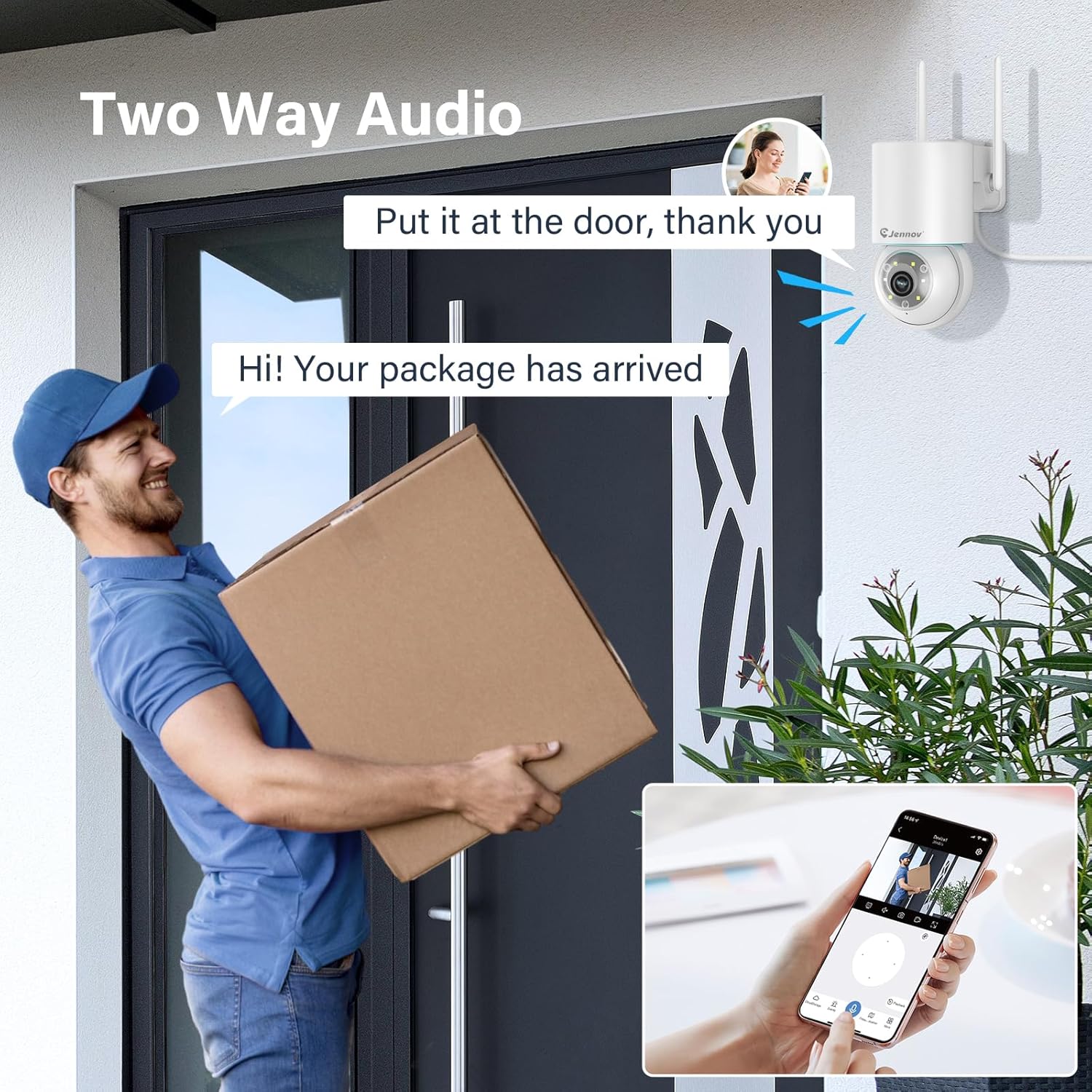
Figure 7: 24/7 Recording and Storage Options
ثبت شوي foo ته لاسرسیtage via the app's playback function.
- ۲۴/۷ ثبت کول: The camera can continuously record footage, ensuring no vital moments are missed.
- ځایی ذخیره: Insert a microSD card (up to 128GB, not included) into the camera's SD card slot for local storage.
- د بادل ذخیره کول: Optional cloud storage service is available, often with a free trial period (e.g., 7 days). This provides off-site backup of your recordings.
۵.۳ د شپې لید حالتونه
The camera offers three night vision modes for clear visibility in low-light conditions.

Figure 8: 5MP Color Night Vision
The camera provides clear night vision up to 65 feet (20 meters) with 5MP resolution.
- بشپړ رنګ حالت: Utilizes white LEDs to provide full-color video at night.
- تور او سپین حالت: Uses infrared LEDs for traditional black and white night vision.
- سمارډ موډ: Automatically switches between black and white and full color based on detected motion or light conditions.
You can switch between these modes within the EseeCloud mobile application.
5.7 Customized Detection Area
د کیمرې دننه ځانګړي ساحې تعریف کړئ view چیرې چې د حرکت کشف باید فعال وي.

Figure 9: Customized Detection Area Settings
This feature helps reduce unwanted alerts by focusing detection on critical zones. The app typically offers "Area mode" and "Cordon mode" for defining these zones.
6. ساتنه
- پاکول: د کیمرې لینز په منظم ډول د نرم او وچ ټوکر سره پاک کړئ ترڅو د عکس کیفیت روښانه شي. سخت کیمیاوي مواد مه کاروئ.
- د فرم ویئر تازه معلومات: Check the EseeCloud app periodically for available firmware updates. Keeping your camera's firmware updated ensures optimal performance and security.
- د SD کارت مدیریت: If using local storage, periodically check the SD card's status in the app. Format the card as needed to maintain recording efficiency.
- د بریښنا رسول: Ensure the power adapter and cable are free from damage and properly connected.
7. ستونزه حل کول
- کیمره آفلاین:
- د وای فای سیګنال ځواک وګورئ.
- ډاډ ترلاسه کړئ چې کیمره فعاله ده.
- کیمره او خپل وای فای روټر بیا پیل کړئ.
- If using 5GHz Wi-Fi, ensure your router supports it and the camera is connected to the correct band.
- Try re-adding the camera to the EseeCloud app.
- د عکس ضعیف کیفیت:
- د کیمرې لینز پاک کړئ.
- Ensure sufficient lighting, especially at night.
- د خپل انټرنیټ اتصال سرعت وګورئ.
- د حرکت کشف کار نه کوي:
- تایید کړئ چې په ایپ کې د حرکت کشف تنظیمات فعال شوي دي.
- د کشف حساسیت تنظیم کړئ.
- ډاډ ترلاسه کړئ چې هیڅ خنډ د کیمرې مخه نه نیسي view.
- Check if detection areas are correctly configured.
- دوه اړخیزه آډیو مسلې:
- Ensure microphone and speaker permissions are granted to the EseeCloud app on your smartphone.
- په اپلیکیشن او خپل تلیفون دواړو کې د حجم تنظیمات وګورئ.
- ډاډ ترلاسه کړئ چې د کیمرې مایکروفون یا سپیکر بندولو لپاره هیڅ فزیکي خنډونه شتون نلري.
- Cannot Access SD Card Recordings:
- ډاډ ترلاسه کړئ چې SD کارت په سمه توګه داخل شوی دی.
- وګورئ چې ایا SD کارت په سمه توګه فارمیټ شوی دی (معمولا FAT32).
- Verify that continuous recording or event recording to SD card is enabled in the app.
- The SD card might be full; consider formatting it or replacing it.
8. مشخصات
| فیچر | مشخصات |
|---|---|
| د ماډل شمیره | JS7015 |
| برانډ | جینوف |
| قرارداد | 5 Megapixel (1920p video recording) |
| پین/ټیلټ زاویه | پین 355 °، 60 ° ټیک کړئ |
| د شپې لید | Color Night Vision, Black & White Night Vision, Smart Mode (up to 65ft/20m) |
| د وائی فای ارتباط | Dual-Band (2.4GHz / 5GHz) |
| آډیو | دوه اړخیزه آډیو (جوړ شوی مایکروفون او سپیکر) |
| د حرکت کشف | PIR Human Detection, Auto Tracking |
| د ذخیره کولو اختیارونه | مایکرو ایس ډي کارت (تر ۱۲۸ جي بي پورې)، کلاوډ ذخیره |
| د پنروک درجه | IP66 |
| د بریښنا انډول | 5 ولټه |
| د بریښنا مصرف | 24 واټ |
| ابعاد (L x W x H) | 12 x 8 x 16 سانتي متره |
| مواد | پلاستیک |
| د نصب کولو ډول | دیوال غر |
| مطابقت لرونکې وسیلې | Smartphone, Tablet, Computer |
| د کنټرول اپلیکیشن | EseeCloud |
9. تضمین او ملاتړ
For warranty information and technical support, please refer to the warranty card included with your product or visit the official Jennov webسایټ
- د پیرودونکو خدمت: Contact Jennov customer support for assistance with product issues, technical questions, or warranty claims.
- آنلاین سرچینې: جینوف وګورئ webد FAQs، تازه شوي لارښودونو، او سافټویر ډاونلوډونو لپاره سایټ.


