1. پیژندنه
The Trevi DAB 7F80 R is a portable digital radio offering DAB, DAB+, and FM reception, along with Bluetooth connectivity. It features a high-readability Dot Matrix display, a programmable alarm clock, and a headphone jack. This manual provides instructions for the proper setup, operation, and maintenance of your device.
2. د خوندیتوب معلومات
- د وسیلې کارولو دمخه ټولې لارښوونې په دقت سره ولولئ.
- وسیله د اوبو، رطوبت، یا ډیرې تودوخې سره مه مخ کوئ.
- Use only the specified power source (4 x AAA batteries or a compatible 5V DC adapter, not included).
- د وسیلې د جلا کولو، ترمیم کولو یا تعدیل کولو هڅه مه کوئ. ټول خدمتونه وړ پرسونل ته راجع کړئ.
- د بیټرۍ د ځایی مقرراتو سره سم په مسؤلیت سره تصفیه کړئ.
- وسیله د قوي مقناطیسي ساحو څخه لرې وساتئ.
3. د بسته محتويات
مهرباني وکړئ وګورئ چې لاندې توکي ستاسو په بسته کې شامل دي:
- Trevi DAB 7F80 R Main Unit
- د کارونکي لارښود (دا لاسوند)
- د تضمین سند
4. محصول ختم شوview
Familiarize yourself with the components and controls of your Trevi DAB 7F80 R radio.
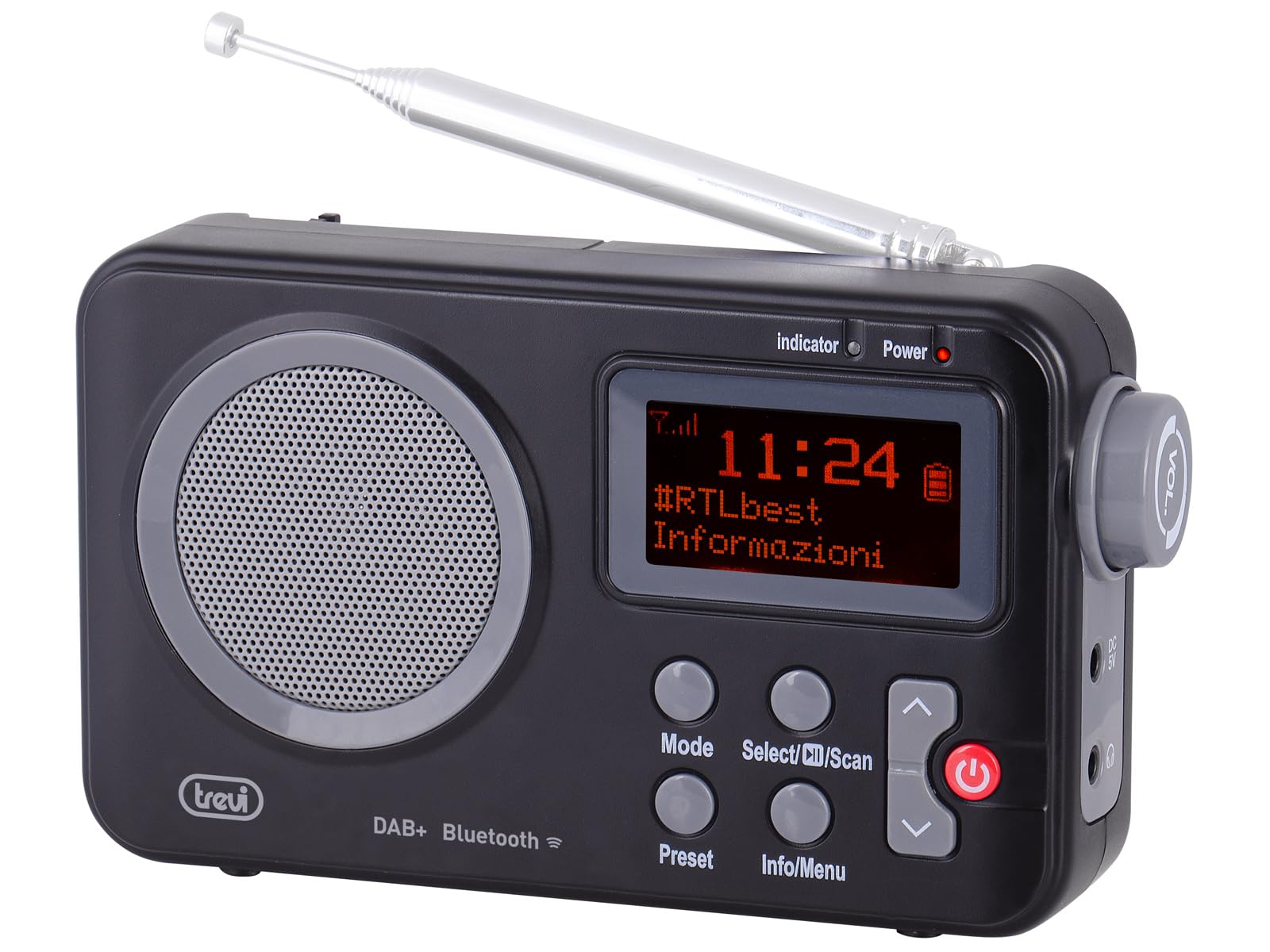
شکل 1: مخکی view of the Trevi DAB 7F80 R radio. This image displays the Dot Matrix screen, the main speaker grille, and the primary control buttons including Mode, Select/Scan, Preset, Info/Menu, and Power. The extendable telescopic antenna is visible at the top.
کنټرولونه او ځانګړتیاوې:
- ښکاره کول: High-readability Dot Matrix screen for station information, time, and menu navigation.
- سپیکر: د آډیو آوټ پټ لپاره مدغم سپیکر.
- د بریښنا تڼۍ: راډیو آن/بندوي.
- د حالت تڼۍ: Switches between DAB/DAB+, FM, and Bluetooth modes.
- Select/Scan Button: Confirms selections in menus, initiates station scans.
- د وړاندې کولو تڼۍ: Accesses and stores favorite radio stations.
- معلومات/مینو تڼۍ: Displays station information and accesses system settings.
- پورته/ښکته د تیر تڼۍ: Navigates through menus, adjusts volume, changes stations.
- د سر غوږ جیک: د شخصي اوریدلو لپاره 3.5 ملي میتر محصول.
- انتن: Extendable telescopic antenna for improved radio reception.
5. ترتیب کول
5.1 وسیلې ته ځواک ورکول
The Trevi DAB 7F80 R can be powered by batteries or an external AC adapter.
- د بیټرۍ نصب کول: Open the battery compartment cover on the back of the unit. Insert 4 x AAA batteries (not included), ensuring correct polarity (+/-). Close the cover securely.
- د AC اډاپټر (اختیاري): For continuous power, connect a compatible 5V DC, 1A AC adapter (not included) to the DC IN port on the side of the radio.
مهم خبرداری: Do not use batteries in the device when it is connected to an AC adapter for extended periods. This may lead to battery leakage or damage to the unit. If using the AC adapter, remove the batteries. If using batteries, disconnect the AC adapter.
۲.۴ د بریښنا لومړنی فعالول او د سټیشن سکین
- د غوره استقبال لپاره ټیلسکوپیک انتن په بشپړه توګه پراخ کړئ.
- فشار ورکړئ ځواک د راډیو د فعالولو لپاره تڼۍ.
- Upon first use, the radio may prompt you to select a language. Use the پورته / ښکته تیر د نیویګیټ کولو لپاره تڼۍ او Select/Scan تصدیق کول.
- The radio will automatically perform a full scan for DAB/DAB+ stations. This process may take a few minutes. Once complete, the first available station will begin playing.
6. عملیاتي لارښوونې
6.1 Radio Mode (DAB/DAB+, FM)
- د بدلولو طریقې: فشار ورکړئ موډ button repeatedly to cycle between DAB, FM, and Bluetooth modes.
- د سټیشنونو لپاره سکین کول:
- In DAB mode, a full scan is usually performed on first use. To perform a new scan, press and hold Select/Scan.
- په FM حالت کې ، فشار ورکړئ Select/Scan د راتلونکي موجود سټیشن لپاره په اوتومات ډول سکین کولو لپاره.
- د سټیشنونو غوره کول: د کارولو پورته / ښکته تیر buttons to browse through available stations.
- د زېرمو ذخیره کول: The radio can store up to 20 DAB/DAB+ and 20 FM stations.
- مطلوب سټیشن ته ټون کړئ.
- فشار ورکړئ او ونیسئ مخکینۍ تڼۍ تر هغه وخته پورې فشار ورکړئ چې 'پریسیټ سټور' په نندارتون کې څرګند شي.
- د کارولو پورته / ښکته تیر د مخکینۍ شمېرې (۱-۲۰) غوره کولو لپاره تڼۍ.
- مطبوعاتي Select/Scan د سټیشن تایید او خوندي کولو لپاره.
- د وړاندې کولو یادول: فشار ورکړئ مخکینۍ تڼۍ په لنډ ډول. وکاروئ پورته / ښکته تیر buttons to select the desired preset number, then press Select/Scan.
- RDS/DLS Information: In FM or DAB mode, press the معلومات/مینو button repeatedly to cycle through available information such as station name, program type, time, and song title (if broadcast).
6.2 بلوتوث حالت
- فشار ورکړئ موډ button until 'Bluetooth' appears on the display. The radio will enter pairing mode, indicated by a flashing Bluetooth icon.
- په خپل سمارټ فون، ټابلیټ یا لیپ ټاپ کې، بلوتوث فعال کړئ او د شته وسایلو لټون وکړئ.
- Select 'Trevi DAB 7F80 R' from the list of devices to pair. Once connected, the Bluetooth icon will stop flashing.
- You can now play audio from your connected device through the radio. Use your device's controls for playback and the radio's volume controls for audio level.
۶.۷ د ساعت او الارم دندې
The radio features an integrated clock and two programmable alarms.
- د وخت ټاکل:
- فشار ورکړئ او ونیسئ معلومات/مینو اصلي مینو ته د ننوتلو لپاره تڼۍ.
- کارول پورته / ښکته تیر buttons to navigate to 'Time/Date' and press Select/Scan.
- Select 'Set Time/Date' and adjust the hour, minute, day, month, and year using the پورته / ښکته تیر buttons and confirming each step with Select/Scan.
- Setting Alarms (Alarm 1 / Alarm 2):
- From the main menu, navigate to 'Alarm' and press Select/Scan.
- Select 'Alarm 1 Setup' or 'Alarm 2 Setup'.
- Configure the alarm settings: 'On Time' (hour/minute), 'Duration', 'Source' (Buzzer or last used radio station), 'Volume', and 'Frequency' (Daily, Weekdays, Weekends, Once). Use پورته / ښکته تیر د ارزښتونو د تنظیمولو لپاره تڼۍ او Select/Scan د هر ترتیب تایید لپاره.
- Ensure the alarm is set to 'On' in the alarm setup menu.
- Deactivating a sounding alarm: فشار ورکړئ ځواک د الارم بندولو لپاره تڼۍ.
۶.۳ د هیډفون کارول
To listen privately, insert standard 3.5mm headphones into the headphone jack located on the side of the radio. The internal speaker will automatically mute.
7. ساتنه
- پاکول: Wipe the radio with a soft, dry, lint-free cloth. Do not use abrasive cleaners, waxes, or solvents.
- د بیټرۍ بدلول: When the low battery indicator appears on the display, replace all four AAA batteries with new ones.
- ذخیره کول: If the radio will not be used for an extended period, remove the batteries to prevent leakage and potential damage. Store the device in a cool, dry place.
8. ستونزه حل کول
If you encounter issues with your Trevi DAB 7F80 R, please refer to the following common problems and solutions:
- راډیو نه چلیږي:
- وګورئ چې بیټرۍ په سمه توګه داخلې شوې او خالي شوې نه دي. که اړتیا وي نو بدل یې کړئ.
- If using an AC adapter, ensure it is properly connected and the power outlet is functional.
- غږ نشته یا د غږ خراب کیفیت:
- حجم تنظیم کړئ.
- Ensure headphones are not connected if you want sound from the speaker.
- Check radio reception. Extend and adjust the antenna. Try moving the radio to a different location.
- For Bluetooth, ensure the device is paired and audio is playing from the source.
- Clock resets after power loss or battery change:
- This model does not feature a backup battery for the clock. It is normal for the time to reset when power is completely removed (e.g., batteries removed or AC adapter unplugged). You will need to re-set the time manually as described in section 6.3.
- د بیټرۍ لنډ ژوند:
- Battery life can vary depending on usage and battery quality. Use high-quality alkaline batteries for best performance.
- For prolonged use, consider using a compatible 5V DC AC adapter (not included).
- Difficulty with setup or navigation (e.g., station search, alarm setup):
- The radio uses a limited number of buttons for various functions. Refer to the specific operating instructions in section 6 for detailed, step-by-step guidance. Some functions may require pressing buttons multiple times or holding them down.
- Radio turns off when switching between battery and AC power:
- This is expected behavior. The radio will power cycle when changing its primary power source. Ensure you have saved any settings or presets before switching.
9. مشخصات
| برانډ | ټریوی |
| ماډل | DAB 7F80 R |
| رنګ | تور |
| د ټون کولو ټیکنالوژي | DAB/DAB+، FM |
| ملاتړ شوي راډیو بانډونه | DAB, DAB+, FM (3 bands) |
| بلوتوث | هو |
| ښودل | High-readability Dot Matrix |
| الارمونه | 2 د پروګرام وړ الارمونه |
| مخکینۍ | 20 DAB/DAB+, 20 FM |
| د بریښنا سرچینه | 4 x AAA batteries (not included) or 5V DC adapter (not included) |
| مطابقت لرونکې وسیلې | سمارټ فون، ټابلیټ، لپ ټاپ |
| د محصول ابعاد (L x W x H) | 14 x 3.5 x 8.5 سانتي متره |
| شاملې برخې | Main unit, user manual, warranty certificate |
10. تضمین او ملاتړ
This product is supplied with a warranty certificate. For detailed information regarding warranty terms and conditions, please refer to the certificate included in your package.
For technical support, troubleshooting beyond this manual, or warranty claims, please contact your retailer or the manufacturer's customer service using the contact information provided with your purchase.


