1. پیژندنه
Welcome to the user manual for your MAXCOM FW67 Titan Pro Smartwatch. This device is designed to enhance your daily life by providing convenient access to notifications, health monitoring, and fitness tracking features directly from your wrist. Please read this manual carefully to ensure proper use and to fully understand the capabilities of your new smartwatch.
2. د خوندیتوب معلومات
- د وسیلې د جلا کولو، ترمیم کولو یا بدلولو هڅه مه کوئ. دا ممکن تضمین باطل کړي او زیان ورسوي.
- وسیله د سختې تودوخې، مستقیم لمر وړانګو او خلاصو اورونو څخه لرې وساتئ.
- د وسیلې د قوي ټکانونو یا وایبریشنونو سره د مخ کیدو څخه ډډه وکړئ.
- This device is water-resistant (IP69K rating), suitable for splashes and swimming. However, avoid hot water, steam, or prolonged submersion in deep water.
- Consult a medical professional before starting any new exercise regimen or if you have any health concerns. The health data provided by the smartwatch is for reference only and should not be used for medical diagnosis or treatment.
- یوازې چمتو شوی چارجینګ کیبل او یو مناسب بریښنا اډاپټر وکاروئ.
3. د بسته محتويات
مهرباني وکړئ د لاندې توکو لپاره په بسته کې وګورئ:
- MAXCOM FW67 Titan Pro Smartwatch (Orange)
- د چارج کیبل
- د کارن لارښود
4. وسیله ختمه شوهview
Familiarize yourself with the main components of your smartwatch.

شکل 4.1: مخکی view of the MAXCOM FW67 Titan Pro Smartwatch, displaying the main watch face with time, date, weather, battery level, and activity metrics like calories burned and step count.

شکل 4.2: اړخ view of the smartwatch, highlighting the 'POWER' button at the top and the 'BACK' button below it, both located on the right side of the watch casing.
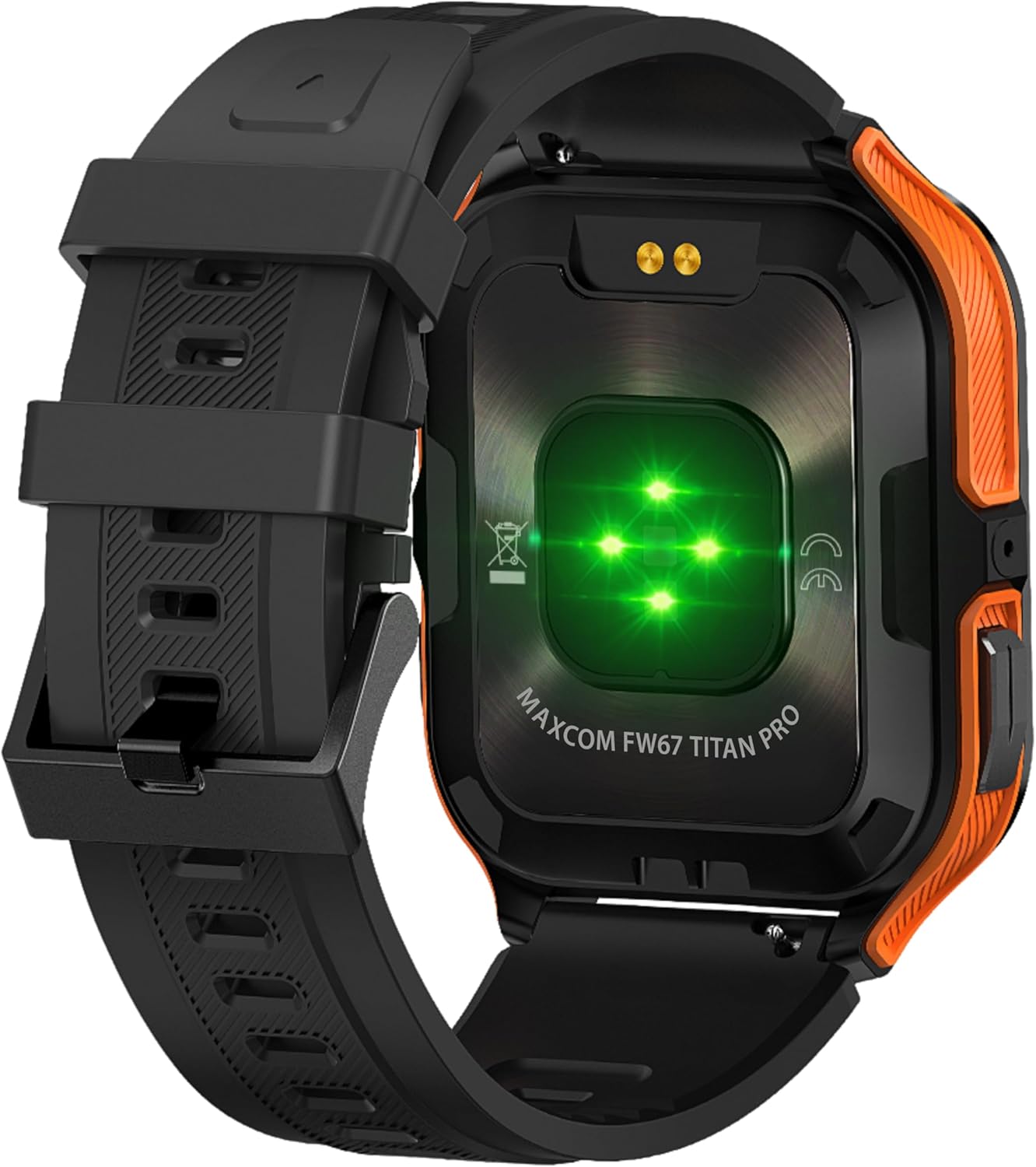
شکل 4.3: شاته view of the smartwatch, showing the optical heart rate sensors (glowing green) and the magnetic charging pins. The model name 'MAXCOM FW67 TITAN PRO' is also visible.
5. ترتیب کول
۱. ابتدايي چارج کول
د لومړي ځل کارولو دمخه، خپل سمارټ واچ په بشپړه توګه چارج کړئ.
- Connect the charging cable to the magnetic charging pins on the back of the smartwatch. Ensure the pins align correctly.
- Plug the USB end of the charging cable into a compatible USB power adapter (e.g., 5V/1A) or a computer's USB port.
- د ساعت ښودنه به د چارج کولو حالت په ګوته کړي. بشپړ چارج معمولا شاوخوا 2-3 ساعته وخت نیسي.
۵.۲. د اپلیکیشن نصب او جوړه کول
To unlock the full potential of your smartwatch, you need to pair it with your smartphone via the dedicated companion application.
- اپلیکیشن ډاونلوډ کړئ: لټون the official MAXCOM smartwatch application (e.g., 'GloryFit' or similar, refer to packaging for exact app name) on the Google Play Store (for Android) or Apple App Store (for iOS). Install the app on your smartphone.
- بلوتوث فعال کړئ: ډاډ ترلاسه کړئ چې ستاسو په سمارټ فون کې بلوتوټ فعال دی.
- اپلیکیشن خلاص کړئ: نصب شوی اپلیکیشن لانچ کړئ او د حساب جوړولو یا ننوتلو لپاره په سکرین کې لارښوونې تعقیب کړئ.
- وسیله اضافه کړئ: Within the app, navigate to the 'Device' or 'Add Device' section. The app will search for available smartwatches.
- Select Your Smartwatch: Select 'FW67 Titan Pro' from the list of discovered devices.
- جوړه کول تایید کړئ: د جوړې غوښتنه ممکن ستاسو په تلیفون او سمارټ واچ دواړو کې ښکاره شي. په دواړو وسیلو کې جوړه تایید کړئ.
- بشپړ تنظیم: د خپل مسلکي تنظیم کولو لپاره په اپلیکیشن کې پاتې لارښوونې تعقیب کړئfile, permissions, and preferences.
۴. ستاسو د سمارټ واچ چلول
6.1. بنسټیز نیویګیشن
- د بریښنا تڼۍ: Press and hold to power on/off. Short press to wake the screen or return to the main watch face.
- د شا تڼۍ: Short press to go back to the previous screen or exit a function.
- د ټچ سکرین اشارې:
- پورته کښته کول: چټکو ترتیباتو/کنټرول مرکز ته لاسرسی ومومئ.
- ښکته سویپ: View خبرتیاوې
- کیڼ/ښي خوا ته سوپ کړئ: د ویجیټونو له لارې حرکت وکړئ (د مثال په توګه، فعالیت، د زړه ضربان، هوا).
- ټایپ: یو توکي غوره کړئ یا مینو ته ننوځئ.
6.2. کلیدي ځانګړتیاوې

شکل 6.1: The smartwatch display showcasing various health metrics including steps taken, calories burned, heart rate, blood oxygen saturation (SpO2), and blood pressure, along with battery status.
- د زړه ضربان څارنه: The watch continuously monitors your heart rate. Access this feature from the main menu or by swiping to the heart rate widget.
- د فعالیت تعقیب: Tracks steps, distance, and calories burned throughout the day. Set daily goals in the companion app.
- د خوب څارنه: ستاسو د خوب نمونې په اتوماتيک ډول تعقیبوي، پشمول د ژور خوب، سپک خوب، او د ویښیدو وختونه. View detailed analysis in the app.
- د سپورت طریقې: Select from various sports modes (e.g., running, walking, cycling) to track specific workout data. Start a workout from the 'Sport' menu.
- خبرتیاوې: Receive call, message, and app notifications directly on your wrist. Ensure notification permissions are granted in the companion app.
- Blood Oxygen (SpO2) & Blood Pressure: The watch can measure SpO2 and blood pressure. These measurements are for reference only and not for medical use.
- هوا: View current weather conditions after syncing with the app and granting location permissions.
- د موسیقۍ کنټرول: په خپل سمارټ فون کې د موسیقۍ غږول په مستقیم ډول له ساعت څخه کنټرول کړئ.
7. ساتنه
- پاکول: Regularly clean your smartwatch and strap with a soft, dry, lint-free cloth. If necessary, use a slightly damp cloth with mild soap, then rinse and dry thoroughly.
- د کیمیاوي موادو څخه ډډه وکړئ: سخت کیمیاوي مواد، د پاکولو محلولونه، یا قوي صابونونه مه کاروئ، ځکه چې دا کولی شي د ساعت پای او سیلونه زیانمن کړي.
- د چارج کولو بندر: Keep the charging pins clean and dry to ensure proper charging.
- ذخیره کول: When not in use for extended periods, store the smartwatch in a cool, dry place.
- د اوبو مقاومت: While the watch is IP69K water-resistant, it is not recommended for diving or high-pressure water activities. Always dry the watch thoroughly after exposure to water.
8. ستونزه حل کول
که تاسو په خپل سمارټ واچ کې ستونزې سره مخ شئ، لاندې عامې ستونزې او حل لارې وګورئ:
| ستونزه | د حل لاره |
|---|---|
| Smartwatch won't turn on | ډاډ ترلاسه کړئ چې ساعت په بشپړه توګه چارج شوی دی. لږترلږه د 30 دقیقو لپاره یې چارجر سره وصل کړئ. |
| د سمارټ فون سره جوړه نشي کیدی | 1. Ensure Bluetooth is enabled on your phone. 2. Make sure the smartwatch is within range. 3. Restart both the smartwatch and your phone. 4. Clear Bluetooth cache on your phone. 5. Try pairing through the app, not directly via phone's Bluetooth settings. |
| Notifications are not received | 1. Check if the smartwatch is connected to the app. 2. Ensure notification permissions are granted for the app on your phone. 3. Verify that app notifications are enabled within the smartwatch app settings. 4. Disable 'Do Not Disturb' mode on both the watch and phone. |
| د روغتیا ناسم معلومات | 1. Ensure the watch is worn snugly on your wrist, not too loose or too tight. 2. Clean the sensors on the back of the watch. 3. Avoid excessive movement during measurements. 4. Remember that data is for reference and not medical diagnosis. |
| د بیټرۍ لنډ ژوند | 1. Reduce screen brightness. 2. Limit continuous heart rate monitoring if not needed. 3. Turn off unnecessary notifications. 4. Ensure the watch is fully charged each time. |
9. مشخصات
Key technical specifications for the MAXCOM FW67 Titan Pro Smartwatch:
| فیچر | مشخصات |
|---|---|
| برانډ | MAXCOM |
| ماډل | FW67 Titan Pro |
| رنګ | نارنجي |
| عملیاتي سیسټم | Proprietary OS (compatible with Android/iOS) |
| د سکرین اندازه | ۷۸۷ انچه |
| ارتباط | بلوتوث |
| ځانګړي ځانګړتیاوې | Heart Rate Monitor, Notifications, SpO2, Blood Pressure, Activity Tracking |
| مطابقت لرونکې وسیلې | سمارټ فون |
| د بیټرۍ جوړښت | لیتیم آیون |
| د بیټرۍ ظرفیت | 380 mAh |
| GPS | د سمارټ فون له لارې GPS |
| شکل | مستطیل |
10. تضمین او ملاتړ
Your MAXCOM FW67 Titan Pro Smartwatch comes with a standard manufacturer's warranty. Please refer to the warranty card included in your package for specific terms and conditions, including warranty duration and coverage details. For technical support, troubleshooting assistance beyond this manual, or warranty claims, please contact MAXCOM customer service through their official webسایټ یا د اړیکې معلومات چې ستاسو د محصول اسنادو سره چمتو شوي.


