پیژندنه
This manual provides detailed instructions for the assembly, operation, maintenance, and troubleshooting of your Gdrasuya10 Rolling Standing Desk with Dual Monitor Mount. Please read this manual thoroughly before assembly and use to ensure safe and efficient operation.

Image: A user standing comfortably at the Gdrasuya10 Rolling Standing Desk, which features a dual monitor mount and multiple tiers for a keyboard, mouse, and other items. The desk is on wheels, indicating its mobility.
د خوندیتوب مهم معلومات
- تل د مجلس لارښوونې په دقت سره تعقیب کړئ.
- د راټولولو پرمهال مناسب خوندیتوب وسایل واغوندئ.
- Keep the work area clear of debris and other hazards.
- Do not exceed the maximum load-bearing capacity of approximately 15kg (33.07lb) on the top tier.
- Ensure the desk is stable and properly secured before use, especially when moving.
- Read the English instruction diagram carefully before installation and pay particular attention to all safety instructions.
تنظیم او مجلس
The Gdrasuya10 Rolling Standing Desk requires assembly. Please ensure all parts are present before beginning. Refer to the included English instruction diagram for detailed step-by-step guidance.
بې ځایه کیدل او د برخو پیژندنه
Carefully unpack all components and compare them against the parts list in your instruction diagram. Identify all shelves, steel pipes, monitor mount components, and hardware.
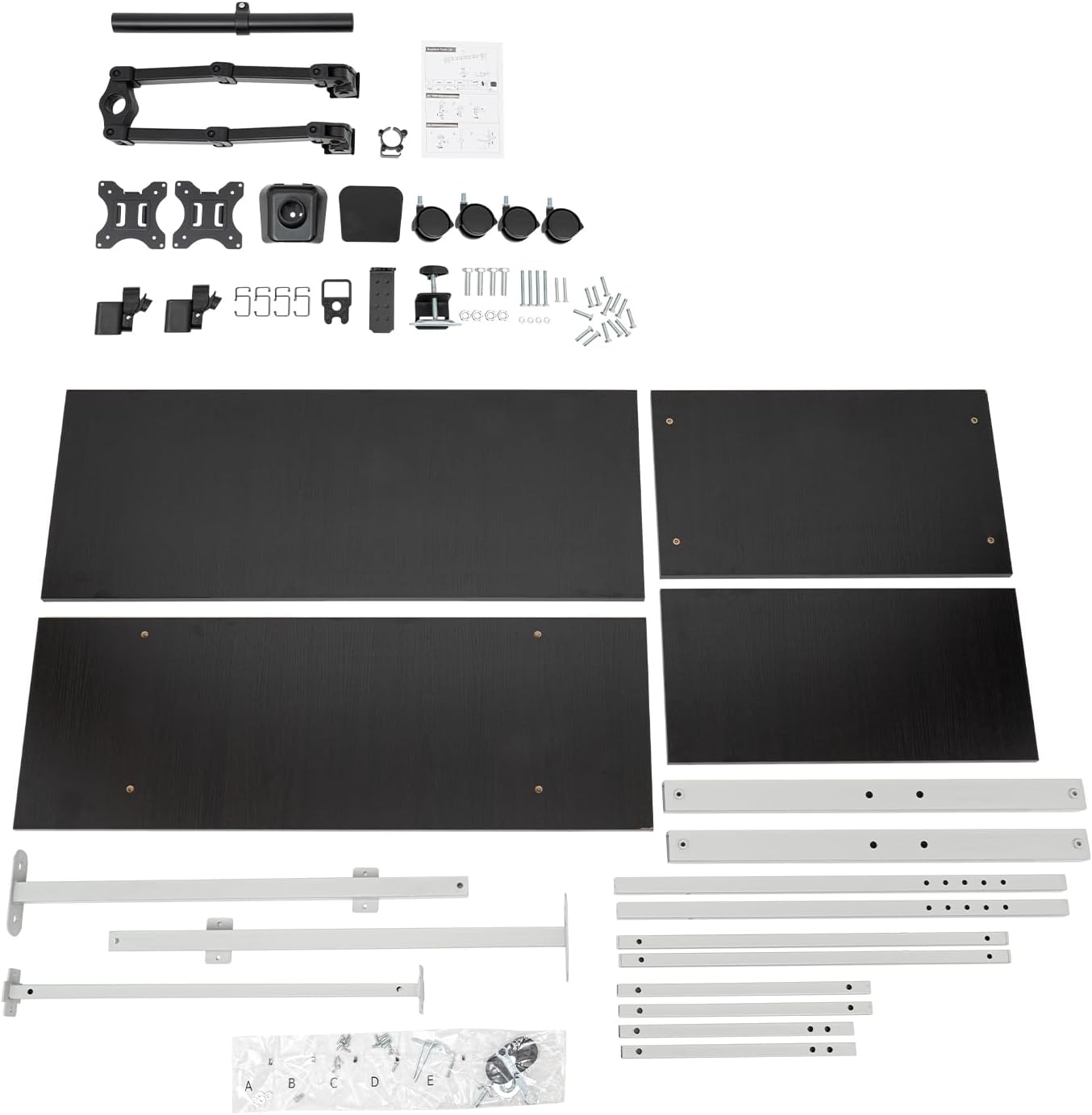
انځور: یو سر view of all desk components, including the four tiers, steel frame parts, monitor mount, universal wheels, and various screws and tools, laid out on a flat surface, ready for assembly.
د مجلس لارښوونې
- When installing, do not tighten the screws completely at the beginning. This allows for fine-tuning and alignment of holes for other parts. Tighten all screws firmly once the entire assembly is complete.
- د لویو برخو د ثبات او اسانه سمبالولو لپاره د دوه کسانو د راټولولو سپارښتنه کیږي.
- Ensure the universal wheels are correctly installed. Two of the four wheels include fixing devices (brakes) for securing the desk in place.

انځور: نږدې انځور view of one of the desk's universal wheels, showing its robust construction and the integrated locking mechanism (brake) that allows the desk to be secured in a stationary position.
عملیاتي لارښوونې
Your Gdrasuya10 Rolling Standing Desk is designed for versatility and ergonomic comfort. Follow these instructions for optimal use.
د لوړوالی سمون
The desk features an adjustable height bracket, allowing you to transition between sitting and standing positions. The height can be adjusted from approximately 138 cm (54.5 inches) to 183.5 cm (72.25 inches).
- Locate the adjustment knobs on the desk's frame.
- Loosen the knobs to allow the desk tiers to move freely.
- Carefully raise or lower the desk to your desired ergonomic height.
- Tighten the adjustment knobs firmly to secure the desk at the new height. Ensure both sides are tightened equally for stability.

Image: A close-up of a hand turning the black adjustment knob located on the desk's vertical support pole, demonstrating how to loosen or tighten it to change the desk's height.
Dual Monitor Mount Operation
The integrated dual monitor mount offers flexibility for your display setup.
- گردش: The monitor mounting connectors allow you to rotate your computer monitors 360 degrees for portrait or landscape orientation.
- ټیلټ: Monitors can be tilted up and down by 80 degrees to reduce glare and optimize viewزاویې
- تیر: The main bracket of the monitor mount can be turned 180 degrees, providing flexibility in monitor positioning relative to the desk.

Image: A hand pressing a small button on the base of the monitor mount, indicating a release or adjustment mechanism for the monitor arm or its position on the desk.

انځور: نږدې انځور view of the monitor mount base securely attached to the top tier of the desk, showing its sturdy construction and connection point.
خوځښت او ثبات
The four universal wheels allow for easy movement of the desk. To secure the desk in a stationary position, engage the brakes on the two wheels equipped with fixing devices.

Image: The Gdrasuya10 Rolling Standing Desk fully assembled and in use, displaying two monitors mounted, a keyboard and mouse on the main tier, and books and a plant on the lower shelf, highlighting its functional design.
ساتنه او پالنه
Proper maintenance will extend the life and appearance of your standing desk.
- Use a clean, soft cloth to wipe surface dust.
- Avoid using sharp objects to strike or hit the surface to prevent damage.
- For steel pipe surfaces with dust and dirt, you can use soap, a weak detergent, or warm water for cleaning. Ensure to dry thoroughly afterward.
- په منظم ډول ټول پیچونه او اړیکې وګورئ ترڅو ډاډ ترلاسه شي چې دوی کلک او خوندي پاتې دي.
د ستونزو حل کول
If you encounter issues with your Gdrasuya10 Rolling Standing Desk, refer to the following common solutions:
- د میز ټپونه:
- ډاډ ترلاسه کړئ چې ټول د راټولولو پیچونه په بشپړه توګه ټینګ شوي دي.
- Verify that the desk is on a flat, even surface.
- Check that the height adjustment knobs are securely fastened after adjusting height.
- د لوړوالي تنظیمولو کې مشکل:
- Ensure the adjustment knobs are sufficiently loosened before attempting to change height.
- Do not force the adjustment; ensure no obstructions are present.
- Wheels Not Locking:
- Confirm that the two wheels with fixing devices (brakes) are correctly engaged.
- Check for any debris obstructing the locking mechanism.
- Monitor Mount Issues:
- Ensure monitors are securely attached to the VESA plates.
- Check all connections and adjustment points on the monitor mount for tightness.
که ستونزې دوام ومومي، مهرباني وکړئ د پیرودونکو ملاتړ سره اړیکه ونیسئ.
د محصول مشخصات

Image: A detailed diagram showing the dimensions of the Gdrasuya10 Rolling Standing Desk, including the height adjustment range, and the sizes of each of the four tiers and the monitor mounting shelf.
| برانډ | Gdrasuya10 |
| د ماډل شمیره | e35684b0-76c8-4431-935e-ce2c02212a06 |
| مواد | Particleboard, Steel Pipes, PP |
| رنګ | Silver (with black tiers) |
| د محصول ابعاد (په ټولیز ډول) | 60 cm (23.5 in) W x 67 cm (26 in) D x 183.5 cm (72.25 in) H |
| د تنظیم وړ لوړوالی سلسله | 138 cm (54.5 in) - 183.5 cm (72.25 in) |
| Top Tier Size | 100 cm (39.5 in) x 40.6 cm (16 in) |
| Second Tier Size | 100 cm (39.5 in) x 50.8 cm (20 in) |
| Third Tier Size | 47 cm (18.5 in) x 22.86 cm (9 in) |
| Bottom Tier Size | 45 cm (17.75 in) x 35.56 cm (14 in) |
| Monitor Mounting Shelf Length | ۴۰ سانتي متره (۱۵۷۴۸ انچه) |
| Max. Load-bearing Capacity (Top Tier) | نږدې ۳.۶ کیلوګرامه (۸.۰ پونډه) |
| څرخ | 4 Universal Wheels (2 with Brakes) |
| مجلس ته اړتیا ده | هو |
| د غونډې لپاره وړاندیز شوي کسان | 2 |
د تضمین معلومات
This Gdrasuya10 product comes with a limited warranty. For specific details regarding coverage, duration, and terms, please refer to the warranty documentation included with your purchase or contact the manufacturer directly.
د تضمین ډول: محدود
د پیرودونکي ملاتړ
For further assistance, technical support, or inquiries regarding parts, please contact the seller or manufacturer. Please have your model number (e35684b0-76c8-4431-935e-ce2c02212a06) and purchase information ready when contacting support.
You can often find contact information on the product packaging, the seller's storefront, or the original purchase platform.


