1. پیژندنه
This manual provides detailed instructions for the installation, configuration, and operation of your Rebel KOM1031 Dual-Band Wireless Network Repeater. This device is designed to extend the coverage of your existing Wi-Fi network, providing a stronger and more reliable signal in areas with weak or no coverage. It supports both 2.4 GHz and 5 GHz wireless bands, offering flexible connectivity options and high data transfer rates.
2. د بسته محتويات
مهرباني وکړئ تصدیق کړئ چې ټول توکي ستاسو په کڅوړه کې شتون لري:
- Rebel KOM1031 Wireless Network Repeater
- د کارونکي لارښود (دا لاسوند)
- Ethernet Cable (may be included, check packaging)

شکل 2.1: The Rebel KOM1031 Repeater packaging, showing the device and its key features.
3. محصول ختم شوview
Familiarize yourself with the physical components and indicators of the Rebel KOM1031 Repeater.
3.1. د وسیلې ترتیب

شکل 3.1: مخکی view of the Rebel KOM1031 Repeater, highlighting the LED indicators and Ethernet ports.

شکل 3.2: اړخ view of the Rebel KOM1031 Repeater, showing the four external antennas in an extended position.

شکل 3.3: لاندې view of the Rebel KOM1031 Repeater, illustrating the integrated power plug and two RJ45 Ethernet ports.
3.2. د LED شاخصونه
| شاخص | حالت | تفصیل |
|---|---|---|
| SYS/power | په سولی | وسیله فعاله ده او په نورمال ډول کار کوي. |
| 2.4G | په سولی | 2.4 GHz Wi-Fi band is active. |
| 5.8G | په سولی | 5 GHz Wi-Fi band is active. |
| LAN3 / LAN4 | Solid On/Flashing | Indicates an active Ethernet connection and data transfer on the respective LAN port. |
4. د تنظیم کولو لارښود
Follow these steps to set up your Rebel KOM1031 Repeater.
۳.۱. لومړنی ځای پرځای کول او بریښنا فعالول
- یو ځای غوره کړئ: Plug the repeater into an electrical outlet in an area between your main router and the location where you need improved Wi-Fi coverage. Ensure it is within the range of your existing Wi-Fi signal.
- پاور آن: Plug the device directly into a standard wall socket. The SYS/POWER LED should illuminate. Wait approximately 30-60 seconds for the device to boot up.
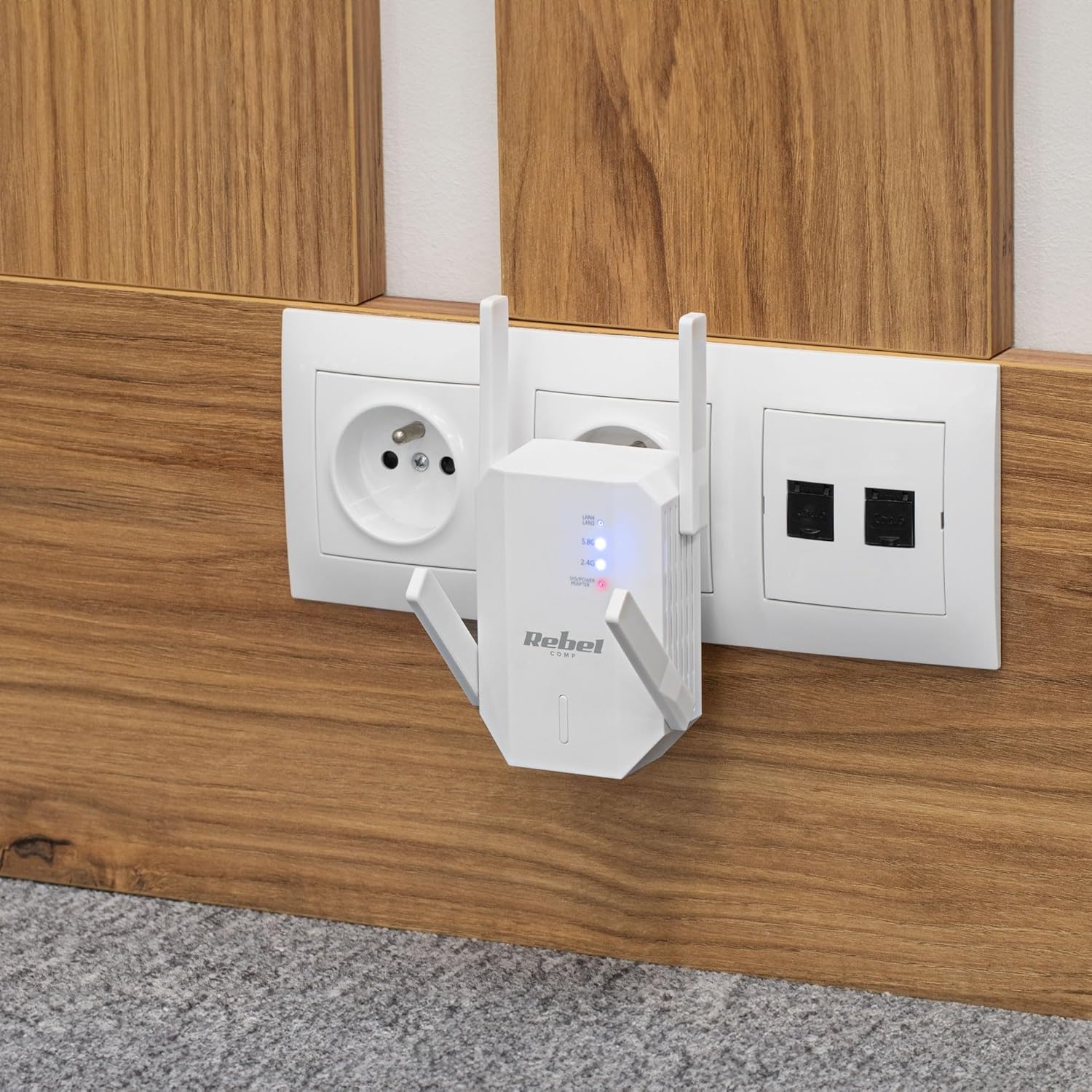
شکل 4.1: The Rebel KOM1031 Repeater plugged into a wall outlet, ready for configuration.
4.2. Connecting to the Repeater
- بې سیم اړیکه ونیسئ: On your computer or mobile device, search for available Wi-Fi networks. Connect to the network named "Rebel_XXXX" or similar (check the label on the device for the default SSID). No password is required for the initial connection.
- لاسرسی Web انٹرفیس: خلاص a web browser (e.g., Chrome, Firefox, Edge) and enter the default IP address or domain name (usually 192.168.10.1 or rebelrepeater.net) د ادرس بار ته. Enter فشار ورکړئ.
- ننوتل: When prompted, enter the default username and password (usually اډمین د دواړو لپاره).
4.3. Configuration Wizard (Repeater Mode)
Most users will configure the device in Repeater Mode to extend an existing Wi-Fi network.
- د تکرار حالت غوره کړئ: په web interface, select "Repeater Mode" or "Wi-Fi Repeater" from the available options.
- د شبکو لپاره سکین وکړئ: The device will scan for available Wi-Fi networks. Select your main Wi-Fi network (SSID) from the list.
- پاسورډ دننه کړئ: Enter the Wi-Fi password (security key) of your main router.
- Configure Repeater SSID (Optional): You can choose to keep the same SSID as your main network or create a new one (e.g., "MyHome_EXT"). It is recommended to use a different SSID to easily distinguish between networks.
- ترتیبات تطبیق کړئ: Click "Apply" or "Save" to confirm your settings. The repeater will restart. This process may take a few minutes.
- بیا اړیکه نیول: After the repeater restarts, disconnect from the repeater's default Wi-Fi network and connect to your newly configured extended network (e.g., "MyHome_EXT") using the password you entered.
Your Rebel KOM1031 Repeater should now be extending your Wi-Fi network. Check the signal strength in previously weak areas.
5. عملیاتي طریقې
The Rebel KOM1031 supports multiple operating modes to suit various networking needs.
۵.۱. د تکرار حالت (ډیفالټ)
In Repeater Mode, the device extends the coverage of an existing wireless network. It receives the wireless signal from your main router and re-transmits it, effectively expanding the Wi-Fi range. This is the most common mode for eliminating Wi-Fi dead zones.
۵. د لاسرسي نقطه (AP) حالت
In AP Mode, the device connects to a wired network (via an Ethernet cable) and broadcasts a new wireless network. This is useful for adding Wi-Fi capability to a wired-only network or creating a new Wi-Fi hotspot from a wired internet connection.
- ایترنیټ سره وصل کړئ: Connect an Ethernet cable from your router or modem to one of the RJ45 ports on the KOM1031.
- لاسرسی Web انٹرفیس: Follow steps 4.2 to access the web انٹرفیس
- د AP حالت غوره کړئ: Choose "AP Mode" or "Access Point" from the configuration options.
- د Wi-Fi ترتیبات تنظیم کړئ: Set a new SSID (network name) and a strong password for your new wireless network.
- ترتیبات تطبیق کړئ: Save the configuration. The device will restart and operate as an Access Point.
6. ساتنه
مناسب ساتنه ستاسو د وسیلې اوږد عمر او غوره فعالیت تضمینوي.
- پاکول: د وسیلې د پاکولو لپاره نرم، وچ ټوکر وکاروئ. مایع پاکوونکي یا ایروسول مه کاروئ.
- وینټیلیشن: Ensure the device is placed in a well-ventilated area. Do not block the ventilation slots.
- د فرم ویئر تازه معلومات: په دوره یي ډول د تولید کونکي معاینه وکړئ website for firmware updates. Updating firmware can improve performance and security.
- بیا تنظیمول: If the device malfunctions or you forget the login credentials, you can perform a factory reset. Locate the reset button (usually a small pinhole) and press it with a paperclip for 5-10 seconds while the device is powered on. The device will revert to factory default settings.
7. ستونزه حل کول
که تاسو له ستونزو سره مخ شئ، لاندې عامې ستونزې او حل لارې وګورئ.
۸.۱. د تنظیم وروسته انټرنیټ ته لاسرسی نشته
- Check Main Router: ډاډ ترلاسه کړئ چې ستاسو اصلي روټر فعال انټرنیټ اتصال لري.
- پاسورډ تایید کړئ: دوه ځله وګورئ چې تاسو د تنظیم کولو پرمهال د خپل اصلي روټر لپاره سم د وای فای پټنوم داخل کړی دی.
- Relocate Repeater: The repeater might be too far from your main router. Move it closer to ensure it receives a strong signal.
- وسیلې بیا پیل کړئ: Restart your main router, the repeater, and your client devices.
۵.۳. لاسرسی نه شي کېدای Web مدیریت پاڼه
- پیوستون چیک کړئ: Ensure your device is connected to the repeater's Wi-Fi network (either the default "Rebel_XXXX" or your configured extended network).
- د IP پته تایید کړئ: Confirm you are using the correct IP address (e.g., 192.168.10.1) or domain name (rebelrepeater.net).
- د براوزر کیچ پاک کړئ: هڅه وکړئ چې خپل پاک کړئ web browser's cache or using a different browser.
- د فابریکې رییس: If all else fails, perform a factory reset (see Section 6. Maintenance) and try setting up again.
7.3. Weak Signal or Slow Speed
- غوره ځای پرځای کول: Ensure the repeater is placed optimally, roughly halfway between your router and the dead zone. Avoid physical obstructions like thick walls or metal objects.
- لاسوهنه: Other electronic devices (microwaves, cordless phones) can cause interference. Try moving the repeater away from such devices.
- د انتن تنظیم کول: Adjust the external antennas for better signal reception and transmission.
8. تخنیکي مشخصات
| فیچر | تفصیل |
|---|---|
| ماډل | KOM1031 |
| برانډ | بغاوت |
| چپسیټ | MTK7612 |
| بې سیم معیارونه | IEEE 802.11 a/b/g/n/ac |
| د فریکونسی بندونه | 2.4 GHz / 5 GHz (Dual-Band) |
| د ډیټا لیږد نرخ | تر ۸۶۷ ایم بی پی ایس (۵ ګهرټه) پورې، تر ۴۰۰ ایم بی پی ایس (۲.۴ ګهرټه) پورې |
| انتن | 4 External (2 dBi each) |
| امنیتي پروتوکولونه | WEP, WPA/WPA2, WPS (64/128 bit) |
| ایترنیټ بندرونه | ۱x RJ2 (۱۰/۱۰۰ Mbps) |
| د بیسیم رینج | Up to 100 meters (environment dependent) |
| د بریښنا رسول | 110-240 V; 50/60 Hz; 2 A |
| ابعاد | 87 x 63 x 55 mm |
| وزن | 76 ګرامه |
| سیمالټ کاروونکي | په ورته وخت کې تر 10 کاروونکو پورې ملاتړ کوي |
9. د خوندیتوب معلومات
مهرباني وکړئ دا خوندیتوب لارښوونې ولولئ او تعقیب یې کړئ ترڅو وسیله ته زیان ونه رسوي یا ځان ته زیان ونه رسوي.
- وسیله د اوبو، رطوبت، یا ډیرې تودوخې سره مه مخ کوئ.
- هڅه مه کوئ چې وسیله پخپله جلا کړئ یا ترمیم کړئ. ټولې خدمتونه وړ پرسونل ته راجع کړئ.
- Ensure the power outlet used is easily accessible and provides the correct voltage (110-240V).
- د تودوخې سرچینو ته نږدې یا مستقیم لمر کې د وسیله ځای په ځای کولو څخه ډډه وکړئ.
- وسیله د ماشومانو او څارویو څخه لرې وساتئ.
10. تضمین او ملاتړ
For warranty information, technical support, or further assistance, please refer to the official Rebel website or contact your retailer. Please have your product model number (KOM1031) and purchase details ready when seeking support.


