پیژندنه
This manual provides comprehensive instructions for the setup, operation, and maintenance of your Blaupunkt 43QD7050 43-inch 4K Ultra HD QLED Google TV. Please read this manual thoroughly before using the television to ensure proper functionality and safety.

انځور: مخکینۍ برخه view of the Blaupunkt 43QD7050 QLED Google TV, highlighting its display and features.
د خوندیتوب مهم معلومات
Always follow basic safety precautions when using this television to reduce the risk of fire, electric shock, and injury. Keep this manual for future reference.
- تلویزیون باران یا رطوبت ته مه ښکاره کوئ.
- د هوا د خلاصیدو مخنیوی مه کوئ.
- د بریښنا تار لپاره مناسب ځمکنۍ کول ډاډمن کړئ.
- د برېښنا د طوفانونو پر مهال یا کله چې د اوږدې مودې لپاره نه کارول کیږي، تلویزیون خلاص کړئ.
- ټول خدمتونه وړ خدمت پرسونل ته راجع کړئ.
په بکس کې څه دي
کله چې ستاسو تلویزیون خلاص کړئ، ډاډ ترلاسه کړئ چې ټولې برخې شتون لري.
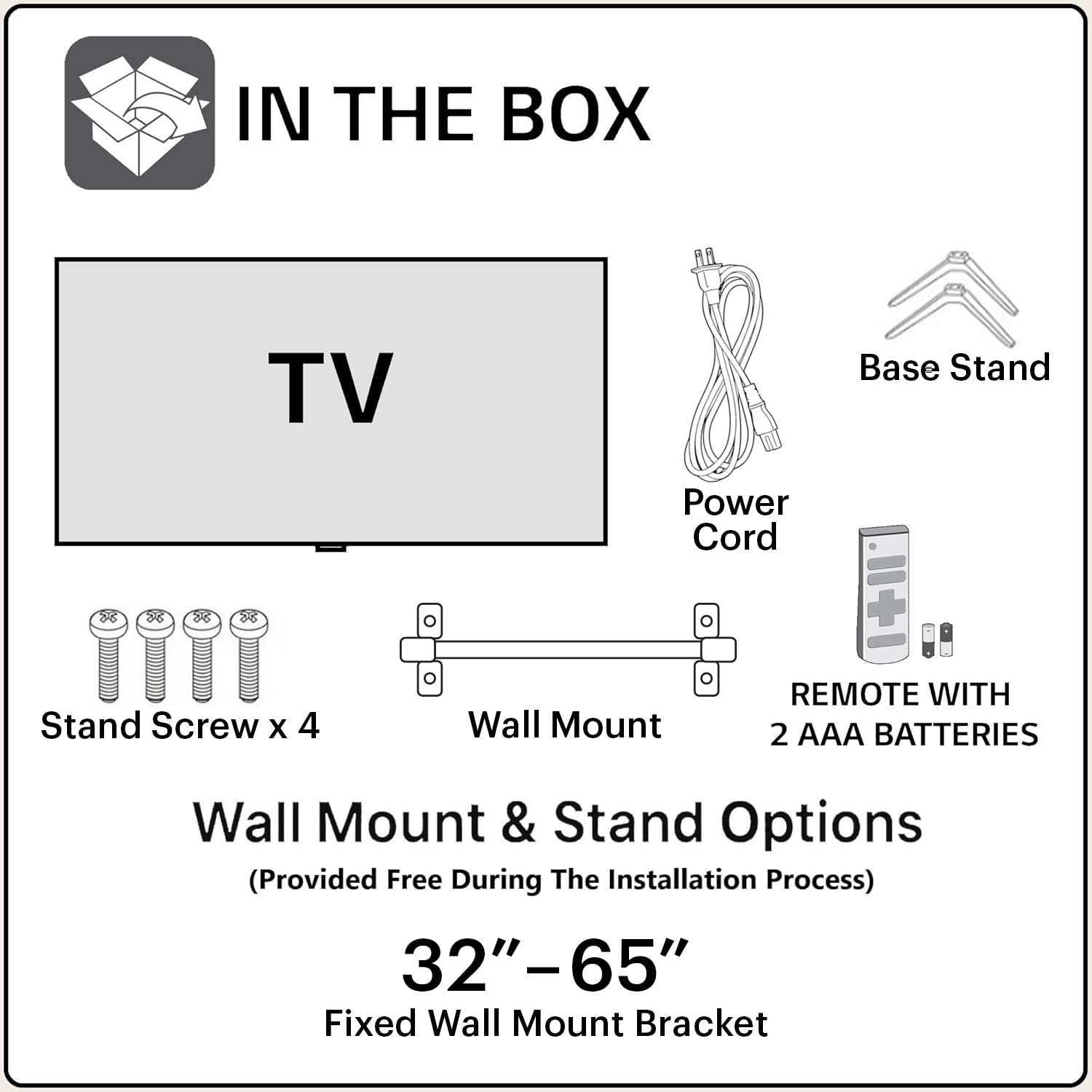
Image: Diagram showing the items included in the product packaging: TV, remote control, wall mount, stand screws, power cord, and AAA batteries.
- 1 x Blaupunkt 43QD7050 LED TV
- 1 x ریموټ کنټرول
- 1 x Wall Mount Bracket (for 32"-65" models)
- ۲ x AAA بیټرۍ (د ریموټ کنټرول لپاره)
- 1 د بریښنا کارډ
- 1 x Base Stand Set (with 4 stand screws)
- د کارونکي لارښود (دا لاسوند)
فزیکي پایview
مخکی View

انځور: مخکینۍ برخه view of the television, showcasing the screen and minimal bezels.
اړخ View

انځور: سایډ پروfile of the television, illustrating its slim design.
شاته View او بندرونه

انځور: شاته view of the television, detailing the location of various input and output ports.
The rear panel of the TV includes various ports for connectivity:
- د HDMI پورټونه (x3): For connecting devices like gaming consoles, set-top boxes, and Blu-ray players. One port supports eARC.
- د USB پورټونه (x2): د USB ذخیره کولو وسیلو سره د نښلولو لپاره.
- ایترنیټ پورټ: د تار لرونکي انټرنیټ اتصال لپاره.
- د انتن/کیبل داخلول: د انتن یا کیبل تلویزیون د نښلولو لپاره.
- آډیو بهر: د بهرني آډیو سیسټمونو سره د نښلولو لپاره.
- د بریښنا ننوتل: د بریښنا تار د نښلولو لپاره.
د تنظیم کولو لارښود
۲. د سټینډ نصب کول (اختیاري)
If you choose to place the TV on a stand, follow these steps:
- د سکرین د زیان مخنیوي لپاره په احتیاط سره تلویزیون په نرم او فلیټ سطح کې کیږدئ.
- Align the base stands with the screw holes on the bottom of the TV.
- هر سټینډ د چمتو شوي پیچونو سره خوندي کړئ.
۳. دیوال نصب کول (اختیاري)
The TV comes with a wall mount bracket. Professional installation is recommended for wall mounting. Ensure the wall can support the weight of the TV.
- Refer to the wall mount bracket's instructions for specific installation details.
- Ensure adequate ventilation around the mounted TV.
3. د پردیو نښلول
خپل بهرني وسایل د تلویزیون په شا پینل کې مناسبو بندرونو سره وصل کړئ.
- HDMI: Use HDMI cables to connect devices like set-top boxes, gaming consoles, or Blu-ray players.
- USB: د میډیا پلې بیک لپاره USB ډرایوونه دننه کړئ.
- ایترنیټ: د یو باثباته تار لرونکي انټرنیټ اتصال لپاره د ایترنیټ کیبل سره وصل کړئ.
- ځواک: د برېښنا تار د تلویزیون د برېښنا ان پټ سره وصل کړئ او بیا د دیوال له لارې وصل کړئ.

Image: Visual representation of the TV's connectivity options including HDMI, Bluetooth, Dual Band Wi-Fi, and USB.
۲.۴. د بریښنا لومړنی فعالول او د ګوګل تلویزیون تنظیم کول
- تلویزیون د بریښنا په سوري کې ولګوه.
- په ریموټ کنټرول یا تلویزیون کې د بریښنا تڼۍ فشار ورکړئ.
- د لومړني تنظیم بشپړولو لپاره په سکرین کې لارښوونې تعقیب کړئ، پشمول د ژبې انتخاب، د شبکې اتصال (وای فای یا ایترنیټ)، او د ګوګل حساب لاسلیک کول.
عملیاتي لارښوونې
د ریموټ کنټرول دندې

Image: Layout of the Blaupunkt TV remote control, showing buttons for power, navigation, volume, and quick access to streaming services.
The remote control allows you to navigate the TV's features:
- د بریښنا تڼۍ: تلویزیون چالان یا بند کړئ.
- د نیویګیشن پیډ (پورته/ښکته/کیڼ/ښي/ښه): د مینو نیویګیشن او انتخاب لپاره.
- د شا تڼۍ: مخکینی سکرین ته راستنیږي.
- د کور تڼۍ: د ګوګل تلویزیون کور سکرین ته لاسرسی لري.
- حجم پورته / ښکته: د حجم کچه تنظیموي.
- تteۍ غږول: غږ خاموش یا غیر خاموش کوي.
- د چټک لاسرسي تڼۍ: Dedicated buttons for Netflix, Prime Video, YouTube, and other services.
- د ګوګل مرستیال تڼۍ: د غږ کنټرول فعالوي.
د ګوګل تلویزیون انٹرفیس نیویګیشن
Google TV organizes your content from various streaming services into a personalized home screen.

Image: Screenshot of the Google TV interface, displaying personalized movie and show recommendations and a unified watchlist.
- Use the navigation pad to browse through recommended content, apps, and settings.
- Select an item by pressing the OK تڼۍ
- Access the full list of installed apps from the "Apps" tab.
سمارټ ځانګړتیاوې
- Voice Control (Google Assistant): Press the Google Assistant button on your remote and speak commands to search for content, control smart home devices, or get information.
- د سکرین عکس العمل: Cast content from your compatible smartphone or tablet to the TV using the built-in casting feature.
- اطلاقات او لوبې: Access a wide range of applications and games from the Google Play Store.

Image: Display of the TV screen showcasing a selection of over 10,000 available apps and games, including popular streaming services.
ساتنه
- د سکرین پاکول: سکرین په نرمۍ سره د نرم، لینټ نه پاک ټوکر سره پاک کړئ. د سختو نښو لپاره، د سکرین پاکوونکي څخه کار واخلئ چې په ځانګړي ډول د تلویزیونونو لپاره ډیزاین شوی وي، په ټوکر باندې تطبیق شي، نه په مستقیم ډول په سکرین باندې.
- د کابینې پاکول: د تلویزیون کابینې د پاکولو لپاره نرم، وچ ټوکر وکاروئ. د کثافاتو پاکوونکي یا محلولونه مه کاروئ.
- د سافټویر تازه معلومات: The TV may receive automatic software updates. Ensure your TV is connected to the internet to receive these updates, which improve performance and add new features.
د ستونزو حل کول
د عامو ستونزو د حل لپاره دې برخې ته مراجعه وکړئ.
| ستونزه | احتمالي حل |
|---|---|
| هیڅ ځواک نشته | Ensure the power cord is securely plugged into both the TV and a working electrical outlet. Check the power indicator light on the TV. |
| انځور نشته، خو غږ شته | Check the input source. Press the "Input" button on the remote to cycle through sources. Ensure external devices are powered on and connected correctly. |
| غږ نشته، خو انځور شته | Check the volume level and ensure the TV is not muted. Verify audio settings in the TV menu. If using external speakers, check their connections and power. |
| ریموټ کنټرول کار نه کوي | په ریموټ کنټرول کې بیټرۍ بدل کړئ. ډاډ ترلاسه کړئ چې د ریموټ او د تلویزیون د IR سینسر ترمنځ هیڅ خنډ شتون نلري. |
| د خراب کیفیت کیفیت | Check the cable connections. Adjust picture settings (brightness, contrast, sharpness) in the TV menu. For external devices, ensure they are outputting at the correct resolution. |
| د وائی فای اتصال مسلې | Restart your router and modem. Go to the TV's network settings and reconnect to your Wi-Fi network. Ensure the TV is within range of your router. |
مشخصات
Detailed technical specifications for the Blaupunkt 43QD7050 QLED Google TV.

Image: Diagram illustrating the physical dimensions of the Blaupunkt 43QD7050 TV, including screen size, width, height, and depth.
| فیچر | تفصیل |
|---|---|
| ماډل | 43QD7050 |
| د سکرین اندازه | 43 انچونه (108 سانتي متره) |
| ټیکنالوژي ښکاره کول | QLED |
| قرارداد | 4K الټرا ایچ ډي (3840 x 2160) |
| د تازه کولو نرخ | 60 Hz |
| عملیاتي سیسټم | ګوګل تلویزیون |
| د غږ محصول | 60 واټ |
| د آډیو ځانګړتیاوې | Dolby Digital Plus, DTS TruSurround, CyberSound Gen2 Technology |
| ارتباط | Dual Band Wi-Fi, 3 HDMI ports (eARC support), 2 USB ports, Ethernet, Bluetooth |
| ځانګړي ځانګړتیاوې | 4K HDR, Google Assistant, Screen Mirroring, HDR 10+ |
| حافظه (RAM/Storage) | ۳ جي بي رام / ۸ جي بي ذخیره |
| د محصول ابعاد (LxWxH) | ۲۴.۱۵ x ۱.۸۶ x ۱۴.۰۴ سانتي متره (پرته له ولاړې) |
| د توکي وزن | 5.9 کیلو ګرامه |
| د ماډل کال | 2024 |

Image: Representation of the MediaTek MT9602 processor, highlighting its quad-core ARM Cortex A53 CPU and Mali-G52MC1 GPU for performance.
تضمین او ملاتړ
Your Blaupunkt 43QD7050 television comes with a manufacturer's warranty.
- د محصول تضمین: د پیرود نیټې څخه 1 کال.
- د ریموټ لوازمو تضمین: د پیرود نیټې څخه 6 میاشتې.
- د تضمین ادعا: The brand warranty can be availed using the purchase invoice.
- هغه توکي چې نه پوښل شوي: Light bleeding and dot issues (Mura issues) occurring within acceptable Mura Inspection standards (2% guideline) are not considered panel defects and are not covered.
For customer support, service requests, or further inquiries, please contact:
- وړیا اړیکه: 1800-274-4342
- بریښنالیک ID: consumercare@blaupunkttv.in
- د جوړونکي پته: B-29,30,31, Phase-II, Noida, Gautam Buddha Nagar, Uttar Pradesh, 201301, India.
Please have your product model number (43QD7050) and purchase invoice ready when contacting support.


