1. محصول ختم شوview
This manual provides essential information for the operation and maintenance of your GHUST MR23GA Replacement Magic Voice Remote Control. This remote is designed as a replacement for various LG Smart TV models, offering convenient control without complex setup.

Image 1.1: The GHUST MR23GA Replacement Magic Voice Remote Control.
کلیدي ځانګړتیاوې:
- مستقیم بدیل: Functions as a direct replacement for original LG Magic Remote models.
- هیڅ پروګرام کولو ته اړتیا نشته: Ready to use out of the box after battery insertion.
- دوامدار ساختمان: Made of high-quality ABS material for enhanced durability.
- تړون ډیزاین: Small and ergonomic for comfortable grip.
- Voice Search Capability: Supports voice commands for easier navigation (functionality may vary based on TV model and original remote features).
- وقف شوي لنډلارې تڼۍ: د مشهورو سټریمینګ خدماتو لکه نیټ فلکس او پرائم ویډیو ته چټک لاسرسی.
2. ترتیب او نصب کول
The MR23GA remote control is designed for immediate use with compatible LG Smart TVs. No complex programming or pairing procedures are required.
2.1. د بیټرۍ نصب کول
- د ریموټ کنټرول شاته د بیټرۍ کمپارټ پوښ ومومئ.
- پوښ ښکته خوا ته وغورځوئ یا د خونې د خلاصولو لپاره لیچ فشار ورکړئ.
- Insert two (2) AAA batteries (not included) into the compartment, ensuring the positive (+) and negative (-) terminals align correctly with the indicators inside.
- د بیټرۍ د برخې پوښ وتړئ او بیرته یې ځای ته وغورځوئ تر هغه چې په خوندي ډول کلیک وکړي.

Image 2.1: The remote control is designed for ease of use with no setup or programming required after battery installation.
Once batteries are installed, the remote is ready to operate your compatible LG Smart TV.
3. عملیاتي لارښوونې
This section details the basic functions and operation of your MR23GA remote control.
3.1. بنسټیز کارونه
- د چالانېدو تڼۍ (●): د تلویزیون فعالولو یا بندولو لپاره فشار ورکړئ.
- د شمېرې تڼۍ (0-9): د چینل شمیرې مستقیم داخلولو لپاره وکاروئ.
- حجم پورته / ښکته (+/-): د تلویزیون د غږ کچه تنظیم کړئ.
- Channel Up/Down (▲/▼): د تلویزیون چینلونه بدل کړئ.
- د خاموش کولو تڼۍ (🔇): د تلویزیون غږ خاموش یا غیر خاموش کړئ.
- د نیویګیشن پیډ (پورته، ښکته، کیڼ، ښي، سمه): د مینو له لارې حرکت وکړئ او اختیارونه غوره کړئ.
- Back Button (↶): پخوانۍ سکرین یا مینو ته بیرته راشئ.
- Home Button (🏠): Access the TV's Smart Home dashboard.

Image 3.1: The compact size and ergonomic design make the remote easy to hold and operate.
3.2. د غږ کنټرول
فشار ورکړئ او ونیسئ د مایکروفون تڼۍ to activate voice control. Speak clearly into the remote to issue commands or search for content. Release the button when finished speaking. Note that voice control functionality may depend on your specific LG TV model and its original features.
3.3. Dedicated Shortcut Buttons
The remote features dedicated buttons for quick access to popular streaming applications:
- د Netflix تڼۍ: Directly launch the Netflix application.
- د لومړي ویډیو بټن: Directly launch the Amazon Prime Video application.
- د ډیزني+ تڼۍ: Directly launch the Disney+ application.
- د LG چینلونو تڼۍ: Directly launch the LG Channels application.
- Sling Button: Directly launch the Sling TV application.
- د الیکسا تڼۍ: Activate Alexa voice assistant (functionality depends on TV model).

Image 3.2: Dedicated shortcut buttons provide quick access to your favorite applications.
3.4. مطابقت
This replacement remote control is compatible with a wide range of LG Smart TV models, including but not limited to:
- LG OLED Series: OLED42C3AUA, OLED42C3PUA, OLED48C3PUA, OLED55C3PUA, OLED65C3AUA, OLED77C3PUA, OLED83C3PUA, OLED55G3PUA, OLED65G3PUA, OLED77G3PUA, OLED83G3PUA, OLED55B3PUA, OLED65B3PUA, OLED77B3PUA
- LG QNED Series: 43QNED75URA, 50QNED75URA, 55QNED75URA, 65QNED75URA, 75QNED75URA, 50QNED80URA, 55QNED80URA, 65QNED80URA, 75QNED80URA, 86QNED80URA
- LG UR9000 Series: 43UR9000PUA, 50UR9000PUA, 55UR9000PUA, 65UR9000PUA, 75UR9000PUA
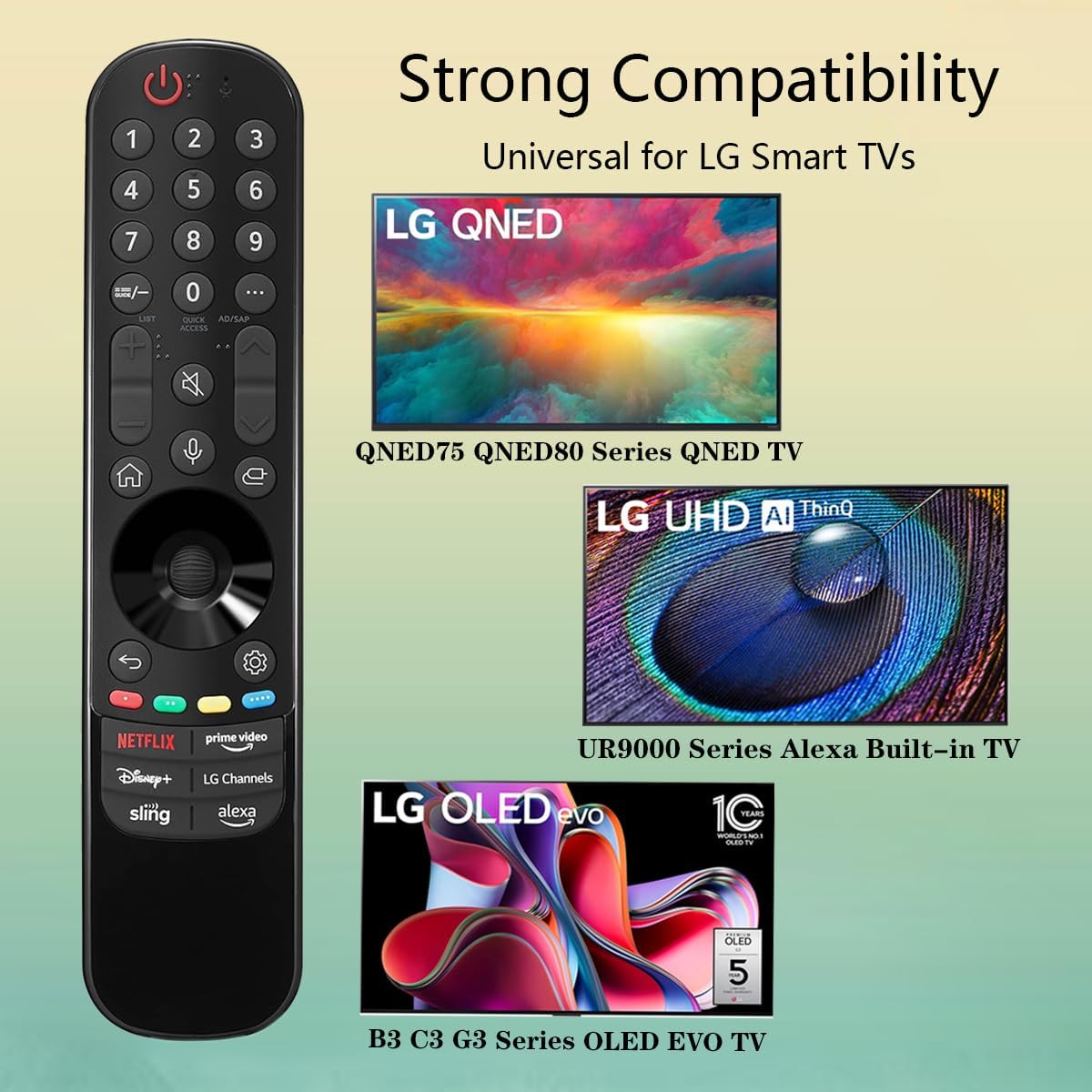
Image 3.3: The remote offers strong compatibility with various LG Smart TV series.
4. ساتنه
Proper care and maintenance will extend the lifespan of your remote control.
4.1. پاکول
- د ریموټ کنټرول سطحه د نرم، وچ ټوکر څخه پاکه کړئ.
- د سختې خاورې لپاره، لږ څهampټوکر د اوبو یا یو نرم، غیر خارښونکي کلینر سره ومینځئ. کلینر مستقیم په ریموټ کنټرول مه سپری کوئ.
- د سختو کیمیاوي موادو، محلولونو، یا د پاکولو موادو کارولو څخه ډډه وکړئ، ځکه چې دا کولی شي د ریموټ پای یا داخلي برخو ته زیان ورسوي.
4.2. د بیټرۍ پاملرنه
- Replace batteries when the remote's responsiveness decreases or it stops functioning.
- تل دواړه بیټرۍ په ورته وخت کې د ورته ډول (AAA) نوي بیټرۍ سره بدل کړئ.
- If the remote will not be used for an extended period (e.g., one month or more), remove the batteries to prevent leakage and potential damage to the remote.
- د ځایی مقرراتو سره سم کارول شوي بیټرۍ تصفیه کړئ.
5. ستونزه حل کول
If you encounter issues with your remote control, refer to the following common problems and solutions:
| ستونزه | احتمالي لامل | د حل لاره |
|---|---|---|
| ریموټ ځواب نه ورکوي. | مړه یا په غلط ډول داخل شوي بیټرۍ. | بیټرۍ د نوي AAA بیټریو سره بدل کړئ، د سم قطبیت ډاډ ترلاسه کول (+/-). |
| ریموټ په وقفه يي ډول کار کوي. | Low battery power; obstruction between remote and TV; infrared sensor blocked on TV. | Replace batteries. Ensure a clear line of sight to the TV's infrared sensor. Remove any obstructions. |
| Voice control or pointer not working. | This replacement remote may not support all advanced features of the original LG Magic Remote, or your TV model does not fully support these features with a replacement remote. | Verify your TV model's compatibility with replacement remotes for advanced features. Basic functions should still operate. |
| Dedicated app buttons (e.g., Alexa, LG Channels) not working. | Functionality depends on TV model and specific app integration. | Some app buttons may not be universally compatible or require specific TV software versions. Verify if other buttons work. |
که چیرې د دې حل لارو هڅه کولو وروسته هم ستونزه دوام ومومي، مهرباني وکړئ د پیرودونکو ملاتړ سره اړیکه ونیسئ.
6. مشخصات
- د ماډل شمیره: MR23GA
- نښه: روح
- د محصول ابعاد: 7.3 x 1.6 x 1.2 انچه
- د توکي وزن: 2.29 اونس
- د بریښنا سرچینه: 2 x AAA بیټرۍ (شامل ندي)
- رنګ: تور
- مواد: لوړ کیفیت لرونکی ABS
- مطابقت لرونکي وسایل: LG Smart Televisions (specific models listed in Section 3.4)
- ځانګړې ځانګړنه: Voice Search (functionality may vary)
7. تضمین او ملاتړ
GHUST is committed to providing high-quality products and excellent customer service.
7.1. د پلور وروسته خدمت
If you have any questions regarding the quality or functionality of your GHUST MR23GA remote control, please do not hesitate to contact our customer support team. We are dedicated to resolving any issues promptly and ensuring your satisfaction.
For support, please refer to the contact information provided with your purchase or on the official GHUST product page.


