محصول پای ته ورسیدview
The Fazoxo Bird Feeder with Camera offers a unique way to observe birds in your garden or yard. This full HD waterproof outdoor bird feeder camera provides a 360° no-gap view, equipped with an FHD image sensor, 36pcs IR LEDs for up to 33 feet night vision, and a built-in mic and speaker for clear two-way audio. It supports TF cards up to 128GB for local storage.
کلیدي ځانګړتیاوې:
- Full HD Waterproof Outdoor Camera with 360° View
- Real-time Monitoring via Mobile App
- AI Bird Recognition (optional subscription after free trial)
- Solar-Powered for continuous operation
- دوه اړخیزه آډیو اړیکه
- Weather-resistant (IP65)
د بسته محتويات
Your Fazoxo Bird Feeder with Camera package includes all necessary components for assembly and installation:
- Bird Feeder Unit with integrated camera
- سولر پینل
- Mounting Kit (screws, anchors, strap)
- د USB چارج کیبل
- انتن
- Food Trays/Accessories (for seeds, fruit, nectar)

Image: The Fazoxo Bird Feeder with Camera, solar panel, and various feeding accessories.
تنظیم او نصب کول
1. Assemble the Bird Feeder
Carefully unpack all components. Attach the roof to the main feeder body. Secure the perches and food trays to the base of the feeder unit. Ensure all connections are firm.
Video: Visual guide to assembling the Fazoxo Bird Feeder components.
2. Install Antenna and Charge Camera
Screw the antenna securely into the designated port on the back of the camera unit. Before first use, fully charge the camera's internal battery using the provided USB cable. The charging port is located under a protective cover on the back of the unit.

Image: Detail of the camera unit's back, highlighting the antenna port and USB charging port.
۲. د سولر پینل نصب کړئ
Attach the solar panel to its mounting bracket. Position the solar panel in an area that receives maximum direct sunlight throughout the day to ensure continuous charging of the camera battery.
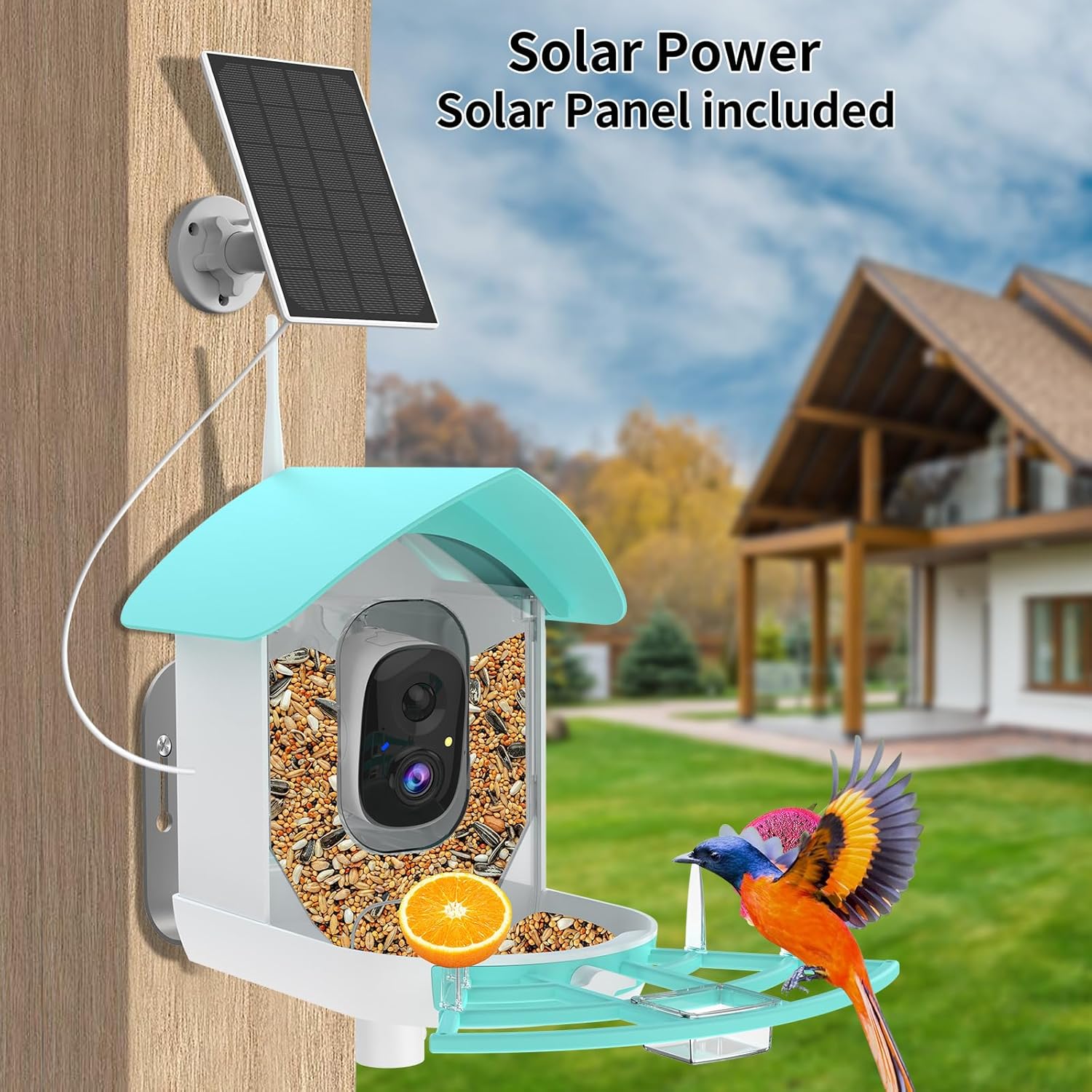
Image: The bird feeder with its solar panel mounted, illustrating solar charging capability.
۱. د نصبولو ځای غوره کړئ
The feeder can be mounted on a pole, wall, or tree using the included mounting kit. Select a location with a clear view of the area you wish to observe and good Wi-Fi signal strength. Ensure the mounting is secure to prevent the feeder from falling.
Video: Demonstrates the packaging and installation process of a bird feeder camera.
5. د ګرځنده ایپ سره وصل شئ
Download the dedicated mobile application (e.g., UBIA app, as seen in some product videos) from your device's app store. Follow the in-app instructions to pair your Fazoxo Bird Feeder Camera with your smartphone. Ensure your Wi-Fi network is 2.4GHz for optimal connectivity.

Image: A smartphone displaying a notification for bird detection and a live view from the feeder camera.
عملیاتي لارښوونې
Real-time Monitoring and Notifications
Once connected, you can access a live video feed of your bird feeder from anywhere via the mobile app. The camera's AI-powered motion detection will send instant notifications to your phone when birds approach, allowing you to capture every moment.
د AI الوتونکو پیژندنه
The smart bird feeder offers an optional AI feature that identifies over 10,000 bird species. Enjoy a one-month free trial to experience this feature. After the trial, a subscription may be required to continue using AI recognition. You can still enjoy birdwatching without the subscription.

Image: The mobile app interface demonstrating the AI bird species identification feature.
دوه طرفه آډیو
Utilize the built-in microphone to listen to bird chirps and calls. The integrated speaker allows for two-way audio, enabling interaction with your feathered visitors or deterring unwanted guests like squirrels.
Video and Photo Storage
Captured videos and photos can be stored locally on a TF card (up to 128GB, not included) or via the optional cloud service. The cloud service typically offers a free trial for new users.

Image: Visual representation of video and photo storage options, including cloud service and local SD card.
د شپې لید
The camera is equipped with 36pcs IR LEDs, providing clear night vision up to 33 feet, allowing for continuous birdwatching even in low-light conditions or at night.

Image: A split image demonstrating the clear video quality during both day and night from the camera.
Feeding Options
The feeder is designed to accommodate various types of bird food, including seeds, fruit, and nectar. Use the provided trays and accessories to offer a diverse diet to attract a wider range of bird species.
ساتنه
د هوا مقاومت
The Fazoxo Bird Feeder Camera is designed to be weather-resistant with an IP65 waterproof rating, allowing it to withstand various outdoor conditions including rain, snow, and extreme temperatures.

Image: The bird feeder camera in a simulated rain environment, emphasizing its weatherproof construction.
پاکول
Regular cleaning of the bird feeder is recommended to maintain hygiene and prevent the spread of diseases among birds. Disassemble the removable parts and wash them with mild soap and water. Ensure all parts are completely dry before reassembling and refilling with food.
د ستونزو حل کول
- د ارتباط مسلې: Ensure your Wi-Fi signal is strong and operating on the 2.4GHz band. Relocate the feeder or your Wi-Fi router if necessary to improve signal strength.
- د بیټرۍ چارج نه کول: Verify the solar panel is positioned in direct sunlight for several hours daily. If charging manually, ensure the USB cable is securely connected to both the camera and a power source.
- هیڅ خبرتیا نشته: Check the mobile app settings to ensure motion detection and notification preferences are enabled. Confirm the camera is online and has a stable internet connection.
- د ویډیو خراب کیفیت: Ensure the camera lens is clean and free from obstructions. Check your internet connection speed, as a slow connection can affect streaming quality.
مشخصات
| فیچر | تفصیل |
|---|---|
| برانډ | Fazoxo |
| د ماډل شمیره | B1 |
| د محصول ابعاد | ۷۱"لیتر x ۲۳.۶"واټه x ۲۴.۴"هوا |
| د توکي وزن | ۲.۴۵ پونډه |
| د بریښنا سرچینه | د بیټرۍ چلول (1 لیتیم آیون بیټرۍ شامله ده) |
| ځانګړی ځانګړنه | Inbuilt Solar Panel, AI-Powered Motion Detection, Real-time Monitoring |
| د نصب کولو ډول | Pole Mount, Wall Mount, Tree Mount |
| ظرفیت | 1.3 لیتره |
| د پنروک درجه | IP65 |
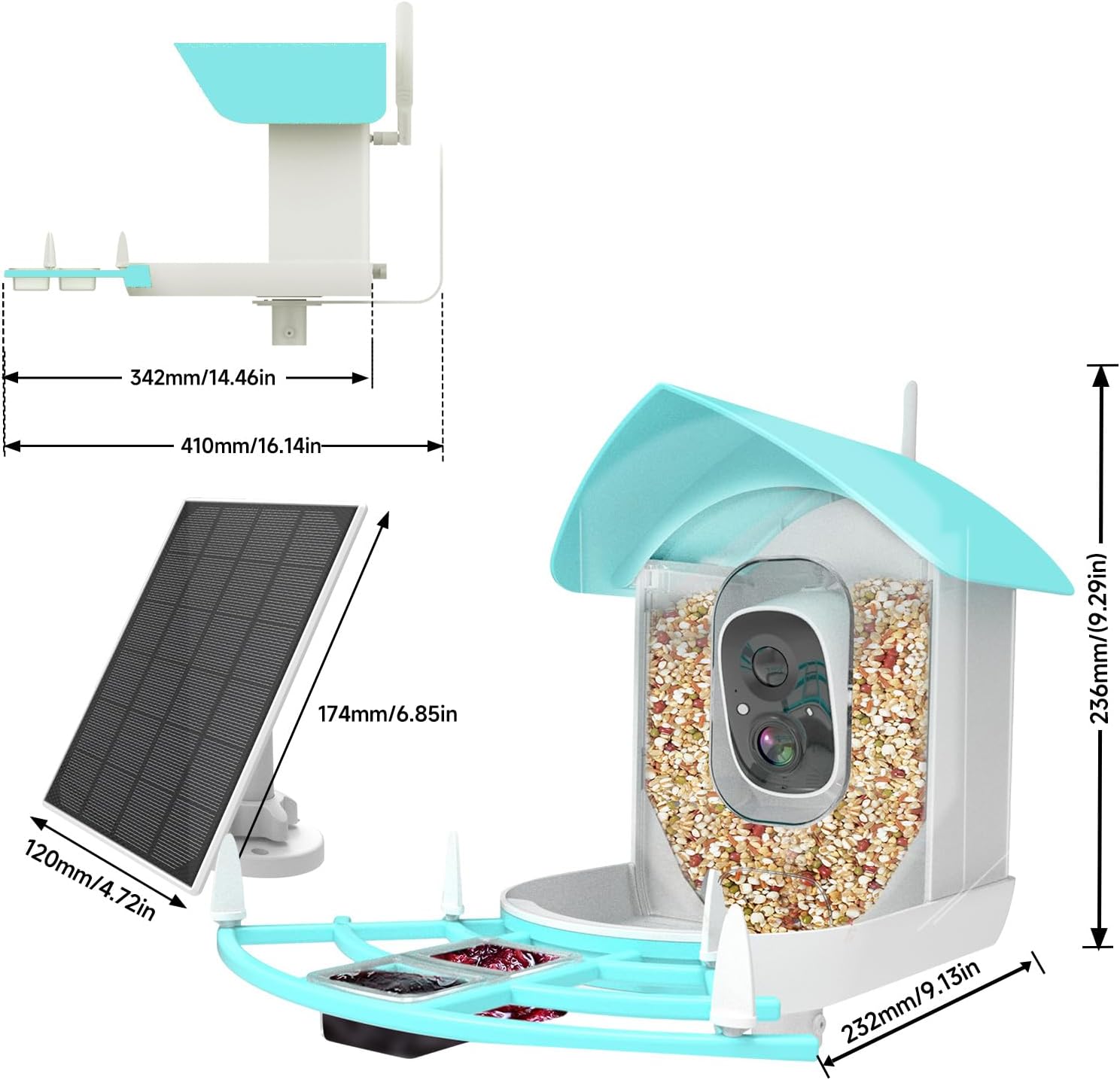
Image: Technical drawing showing the dimensions of the bird feeder and solar panel.
تضمین او ملاتړ
For detailed warranty information, product registration, and technical support, please refer to the contact details provided in your product packaging or visit the official Fazoxo website. Ensure you keep your proof of purchase for any warranty claims.


