1. پیژندنه
Thank you for choosing the WORKPRO 7.2V Cordless Rotary Tool. This manual provides essential information for the safe and effective operation, maintenance, and troubleshooting of your tool. Please read it thoroughly before use and retain it for future reference.
The WORKPRO 7.2V Cordless Rotary Tool is a versatile and compact device designed for various DIY and craft projects. Its lightweight design and variable speed settings make it suitable for tasks such as sanding, engraving, cutting, drilling, grinding, and polishing.

Figure 1: WORKPRO 7.2V Cordless Rotary Tool with included accessories and storage bag.
2. د خوندیتوب معلومات
د بریښنا وسیلو د چلولو په وخت کې د اور، بریښنا شاک او شخصي ټپي کیدو خطر کمولو لپاره تل د خوندیتوب لومړني احتیاطي تدابیر په پام کې ونیسئ.
- ټولې لارښوونې ولولئ: د وسیلې د عملیاتو او خوندیتوب لارښوونو سره ځان آشنا کړئ.
- د سترګو د ساتنې جامې: تل د خوندیتوب عینکې یا د خوندیتوب شیشې د غاړې پوښونو سره واغوندئ.
- خوندي کاري ټوټه: تل د clamp یا په بل ډول د کار ټوټه خوندي کړئ ترڅو د عملیاتو پرمهال د حرکت مخه ونیسي.
- د کار ځای پاک ساتل: ګډوډې سیمې حادثې ته بلنه ورکوي.
- د خطرناک چاپیریال څخه مخنیوی وکړئ: د بریښنا وسیلې مه کاروئamp یا لوند ځایونه ، یا باران ته یې افشا کړئ. د کار ساحه ښه روښانه وساتئ.
- ماشومان لرې وساتئ: ټول لیدونکي باید د کار ساحې څخه په خوندي فاصله کې وساتل شي.
- په سمه توګه جامې کول: Do not wear loose clothing or jewelry. They can be caught in moving parts. Non-skid footwear is recommended. Wear protective hair covering to contain long hair.
- سمه وسیله وکاروئ: وسیله یا ضمیمه د داسې کار کولو لپاره مه مجبوروئ چې د هغې لپاره ډیزاین شوی نه وي.
- د بریښنا قطع کول: Disconnect the tool from its power source before making adjustments, changing accessories, or storing it.
- له حده زیاتی مه کوئ: هر وخت مناسب پښه او توازن وساتئ.
- وسایل په احتیاط سره ساتل: د غوره او خوندي فعالیت لپاره وسایل تیز او پاک وساتئ. د لوازمو د غوړولو او بدلولو لپاره لارښوونې تعقیب کړئ.
- د خرابو برخو لپاره وګورئ: د وسیلې د نورو کارولو دمخه ، یو ساتونکی یا بله برخه چې زیانمن شوې باید په احتیاط سره وڅیړل شي ترڅو معلومه کړي چې دا به په سمه توګه کار وکړي او خپل مطلوب فعالیت ترسره کړي.
- د چارج کولو پرمهال کار مه کوئ: For safety reasons, do not use the tool while it is being charged.
3. محصول ختم شوview
The WORKPRO 7.2V Cordless Rotary Tool is designed for precision work. Understanding its components is key to effective operation.
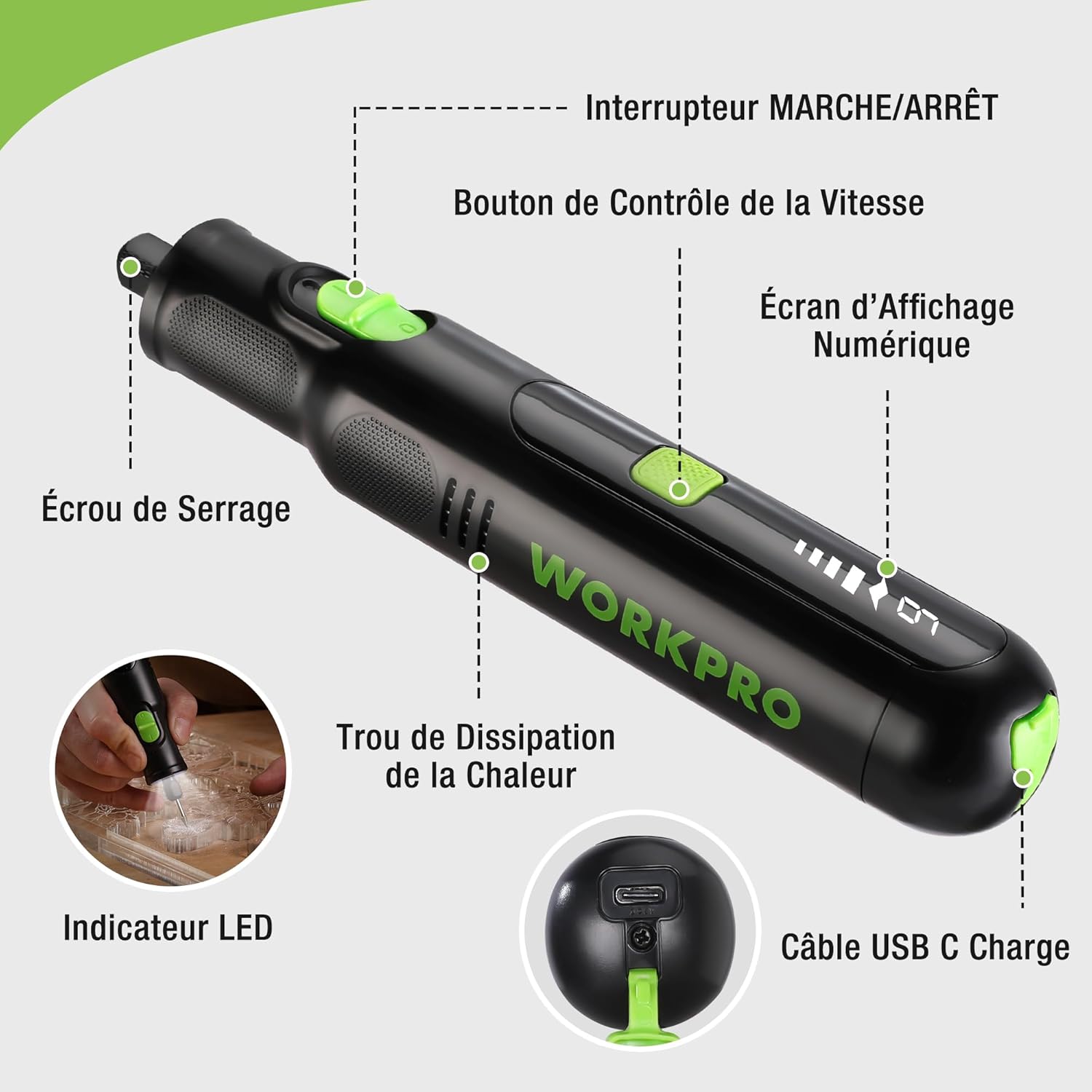
Figure 2: Key components of the rotary tool.
اجزا:
- آن/آف سویچ: وسیله فعاله او غیر فعاله کوي.
- د سرعت کنټرول تڼۍ: Adjusts the rotational speed of the tool.
- ډیجیټل ښودنه سکرین: Shows the current speed setting.
- د کولټ مغز: Secures the accessory bits in place.
- د تودوخې د ضایع کولو سوراخ: Ensures proper cooling of the motor during operation.
- د LED شاخص: د کار ساحې لپاره روښانتیا چمتو کوي.
- د USB-C چارج کولو بندر: د داخلي بیټرۍ د چارجولو لپاره.
شامل لوازم:
Your WORKPRO rotary tool comes with 117 diverse accessories, enabling a wide range of applications. These include:

شکل 3: پایview of the 117 included accessories.
- پیسول/تیزول: Grinding stones and wheels for material shaping and sharpening.
- نقاشي: Diamond bits for detailed carving and engraving.
- پالش کول: Wool felt wheels, felt wheels, screw mandrels, and metal brushes for achieving smooth, shiny finishes.
- ملنګ: Milling bits for precise material removal.
- پرې کول: Cutting discs and saw blades for various cutting tasks, along with a cutting disc holder.
- سانډینګ: Sandpaper, rubber sanding drums, and sanding bands for surface preparation and finishing.
- کولټونه: 2.35mm and 3.2mm collets to accommodate different shank sizes.
- برمه کول: 2.35mm and 3.2mm drill bits for small-scale drilling.
- رنچ: For securing and loosening collet nuts.
4. ترتیب کول
۳.۱ د وسیلې چارج کول
The tool is equipped with a 7.2V 1100mAh Lithium-ion rechargeable battery. Before first use, fully charge the tool.
- Connect the provided USB-C charging cable to the tool's USB-C charging port.
- Connect the other end of the USB cable to a compatible USB power source (e.g., computer, USB wall adapter).
- The digital display will indicate charging status. A full charge typically takes approximately 2 hours.
- یوځل چې په بشپړ ډول چارج شو، د چارج کیبل له مینځه یوسئ.
Note: For optimal battery life, it is recommended to store the tool with the battery charged between 50% and 75%. Recharge the tool at least once every 3 to 6 months if not used regularly.

Figure 4: Charging the rotary tool via USB-C.
4.2 د لوازمو نصب کول
The WORKPRO rotary tool features an automatic spindle lock design for easy and secure accessory changes.
- ډاډ ترلاسه کړئ چې وسیله بنده ده.
- Unscrew the collet nut at the front of the tool.
- Select the appropriate collet size for your desired accessory (2.35mm or 3.2mm). Insert the collet into the tool if not already present.
- Insert the shank of the accessory bit into the center of the collet nut. Ensure the bit is fully seated.
- Hand-tighten the collet nut. For a secure fit, use the included wrench to tighten the collet nut firmly. Do not overtighten.

Figure 5: Two-step accessory replacement process.

Figure 6: Detailed installation steps for various accessories.
Note: The automatic spindle lock engages when the tool is off, allowing for accessory changes without needing to press a separate button. A slight clicking sound when the tool stops is normal due to this mechanism.
5. عملیاتي لارښوونې
5.1 بریښنا کول / بندول
To turn the tool ON, slide the ON/OFF switch to the 'ON' position. To turn it OFF, slide the switch to the 'OFF' position.
۵.۲ د سرعت تنظیم کول
The tool features 6 variable speed settings, ranging from 5000 RPM to 30000 RPM. Press the Speed Control Button to cycle through the speeds. The current speed setting will be displayed on the digital screen.
- Speed I: 5000 RPM
- Speed II: 10000 RPM
- Speed III: 15000 RPM
- Speed IV: 20000 RPM
- Speed V: 25000 RPM
- Speed VI: 30000 RPM
Choose the appropriate speed for your task and material. Lower speeds are generally suitable for polishing, delicate work, and softer materials, while higher speeds are for cutting, grinding, and harder materials.

Figure 7: Variable speed settings and powerful motor.
۶.۵ مدغم شوی LED څراغ
The tool includes an integrated LED light that illuminates the work area, improving visibility in dimly lit spaces and for detailed tasks.

Figure 8: Using the LED light for precision engraving.
5.4 غوښتنلیکونه
The WORKPRO rotary tool is highly versatile and can be used for:
- پرې کول: Use appropriate cutting discs for various materials.
- نقاشي/کښت: Utilize diamond bits for intricate designs on wood, plastic, or soft metals.
- پالش کول: Apply felt wheels and polishing compounds to restore shine to surfaces.
- سانډینګ: Use sanding bands and drums for smoothing rough edges or preparing surfaces.
- برمه کول: Employ small drill bits for precision holes.

شکل 9: مثالamples of versatile applications.
6. ساتنه
6.1 پاکول
- تل د پاکولو دمخه وسیله د بریښنا له هرې سرچینې څخه جلا کړئ.
- یو نرم استعمال کړئ، دamp د وسیلې بهرنۍ برخه د پاکولو لپاره ټوکر. سخت کیمیاوي توکي یا د کثافاتو پاکوونکي مه کاروئ.
- Use a small brush or compressed air to clear dust and debris from the heat dissipation holes and around the collet area.
۵.۳ د بیټرۍ پاملرنه او ذخیره کول
- To prolong battery life, avoid completely discharging the battery regularly.
- For long-term storage, ensure the battery is charged to approximately 50-75%. Recharge the tool every 3 to 6 months to prevent deep discharge and maintain battery health.
- وسیله په یخ او وچ ځای کې وساتئ، د مستقیم لمر وړانګو او سختې تودوخې څخه لرې.
۱۶ د لوازمو ذخیره
Keep all accessories organized in the provided storage bag or a suitable container to prevent loss and damage.
7. ستونزه حل کول
دا برخه هغه عامې ستونزې په ګوته کوي چې تاسو یې د خپل WORKPRO روټري وسیلې سره مخ کیدی شئ.
| ستونزه | احتمالي لامل | د حل لاره |
|---|---|---|
| وسیله نه چالانیږي. | بیټرۍ خارجیږي. | Charge the tool fully using the USB-C cable. |
| Tool stops unexpectedly during use. | بیټرۍ ټیټه ده یا وسیله ډیر بار شوې ده. | Recharge the battery. Reduce pressure on the tool or use a lower speed setting for the task. |
| Clicking sound when turning off. | Normal operation of the automatic spindle lock. | This is a normal function and does not indicate a fault. |
| Accessory bit is loose or wobbles. | Collet nut not tightened sufficiently or incorrect collet size. | Ensure the correct collet size is used for the accessory. Tighten the collet nut firmly with the included wrench. |
| Reduced performance or short runtime. | Battery degradation or improper charging/storage. | Ensure proper charging and storage practices are followed (refer to Section 6.2). If the issue persists, the battery may need replacement. |
8. مشخصات
Below are the technical specifications for the WORKPRO 7.2V Cordless Rotary Tool (Model W123024A).
| فیچر | مشخصات |
|---|---|
| برانډ | د کار پرو |
| د ماډل شمیره | W123024A |
| والیtage | 7.2 ولټه |
| د بیټرۍ ډول | لیتیم آیون (۱ پکې شامل دی) |
| د بیټرۍ ظرفیت | 1100 mAh |
| د اعظمي گردش سرعت | 30000 RPM |
| متغیر سرعت | ۶ (۱۲،۰۰۰-۳۰،۰۰۰ RPM) |
| د چارج کولو وخت | نږدې 2 ساعته |
| Runtime (Max Speed) | نږدې 45 دقیقې |
| وزن | 227 ګرامه |
| ابعاد (L x W x H) | 25.2 x 16.8 x 5.5 سانتي متره |
| ځانګړی ځانګړنه | Cordless, Integrated LED Light, Automatic Spindle Lock |
| شاملې برخې | 117 لوازم |
| جوړونکی | د هانګ ژو لوی ستوري صنعتي شرکت، ل. |
9. تضمین او ملاتړ
For warranty information, please refer to the documentation provided at the time of purchase or contact your retailer. WORKPRO is committed to providing quality products and customer satisfaction.
If you encounter any issues or have questions regarding your WORKPRO 7.2V Cordless Rotary Tool, please contact the seller or WORKPRO customer support through their official website or contact channels. Please have your model number (W123024A) and purchase details ready when seeking support.


