پیژندنه
This manual provides essential information for setting up, operating, maintaining, and troubleshooting your Lenovo Legion Slim 5 16AHP9 laptop. Please read this manual thoroughly to ensure proper use and to maximize the performance and longevity of your device. Keep this manual for future reference.

Figure 1: Lenovo Legion Slim 5 16AHP9 Laptop Overview
په بکس کې څه دي
ډاډ ترلاسه کړئ چې ټول توکي په کڅوړه کې شتون لري:
- Lenovo Legion Slim 5 16AHP9 Laptop
- د بریښنا اډاپټر او کیبل
- اسناد (د چټک پیل لارښود، د تضمین معلومات)
چمتو کول
1. د بسته بندۍ او ابتدايي تفتیش
Carefully remove the laptop and all accessories from the packaging. Inspect the laptop for any signs of physical damage. If any damage is found, contact your retailer immediately.
۲. د بریښنا اډاپټر سره نښلول
Connect the power adapter to the laptop's power input port, typically located on the rear or side. Plug the power cable into a wall outlet. It is recommended to fully charge the battery before the first use.

شکل ۲: د لپ ټاپ اړخ View د بندرونو سره
۳. لومړنی بوټ او د وینډوز تنظیم کول
Press the power button to turn on the laptop. Follow the on-screen instructions to complete the Windows operating system setup. This includes selecting your region, language, accepting terms, and creating a user account.
- د بریښنا تڼۍ: Usually located on the keyboard deck or side.
- د شبکې پیوستون: Connect to a Wi-Fi network or use an Ethernet cable during setup for updates.
- تازه معلومات: Allow Windows to download and install necessary updates after initial setup.
عملیاتي لارښوونې
۱. د بریښنا فعال/بند او د خوب حالت
- پاور آن: د بریښنا تڼۍ فشار ورکړئ.
- بندول: د سټارټ تڼۍ کلیک وکړئ، بیا پاور > بند کړئ.
- بیا پیل کول: د سټارټ تڼۍ کلیک وکړئ، بیا پاور> بیا پیل کړئ.
- خوب: سر وتړئ یا د سټارټ تڼۍ کلیک وکړئ، بیا پاور > سلیپ کړئ.
۲. کیبورډ او ټچ پیډ
The laptop features a full-sized keyboard and a precision touchpad. Refer to the image below for a visual representation.
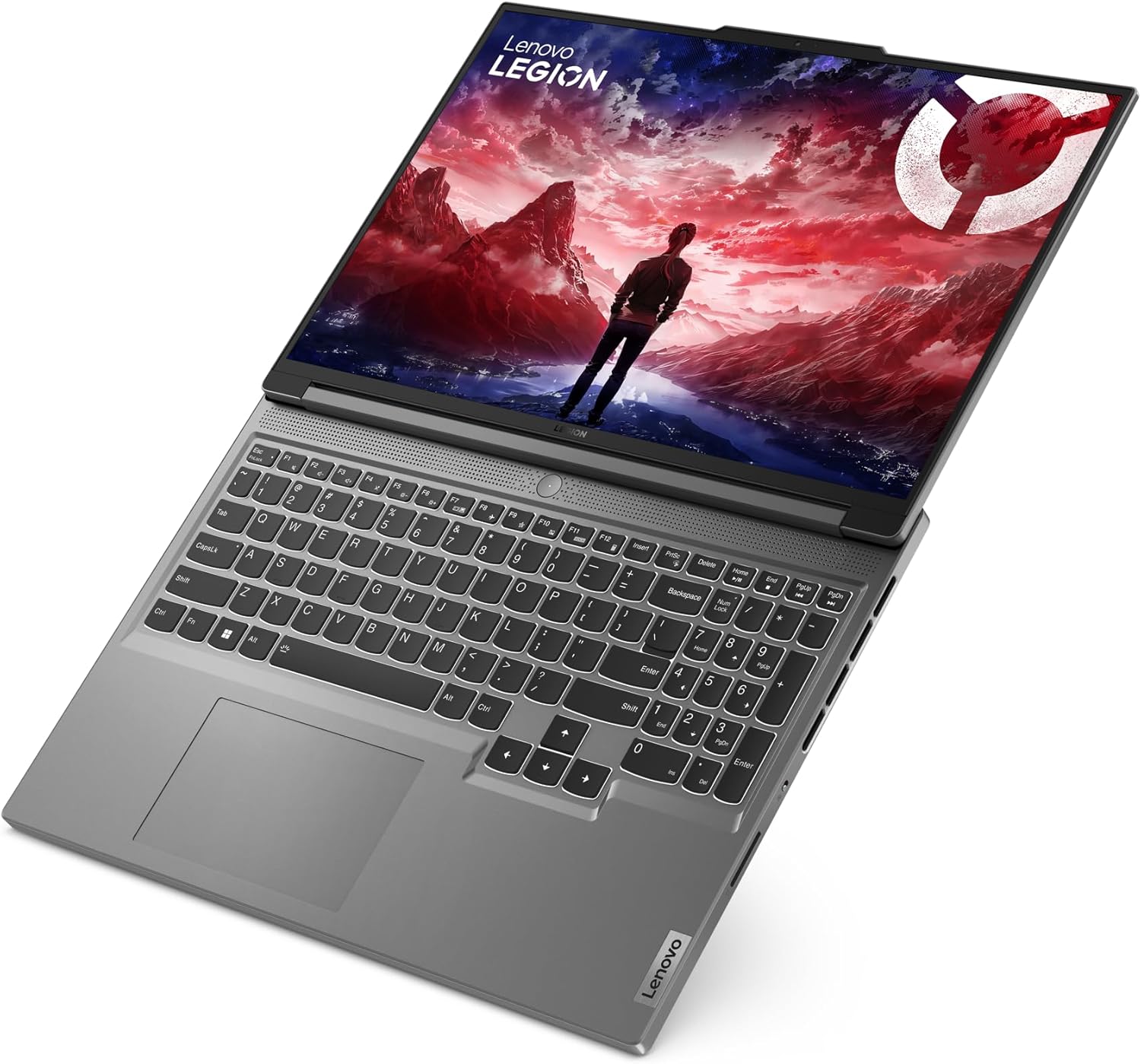
شکل ۳: د کیبورډ او ټچ پیډ ترتیب
- د فعالیت کیلي (Fn): Use the Fn key in combination with F1-F12 for special functions like volume control, brightness adjustment, and Wi-Fi toggle.
- د ټچ پیډ اشارې: Supports multi-touch gestures for scrolling, zooming, and switching applications. Customize these in Windows Settings.
3. د پردیو نښلول
ستاسو لیپ ټاپ د بهرنیو وسیلو د نښلولو لپاره په مختلفو پورټونو سمبال دی:
- USB پورټونه: د موږکانو، کیبورډونو، بهرني ډرایوونو او نورو لپاره.
- د HDMI پورټ: بهرني مانیټرونو یا تلویزیونونو سره وصل شئ.
- آډیو جیک: د هیډفونونو یا بهرنیو سپیکرو لپاره.
- وای فای/بلوتوث: Connect to wireless networks and Bluetooth devices.

Figure 4: Laptop Right Side Ports
ساتنه
۱. د لپ ټاپ پاکول
- سکرین: د نرم، لینټ پاک ټوکر څخه په روښانه توګه کار واخلئampپه اوبو یا د سکرین پاکونکي سره مینځل شوی. په مستقیم ډول په سکرین باندې مایع مه سپری کوئ.
- کیبورډ او چیسس: د نرم ټوکر څخه کار واخلئ. د سختې خاورې لپاره، یو څه damp د نرم صابون سره ټوکر کارول کیدی شي، ډاډ ترلاسه شي چې هیڅ مایع سوریو ته ننوځي.
- پلورونکي: Periodically clean dust from the cooling vents using compressed air to maintain optimal airflow.
2. د بیټرۍ پاملرنه
- د سخت تودوخې څخه ډډه وکړئ.
- بیټرۍ په مکرر ډول په بشپړه توګه مه خارجوئ.
- که چیرې لیپ ټاپ د اوږدې مودې لپاره ذخیره کوئ، نو بیټرۍ یې شاوخوا 50-60٪ پورې چارج کړئ.
3. د سافټویر تازه معلومات
Regularly update your operating system, drivers, and applications to ensure security and optimal performance. Check for updates via Windows Update and Lenovo Vantagای سافټویر.
د ستونزو حل کول
- لیپ ټاپ نه چالانېږي:
- ډاډ ترلاسه کړئ چې د بریښنا اډاپټر په خوندي ډول د لیپ ټاپ او د کار کولو بریښنا سایټ دواړو سره وصل دی.
- د بریښنا یو بل ځای هڅه وکړئ.
- که چیرې بیټرۍ په بشپړه توګه وچه شوې وي، نو د څو دقیقو لپاره یې چارج کړئ مخکې له دې چې د بریښنا هڅه وکړئ.
- د ښودنې ستونزې (انځور نشته، ځلیږي):
- ډاډ ترلاسه کړئ چې لپ ټاپ فعال دی.
- د فعالیت کیلي په کارولو سره د سکرین روښانتیا تنظیم کړئ.
- If an external monitor is connected, try disconnecting it or switching display modes (Fn + F7 or similar).
- ورو فعالیت:
- هغه غیر ضروري غوښتنلیکونه بند کړئ چې په شاليد کې روان دي.
- د وینډوز یا ډرایور تازه معلومات وګورئ او نصب یې کړئ.
- په SSD کې کافي خالي ځای ډاډمن کړئ.
- د ویروس سکین چل کړئ.
- د وای فای اتصال ستونزې:
- Ensure Wi-Fi is enabled (Fn + F5 or similar).
- خپل روټر او موډیم بیا پیل کړئ.
- Check network settings in Windows.
- د وای فای چلوونکي تازه کړئ.
مشخصات
| نښه: | Lenovo |
| د ماډل شمیره: | 83DH001FGE |
| لړۍ: | Lenovo Legion Slim 5 16AHP9 |
| رنګ: | خړ |
| د فورم فکتور: | الټرا پورټ ایبل |
| د پروسیسر نښه: | AMD |
| د پروسیسر ډول: | رایزن ۷ ۸۷۴۵ ایچ ایس |
| د پروسیسر سرعت: | 3.4 GHz |
| د سکرین اندازه: | 16 انچه (40.6 سانتي متره) |
| د سکرین ریزولوشن: | ۲۵۶۰ x ۱۶۰۰ پېکسل (WQXGA) |
| د رام اندازه: | ۸ جي بي ډي ډي آر ۳-اېس ډي ار اېم |
| د هارډ ډرایو ډول: | SSD |
| د هارډ ډرایو اندازه: | 1 TB |
| د ګرافیک کاپروسیسر: | NVIDIA GeForce RTX 4060 |
| Graphics Memory Type: | GDDR6 |
| Graphics Memory Size: | 8 جي بي |
| عملیاتي سیسټم: | وینډوز ۱۱ |
| بې سیم ډول: | 802.11ac, 802.11ax, 802.11n (Wi-Fi 6E compatible) |
| د USB 2.0 بندرونه: | 1 |
| د USB 3.0 بندرونه: | 1 |
| HDMI بندرونه: | 1 |
| بیټرۍ: | 1 Lithium Ion battery (included), 4 cells |
| د توکي وزن: | 4.1 کیلوګرامه |
تضمین او ملاتړ
Your Lenovo Legion Slim 5 16AHP9 laptop comes with a standard manufacturer's warranty. For detailed warranty terms and conditions, please refer to the warranty documentation included with your product or visit the official Lenovo support webسایټ
For technical support, driver downloads, and service information, please visit ملاتړ.lenovo.com.


