1. پیژندنه
The HIKMICRO ECO-V Handheld Thermography Camera is a versatile thermal imaging device designed for various professional applications. It offers thermal, bi-spectrum image fusion, and visible light modes to meet diverse business needs. This manual provides essential information for the safe and effective operation of your ECO-V camera.
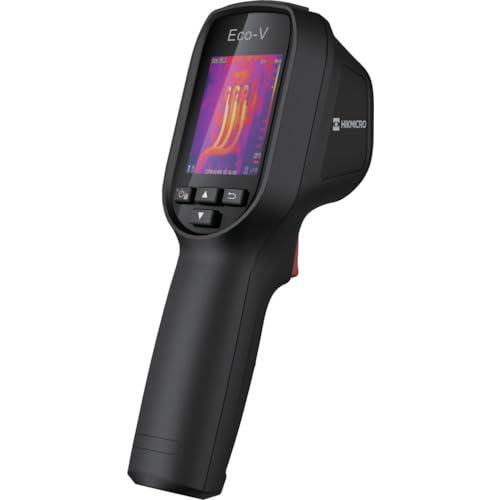
Figure 1: HIKMICRO ECO-V Handheld Thermography Camera
2. د خوندیتوب معلومات
مهرباني وکړئ د دې محصول کارولو دمخه د خوندیتوب ټول اخطارونه او لارښوونې ولولئ او پوه شئ. د دې لارښوونو په تعقیب کې پاتې راتلل ممکن د بریښنا شاک، اور، یا جدي ټپي کیدو لامل شي.
د عمومي خوندیتوب احتیاطي تدابیر
- وسیله په چاودیدونکو فضا کې مه چلوئ، لکه د اور اخیستونکي مایعاتو، ګازونو یا دوړو په شتون کې.
- وسیله د اوبو او نورو مایعاتو څخه لرې وساتئ.
- د وسیلې د خلاصولو یا بدلولو هڅه مه کوئ. ټولې خدمتونه وړ پرسونل ته راجع کړئ.
- Use only HIKMICRO-approved accessories.
- Avoid direct exposure of the thermal lens to strong light sources (e.g., sun, laser) as this may damage the detector.
د بیټرۍ خوندیتوب
- The device contains a built-in Lithium-ion battery. Do not expose the battery to excessive heat, direct sunlight, or fire.
- Do not puncture, open, or disassemble the battery.
- Charge the battery only with the provided USB cable and a compatible power adapter.
- د ځایی مقرراتو سره سم د بیټرۍ تصفیه کول.
3. د بسته محتويات
The HIKMICRO ECO-V package includes the following items:
- HIKMICRO Handheld Thermography Camera ECO-V
- د USB ډول - سي کیبل
- Quick Start Guide (not explicitly mentioned but standard)
- Calibration Certificate (not explicitly mentioned but standard)
Video 3.1: Unboxing the HIKMICRO M-Series (similar to ECO-V, showing typical package contents and device appearance).
4. وسیله ختمه شوهview
Familiarize yourself with the physical components and interface of your HIKMICRO ECO-V camera.
بڼه او انٹرفیس
The ECO-V features a compact, ergonomic design for comfortable handheld use. Key components include the thermal lens, optical lens, laser indicator, white light, trigger button, navigation buttons, and a 2.4-inch display.
Video 4.1: This video demonstrates the physical appearance and interface of a HIKMICRO M-Series camera, which shares similar design elements and interface components with the ECO-V.
5. ترتیب کول
5.1 د وسیلې چارج کول
Before initial use, fully charge the device's built-in Lithium-ion battery.
- Connect the provided USB Type-C cable to the device's USB port.
- Connect the other end of the USB cable to a compatible power adapter (5V2A recommended) and plug it into a power outlet.
- The charging indicator will show red during charging and turn green when fully charged.
Video 5.1: This HIKMICRO ECO operation video demonstrates the charging process for the device.
۸ پاور آن/بند
To power on the device, press and hold the power button for more than 6 seconds. To power off, press and hold the power button again until the device shuts down.
Video 5.2: This HIKMICRO ECO operation video demonstrates how to power on the device.
6. عملیاتي لارښوونې
This section covers the basic and advanced operational features of your ECO-V camera.
6.1 Image Capture and Display
To capture a thermal image, aim the camera at the target and press the trigger button. The captured image will be saved to the internal EMMC storage. To view saved images, navigate to the 'Albums' section in the menu.
Video 6.1: This HIKMICRO ECO operation video demonstrates image capture and viewing saved snapshots.
6.2 د اندازه کولو وسیلې
The ECO-V provides various measurement tools to analyze thermal images:
- Hot Spot: Automatically identifies and displays the highest temperature point.
- Cold Spot: Automatically identifies and displays the lowest temperature point.
- مرکز ځای: د سکرین په مرکز کې د تودوخې درجه ښیي.
Video 6.2: This HIKMICRO ECO operation video demonstrates the use of measurement tools like hot, cold, and center spots.
۴.۳ د سوپر آی آر انځور لوړول
SuperIR technology enhances the thermal image resolution, providing more detail for analysis. You can enable or disable this feature in the settings menu.
Video 6.3: This HIKMICRO ECO operation video demonstrates how to enable and use the SuperIR image enhancement feature.
6.4 د انځور طریقې
The ECO-V supports multiple image modes for different inspection needs:
- حرارتي: Displays only the thermal image.
- فیوژن: Blends the thermal and visible light images for enhanced detail.
- PIP (په انځور کې په انځور کې): Overlays a smaller thermal image on a visible light image.
- نظري: Displays only the visible light image.
Video 6.4: This HIKMICRO B10S product video demonstrates switching between different image modes, including Thermal, Fusion, PIP, and Optical.
6.5 Parallax Correction
When using fusion modes, adjust the parallax correction based on the distance to the target to ensure accurate alignment between thermal and visible images.
Video 6.5: This HIKMICRO B10S product video demonstrates how to adjust parallax correction for accurate image fusion.
6.6 Palette Adjustment
Select from various color palettes (e.g., White Hot, Black Hot, Rainbow, Ironbow) to visualize temperature differences more effectively. This can be adjusted in the settings menu.
Video 6.6: This HIKMICRO B10S product video demonstrates how to adjust color palettes.
6.7 Emissivity and Distance Settings
For accurate temperature measurements, it is crucial to set the correct emissivity value for the target material and the distance to the target. Refer to the general emissivity reference table in the specifications section.
Video 6.7: This HIKMICRO ECO operation video demonstrates setting emissivity and distance for accurate temperature readings.
6.8 لیزر پوائنټر
The built-in laser pointer helps to precisely identify the measurement target. It can be enabled or disabled in the settings menu.
Video 6.8: This HIKMICRO ECO operation video demonstrates how to enable and use the laser pointer.
6.9 د لوړ حرارت الارم
Set a high temperature alarm threshold to be notified when temperatures exceed a predefined limit. This feature is useful for identifying potential overheating issues.
Video 6.9: This HIKMICRO B10S product video demonstrates how to set a high temperature alarm.
6.10 Hotspot Connection
The ECO-V can connect to a mobile device via Wi-Fi hotspot for live viewing and data transfer. Enable the Wi-Fi hotspot function in the device settings and connect your mobile device.
Video 6.10: This HIKMICRO M-Series video demonstrates how to establish a hotspot connection with a mobile device.
6.11 HIKMICRO Viewer App Connection
HIKMICRO ډاونلوډ کړئ Viewer app on your mobile device to access live view, manage images and videos, and generate reports. Connect the device to your phone via Wi-Fi.
Video 6.11: This HIKMICRO Pocket series video demonstrates connecting the device to the HIKMICRO Viewer app for various functions.
7. ساتنه
7.1 پاکول
- د وسیلې بدن په نرم، d سره پاک کړئamp ټوکر د کثافاتو پاکوونکي یا محلول مه کاروئ.
- Gently clean the lenses with a lens cleaning cloth. Avoid touching the lens surface with bare hands.
7.2 ذخیره کول
- وسیله په یخ او وچ ځای کې وساتئ، د مستقیم لمر وړانګو او سختې تودوخې څخه لرې.
- که چیرې د اوږدې مودې لپاره ذخیره کوئ، ډاډ ترلاسه کړئ چې بیټرۍ جزوي چارج شوې ده (شاوخوا 50٪) او د بیټرۍ روغتیا ساتلو لپاره یې په هرو څو میاشتو کې چارج کړئ.
8. ستونزه حل کول
If you encounter issues with your HIKMICRO ECO-V, refer to the following common problems and solutions:
| ستونزه | احتمالي لامل | د حل لاره |
|---|---|---|
| وسیله فعاله نه ده | د بیټرۍ ټیټوالی؛ د وسیلې خرابوالی | Charge the battery; Contact support |
| د تودوخې ناسم لوستل | Incorrect emissivity/distance settings; Dirty lens | Adjust emissivity/distance; Clean the lens |
| Cannot connect to Wi-Fi hotspot | Incorrect password; Hotspot not enabled | Verify password; Enable hotspot in settings |
9. مشخصات
Detailed technical specifications for the HIKMICRO ECO-V camera:
| فیچر | مشخصات |
|---|---|
| ماډل | ECO-V |
| Measurement Temperature Range | له 20 درجو څخه تر 550 درجو پورې |
| Minimum Temperature Display | ۹۶ درجې سانتي ګراد |
| د ډګر View (FOV) | 50° × 50° |
| ځایی حل (IFOV) | 8.89 mrad |
| د عملیاتي تودوخې سلسله | له 10 درجو څخه تر 50 درجو پورې |
| د ذخیره کولو د حرارت درجه | له 40 درجو څخه تر 70 درجو پورې |
| د ښودلو اندازه | 2.4 انچه |
| د بریښنا سرچینه | جوړ شوی لیتیم آئن بیټرۍ |
| د بیټرۍ عملیاتي وخت | ۸ ساعته |
| وای فای | شتون نلري |
| د ساتنې کچه | IP54 |
| انٹرفیس | د USB ډول-C |
| د پکسل پچ | ایکسینیممیم |
| Measuring Wavelength | 7.5-14μM |
| NETD | <40 mK (@ 25°C، F#=1.0) |
| فوکل اوږدوالی | 1.35 ملي متره |
| اپرچر | F1.0 |
| د تمرکز لږترلږه واټن | 0.1m (0.33ft) |
| د چوکاټ نرخ | 25Hz |
| د تمرکز سیسټم | له تمرکز پرته |
| د رسنیو ثبتول | EMMC (4GB) |
| د انځور ذخیره کولو ظرفیت | 30,000 انځورونه |
| انځور File بڼه | BMP (includes measurement data) |
| د تودوخې عکس حل | 96×96 (9,216 pixels) |
| Visible Image Resolution | 640×480 |
| دقت | ±2°C or ±2% (whichever is greater), when ambient temperature is 15°C to 35°C and target temperature is 0°C or above. |
| مواد | پولی کاربونیټ، ABS رال |
| وزن | 360 ګرامه |
General Emissivity Reference
| مواد | ایمسیوتیت |
|---|---|
| د انسان پوټکی | 0.98 |
| PCB | 0.91 |
| د سمنټو کانکریټ | 0.95 |
| سیرامیک | 0.92 |
| ربړ | 0.95 |
| رنګ | 0.93 |
| لرګي | 0.85 |
| خښته | 0.96 |
| شګه | 0.90 |
| خاوره | 0.92 |
| پنبه | 0.98 |
| د کارت بورډ | 0.90 |
| سپین کاغذ | 0.96 |
| اوبه | 0.96 |
10. تضمین او ملاتړ
HIKMICRO products are covered by a limited warranty. For detailed warranty terms and conditions, please refer to the official HIKMICRO webسایټ ته مراجعه وکړئ یا خپل سیمه ایز توزیع کونکي سره اړیکه ونیسئ.
د پیرودونکي ملاتړ
If you require technical assistance, troubleshooting, or have questions about your ECO-V camera, please contact HIKMICRO customer support through their official webسایټ یا ستاسو د محصول په بسته بندۍ کې چمتو شوي د اړیکو معلومات.