پیژندنه
The Northpoint Digital LED Light Column is designed to provide versatile and modern lighting for your home or office. Standing 103 cm tall, this light column features digital LEDs capable of producing both warm white (3000K) and RGB light. It includes a remote control for adjusting brightness, selecting various lighting modes, and activating an integrated sound sensor. A touch button on the top allows for convenient power control.
د تنظیم کولو لارښوونې
د بسته محتويات
- LED Light Column components (DIY kit)
- ریموټ کنټرول
- د بریښنا کیبل
- د کارن لارښود
مجلس
The light column is provided as a DIY kit. Follow these steps for assembly:
- د بسته بندۍ ټولې برخې په احتیاط سره خلاص کړئ.
- Assemble the main column structure according to the diagrams provided in the included printed manual. Ensure all sections are securely connected.
- Install the LED strip(s) inside the column. Ensure the strip is properly adhered and positioned for optimal light distribution. Verify that all connections are firm.
- Attach the top and bottom bases to the column.
- Connect the power cable to the designated port on the light column.
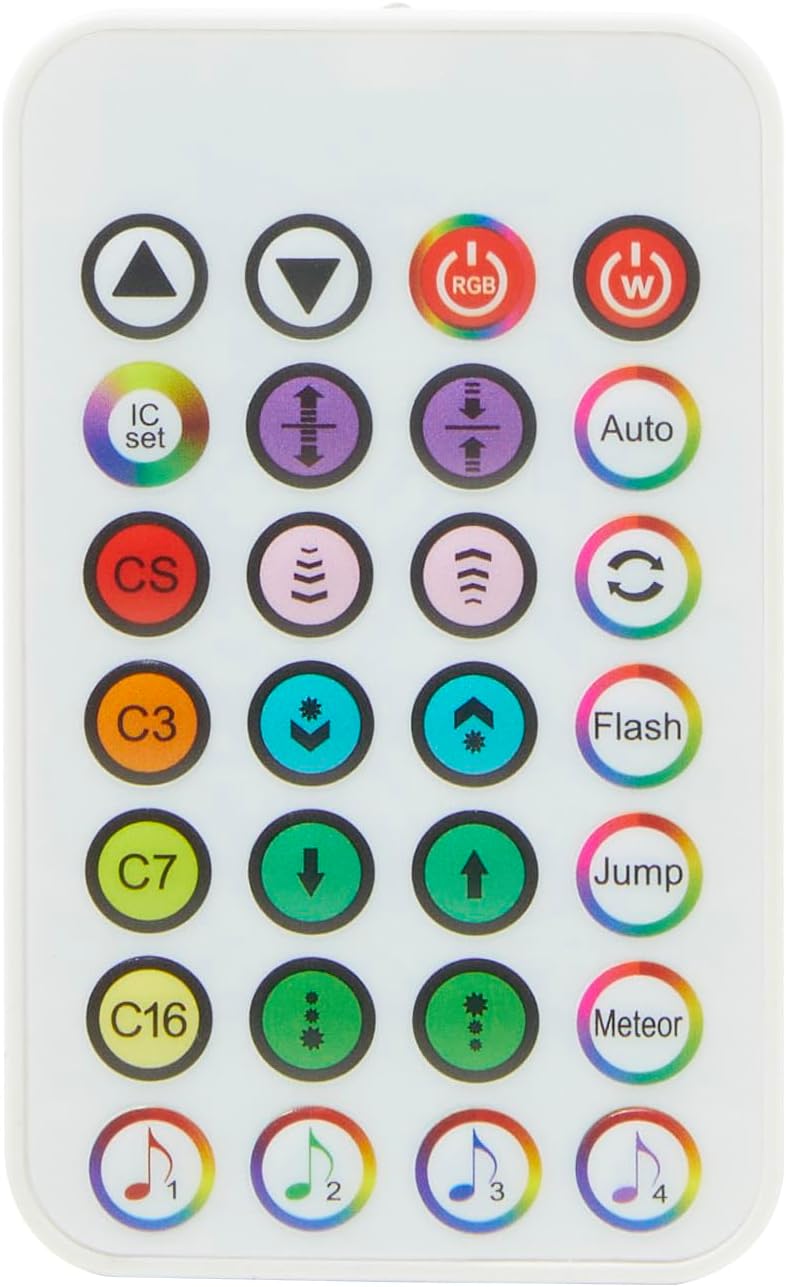
Image: All components of the Northpoint LED Light Column laid out for assembly, including the cylindrical column, bases, LED strip, power adapter, and remote control.
ځای پرځای کول او د بریښنا اتصال
Place the assembled light column on a stable, flat surface. Connect the power cable to a standard electrical outlet. The 150 cm power cord allows for flexible placement.
عملیاتي لارښوونې
پاور آن/بند
- د ټچ تڼۍ: Press the touch button located on the top of the light column to turn the light on or off.
- ریموټ کنټرول: Use the power button on the remote control to turn the light on or off.

Image: A finger pressing the touch-sensitive power button located on the top surface of the light column.
د ریموټ کنټرول دندې
The included remote control provides comprehensive control over the light column's features:

Image: The remote control for the Northpoint LED Light Column, showing buttons for power, RGB, warm white, brightness adjustment, mode selection, and sound sensor activation.
- د RGB تڼۍ: Activates the RGB color lighting.
- W تڼۍ: Activates the warm white (3000K) lighting.
- د روښانتیا سمون: د کارولو Up او ښکته arrow buttons to increase or decrease the light intensity.
- د موډل انتخاب: Select from various pre-programmed lighting modes:
- اتومات: Cycles through different lighting effects automatically.
- فلش: Rapidly flashes colors.
- ټوپ: Jumps between different colors.
- میتر: Creates a meteor-like light effect.
- C3, C7, C16: Pre-set color or effect combinations.
- Sound Sensor (CS Button): فشار ورکړئ CS button to activate the integrated sound sensor. The light column will react to ambient sounds or music.
- Music Modes (1, 2, 3, 4): These buttons may offer specific light reactions synchronized with music or sound when the sound sensor is active.
ساتنه
پاکول
To clean the light column, ensure it is unplugged from the power source. Use a soft, dry, or slightly damp cloth to wipe the surfaces. Avoid abrasive cleaners, solvents, or excessive moisture, as these can damage the finish or internal components.
ذخیره کول
If storing the light column for an extended period, unplug it and store it in a dry, cool place, away from direct sunlight and extreme temperatures.
د ستونزو حل کول
| ستونزه | احتمالي لامل | د حل لاره |
|---|---|---|
| ر Lightا نه ځي. | بریښنا نشته. تړلی اړیکه. د ریموټ کنټرول بیټرۍ ختمه شوې ده. | Ensure the power cable is securely plugged into both the light column and the electrical outlet. Check all internal connections made during assembly. د ریموټ کنټرول بیټرۍ بدل کړئ. |
| ریموټ کنټرول غیر ځواب ویونکی دی. | بیټرۍ ختمه شوې. Obstruction between remote and light column. | د ریموټ کنټرول بیټرۍ بدل کړئ. Ensure a clear line of sight between the remote and the light column's sensor. |
| Light output is dim or uneven. | د روښانتیا غلط ترتیب. LED strip not properly installed. | د ریموټ کنټرول په کارولو سره روښانتیا زیاته کړئ. Review assembly steps to ensure the LED strip is correctly and fully adhered within the column. |
| Sound sensor not reacting. | Sound sensor not activated. Insufficient sound level. | Press the 'CS' button on the remote control to activate the sound sensor. Ensure there is sufficient ambient sound or music for the sensor to detect. |
مشخصات
| فیچر | تفصیل |
|---|---|
| برانډ | شمالي نقطه |
| د ماډل شمیره | NP-DLS-Star |
| ابعاد (L x W x H) | 15.9 x 15.9 x 103 سانتي متره |
| سټایل | عصري |
| رنګ | Star (Effect) |
| د رڼا ډول | ډیجیټل LED |
| رڼا رنګونه | Warm White (3000K), RGB (Multicolor) |
| ډول بدل کړئ | لمس، ریموټ کنټرول |
| د بریښنا کیبل اوږدوالی | 150 سانتي متره |
| ځانګړي ځانګړتیاوې | Dimmable, Sound Sensor, Various Lighting Modes |
| مواد (سیوري) | اکریلیک |
| مواد (بنسټ) | فلزي |
| د انرژۍ لیبل | F |
د تضمین معلومات
د محصول په معلوماتو کې د تضمین ځانګړي توضیحات ندي ورکړل شوي. مهرباني وکړئ د تضمین شرایطو او مقرراتو لپاره خپل د پیرود اسنادو ته مراجعه وکړئ یا له پرچون پلورونکي سره اړیکه ونیسئ.
د پیرودونکي ملاتړ
For further assistance or inquiries, please contact Northpoint customer service or the retailer from whom you purchased this product. Specific contact information was not available in the product details.


