پیژندنه
This manual provides detailed instructions for the setup, operation, and maintenance of your BUFFBEE RS11 Radio Alarm Clock. Please read this manual thoroughly before using the device to ensure proper function and to maximize your user experience. Keep this manual for future reference.
د بسته محتويات
د خلاصولو پر مهال، مهرباني وکړئ تصدیق کړئ چې لاندې لیست شوي ټول توکي شتون لري او په ښه حالت کې دي:
- 1 x BUFFBEE RS11 Radio Alarm Clock
- 1 x DC بریښنا اډاپټر
- ۱ x د کارونکي لارښود (دا سند)
- 1 x CR2032 Battery (pre-installed or included separately for backup)
محصول پای ته ورسیدview
The BUFFBEE RS11 is a compact device combining an alarm clock, FM radio, and a 7-color night light. It features a clear digital display and intuitive controls.

شکل 1: مخکی view of the BUFFBEE RS11 Radio Alarm Clock, displaying the digital time and accessible control buttons on top.

شکل 2: Internal structure highlighting the 5W Hi-Fi speaker, designed for clear and authentic sound reproduction.
چمتو کول
1. د بریښنا پیوستون
- Connect the provided DC power adapter to the 'DC 5V' port on the back of the alarm clock.
- Plug the adapter into a standard wall outlet. The display will illuminate, and the clock will be ready for initial setup.
۴.۲. د بیک اپ بیټرۍ نصبول
The BUFFBEE RS11 includes a CR2032 battery for backup, which preserves time and alarm settings during a power outage.
- د بیټرۍ کڅوړه د واحد په ښکته برخه کې ومومئ.
- د CR2032 بیټرۍ د مثبت (+) اړخ پورته مخ سره دننه کړئ.
- د بیټرۍ کڅوړه په خوندي ډول وتړئ.
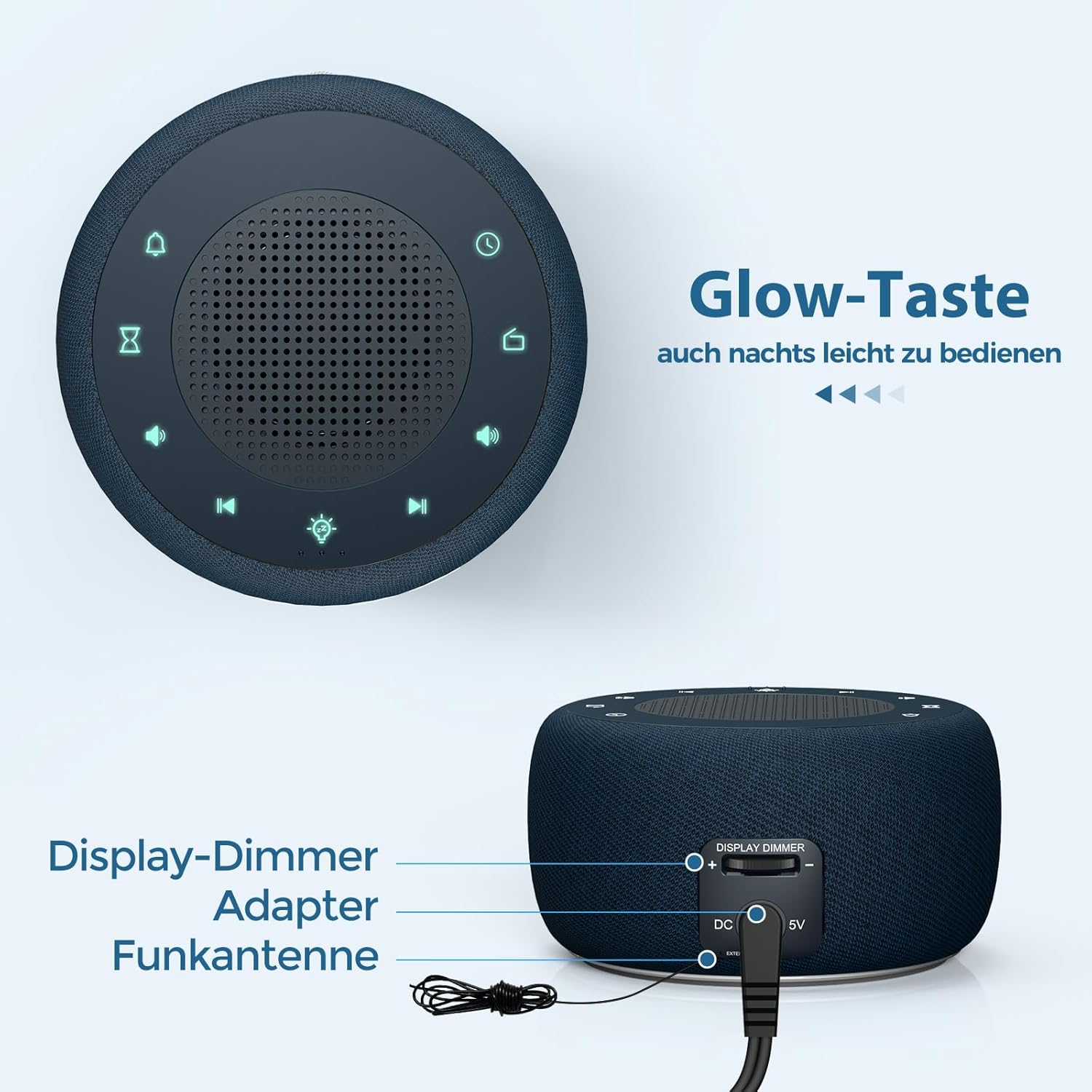
شکل 3: Rear panel connections, showing the display dimmer control, DC 5V power input, and FM antenna port.
عملیاتي لارښوونې
1. د وخت ټاکل
- Press and hold the 'Time Set' button (often indicated by a clock icon) until the hour digits begin to flash.
- د ساعت تنظیمولو لپاره د '+' او '-' تڼیو څخه کار واخلئ.
- Press the 'Time Set' button again to switch to minute adjustment. Use '+' and '-' to set the minutes.
- Press 'Time Set' once more to confirm and exit time setting mode.
2. د الارم تنظیم کول
- Press and hold the 'Alarm Set' button (often indicated by an alarm clock icon) until the alarm hour digits flash.
- د الارم ساعت تنظیمولو لپاره '+' او '-' تڼۍ وکاروئ.
- Press 'Alarm Set' again to switch to alarm minute adjustment. Use '+' and '-' to set the alarm minutes.
- Press 'Alarm Set' to select the alarm tone. Options include: Bird sounds, Piano, Beep, or FM Radio.
- Press 'Alarm Set' once more to confirm and exit alarm setting mode.
- To activate/deactivate the alarm, briefly press the 'Alarm Set' button. An alarm icon will appear/disappear on the display.

شکل 4: Wake-up options with four distinct alarm tones, including the option to wake to your favorite radio station.
۵.۲. د راډیو عملیات (ایف ایم)
- Press the 'Radio' button (often indicated by a radio icon) to turn the FM radio on or off.
- Use the 'Previous Track' and 'Next Track' buttons (often indicated by ◀◀ and ▶▶ icons) to tune to different FM stations.
- Press and hold the 'Previous Track' or 'Next Track' buttons to automatically scan for the next available station.
- Adjust the volume using the 'Volume Up' and 'Volume Down' buttons (often indicated by '+' and '-' speaker icons). The volume can be adjusted in 16 levels.

شکل 5: Enjoying the radio alarm clock, featuring a 0-120 minute sleep timer and 0-30 levels of adjustable volume.
4. د شپې رڼا فعالیت
- Press the 'Night Light' button (often indicated by a light bulb icon) to turn the night light on or off.
- Press the 'Night Light' button repeatedly to cycle through the 7 available colors.
- To activate the sleep timer for the night light (or radio), press the 'Sleep Timer' button (often indicated by an hourglass icon).
- Use the '+' and '-' buttons to set the desired duration (0-120 minutes). The night light/radio will automatically turn off after the set time.

شکل 6: The 7-color night light feature, with options to turn on/off and change colors.
5. Display Brightness Adjustment (Dimmer)
The display brightness can be adjusted from 0% to 100% to suit your preference.
- Locate the 'Display Dimmer' control on the back of the unit (refer to Figure 3).
- Slide the control to increase or decrease the display brightness.
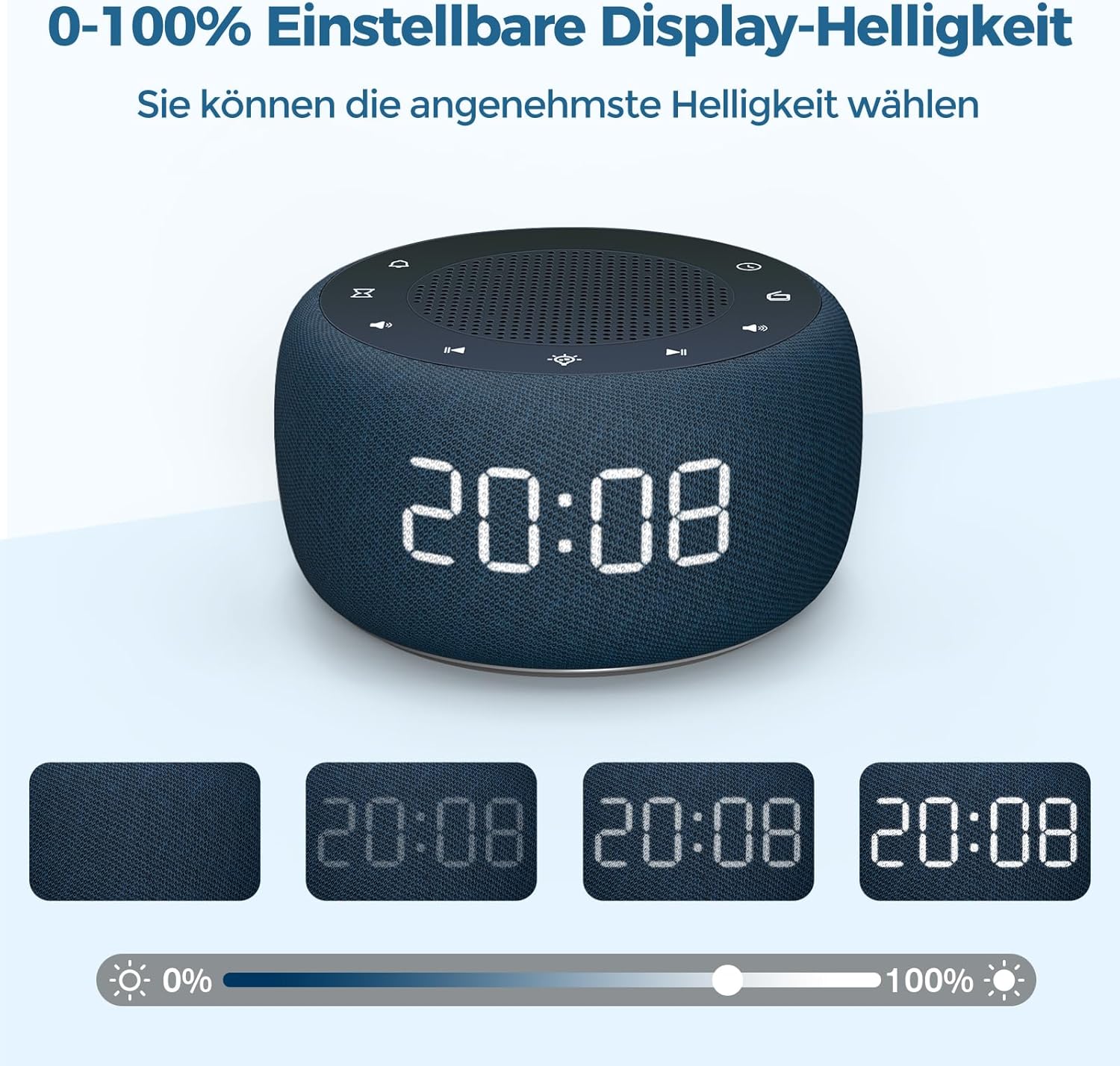
شکل 7: Demonstrating the 0-100% adjustable display brightness, allowing users to select their preferred comfort level.
6. Luminous Buttons
The control buttons on the top of the unit are designed to illuminate for 5 seconds when pressed, making operation easier in low-light conditions.
7. د 12/24 ساعت بڼه
To switch between 12-hour and 24-hour time formats, briefly press the '12/24H' button (if available, or often combined with the 'Time Set' button by a quick press after setting time).
ساتنه
- پاکول: د الارم ساعت سطحه پاکولو لپاره نرم، وچ ټوکر وکاروئ. مایع پاکوونکي یا د کثافاتو مواد مه کاروئ.
- ذخیره کول: که چیرې وسیله د اوږدې مودې لپاره ذخیره کوئ، نو له بریښنا څخه یې جلا کړئ او د بیک اپ بیټرۍ لرې کړئ. په یخ او وچ ځای کې وساتئ.
- د بیټرۍ بدلول: The CR2032 backup battery should be replaced periodically (e.g., every 1-2 years) to ensure settings are retained during power outages.
د ستونزو حل کول
| ستونزه | احتمالي لامل | د حل لاره |
|---|---|---|
| ښودنه خالي ده. | د بریښنا پیوستون نشته. | Ensure the DC power adapter is securely plugged into the unit and a working wall outlet. |
| الارم نه غږېږي. | الارم فعال شوی نه دی یا حجم ډیر ټیټ دی. | Check if the alarm icon is visible on the display. Increase alarm volume. |
| د راډیو ضعیف استقبال. | FM antenna not extended or poor signal area. | د ایف ایم انتن په بشپړه توګه غځول. د ښه استقبال لپاره واحد بیا ځای پر ځای کړئ. |
| د بریښنا بندیدو وروسته وخت/ترتیبات له لاسه ورکړل شولtage. | د بیک اپ بیټرۍ مړه شوې یا نصب شوې نه ده. | Install or replace the CR2032 backup battery. |
مشخصات
- ماډل: RS11
- نښه: BUFFBEE
- ابعاد (L x W x H): ۳۷.۵ x ۲۶.۵ x ۳۴ سانتي متره (تقریبا ۱۴.۷۶ x ۱۰.۴۳ x ۱۳.۳۹ انچه)
- وزن: ۷۷۰ ګرامه (تقریبا ۱.۷ پونډه)
- د بریښنا تولید: 5 واټ
- د ایف ایم فریکونسي رینج: 87.5-108 MHz
- د ښودلو ډول: ډیجیټل
- د شپې رڼا رنګونه: 7
- بیک اپ بیټرۍ: CR2032 (شامل)
- د بریښنا سرچینه: Cable Electric (DC Adapter)
تضمین او ملاتړ
This product comes with a standard manufacturer's warranty. For specific warranty details, please refer to the documentation provided at the time of purchase or contact BUFFBEE customer support. If you encounter any issues not covered in this manual, please contact our customer service for assistance.


