1. پیژندنه
Thank you for choosing the Muse MH08MB Portable Radio. This device is designed for versatility and durability, offering multiple power sources, audio playback options, and emergency features. Please read this manual carefully to ensure proper use and maintenance of your device.

شکل 1: Muse MH08MB Portable Radio. This image displays the Muse MH08MB portable radio from a side angle, highlighting its integrated hand crank for dynamo charging, the solar panel on top, and the powerful LED flashlight on the front. A green lanyard is attached for portability.
2. د خوندیتوب معلومات
- وسیله د اوږدې مودې لپاره د لوړې تودوخې یا مستقیم لمر وړانګو ته مه ښکاره کوئ.
- د وسیلې له مینځه وړلو یا د قوي تاثیراتو تابع کولو څخه ډډه وکړئ.
- Keep the device away from water and moisture, despite its splash-proof design, to prevent damage.
- هڅه مه کوئ چې وسیله پخپله جلا کړئ یا ترمیم کړئ. ټولې خدمتونه وړ پرسونل ته راجع کړئ.
- Use only the specified charging methods (USB-C, solar, dynamo) to power the device.
3. د بسته محتويات
مهرباني وکړئ وګورئ چې ټول توکي شتون لري:
- Muse MH08MB Portable Radio
- د USB-C چارج کیبل
- د بریښنا اډاپټر
- د کارونکي لارښود (دا لاسوند)
4. محصول ختم شوview
Familiarize yourself with the various parts and controls of your Muse MH08MB radio.

شکل 2: اوورview of Muse MH08MB Features. A detailed infographic summarizing all major features of the Muse MH08MB portable radio. It includes a jumbo display, FM radio with 5 presets, hands-free function, IP64 dust and splash resistance, siren, clock, 6 hours playtime, multiple charging options (USB-C, hand crank, solar), stereo pairing, LED flashlight, and an AUX-in jack.
مهمې برخې:
- ډیجیټل ډیزاین: Shows frequency, time, and other indicators.
- د کنټرول تڼۍ: Power, Play/Pause, Skip, Preset selection (1-5).
- دوربین انتن: د راډیو د ښه استقبال لپاره.
- LED فلش لائټ: د رڼا مدغم سرچینه.
- د لاس کرینک: For dynamo charging.
- سولر پینل: د لمریزې بریښنا چارج کولو لپاره.
- د USB-C پورټ: For charging the device and external devices.
- AUX-IN جیک: د بهرنیو آډیو سرچینو سره د نښلولو لپاره.
- مایکروفون: د لاسي وړیا تلیفونونو لپاره.
- سایرن: Emergency alert function.

شکل 3: پورته View with Antenna and Controls. This view of the Muse MH08MB portable radio features its telescopic antenna fully extended for improved radio reception. The top panel shows various control buttons, and the digital display is active.
5. د وسیلې چارج کول
The Muse MH08MB offers multiple charging methods to ensure you always have power.
5.1. د USB-C چارج کول
- Connect the provided USB-C cable to the USB-C port on the radio.
- Connect the other end of the cable to the power adapter and plug it into a wall outlet.
- The charging indicator on the display will show the charging status.
5.2. د سولر چارج کول
Place the radio with the solar panel facing direct sunlight. The solar panel will convert sunlight into energy to charge the internal battery. This method is ideal for maintaining charge or slow charging in outdoor environments.
5.3. Dynamo (Hand Crank) Charging
Extend the hand crank located on the side of the radio. Rotate the crank clockwise or counter-clockwise at a steady pace. Continuous cranking will generate power to charge the internal battery, useful in emergency situations or when other power sources are unavailable.

شکل 4: Charging Options and IP64 Design. This infographic illustrates the versatile charging options of the Muse MH08MB, including solar power and hand-crank dynamo. It also points out the USB-C port for charging other devices and emphasizes its IP64 dust and splash-proof design.
6. ترتیب کول
۴. لومړنی بریښنا فعالول
فشار ورکړئ او ونیسئ ځواک button to turn on the device. The digital display will illuminate.
6.2. د ساعت تنظیم کول
کله چې وسیله روانه وي، فشار ورکړئ ساعت button (if available, or refer to the general controls for time setting). Use the ټون/پرېږدئ buttons to adjust the hour and minute. Press the ساعت د تایید لپاره بیا تڼۍ.
7. عملیاتي لارښوونې
7.1. بریښنا فعال/بند
فشار ورکړئ او ونیسئ ځواک button for approximately 2 seconds to turn the radio on or off.
۵.۳. د راډیو عملیات (AM/FM)
- راډیو چالان کړه.
- Extend the telescopic antenna for optimal FM reception.
- فشار ورکړئ موډ د FM یا AM بانډ غوره کولو لپاره تڼۍ.
- د کارولو ټون/پرېږدئ د سټیشن سره په لاسي ډول ټون کولو لپاره تڼۍ یا د راتلونکي موجود سټیشن لپاره د اتوماتیک سکین کولو لپاره فشار ورکړئ او ونیسئ.
- To save a preset, tune to your desired station, then press and hold one of the Preset (1-5) buttons until the display confirms it's saved. To recall a preset, simply press the corresponding مخکینۍ تڼۍ
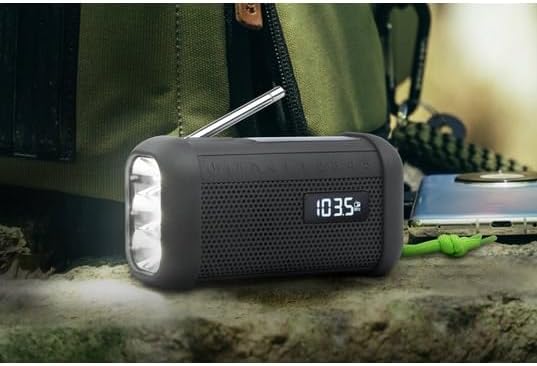
شکل 5: Digital Display in Radio Mode. The Muse MH08MB portable radio is shown resting on a surface, with its digital display clearly indicating "103.5 MHz", signifying active FM radio tuning. The speaker grille and flashlight are also visible.
7.3. د بلوتوث جوړه کول
- Turn on the radio and switch to Bluetooth mode using the موډ button. The display will show a Bluetooth indicator.
- په خپل ګرځنده وسیله کې، بلوتوټ فعال کړئ او د شته وسایلو لټون وکړئ.
- Select "MH08MB" from the list of devices.
- یوځل چې جوړه شي، راډیو به اړیکه تایید کړي، او تاسو کولی شئ له خپل وسیله څخه آډیو غږ کړئ.
7.4. Hands-Free Microphone
When connected via Bluetooth to a smartphone, the integrated microphone allows for hands-free calling. When a call comes in, the radio will pause playback. Press the پلی/ودرول د ځواب ویلو یا پای پای ته ت endی.
7.5. د LED څراغ
فشار ورکړئ فلش رڼا button (or designated button) to turn the LED flashlight on or off. The flashlight features 3 ultra-bright LEDs.
۵.۳. د سایرن فعالیت
په بیړني حالت کې، فشار ورکړئ او ونیسئ سرین button to activate the emergency siren and flashing light. Press again to deactivate.
7.7. Stereo Pairing (TWS)
If you have two Muse MH08MB units, you can pair them for True Wireless Stereo (TWS) sound. Turn on both units and ensure they are in Bluetooth mode. On one unit, press and hold the سټیریو جوړه button (refer to controls for exact button). The units will connect, providing a wider stereo soundstage.
7.8. د اکس - ان حالت
Connect an external audio device (e.g., MP3 player) to the AUX-IN jack using a 3.5mm audio cable. Switch the radio to AUX mode using the موډ button. Audio from the external device will play through the radio's speaker.
8. ساتنه
- پاکول: وسیله په نرم، وچ ټوکر سره پاک کړئ. د کثافاتو پاکوونکي یا محلولونه مه کاروئ.
- ذخیره کول: Store the radio in a cool, dry place away from direct sunlight when not in use for extended periods.
- د بیټرۍ پاملرنه: To prolong battery life, avoid fully discharging the battery frequently. Charge it regularly, especially if stored for a long time.
9. ستونزه حل کول
| ستونزه | احتمالي لامل | د حل لاره |
|---|---|---|
| هیڅ ځواک نشته | بیټرۍ له مینځه تللې | Charge the device using USB-C, solar, or dynamo. |
| د راډیو ضعیف استقبال | Antenna not extended or weak signal | Extend the telescopic antenna fully. Try moving to a different location. |
| بلوتوث نه نښلي | Radio not in pairing mode or device too far | Ensure radio is in Bluetooth mode. Move your device closer. Forget and re-pair on your mobile device. |
| غږ نشته | Volume too low or incorrect mode | Increase volume. Ensure the correct mode (Radio, Bluetooth, AUX) is selected. |
10. مشخصات
| فیچر | تفصیل |
|---|---|
| د ماډل شمیره | MH08MB |
| برانډ | میوز |
| رنګ | تور |
| ارتباط | بلوتوث |
| د راډیو بندونه | AM/FM (5 digital presets) |
| د بریښنا سرچینې | USB-C, Solar, Dynamo (Hand Crank) |
| بیټرۍ | ۱ لیتیم آیون (شامل دی) |
| د بیټرۍ ژوند | Up to 6 hours (depending on volume/content) |
| ځانګړي ځانګړتیاوې | Integrated Clock, Hands-free Microphone, LED Flashlight (3 ultra-bright LEDs), Siren, Stereo Pairing (TWS), NFC |
| د اوبو مقاومت | IP64 (د دوړو او شیندل په وړاندې مقاومت لرونکی) |
| ابعاد (L x W x H) | 15.8 x 6.4 x 8 سانتي متره |
| شاملې برخې | Power adapter, USB-C Charging Cable, User manual |

شکل 6: Product Dimensions. A technical diagram showing the dimensions of the Muse MH08MB portable radio: 158mm length, 80mm height, and 64mm width.
11. تضمین او ملاتړ
Muse products are designed for reliability and performance. For warranty information and technical support, please refer to the warranty card included with your purchase or visit the official Muse webسایټ. د هر ډول تضمین ادعا لپاره د پیرود ثبوت وساتئ.
For further assistance, please contact Muse customer service.


